Archive
SQL Error – The server may be running out of resources, or the assembly may not be trusted with PERMISSION_SET = EXTERNAL_ACCESS or UNSAFE
Today after setting up a new Database environment I ran into a small issue. While running a Stored Procedure I was getting following error:
Sql Severity : 16
Sql Message ID : 10314
Message
Executed as user: XYZdomain\XYZaccount. An error occurred in the Microsoft .NET Framework while trying to load assembly id 65536. The server may be running out of resources, or the assembly may not be trusted with PERMISSION_SET = EXTERNAL_ACCESS or UNSAFE. Run the query again, or check documentation to see how to solve the assembly trust issues. For more information about this error: System.IO.FileLoadException: Could not load file or assembly ‘XYZAssemblyName, Version=0.0.0.0, Culture=neutral, PublicKeyToken=null’ or one of its dependencies. An error relating to security occurred. (Exception from HRESULT: 0x8013150A) System.IO.FileLoadException: at System.Reflection.RuntimeAssembly._nLoad(AssemblyName fileName, String codeBase, Evidence assemblySecurity, RuntimeAssembly locationHint, StackCrawlMark& stackMark, IntPtr pPrivHostBinder, Boolean throwOnFileNotFound, Boolean forIntrospection, Boolean suppressSecurityChecks) at System.Reflection.RuntimeAssembly.InternalLoadAssemblyName(AssemblyName assemblyRef, Evidence assemblySecurity, RuntimeAssembly reqAssembly, StackCrawlMark& stackMark, IntPtr pPrivHostBinder, Boolean throwOnFileNotFound, Boolean forIntrospection, Boolean suppressSecurityChecks) at System.Reflection.RuntimeAssembly.InternalLoad(String assemblyString, Evidence assemblySecurity, StackCrawlMark& stackMark, IntPtr pPrivHostBinder, Boolean forIntrospection) at System.Reflection.RuntimeAssembly.InternalLoad(String assemblyString, Evidence assemblySecurity, StackCrawlMark& stackMark, Boolean forIntrospection) at System.Reflection.Assembly.Load(String assemblyString) [SQLSTATE 42000] (Error 10314). The step failed.
I checked online and found that after restoring the Databases on DEV from PROD environment, the Stored Procedure that I was executing on DEV was CLR enabled thus it has the external_access or unsafe permission set from the database. And the login that was use to create the database on PROD was not same as in the instance of DEV DB. Thus it was not allowing to execute the CLR SP and resulting into error due to safety concerns.
Thus you can either use the Windows login or the SQL Server login which is common on both the environments (PROD & DEV, in my case), so:
1. First Enable Trustworthy database property
2. And change the database owner to ‘sa’
ALTER DATABASE [DatabaseName] SET TRUSTWORTHY ON;
GO

USE [DatabaseName]
GO

EXEC sp_changedbowner 'sa'
GO
This issue could also occur when you are Creating a new Assembly that has the external_access or unsafe permission set in the same database.
Server: Msg 10327, Level 14, State 1, Line 1
CREATE ASSEMBLY for assembly ‘XYZAssemblyName’ failed because assembly ‘XYZAssemblyName’ is not authorized for PERMISSION_SET = EXTERNAL_ACCESS. The assembly is authorized when either of the following is true: the database owner (DBO) has EXTERNAL ACCESS ASSEMBLY permission and the database has the TRUSTWORTHY database property on; or the assembly is signed with a certificate or an asymmetric key that has a corresponding login with EXTERNAL ACCESS ASSEMBLY permission.
Informatica – The first character in a name cannot be a number (error)
Today while creating a mapping by using import method & template I got a pop-up with following error message in Designer:
03/30/2016 16:30:55 **** Importing Source Definition: tblCustomerResults ...
     : The first character in a name cannot be a number.
** Failed to Import: tblCustomerResults

03/30/2016 16:30:55 **** Importing Target Definition: tblCustomerResults ...
     : A column with the name 120_-_Unknown already exists.
       Please enter a unique name.
** Failed to Import: tblCustomerResults

03/30/2016 16:30:56 **** Importing Mapping: mACQtblCustomerResults ...
     : Could not find Transformation definition for: tblCustomerResults
** Failed to Import: mACQtblCustomerResults
With the above error its quiet evident that Informatica do not support column names that starts with a number. But to confirm I checked online and found it to be true and one of the biggest limitation in Informatica.
As a workaround:
1. I dropped the Source Connection pointing to the Original source.
2. I created the Source table in my Database and re-created the Source Connection pointing to this table.
3. Save and export the Source XML.
4. Finally Import the mapping by using same template and the new Source XML, successful 🙂
I also found that this limitation is not only with columns, but also with Source Table Name, Database Definition (DBD) name, Repository Folders, etc.
Good news – Microsoft makes SQL Server “Developer Edition” free for developers !
Microsoft on 31st March 2016 announced the free availability of Developer Edition of SQL Server, currently 2014. The Developer Edition is meant for development and testing only, and not for production environments or for use with production data.

With SQL Server 2014 Developer edition developers can build any kind of application on top of SQL Server. It includes all the functionality of Enterprise edition, but is licensed for use as a development and test system, not as a production server.
So, with this edition you are getting the Database Engine as well as DW/BI capabilities ( i.e. SSIS /AS /RS) for free 🙂
[Download the SQL Server 2014 Developer Edition free here]
This is a very good news for Developers, as till now the SQL Server Express edition used to be the free database for entry-level development, which has lot of limitations like:
1. Only Database Engine, no DW/BI suit (absence of SSIS/RS/AS).
2. Max size of a DataBase is set to 10GB (but you can create multiple databases)
3. No SQL Agent
4. Single CPU utilization
5. Max 1 GB RAM allocation
6. Max 16 number of instances per server
Hence this is a very good deal that you can now get full featured suit of SQL Server with Database Engine as well as with all DW/BI capabilities for free to play, develop and learn with.
My whitepaper published on – Top 8 features of SQL Server 2016
I am super excited to announce the availability of my Whitepaper at Microsoft IT Showcase on:
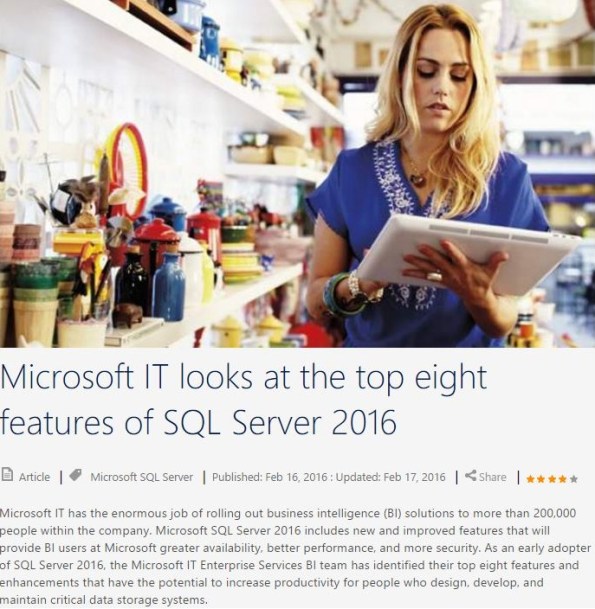
Microsoft IT looks at the top eight features of SQL Server 2016
Summary:
1. In-Memory OLTP helps ESBI meet their users’ business requirements for increased agility.
2. Columnstore Indexes reduce the amount of time it takes to run and render SRSS reporting data.
3. Temporal data reduces the amount of support tickets received from the field due to inaccurate data.
4. Row-Level Security provides a more reliable and standardized method to easily control which users can access data.
5. Dynamic Data Masking helps limit exposure of sensitive data, preventing users who should not have access to the data from viewing it.
6. Query Store provides better insight into the performance differences caused by changes in query plans.
7. Active Query Statistics allows a view of active query execution plans and helps identify and fix blocking issues while queries are running.
8. SQL Stretch Database helps improve performance to frequently used data while preserving access to archived data.
Please check my other posts on SQL Server 2016
SQL Server on Linux – Microsoft announcement
Scott Guthrie, Executive Vice President, Cloud and Enterprise Group, Microsoft on March 7, 2016 announced plans to bring SQL Server to Linux. He mentioned that this will enable SQL Server to deliver a consistent data platform across Windows Server and Linux, as well as on-premises and cloud, targeting the availability by mid-2017.
You can sign up for a Private preview here.
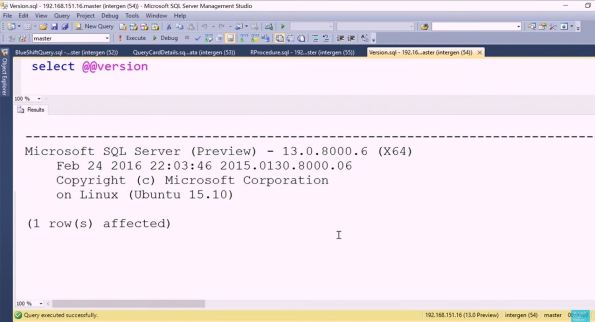
Recently in a Data Driven event Shawn Bice, General Manager, Database Systems Group, Microsoft showcased the capabilities and new features of SQL Server 2016. While demonstrating he gave a glimpse of SQL Server preview version running on Linux, and you can see the version in the snapshot below:
Microsoft SQL Server (Preview) – 13.0.8000.6 (X64)
Feb 24 2016 22:03:46 2015.0130.8000.06
Copyright (c) Microsoft Corporation
on Linux (Ubuntu 15.10)
Well I’m very excited and looking forward to download the SQL Server Linux preview and do some hands on.
Check more at https://www.microsoft.com/en-in/server-cloud/sql-server-on-linux.aspx



Current Visitors

StatCounter …since April 2012


 Leisure blog: Creek & Trails
- NMDC Hyderabad Marathon – My first 42k FM, cramps, training and fuelling
- Singapore (Part 2) – 6 days itinerary, sightseeing & attractions
- Singapore (Part 1) – Tickets, Visa, Hotel, Forex Card/Cash, Metro/Bus cards
- I got full refund of my flight tickets during COVID lockdown (AirIndia via MakeMyTrip)
- YouTube – Your Google Ads account was cancelled due to no spend
- YouTube latest update on its YPP (YouTube Partner Program) which may affect your channel
- Starting your own blog !!!
- How to file ITR (Income Tax Return) online AY 2017-18 (for simple salaried)
- Scam – Become a kin/hier and earn a fortune – via LinkedIn and Email
- Places to visit in and around Vizag (aka Visakhapatnam)
 SQL with Manoj