Archive
Defensive Database Programming with SQL Server… a must have (e)book
Book By Alex Kuznetsov… and a must read for all T-SQL techies.
The goal of Defensive Programming is to produce resilient code that responds gracefully to the unexpected.
To the SQL Server programmer, this means T-SQL code that behaves consistently and predictably in cases of unexpected usage, doesn’t break under concurrent loads, and survives predictable changes to database schemas and settings.
Inside this book, you will find dozens of practical, defensive programming techniques that will improve the quality of your T-SQL code and increase its resilience and robustness.
Download the e-book from here: http://www.red-gate.com/specials/Ebooks/Defensive_Database_Programming.pdf
Related article: http://www.simple-talk.com/sql/t-sql-programming/book-review-defensive-database-programming-with-sql-server/
Stopping a DELETE statement in middle of its execution – MSDN TSQL forum
–> Question:
I accidentally executed the DELETE statement for a table.
However, I stopped it before it completed.
What effect will this have on the table in Database, is my data safe?
–> My Answer:
In SQL Server by default a single SQL statement is bounded within a Transaction.
So, if you cancelled the DELETE statement execution in between it would have cancelled the overall deletion from the table. So either all of your rows are safe or all gone. SQL Server ensures that a transaction should be completed fully or not at all, one of the ACID properties.
TRY CATCH – Exception Handling in SQL Server
Similar to C++, Java and other languages SQL Server also has a mechanism to handle exceptions by using TRY-CATCH construct. The TRY block contains the SQL statements that may raise an error and CATCH block contains the handling mechanism to process the error. When any error is raised in the TRY block the control is immediately transferred to the CATCH block, where the Error is handled.
–> Following rules should be taken care off while using TRY-CATCH constructs:
– A TRY block must be followed immediately by the CATCH block.
– Both TRY & CATCH blocks must be inside a Batch, Stored Procedure or a Trigger.
– Only Errors with severity between 10 & 20 that do not close the database connection are caught & handled by TRY-CATCH constructs.
– As per MS BOL, Errors that have a severity of 20 or higher that cause the Database Engine to close the connection will not be handled by the TRY…CATCH block. And Errors that have a severity of 10 or lower are considered warnings or informational messages, and are not handled by TRY…CATCH blocks.
–> let’s check how to use TRY-CATCH block:
USE [tempdb]
GO

--// Create a test Stored Procedure
CREATE PROC testPrc (@val VARCHAR(10))
AS
BEGIN
 SELECT 1/@val AS operation
END
GO

--// Test for Divide by 0 (Divide by zero error encountered.)
BEGIN TRY
 EXEC testPrc '0'
END TRY
BEGIN CATCH
 SELECT
 ERROR_NUMBER() AS ERROR_ID,
 ERROR_MESSAGE() AS ERROR_MSG,
 ERROR_SEVERITY() AS ERROR_SEVERITY,
 ERROR_STATE() AS ERROR_STATE,
 ERROR_PROCEDURE() AS ERROR_PROCEDURE,
 ERROR_LINE() AS ERROR_LINE
END CATCH
GO

--// Test for Datatype conversion (Conversion failed when converting the varchar value 'a' to data type int.)
BEGIN TRY
 EXEC testPrc 'a'
END TRY
BEGIN CATCH
 SELECT
 ERROR_NUMBER() AS ERROR_ID,
 ERROR_MESSAGE() AS ERROR_MSG,
 ERROR_SEVERITY() AS ERROR_SEVERITY,
 ERROR_STATE() AS ERROR_STATE,
 ERROR_PROCEDURE() AS ERROR_PROCEDURE,
 ERROR_LINE() AS ERROR_LINE
END CATCH
GO

--// Test nested TRY-CATCH for "Divide by 0" & "Datatype conversion" errors both.
BEGIN TRY
 EXEC testPrc 'a'
END TRY
BEGIN CATCH
 SELECT 'outer block',
 ERROR_NUMBER() AS ERROR_ID,
 ERROR_MESSAGE() AS ERROR_MSG,
 ERROR_SEVERITY() AS ERROR_SEVERITY,
 ERROR_STATE() AS ERROR_STATE,
 ERROR_PROCEDURE() AS ERROR_PROCEDURE,
 ERROR_LINE() AS ERROR_LINE

 BEGIN TRY
 SELECT 1/0 AS operation
 END TRY
 BEGIN CATCH
 SELECT 'inner block',
 ERROR_NUMBER() AS ERROR_ID,
 ERROR_MESSAGE() AS ERROR_MSG,
 ERROR_SEVERITY() AS ERROR_SEVERITY,
 ERROR_STATE() AS ERROR_STATE,
 ERROR_PROCEDURE() AS ERROR_PROCEDURE,
 ERROR_LINE() AS ERROR_LINE
 END CATCH

END CATCH
GO

--// Test for violation of PK Constraint (Violation of PRIMARY KEY constraint 'PK__testTable__2C3393D0'. Cannot insert duplicate key in object 'dbo.testTable'.)
BEGIN TRY
 CREATE TABLE testTable (a INT PRIMARY KEY)

 INSERT INTO testTable VALUES(1)
 INSERT INTO testTable VALUES(1)
END TRY
BEGIN CATCH
 SELECT
 ERROR_NUMBER() AS ERROR_ID,
 ERROR_MESSAGE() AS ERROR_MSG,
 ERROR_SEVERITY() AS ERROR_SEVERITY,
 ERROR_STATE() AS ERROR_STATE,
 ERROR_PROCEDURE() AS ERROR_PROCEDURE,
 ERROR_LINE() AS ERROR_LINE
END CATCH
GO

SELECT * FROM testTable -- Contains single record with value 1

--// Test for recreating a table that already exists (There is already an object named 'testTable' in the databASe.)
BEGIN TRY
 CREATE TABLE testTable (a INT PRIMARY KEY)
END TRY
BEGIN CATCH
 SELECT
 ERROR_NUMBER() AS ERROR_ID,
 ERROR_MESSAGE() AS ERROR_MSG,
 ERROR_SEVERITY() AS ERROR_SEVERITY,
 ERROR_STATE() AS ERROR_STATE,
 ERROR_PROCEDURE() AS ERROR_PROCEDURE,
 ERROR_LINE() AS ERROR_LINE
END CATCH
GO

--// Test for inserting NULL value on Primary Key column (Cannot insert the value NULL into column 'a', table 'tempdb.dbo.testTable'; column does not allow nulls. INSERT fails.)
BEGIN TRY
 INSERT INTO testTable VALUES(NULL)
END TRY
BEGIN CATCH
 SELECT
 ERROR_NUMBER() AS ERROR_ID,
 ERROR_MESSAGE() AS ERROR_MSG,
 ERROR_SEVERITY() AS ERROR_SEVERITY,
 ERROR_STATE() AS ERROR_STATE,
 ERROR_PROCEDURE() AS ERROR_PROCEDURE,
 ERROR_LINE() AS ERROR_LINE
END CATCH
GO

--// Final Cleanup
DROP TABLE     testTable
DROP PROC testPrc
GO
MS BOL Links for TRY-CATCH:
http://msdn.microsoft.com/en-us/library/ms175976.aspx
http://msdn.microsoft.com/en-us/library/ms179296%28v=SQL.90%29.aspx
http://msdn.microsoft.com/en-us/library/ms179495.aspx (Error Information)
SQL Basics – Working with Foreign Key (FK) constraints
A foreign key (FK) is a column or combination of columns that is used to establish and enforce a link between the data in two tables, as per MSDN BoL.
–> Foreign Key (FK) Constraint
1. We can create a FK by defining a FOREIGN KEY constraint while Creating or modifying (Altering) a table.
2. We can define a FK in a table that points to a PK or UK in another table.
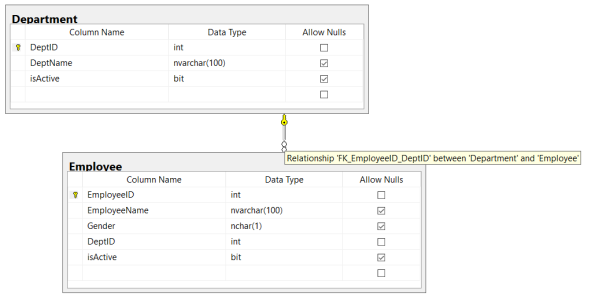
– Like Employee & Department, shown in video-demo below.
3. A FK constraint can reference columns within the same table, these are called self-referencing tables. For example: Employee & Manager Relationship.
–> Referential Integrity:
1. The FK constraint enforces Referential Integrity by not allowing values in the Child table outside form the domain of the Parent table.
2. This also disallows any changes to the Parent table, like deleting any row or modifying PK value in the Parent table.
–> Check the video on Foreign Key:
–> Department and Employee table FK relationship:
–> SQL Code used in above video:
-- 1. Parent table:

CREATE TABLE [dbo].[Department](
	 [DeptID]	int IDENTITY (101, 1) PRIMARY KEY
	,[DeptName]	nvarchar(100)
	,[isActive]	bit DEFAULT(1)
)
GO

INSERT INTO [dbo].[Department] ([DeptName])
SELECT 'HR'
UNION ALL
SELECT 'Finance'
UNION ALL
SELECT 'Admin'
UNION ALL
SELECT 'IT'

select * from [dbo].[Department]
GO


-- 2. Child Table:

-- Method #1.a : with Column inline
CREATE TABLE [dbo].[Employee](
	 [EmployeeID]	int IDENTITY (100, 1) PRIMARY KEY
	,[EmployeeName]	nvarchar(100)
	,[Gender]		nchar(1)
	,[DeptID]		int NOT NULL FOREIGN KEY REFERENCES Department(DeptID)
	,[isActive]		bit DEFAULT(1)
)
GO

-- Method #1.b : with Column inline & Named FK
DROP TABLE [dbo].[Employee]
GO
CREATE TABLE [dbo].[Employee](
	 [EmployeeID]	int IDENTITY (100, 1) PRIMARY KEY
	,[EmployeeName]	nvarchar(100)
	,[Gender]		nchar(1)
	,[DeptID]		int NOT NULL CONSTRAINT FK_EmployeeID_DeptID FOREIGN KEY REFERENCES Department(DeptID)
	,[isActive]		bit DEFAULT(1)
)
GO

-- Method #2.a : with Explicit
DROP TABLE [dbo].[Employee]
GO
CREATE TABLE [dbo].[Employee](
	 [EmployeeID]	int IDENTITY (100, 1) PRIMARY KEY
	,[EmployeeName]	nvarchar(100)
	,[Gender]		nchar(1)
	,[DeptID]		int NOT NULL
	,[isActive]		bit DEFAULT(1)
		FOREIGN KEY ([DeptID]) REFERENCES Department(DeptID)
)
GO

-- Method #2.b : with Explicit & Named FK
DROP TABLE [dbo].[Employee]
GO
CREATE TABLE [dbo].[Employee](
	 [EmployeeID]	int IDENTITY (100, 1) PRIMARY KEY
	,[EmployeeName]	nvarchar(100)
	,[Gender]		nchar(1)
	,[DeptID]		int NOT NULL
	,[isActive]		bit DEFAULT(1)
		CONSTRAINT FK_EmployeeID_DeptID FOREIGN KEY ([DeptID]) REFERENCES Department(DeptID)
)
GO

-- Method #3 : with ALTER Table Named FK
DROP TABLE [dbo].[Employee]
GO
CREATE TABLE [dbo].[Employee](
	 [EmployeeID]	int IDENTITY (100, 1) PRIMARY KEY
	,[EmployeeName]	nvarchar(100)
	,[Gender]		nchar(1)
	,[DeptID]		int NOT NULL
	,[isActive]		bit DEFAULT(1)
)
GO

-- SSMS or ALTER Table stmt:

-- Generated by SSMS - Table Designer:
ALTER TABLE dbo.Employee ADD CONSTRAINT
	FK_Employee_Department FOREIGN KEY
	(
	DeptID
	) REFERENCES dbo.Department
	(
	DeptID
	)

-- OR --

ALTER TABLE [dbo].[Employee]
ADD CONSTRAINT FK_EmployeeID_DeptID FOREIGN KEY ([DeptID]) REFERENCES Department(DeptID)
GO


INSERT INTO Employee ([EmployeeName], [Gender], [DeptID])
VALUES ('Manoj Pandey', 'M', 101)

INSERT INTO Employee ([EmployeeName], [Gender], [DeptID])
VALUES ('Deepak B', 'M', 102)

INSERT INTO Employee ([EmployeeName], [Gender], [DeptID])
VALUES ('Jhon B', 'M', 103)

INSERT INTO Employee ([EmployeeName], [Gender], [DeptID])
VALUES ('Mariya Y', 'F', 104)

select * from [dbo].[Employee]
GO


-- REFERENTIAL INTEGRITY:

INSERT INTO Employee ([EmployeeName], [Gender], [DeptID])
VALUES ('Mary J', 'F', 105)
--Msg 547, Level 16, State 0, Line 115
--The INSERT statement conflicted with the FOREIGN KEY constraint "FK_EmployeeID_DeptID". The conflict occurred in database "TestManDB", table "dbo.Department", column 'DeptID'.
--The statement has been terminated.

DELETE FROM [dbo].[Department]
WHERE DeptID = 102
--Msg 547, Level 16, State 0, Line 118
--The DELETE statement conflicted with the REFERENCE constraint "FK_EmployeeID_DeptID". The conflict occurred in database "TestManDB", table "dbo.Employee", column 'DeptID'.
--The statement has been terminated.

DROP TABLE [dbo].[Department]
--Msg 3726, Level 16, State 1, Line 121
--Could not drop object 'dbo.Department' because it is referenced by a FOREIGN KEY constraint.

GO


-- Allowed updates:

select * from [dbo].[Department]

UPDATE [dbo].[Department]
SET DeptName = 'Human Resource'
WHERE DeptID = 101

select * from [dbo].[Department]

GO


-- Final Cleanup:

DROP TABLE [dbo].[Employee]
GO
DROP TABLE [dbo].[Department]
GO
Check Primary Key & Unique Key constraints
To know about more on Constraints and their types check this blog post.
DB Basics – Difference between Primary Key & Unique Key
Primary Key & Unique Key are nothing but Constraints that can be set at column level of a table, to maintain Uniqueness in the table and thus not allowing duplicate entries.
–> Primary Key (PK) Constraint:
1. A PRIMARY KEY uniquely identifies every row in a database table.
2. The PK constraint on a Table’s COLUMN enforces:
– – UNIQUE values and
– – NOT NULL values
3. Every table can have only one PK defined on a particular column (or more than 1 columns).
4. You can create PK on a Table with:
– – CREATE TABLE statement (in two ways)
– – or later with ALTER TABLE … ADD CONSTRAINT statement.
5. You can create a PK with an IDENTITY column.
6. PK can be Composite Key, containing more than one column.
PRIMARY Key and INDEXes:
7. In SQL Server on creating a Primary Key on a table, a Clustered Index is created with PK column as the Clustering Key.
8. You can also create a Primary Key with a Non-Clustered Index, check this blog post.
Check the video on Primary Keys:
–> Unique Key (PK) Constraint:
1. A UNIQUE KEY just like PK uniquely identifies every row in a database table.
2. The UK constraint on a Table’s COLUMN enforces:
– – UNIQUE values (no duplicate values)
– – Allow single NULL value (But PK do not allow NULL values)
3. A table can have one or more than one UK defined on many columns (or more than 1 columns). But only 1 PK.
4. You can create UK on a Table with:
– – CREATE TABLE statement (in two ways)
– – or later with ALTER TABLE … ADD CONSTRAINT statement.
6. UK can be Composite Key, containing more than one column.
7. A UNIQUE constraint can be referenced by a FOREIGN KEY constraint.
Unique Key and INDEXes:
8. In SQL Server on creating a Unique Key on a table, a Non-Clustered Index is created with the column(s) as the Index Key.
Check the video on Unique Keys:
To know about more on Constraints and their types check this blog post.



Current Visitors

StatCounter …since April 2012


 Leisure blog: Creek & Trails
- NMDC Hyderabad Marathon – My first 42k FM, cramps, training and fuelling
- Singapore (Part 2) – 6 days itinerary, sightseeing & attractions
- Singapore (Part 1) – Tickets, Visa, Hotel, Forex Card/Cash, Metro/Bus cards
- I got full refund of my flight tickets during COVID lockdown (AirIndia via MakeMyTrip)
- YouTube – Your Google Ads account was cancelled due to no spend
- YouTube latest update on its YPP (YouTube Partner Program) which may affect your channel
- Starting your own blog !!!
- How to file ITR (Income Tax Return) online AY 2017-18 (for simple salaried)
- Scam – Become a kin/hier and earn a fortune – via LinkedIn and Email
- Places to visit in and around Vizag (aka Visakhapatnam)
 SQL with Manoj