Archive
DB Basics – Is SELECT a DML (Data Manipulation Language)?
DML or Data Manipulation Langauge as the term suggest represents those SQL statements that manipulates the data in a database. Thus these langauges allows users to INSERT, UPDATE & DELETE the data in a particular database. Other than this the much debatable SELECT statement may or may not be considered as DML upon its usage.
A simple SELECT statement which fetches data from a table is a read-only language and cannot be called as DML.
But a modified version of SELECT i.e. ‘SELECT INTO’ can fall into the DML segment. The ‘SELECT INTO’ can be used to create a Table and insert records fetched from the SELECT statement.
Also, we can manipulate the data for reporting purpose while retriving by using the SELECT statement. The data in underlying tables is unchanged but on the frontend you get a view of modified data, like:
USE [AdventureWorks]
GO

SELECT ContactID, Title,
	FirstName, MiddleName, LastName,
	FirstName + ' ' + ISNULL(MiddleName,'') + ' ' + LastName as [FullName] -- Name manipulated by joining 3 part names.
FROM Person.Contact

SELECT SalesOrderID, SalesOrderDetailID,
	OrderQty, UnitPrice,
	OrderQty * UnitPrice as [TotalPrice] -- Manipulated cost by calculating it for total items purchased.
FROM Sales.SalesOrderDetail
Thus SELECT also comes under DML and following is the list of all DMLs:
1. SELECT {COLUMN LIST} [INTO {TABLE_NAME}] [WHERE {WHERE condition}]
2. INSERT INTO {TABLE_NAME} VALUES (SET of Values)
3. UPDATE {TABLE_NAME} SET [WHERE {WHERE condition}]
4. DELETE FROM {TABLE_NAME} [WHERE {WHERE condition}]
DIRTY reads and PHANTOM reads – SQL Server
–> DIRTY READS: Reading uncommitted modifications are call Dirty Reads. Values in the data can be changed and rows can appear or disappear in the data set before the end of the transaction, thus getting you incorrect or wrong data.
This happens at READ UNCOMMITTED transaction isolation level, the lowest level. Here transactions running do not issue SHARED locks to prevent other transactions from modifying data read by the current transaction. This also do not prevent from reading rows that have been modified but not yet committed by other transactions.
To prevent Dirty Reads, READ COMMITTED or SNAPSHOT isolation level should be used.
–> PHANTOM READS: Data getting changed in current transaction by other transactions is called Phantom Reads. New rows can be added by other transactions, so you get different number of rows by firing same query in current transaction.
In REPEATABLE READ isolation levels Shared locks are acquired. This prevents data modification when other transaction is reading the rows and also prevents data read when other transaction are modifying the rows. But this does not stop INSERT operation which can add records to a table getting modified or read on another transaction. This leads to PHANTOM reads.
PHANTOM reads can be prevented by using SERIALIZABLE isolation level, the highest level. This level acquires RANGE locks thus preventing READ, Modification and INSERT operation on other transaction until the first transaction gets completed.
>> Check & Subscribe my [YouTube videos] on SQL Server.
SELECT or Query nodes in hierarchial or nested XML
On this post I’ll show how to retrieve information from nested XML.
I’ve shown this with an example with 2 approaches/methods and it’s up to you what to chose based upon their performance. Here we go:
DECLARE @xml XML

SET @xml=N'<Root>
	<orderHRD ID="101">
		<custID>501</custID>
		<orderDTL ID="201">
			<prodID>1</prodID>
			<qty>5</qty>
			<cost>25.12</cost>
		</orderDTL>
		<orderDTL ID="202">
			<prodID>2</prodID>
			<qty>3</qty>
			<cost>30.00</cost>
		</orderDTL>
	</orderHRD>
	<orderHRD ID="102">
		<custID>502</custID>
		<orderDTL ID="203">
			<prodID>11</prodID>
			<qty>12</qty>
			<cost>140.78</cost>
		</orderDTL>
	</orderHRD>
	<orderHRD ID="103">
		<custID>503</custID>
		<orderDTL ID="204">
			<prodID>6</prodID>
			<qty>8</qty>
			<cost>60.35</cost>
		</orderDTL>
		<orderDTL ID="205">
			<prodID>9</prodID>
			<qty>2</qty>
			<cost>10.50</cost>
		</orderDTL>
		<orderDTL ID="206">
			<prodID>10</prodID>
			<qty>6</qty>
			<cost>120.89</cost>
		</orderDTL>
	</orderHRD>
</Root>';

-- Method #1: Query nested XML nodes by traversing backward and forward.
-- Query Cost: 81%
select
	Tab.Col.value('../@ID', 'int') as OrderHDR_ID,
	Tab.Col.value('../custID[1]', 'int') as Cust_ID,
	Tab.Col.value('@ID', 'int') as OrderDTL_ID,
	Tab.Col.value('prodID[1]', 'int') as Prod_ID,
	Tab.Col.value('qty[1]', 'int') as QTY,
	Tab.Col.value('cost[1]', 'float') as Cost,
	Tab.Col.value('count(../orderDTL)', 'int') as Cust_Ord_Count
from @xml.nodes('/Root/orderHRD/orderDTL') Tab(Col)

-- Method #2: Query nested XML nodes by using CROSS APPLY on appropriate node.
-- Query Cost: 19%
select
	Tab.Col.value('@ID', 'int') as OrderHDR_ID,
	Tab.Col.value('custID[1]', 'int') as Cust_ID,
	Tab1.Col1.value('@ID', 'int') as OrderDTL_ID,
	Tab1.Col1.value('prodID[1]', 'int') as Prod_ID,
	Tab1.Col1.value('qty[1]', 'int') as QTY,
	Tab1.Col1.value('cost[1]', 'float') as Cost,
	Tab.Col.value('count(./orderDTL)', 'int') as Cust_Ord_Count
from @xml.nodes('/Root/orderHRD') as Tab(Col)
cross apply Tab.Col.nodes('orderDTL') as Tab1(Col1)
GO
Output:-
OrderHDR_ID Cust_ID OrderDTL_ID Prod_ID QTY Cost
101	    501	    201		1	5   25.12
101	    501	    202		2	3   30
102	    502	    203		11	12  140.78
103	    503	    204		6	8   60.35
103	    503	    205		9	2   10.5
103	    503	    206		10	6   120.89
Method #2 is much more effecient than first one. As 1st method uses forward-backward traversal approach. The 2nd method uses APPLY operator which gets Nodes information from a specific parent.
This topic was also discussed on MSDN TSQL’s forum few weeks back, link.
>> Check & Subscribe my [YouTube videos] on SQL Server.
Query XML string in tabular format – SQL Server
My previous post on XML discusses how to simply SELECT records from an XML string.
On this post I’m giving few more examples on how to SELECT records from an XML string. Here are some more examples to retrieve data in a relational tabular format by querying an XML string:
DECLARE @xml XML

SET @xml=N'<Root>
    <stud id="1">
		<fname>Manoj</fname>
		<lname>Pandey</lname>
		<class>10</class>
		<marks>80.5</marks>
	</stud>
    <stud id="2">
		<fname>Saurabh</fname>
		<lname>Sharma</lname>
		<class>11</class>
		<marks>82.7</marks>
	</stud>
    <stud id="3">
		<fname>Kanchan</fname>
		<lname>Pandey</lname>
		<class>10</class>
		<marks>90.5</marks>
	</stud>
    <stud id="4">
		<fname>Rajesh</fname>
		<lname>Shah</lname>
		<class>11</class>
		<marks>70.3</marks>
	</stud>
    <stud id="5">
		<fname>Kunal</fname>
		<lname>Joshi</lname>
		<class>12</class>
		<marks>64.7</marks>
	</stud>
</Root>';

-- Select all records in tabular format from above XML string:
SELECT
Tab.Col.value('@id','int') AS ID,
Tab.Col.value('fname[1]','nvarchar(20)') AS FirstName,
Tab.Col.value('lname[1]','nvarchar(20)') AS LastName,
Tab.Col.value('class[1]','int') AS class,
Tab.Col.value('marks[1]','float') AS Marks
FROM @xml.nodes('/Root/stud') Tab(Col)
Output:-
ID FirstName LastName Class Marks
1  Manoj     Pandey   10    80.5
2  Saurabh   Sharma   11    82.7
3  Kanchan   Pandey   10    90.5
4  Rajesh    Shah     11    70.3
5  Kunal     Joshi    12    64.7
-- Select records as in Key-Value pair format:
SELECT
Tab.Col.value('../@id', 'int') AS RowID,
Tab.Col.value('local-name(.)', 'nvarchar(max)') AS ColName,
Tab.Col.value('text()[1]', 'nvarchar(max)') AS ColValue
FROM @xml.nodes('/*/*/*') AS Tab(Col)
GO
Output:-
RowID ColName ColValue
1     fname   Manoj
1     lname   Pandey
1     class   10
1     marks   80.5
2     fname   Saurabh
2     lname   Sharma
2     class   11
2     marks   82.7
3     fname   Kanchan
3     lname   Pandey
3     class   10
3     marks   90.5
4     fname   Rajesh
4     lname   Shah
4     class   11
4     marks   70.3
5     fname   Kunal
5     lname   Joshi
5     class   12
5     marks   64.7
SQL DBA – DBID 32767 | Resource Database
select * from sys.databases
On executing the above query it gives me 9 records with DBID ranging from 1 to 9. First 4 DBIDs (1-4) for master, tempdb, model & msdb and another 5 databases (5-9) created by me.
But when I queried some DMVs & DMFs it resulted some records with DBID 32767 which left me clueless until I googled about it. Also submitted a post on my favourite MSDN T-SQL forum and got to know that this ID is reserved for Resource Database. The Resource database is readonly database that does not appear on SSMS and is managed internally by SQL Server engine. More on MS BOL about Resources.
To regenerate this scenario, lets do a simple exercise. Execute the following code (make sure you have AdventureWorks sample database installed):
USE [AdventureWorks]
go

-- Execute some sample SQL statements
select top 10 * from Person.Contact
select top 10 * from Production.Product
go 10

-- Execute sp_who2 proc
sp_who2
go 5
Now execute the query below using sys.dm_exec_query_stats DMV & sys.dm_exec_sql_text(sql_handle) DMF to get the status of what SQL engine is doing behind:
select x.dbid, x.text, a.creation_time, a.Last_execution_time, a.execution_count
from sys.dm_exec_query_stats a
cross apply sys.dm_exec_sql_text(a.sql_handle) x
go
Output:-
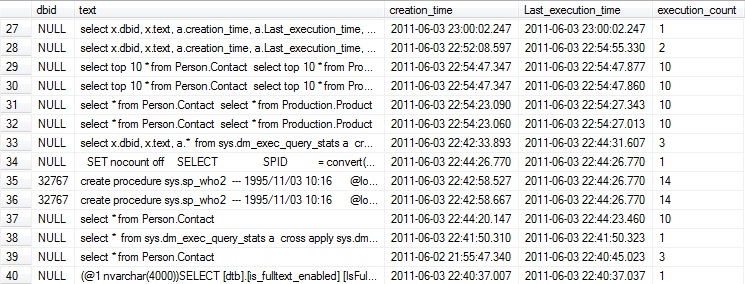
The results displayed in the image above shows 2 records with DBID 32767.



Current Visitors

StatCounter …since April 2012


 Leisure blog: Creek & Trails
- NMDC Hyderabad Marathon – My first 42k FM, cramps, training and fuelling
- Singapore (Part 2) – 6 days itinerary, sightseeing & attractions
- Singapore (Part 1) – Tickets, Visa, Hotel, Forex Card/Cash, Metro/Bus cards
- I got full refund of my flight tickets during COVID lockdown (AirIndia via MakeMyTrip)
- YouTube – Your Google Ads account was cancelled due to no spend
- YouTube latest update on its YPP (YouTube Partner Program) which may affect your channel
- Starting your own blog !!!
- How to file ITR (Income Tax Return) online AY 2017-18 (for simple salaried)
- Scam – Become a kin/hier and earn a fortune – via LinkedIn and Email
- Places to visit in and around Vizag (aka Visakhapatnam)
 SQL with Manoj