Archive
Save XML in a file | Read XML from a file (in SQL Server)
USE [AdventureWorks]
GO

-- Save XML records to a file:
DECLARE @fileName VARCHAR(50)

DECLARE @sqlStr VARCHAR(1000)
DECLARE @sqlCmd VARCHAR(1000)

SET @fileName = 'E:\SQL_Queries\test.xml'
SET @sqlStr = 'select TOP 50 [ContactID], [Title], [FirstName], [MiddleName], [LastName], [Suffix], [EmailAddress], [Phone] from AdventureWorks.Person.Contact FOR XML PATH(''Contact''), ROOT(''Person.Contact'')'

SET @sqlCmd = 'bcp "' + @sqlStr + '" queryout ' + @fileName + ' -w -T'

EXEC xp_cmdshell @sqlCmd
Progress:-
NULL
Starting copy...
NULL
6 rows copied.
Network packet size (bytes): 4096
Clock Time (ms.) Total     : 15     Average : (400.00 rows per sec.)
NULL
Check the file in the directory set above in @filename variable.
Now we will see how can we read the XML file saved above. Will store the XML in into a SQL Server XML variable
and query it with SELECT statement:
DECLARE @xmlStr XML

-- Storing XML records into a XML variable:

SELECT @xmlStr = BulkColumn
FROM OPENROWSET(BULK 'E:\SQL_Queries\test.xml', SINGLE_CLOB) AS X
The above statement gave me ERROR:
SINGLE_CLOB requires a double-byte character set (DBCS) (char) input file. The file specified is Unicode.
Because the XML BCP’d to the file above was saved in unicode format. So use SINGLE_NCLOB instead of SINGLE_CLOB.
SELECT @xmlStr = BulkColumn
FROM OPENROWSET(BULK 'E:\SQL_Queries\test.xml', SINGLE_NCLOB) AS X
This again gave me ERROR:
XML parsing: line 1, character 2034, illegal qualified name character
Because the file saved in xml file has CrLf (Carriage Return & Line Feed) in between.
So I removed the CrLf from the XML string as shown below.
SELECT @xmlStr = REPLACE(REPLACE(BulkColumn,CHAR(10),''),CHAR(13),'')
FROM OPENROWSET(BULK 'E:\SQL_Queries\test.xml', SINGLE_NCLOB) AS X

-- Querying the XML stored in @xmlStr variable with SELECT statement:
SELECT
	T.C.value('ContactID[1]', 'INT') as [ContactID],
	T.C.value('Title[1]', 'VARCHAR(8)') as [Title],
	T.C.value('FirstName[1]', 'VARCHAR(50)') as [FirstName],
	T.C.value('MiddleName[1]', 'VARCHAR(50)') as [MiddleName],
	T.C.value('LastName[1]', 'VARCHAR(50)') as [LastName],
	T.C.value('Suffix[1]', 'VARCHAR(10)') as [Suffix],
	T.C.value('EmailAddress[1]', 'VARCHAR(50)') as [EmailAddress],
	T.C.value('Phone[1]', 'VARCHAR(50)') as [Phone]
FROM @xmlStr.nodes('//Person.Contact/Contact') as T(C)
Using DMLs with XMLs – INSERT (SQL Server)
In my previous XML related posts I wrote about how can we query and SELECT XML strings & pull data from parent-child nodes and hierarchies. In this post we’ll see how we can modify that XML data by applying DMLs to it.
In this part let’s see how we can INSERT new records in a XML string:
DECLARE @xml XML

-- Creating sample XML string with single row:
SET @xml=N'<Root>
    <stud id="1">
		<fname>Manoj</fname>
		<lname>Pandey</lname>
		<class>10</class>
		<marks>80.5</marks>
	</stud>
</Root>';

-- Now check the sample row by querying it with SELECT statement:
SELECT
	Tab.Col.value('@id','int') AS ID,
	Tab.Col.value('fname[1]','nvarchar(20)') AS FirstName,
	Tab.Col.value('lname[1]','nvarchar(20)') AS LastName,
	Tab.Col.value('class[1]','int') AS class,
	Tab.Col.value('marks[1]','float') AS Marks
FROM @xml.nodes('/Root/stud') Tab(Col)
Output:-
ID FirstName LastName class Marks
1 Manoj Pandey 10 80.5
DMLs in XML provides a common function xml.modify() to modify the XML string in 3 ways, i.e. INSERT, UPDATE & DELETE. Here we will see how we can INSERT new records at different positions in the sample XML created above:
--// Now INSERTing some more records:

-- 1. INSERT (basic)
SET @xml.modify('
insert <stud id="2">
		<fname>Saurabh</fname>
		<lname>Sharma</lname>
		<class>11</class>
		<marks>82.7</marks>
	</stud>
into (/Root)[1]');

-- 2. INSERT at beginning, first record
SET @xml.modify('
insert <stud id="0">
		<fname>Kanchan</fname>
		<lname>Pandey</lname>
		<class>10</class>
		<marks>90.5</marks>
	</stud>
as first
into (/Root)[1]');

-- 3. INSERT at end, last record
SET @xml.modify('
insert <stud id="3">
		<fname>Rajesh</fname>
		<lname>Shah</lname>
		<class>11</class>
		<marks>70.3</marks>
	</stud>
as last
into (/Root)[1]');

-- Let's check the records just inserted:
SELECT
	Tab.Col.value('@id','int') AS ID,
	Tab.Col.value('fname[1]','nvarchar(20)') AS FirstName,
	Tab.Col.value('lname[1]','nvarchar(20)') AS LastName,
	Tab.Col.value('class[1]','int') AS class,
	Tab.Col.value('marks[1]','float') AS Marks
FROM @xml.nodes('/Root/stud') Tab(Col)
Output:-
ID FirstName LastName class Marks
0 Kanchan Pandey 10 90.5
1 Manoj Pandey 10 80.5
2 Saurabh Sharma 11 82.7
3 Rajesh Shah 11 70.3
-- Check final XML with INSERTed records above:
SELECT @xml
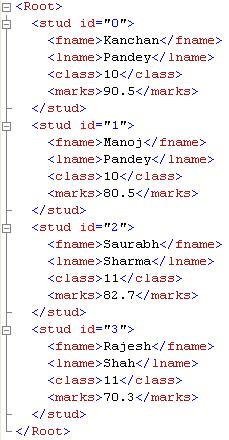
In my next XML-DML post we will see UPDATE and DELETE operations.
more examples on querying XML …with CROSS APPLY & XQuery – in SQL Server
My quest to know more about XML and to use it in SQL language always encourages me to google this topic and religiously follow the MSDN’s SQL Server XML forum. I liked this post on XML, it contains some more ways to query XML data cited by some SQL experts.
In my previous posts I’ve shown some practical examples on how to query your XML data or string and get results in tabular format. Following are the links I’ve previously posted on this topic:
1. https://sqlwithmanoj.com/2011/01/28/select-an-xml-to-table/
2. https://sqlwithmanoj.com/2011/07/13/query-xml-string-in-tabular-format/
3. https://sqlwithmanoj.com/2011/07/13/select-or-query-nodes-in-hierarchial-or-nested-xml/
–> Let’s see one more example and multiple ways to query an XML string:
DECLARE @XML XML
SET @XML =
'<Input>
    <Courses>
        <Course>
            <Id>27</Id>
            <Students>
                <Id>19876</Id>
                <Id>19878</Id>
            </Students>
        </Course>
        <Course>
            <Id>29</Id>
            <Students>
                <Id>19879</Id>
            </Students>
        </Course>
    </Courses>
</Input>'
-> Desired Output: CourseId Students
27	 19876
27	 19878
29	 19879
-- Method# 1. Simple approach but bit costly | Query Cost: 83%
select t.c.value('../../Id[1]', 'INT') as CourseId,
	t.c.value('.', 'INT') as Students
from @XML.nodes('//Input/Courses/Course/Students/Id') as t(c)

-- Method# 2. By using Cross Apply | Query Cost: 17%
select t.c.value('Id[1]', 'INT') as CourseId,
	t1.c1.value('.', 'INT') as Students
from @XML.nodes('//Input/Courses/Course') as t(c)
cross apply t.c.nodes('Students/Id') as t1(c1)
The above 2 approaches shows that the second one with CROSS APPLY is much more performant.
– The traditional approach (#1) traverses the nodes (parent/child) and pulls the desired data.
– But the 2nd one with APPLY clause fetches specific node’s entire row and join it with the SELECTed data.
The NODES() function allows us to identify a particular node and map it into a new row. As the NODES function returns a rowset thus it can be queried by a SELECT statement or used like a UDF by applying APPLY clause. More on NODES(), here’s the link.
–> Let’s see an another approach by applying XQuery in a QUERY() function. The XQuery is a string, an XQuery expression, that queries for XML nodes such as elements, attributes, in an XML instance. More on QUERY(), here’s the link.
-- Method# 3. By using XML Query:

DECLARE @temp XML
set  @temp = @XML.query('
for $a in /Input/Courses/Course/Id,
    $b in /Input/Courses/Course/Students/Id
where $a/.. is $b/../..
return element detail {attribute CourseID {string($a)},attribute StudentID {string($b)}}')

select t.c.value('@CourseID','int') as [CourseID],
	t.c.value('@StudentID','int') as [StudentID]
from @temp.nodes('/detail') as t(c)
Will see some more examples & more stuff on XML in my forthcoming posts.
>> Check & Subscribe my [YouTube videos] on SQL Server.
SELECT or Query nodes in hierarchial or nested XML
On this post I’ll show how to retrieve information from nested XML.
I’ve shown this with an example with 2 approaches/methods and it’s up to you what to chose based upon their performance. Here we go:
DECLARE @xml XML

SET @xml=N'<Root>
	<orderHRD ID="101">
		<custID>501</custID>
		<orderDTL ID="201">
			<prodID>1</prodID>
			<qty>5</qty>
			<cost>25.12</cost>
		</orderDTL>
		<orderDTL ID="202">
			<prodID>2</prodID>
			<qty>3</qty>
			<cost>30.00</cost>
		</orderDTL>
	</orderHRD>
	<orderHRD ID="102">
		<custID>502</custID>
		<orderDTL ID="203">
			<prodID>11</prodID>
			<qty>12</qty>
			<cost>140.78</cost>
		</orderDTL>
	</orderHRD>
	<orderHRD ID="103">
		<custID>503</custID>
		<orderDTL ID="204">
			<prodID>6</prodID>
			<qty>8</qty>
			<cost>60.35</cost>
		</orderDTL>
		<orderDTL ID="205">
			<prodID>9</prodID>
			<qty>2</qty>
			<cost>10.50</cost>
		</orderDTL>
		<orderDTL ID="206">
			<prodID>10</prodID>
			<qty>6</qty>
			<cost>120.89</cost>
		</orderDTL>
	</orderHRD>
</Root>';

-- Method #1: Query nested XML nodes by traversing backward and forward.
-- Query Cost: 81%
select
	Tab.Col.value('../@ID', 'int') as OrderHDR_ID,
	Tab.Col.value('../custID[1]', 'int') as Cust_ID,
	Tab.Col.value('@ID', 'int') as OrderDTL_ID,
	Tab.Col.value('prodID[1]', 'int') as Prod_ID,
	Tab.Col.value('qty[1]', 'int') as QTY,
	Tab.Col.value('cost[1]', 'float') as Cost,
	Tab.Col.value('count(../orderDTL)', 'int') as Cust_Ord_Count
from @xml.nodes('/Root/orderHRD/orderDTL') Tab(Col)

-- Method #2: Query nested XML nodes by using CROSS APPLY on appropriate node.
-- Query Cost: 19%
select
	Tab.Col.value('@ID', 'int') as OrderHDR_ID,
	Tab.Col.value('custID[1]', 'int') as Cust_ID,
	Tab1.Col1.value('@ID', 'int') as OrderDTL_ID,
	Tab1.Col1.value('prodID[1]', 'int') as Prod_ID,
	Tab1.Col1.value('qty[1]', 'int') as QTY,
	Tab1.Col1.value('cost[1]', 'float') as Cost,
	Tab.Col.value('count(./orderDTL)', 'int') as Cust_Ord_Count
from @xml.nodes('/Root/orderHRD') as Tab(Col)
cross apply Tab.Col.nodes('orderDTL') as Tab1(Col1)
GO
Output:-
OrderHDR_ID Cust_ID OrderDTL_ID Prod_ID QTY Cost
101	    501	    201		1	5   25.12
101	    501	    202		2	3   30
102	    502	    203		11	12  140.78
103	    503	    204		6	8   60.35
103	    503	    205		9	2   10.5
103	    503	    206		10	6   120.89
Method #2 is much more effecient than first one. As 1st method uses forward-backward traversal approach. The 2nd method uses APPLY operator which gets Nodes information from a specific parent.
This topic was also discussed on MSDN TSQL’s forum few weeks back, link.
>> Check & Subscribe my [YouTube videos] on SQL Server.
Query XML string in tabular format – SQL Server
My previous post on XML discusses how to simply SELECT records from an XML string.
On this post I’m giving few more examples on how to SELECT records from an XML string. Here are some more examples to retrieve data in a relational tabular format by querying an XML string:
DECLARE @xml XML

SET @xml=N'<Root>
    <stud id="1">
		<fname>Manoj</fname>
		<lname>Pandey</lname>
		<class>10</class>
		<marks>80.5</marks>
	</stud>
    <stud id="2">
		<fname>Saurabh</fname>
		<lname>Sharma</lname>
		<class>11</class>
		<marks>82.7</marks>
	</stud>
    <stud id="3">
		<fname>Kanchan</fname>
		<lname>Pandey</lname>
		<class>10</class>
		<marks>90.5</marks>
	</stud>
    <stud id="4">
		<fname>Rajesh</fname>
		<lname>Shah</lname>
		<class>11</class>
		<marks>70.3</marks>
	</stud>
    <stud id="5">
		<fname>Kunal</fname>
		<lname>Joshi</lname>
		<class>12</class>
		<marks>64.7</marks>
	</stud>
</Root>';

-- Select all records in tabular format from above XML string:
SELECT
Tab.Col.value('@id','int') AS ID,
Tab.Col.value('fname[1]','nvarchar(20)') AS FirstName,
Tab.Col.value('lname[1]','nvarchar(20)') AS LastName,
Tab.Col.value('class[1]','int') AS class,
Tab.Col.value('marks[1]','float') AS Marks
FROM @xml.nodes('/Root/stud') Tab(Col)
Output:-
ID FirstName LastName Class Marks
1  Manoj     Pandey   10    80.5
2  Saurabh   Sharma   11    82.7
3  Kanchan   Pandey   10    90.5
4  Rajesh    Shah     11    70.3
5  Kunal     Joshi    12    64.7
-- Select records as in Key-Value pair format:
SELECT
Tab.Col.value('../@id', 'int') AS RowID,
Tab.Col.value('local-name(.)', 'nvarchar(max)') AS ColName,
Tab.Col.value('text()[1]', 'nvarchar(max)') AS ColValue
FROM @xml.nodes('/*/*/*') AS Tab(Col)
GO
Output:-
RowID ColName ColValue
1     fname   Manoj
1     lname   Pandey
1     class   10
1     marks   80.5
2     fname   Saurabh
2     lname   Sharma
2     class   11
2     marks   82.7
3     fname   Kanchan
3     lname   Pandey
3     class   10
3     marks   90.5
4     fname   Rajesh
4     lname   Shah
4     class   11
4     marks   70.3
5     fname   Kunal
5     lname   Joshi
5     class   12
5     marks   64.7



Current Visitors

StatCounter …since April 2012


 Leisure blog: Creek & Trails
- NMDC Hyderabad Marathon – My first 42k FM, cramps, training and fuelling
- Singapore (Part 2) – 6 days itinerary, sightseeing & attractions
- Singapore (Part 1) – Tickets, Visa, Hotel, Forex Card/Cash, Metro/Bus cards
- I got full refund of my flight tickets during COVID lockdown (AirIndia via MakeMyTrip)
- YouTube – Your Google Ads account was cancelled due to no spend
- YouTube latest update on its YPP (YouTube Partner Program) which may affect your channel
- Starting your own blog !!!
- How to file ITR (Income Tax Return) online AY 2017-18 (for simple salaried)
- Scam – Become a kin/hier and earn a fortune – via LinkedIn and Email
- Places to visit in and around Vizag (aka Visakhapatnam)
 SQL with Manoj