Archive
UPDATE statement with new .WRITE Clause – SQL Server
As per MS BOL the new .WRITE clause of the UPDATE DML statement enables partial or full updates and high performance appends to varchar(max), nvarchar(max) and varbinary(max) data type columns.
The UPDATE statement is logged; however, partial updates to large value data types using the .WRITE clause are minimally logged.
Syntax: .WRITE ( expression, @Offset , @Length )
Usage: The string specified in the expression param is replaced by the number of characters specified in
@Length param starting from the position mentioned in @Offset param.
Let’s check this with an example mentioned below: The “Senior” character set is replaced by the 3 length character “Sr.” starting from the 18th character.
-- Create a table containing a VARCHAR(MAX), NVARCHAR(MAX) or VARBINARY(MAX) column:
CREATE TABLE CheckWrite (empID INT, eName VARCHAR(50), descr VARCHAR(MAX))

-- Insert test data in the table:
INSERT INTO CheckWrite
SELECT 101, 'Manoj Pandey', 'Manoj Pandey is a Sr. SQL Server developer and CRM analyst. He likes Photography & travelling.'

-- Check inserted record before UPDATE:
SELECT * FROM CheckWrite

-- Now UPDATE the descr column by using .WRITE clause:
UPDATE CheckWrite
SET descr .WRITE('Senior', 18, 3)
WHERE empID = 101

-- Check the updated result:
SELECT * FROM CheckWrite

-- Final cleanup
DROP TABLE CheckWrite
Output:–

Note: The .WRITE clause cannot be used to update a NULL column or set the value of column_name to NULL.
>> Check & Subscribe my [YouTube videos] on SQL Server.
SQL Server 2012 (DENALI) TSQL – New Feature in SSMS – Surround With
I just stumbled on this new exciting feature of SSMS Denali while trying my hands querying on this new environment.
Here is a scenario: You’ve created a query or a logic with multiple lines of SQL statements. Now you want this to be validated by an IF-ELSE condition or iterate it in a WHILE loop. You will move the cursor to the top and make extra spaces for inserting IF/WHILE {condition} BEGIN, go to the Bottom and terminate the condition/loop with END statement.
But if you are on Denali you won’t have to do this and type anything. Just a few mouse click would do for you, let’s see how:
1. Select the SQL statement or logic you want to Surround with, then right click on it, select the “Surround With…” option:

2. Now double click on any 3 of your choice, here I selected the “If” condition:
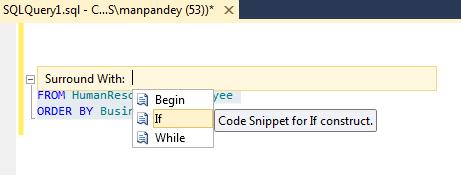
3. The Editor will automatically write the “IF” syntax for you:
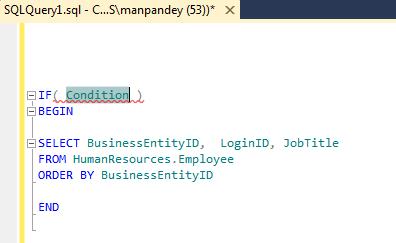
4. You just need to add the condition within brackets as per your requirement.
… nice feature introduced by Microsoft.
SQL Server 2012 (DENALI) TSQL – New feature | OFFSET FETCH Clause (for paging/pagination)
As per MS BOL, the new Denali’s OFFSET-FETCH Clause provides an option to fetch only a window or page of a fix set of results from the result set. OFFSET-FETCH can be used only with the ORDER BY clause.
This was the most awated feature for the frontend/GUI developers to display volumnous data in a small grid, page by page. Prior to this they used to devise not so complex but a bit complex SQL logic to display records page by page. Introduction of this feature has limited the complex logic to a few lines of single SQL statement which is much more optimized.
Let’s see how can we use this feature:
--// Example #1:

-- This will skip first 100 records and show next 20 records
SELECT BusinessEntityID,  LoginID, JobTitle
FROM HumanResources.Employee
ORDER BY BusinessEntityID
OFFSET 100 ROWS
FETCH NEXT 20 ROWS ONLY;
GO

--// Example #2:

-- Start from first record and show next 10 records
SELECT BusinessEntityID,  LoginID, JobTitle
FROM HumanResources.Employee
ORDER BY BusinessEntityID
OFFSET 0 ROWS
FETCH NEXT 10 ROWS ONLY;

-- Skip first 10 records and show next 10 records
SELECT BusinessEntityID,  LoginID, JobTitle
FROM HumanResources.Employee
ORDER BY BusinessEntityID
OFFSET 10 ROWS -- To show next page of 10 records, just change the offset by adding the page size, i.e 10.
FETCH NEXT 10 ROWS ONLY;
GO

--// Example #3:

-- To use this in front-end, the above logic can be made dynamic by using a few variables, like:
DECLARE @StartRec INT
DECLARE @PageSize INT
DECLARE @RecordEnd INT

SET @StartRec = 0
SET @PageSize = 10
SET @RecordEnd = @PageSize

WHILE @RecordEnd <> 0 -- I'm using WHILE loop to simulate it here
BEGIN
	SELECT BusinessEntityID,  LoginID, JobTitle
	FROM HumanResources.Employee
	ORDER BY BusinessEntityID
	OFFSET @StartRec ROWS
	FETCH NEXT @PageSize ROWS ONLY

	SET @RecordEnd = @@ROWCOUNT -- Exit loop at 0

	SET @StartRec = @StartRec + @PageSize
END
GO
Rules to use OFFSET FETCH (via MSDN):
1. ORDER BY is mandatory to use OFFSET and FETCH clause.
2. OFFSET clause is mandatory with FETCH. You can never use, ORDER BY … FETCH.
3. TOP cannot be combined with OFFSET and FETCH in the same query expression.
4. The OFFSET/FETCH rowcount expression can be any arithmetic, constant, or parameter expression that will return an integer value. The rowcount expression does not support scalar sub-queries.
More on MSDN, link: http://msdn.microsoft.com/en-us/library/gg699618%28v=sql.110%29.aspx
SQL Server 2012 (DENALI) TSQL – New features | Built-in Functions
Here is a list of some new function introduced in SQL Server Denali, some examples are taken from MSDN and here is the link for more details.
Logical Functions:
-- CHOOSE()
SELECT CHOOSE ( 3, 'Manager', 'Director', 'Developer', 'Tester' ) AS Result; -- Developer
SELECT CHOOSE ( 2, 'Manoj', 'Saurabh', 'Andy', 'Dave' ) AS Result; -- Saurabh
GO

-- IIF()
DECLARE @a int = 45;
DECLARE @b int = 40;
SELECT IIF ( @a > @b, 'TRUE', 'FALSE' ) AS Result; -- TRUE
GO
Note: The IIF() function was important for the developers that migrated from ACCESS to SQL Server. Introduction of these 2 functions will make their life easy.
Check the video Tutorial on CHOOSE() and IIF() functions.
Conversion Functions:
-- PARSE()
SELECT PARSE ('Monday, 13 December 2010' AS datetime2 USING 'en-US') AS Result;
SELECT PARSE ('€345,98' AS money USING 'de-DE') AS Result;
GO

-- TRY_CAST()
SELECT
CASE WHEN TRY_CAST ('test' as float) IS NULL
	THEN 'Cast failed'
	ELSE 'Cast succeeded'
END AS Result;
GO

-- TRY_CONVERT()
SELECT
CASE WHEN TRY_CONVERT (float,'test') IS NULL
THEN 'Cast failed'
ELSE 'Cast succeeded'
END AS Result;
GO

-- TRY_PARSE()
SELECT
CASE WHEN TRY_PARSE ('Aragorn' AS decimal, 'sr-Latn-CS') IS NULL
THEN 'True'
ELSE 'False'
END
AS Result;
GO
Note: The TRY_CAST(), TRY_CONVERT() & TRY_PARSE() functions added exception handling to the existing CAST(), CONVERT() and new PARSE() function respectively. Now developers can fully rely on these 2 functions while type converting values and defaulting them to something else on any execption.
Analytic Functions:
USE AdventureWorks2008R2;
GO

-- FIRST_VALUE() and LAST_VALUE()
SELECT
	Name, ListPrice, ProductSubcategoryID,
	FIRST_VALUE (Name) OVER (PARTITION BY ProductSubcategoryID ORDER BY ListPrice ASC) AS LeastExpensive,
	LAST_VALUE (Name) OVER (PARTITION BY ProductSubcategoryID ORDER BY ListPrice ASC) AS LeastExpensive
FROM Production.Product;

-- LAG()
SELECT
	BusinessEntityID, YEAR(QuotaDate) AS SalesYear, SalesQuota AS CurrentQuota,
	LAG (SalesQuota, 1, 0) OVER (ORDER BY YEAR(QuotaDate)) AS PreviousQuota
FROM Sales.SalesPersonQuotaHistory
WHERE BusinessEntityID = 275 and YEAR(QuotaDate) IN ('2005','2006');

-- LEAD()
SELECT
	TerritoryName, BusinessEntityID, SalesYTD,
	LEAD (SalesYTD, 1, 0) OVER (PARTITION BY TerritoryName ORDER BY SalesYTD DESC) AS PrevRepSales
FROM Sales.vSalesPerson
WHERE TerritoryName IN (N'Northwest', N'Canada')
ORDER BY TerritoryName;
Note: The LAG() and LEAD() functions are already in Oracle and by introducing them in MS SQL Server’s Denali version is very much welcomed by TSQL developers. Plus the addition of FIRST_VALUE(), LAST_VALUE(), PERCENTILE_XXX(), etc will really add value and provide zeal to programmers in TSQL development, just like Ranking functions and Cube/Rollup did in 2005(08).
Some other new functions introduced are:
– CUME_DIST()
– PERCENTILE_CONT()
– PERCENTILE_DISC()
– PERCENT_RANK()
More details here on MS BOL: http://technet.microsoft.com/en-us/library/hh213234%28SQL.110%29.aspx



Current Visitors

StatCounter …since April 2012


 Leisure blog: Creek & Trails
- NMDC Hyderabad Marathon – My first 42k FM, cramps, training and fuelling
- Singapore (Part 2) – 6 days itinerary, sightseeing & attractions
- Singapore (Part 1) – Tickets, Visa, Hotel, Forex Card/Cash, Metro/Bus cards
- I got full refund of my flight tickets during COVID lockdown (AirIndia via MakeMyTrip)
- YouTube – Your Google Ads account was cancelled due to no spend
- YouTube latest update on its YPP (YouTube Partner Program) which may affect your channel
- Starting your own blog !!!
- How to file ITR (Income Tax Return) online AY 2017-18 (for simple salaried)
- Scam – Become a kin/hier and earn a fortune – via LinkedIn and Email
- Places to visit in and around Vizag (aka Visakhapatnam)
 SQL with Manoj