Archive
UNION vs UNION ALL | which one is faster?
UNION and UNION ALL are used to combine data or record sets from two different tables. One could combine more than 2 tables. Just like JOINS, UNION combines data into a single record-set but vertically by adding rows from another table. JOINS combine data horizontally by adding columns from another table.
UNION insures you get DISTINCT records from both the tables.
UNION ALL pulls out all records from both the tables with duplicates.
Generally “UNION ALL” is considered best in performance when compared with UNION.
But you should only use “UNION ALL” when you are sure that you have distinct or no common records in both the records-sets.
For more information on this check my earlier blog post which shows the main differences and how performance differs in b/w the two: https://sqlwithmanoj.wordpress.com/2010/12/30/why-union-all-is-faster-than-union/
Why UNION ALL is faster than UNION?
UNION and UNION ALL are used to combine data or record sets from two different tables. One could combine more than 2 tables. Just like JOINS, UNION combines data into a single record-set but vertically by adding rows from another table. JOINS combine data horizontally by adding columns from another table.
UNION insures you get DISTINCT records from both the tables.
UNION ALL pulls out all records from both the tables with duplicates.
SQL Scripts below proves why UNION ALL is faster than UNION:
-- Create First table: #tempTable1
select FirstName, LastName into #tempTable1
from Person.Contact
where ContactID <= 100 -- Create Second table: #tempTable2 select FirstName, LastName into #tempTable2 from Person.Contact where ContactID > 100 and ContactID <= 200
Comparison:
SET STATISTICS PROFILE ON

-- Using UNION - Query Cost: 35%
select * from #tempTable1
UNION
select * from #tempTable2
Query Plan for UNION:
  |--Sort(DISTINCT ORDER BY:([Union1008] ASC, [Union1009] ASC))
       |--Concatenation
            |--Table Scan(OBJECT:([tempdb].[dbo].[#tempTable1]))
            |--Table Scan(OBJECT:([tempdb].[dbo].[#tempTable2]))
-- Using UNION ALL - Query Cost: 13%
select * from #tempTable1
UNION ALL
select * from #tempTable2
Query Plan for UNION ALL:
  |--Concatenation
       |--Table Scan(OBJECT:([tempdb].[dbo].[#tempTable1]))
       |--Table Scan(OBJECT:([tempdb].[dbo].[#tempTable2]))
-- Using UNION ALL with DISTINCT - Query Cost: 52%
select DISTINCT * from #tempTable1
UNION ALL
select DISTINCT * from #tempTable2
Query Plan for UNION ALL with DISTINCT:
  |--Concatenation
       |--Sort(DISTINCT ORDER BY:([tempdb].[dbo].[#tempTable1].[FirstName] ASC, [tempdb].[dbo].[#tempTable1].[LastName] ASC))
       |    |--Table Scan(OBJECT:([tempdb].[dbo].[#tempTable1]))
       |--Sort(DISTINCT ORDER BY:([tempdb].[dbo].[#tempTable2].[FirstName] ASC, [tempdb].[dbo].[#tempTable2].[LastName] ASC))
            |--Table Scan(OBJECT:([tempdb].[dbo].[#tempTable2]))
SET STATISTICS PROFILE OFF

-- Final Cleanup
drop table #tempTable1
drop table #tempTable2
The Query plan for:
– UNION ALL SELECT above shows it just does a concatenation.
– UNION SELECT above shows it does a SORT on final concatenation.
– UNION ALL with DISTINCT SELECT above shows it does a SORT of individual tables than does the final concatenation.
The Query cost with:
– UNION ALL = 13%
– UNION = 35%
– UNION ALL with DISTINCT = 52%
This proves that:
- UNION ALL is faster and more optimized than UNION. But this does not mean you use UNION ALL in every scenario.
- UNION is not equivalent to “UNION ALL with DISTINCT”.
ISNULL vs COALESCE – expressions/functions in SQL Server
ISNULL & COALESCE with some common features makes them equivalent, but some features makes them work and behave differently, shown below.
– Similarity
Both can be use to build/create a CSV list as shown below:
USE [AdventureWorks]
GO

DECLARE @csv VARCHAR(2000)

SELECT @csv = ISNULL(@csv + ', ', '') + FirstName
FROM Person.Contact
WHERE ContactID <= 10
ORDER BY FirstName

select @csv

set @csv=NULL
SELECT @csv = COALESCE(@csv + ', ', '') + FirstName
FROM Person.Contact
WHERE ContactID <= 10
ORDER BY FirstName

select @csv
Both will give the same output:
Carla, Catherine, Frances, Gustavo, Humberto, Jay, Kim, Margaret, Pilar, Ronald
– Difference #1
ISNULL accepts only 2 parameters. The first parameter is checked for NULL value, if it is NULL then the second parameter is returned, otherwise it returns first parameter.
COALESCE accepts two or more parameters. One can apply 2 or as many parameters, but it returns only the first non NULL parameter, example below.
DECLARE @str1 VARCHAR(10), @str2 VARCHAR(10)

-- ISNULL() takes only 2 arguments
SELECT ISNULL(@str1, 'manoj') AS 'IS_NULL' -- manoj

-- COALESCE takes multiple arguments and returns first non-NULL argument
SELECT COALESCE(@str1, @str2, 'manoj') AS 'COALESCE' -- manoj

-- ISNULL() equivalent of COALESCE, by nesting of ISNULL()
SELECT ISNULL(@str1, ISNULL(@str2, 'manoj')) AS 'IS_NULL eqv' -- manoj
– Difference #2
ISNULL does not implicitly converts the datatype if both parameters datatype are different.
On the other side COALESCE implicitly converts the parameters datatype in order of higher precedence.
-- ISNULL Does not do Implicit conversion
select ISNULL(10, getdate()) as 'IS_NULL' -- Errors out
Error Message:
Msg 257, Level 16, State 3, Line 1
Implicit conversion from data type datetime to int is not allowed.
Use the CONVERT function to run this query.
-- COALESCE Does Implicit conversion and gets converted to higher precedence datatype.
select COALESCE(10, getdate()) as 'COALESCE' -- 1900-01-11 00:00:00.000, outputs 10 but convert it to datetime [datetime > int]
select COALESCE(getdate(),10) as 'COALESCE' -- {Current date} 2010-12-23 23:36:31.110
select COALESCE(10, 'Manoj') as 'COALESCE' -- 10 [int > varchar]
select COALESCE('Manoj',10) as 'COALESCE' -- Errors out, it does an implicit conversion, but cannot change 'Manoj' to Integer.
Error Message:
Msg 245, Level 16, State 1, Line 1
Conversion failed when converting the varchar value 'Manoj' to data type int.
– Difference #3
Similar to above point ISNULL always returns the value with datatype of first parameter.
Contrary to this, COALESCE returns the datatype value according to the precedence and datatype compatibility.
DECLARE @str VARCHAR(5)

SET @str = NULL

-- ISNULL returns truncated value after its fixed size, here 5
SELECT ISNULL(@str, 'Half Full') AS 'IS_NULL' -- Half

-- COALESCE returns full length value, returns full 12 char string
SELECT COALESCE(@str, 'Half Full') AS 'COALESCE' -- Half Full
– Difference #4
According to MS BOL, ISNULL and COALESCE though equivalent, can behave differently. An expression involving ISNULL with non-null parameters is considered to be NOT NULL, while expressions involving COALESCE with non-null parameters is considered to be NULL. Thus to index expressions involving COALESCE with non-null parameters, the computed column can be persisted using the PERSISTED column attribute.
-- ISNULL() is allowed in computed columns with Primary Key
CREATE TABLE T1 (
	col1 INT,
	col2 AS ISNULL(col1, 1) PRIMARY KEY)

-- COALESCE() is not allowed in non-persisted computed columns with Primary Key
CREATE TABLE T2 (
	col1 INT,
	col2 AS COALESCE(col1, 1) PRIMARY KEY)
Error Message:
Msg 1711, Level 16, State 1, Line 1
Cannot define PRIMARY KEY constraint on column 'col2' in table 'T2'.
The computed column has to be persisted and not nullable.
Msg 1750, Level 16, State 0, Line 1
Could not create constraint. See previous errors.
-- COALESCE() is only allowed as persisted computed columns with Primary Key
CREATE TABLE T2 (
	col1 INT,
	col2 AS COALESCE(col1, 1) PERSISTED PRIMARY KEY)

-- Clean up
DROP TABLE T1
DROP TABLE T2
MSDN BOL links:
ISNULL: http://msdn.microsoft.com/en-us/library/ms184325.aspx
COALESCE: http://msdn.microsoft.com/en-us/library/ms190349.aspx
http://code.msdn.microsoft.com/SQLExamples/Wiki/View.aspx?title=ISNULL_COALESCE
CROSS APPLY vs OUTER APPLY operators in SQL Server
In my [previous post] we learnt about UDFs, their types and implementations. UDFs can be used in queries at column level, table levels and on column definition while creating tables.
They can also be joined with other tables, but not by simple joins. They use special join-keyword called APPLY operator.
According to MS BOL an APPLY operator allows you to invoke a table-valued function for each row returned by an outer table expression of a query. The table-valued function acts as the right input and the outer table expression acts as the left input. The right input is evaluated for each row from the left input and the rows produced are combined for the final output. The list of columns produced by the APPLY operator is the set of columns in the left input followed by the list of columns returned by the right input.
–> There are 2 forms of APPLY operators:
1. CROSS APPLY acts as INNER JOIN, returns only rows from the outer table that produce a result set from the table-valued function.
2. OUTER APPLY acts as OUTER JOIN, returns both rows that produce a result set, and rows that do not, with NULL values in the columns produced by the table-valued function.
Lets take 2 tables: Person.Contact & Sales.SalesOrderHeader
SELECT * FROM Person.Contact WHERE ContactID = 100
SELECT * FROM Sales.SalesOrderHeader WHERE ContactID = 100
You have a UDF that returns Sales Order Details of a Particular Contact. Now you want to use that UDF to know what all Contacts have Ordered what with other details, let’s see:
–> First creating a UDF to test with JOINS & APPLY:
--// Create Multiline UserDefinedFunction [dbo].[ufn_mtv_GetContactSales]
SET ANSI_NULLS ON
GO
SET QUOTED_IDENTIFIER ON
GO
CREATE FUNCTION [dbo].[ufn_mtv_GetContactSales](@ContactID int)
RETURNS @retSalesInfo TABLE (
    [ContactID] INT NOT NULL,
	[SalesOrderID] INT NULL,
	[ProductID] INT NULL,
	[Name] NVARCHAR(50) NULL,
    [OrderDate] DATETIME NULL,
    [DueDate] DATETIME NULL,
    [ShipDate] DATETIME NULL,
	[TotalDue] MONEY NULL,
    [Status] TINYINT NULL,
	[SalesPersonID] INT NULL)
AS
BEGIN
    IF @ContactID IS NOT NULL
    BEGIN
        INSERT @retSalesInfo
		SELECT h.[ContactID], h.[SalesOrderID], p.[ProductID], p.[Name], h.[OrderDate], h.[DueDate],
			   h.[ShipDate], h.[TotalDue], h.[Status], h.[SalesPersonID]
		FROM Sales.SalesOrderHeader AS h
		JOIN Sales.SalesOrderDetail AS d ON d.SalesOrderID = h.SalesOrderID
		JOIN Production.Product AS p ON p.ProductID = d.ProductID
		WHERE ContactID = @ContactID
    END
	-- Return the recordsets
    RETURN
END

--// Test the UDF
SELECT * FROM dbo.ufn_mtv_GetContactSales(100)
–> Trying to JOIN UDF with a table, problem is you need to apply a parameter and it can’t be a column, but a value:
--// UDF with JOIN, try it out!!!
SELECT *
FROM Person.Contact c
JOIN dbo.ufn_mtv_GetContactSales(100) f -- You will have to pass the ContactID parameter, so no use of joining.
ON f.ContactID = c.ContactID
–> Testing with CROSS APPLY:
--// CROSS APPLY -- 279 records (All matched records, 1 missing out of 280)
SELECT c.[ContactID], c.[FirstName], c.[LastName], c.[EmailAddress], c.[Phone], s.*
FROM Person.Contact AS c
CROSS APPLY ufn_mtv_GetContactSales(c.ContactID) AS s
WHERE c.ContactID between 100 and 105

-- Same equivalent query without cross apply, using JOINs -- 279 records
SELECT c.[ContactID], c.[FirstName], c.[LastName], c.[EmailAddress], c.[Phone],
	   h.[ContactID], h.[SalesOrderID], p.[ProductID], p.[Name], h.[OrderDate], h.[DueDate],
	   h.[ShipDate], h.[TotalDue], h.[Status], h.[SalesPersonID]
FROM Person.Contact AS c
JOIN Sales.SalesOrderHeader AS h ON c.ContactID = h.ContactID
JOIN Sales.SalesOrderDetail AS d ON d.SalesOrderID = h.SalesOrderID
JOIN Production.Product AS p ON p.ProductID = d.ProductID
WHERE c.ContactID between 100 and 105
–> Testing with OUTER APPLY:
--// OUTER APPLY -- 280 records (All 280 records with 1 not matched)
SELECT c.[ContactID], c.[FirstName], c.[LastName], c.[EmailAddress], c.[Phone], s.*
FROM Person.Contact AS c
OUTER APPLY ufn_mtv_GetContactSales(c.ContactID) AS s
WHERE c.ContactID between 100 and 105

-- Same equivalent query without OUTER APPLY, using LEFT JOINs -- 280 records
SELECT c.[ContactID], c.[FirstName], c.[LastName], c.[EmailAddress], c.[Phone],
	   h.[ContactID], h.[SalesOrderID], p.[ProductID], p.[Name], h.[OrderDate], h.[DueDate],
	   h.[ShipDate], h.[TotalDue], h.[Status], h.[SalesPersonID]
FROM Person.Contact AS c
LEFT JOIN Sales.SalesOrderHeader AS h ON c.ContactID = h.ContactID
LEFT JOIN Sales.SalesOrderDetail AS d ON d.SalesOrderID = h.SalesOrderID
LEFT JOIN Production.Product AS p ON p.ProductID = d.ProductID
WHERE c.ContactID between 100 and 105
>> Check & Subscribe my [YouTube videos] on SQL Server.
SQL Basics – UDF | User Defined Functions – Scalar, Table Valued (TVF), MultiStatement (MTVF)
UDF or User Defined Functions are a set or batch of code where one can apply any SQL logic and return a single scalar value or a record set.
According to MS BOL UDFs are the subroutines made up of one or more Transact-SQL statements that can be used to encapsulate code for reuse. These reusable subroutines can be used as:
– In TSQL SELECT statements at column level.
– To create parametrized view or improve the functionality of in indexed view.
– To define a column and CHECK constraints while creating a table.
– To replace a stored procedures and views.
– Join complex logic with a table where a stored procedure fails.
– Faster execution like Stored procedures, reduce compliation cost by caching the execution query plans.
Apart from the benefits UDF’s has certain limitations:
– Can not modify any database objects, limited to update table variables only.
– Can not contain the new OUTPUT clause.
– Can only call extended stored procedures, no other procedures.
– Can not define TRY-CATCH block.
– Some built-in functions are not allowed here, like:GETDATE(), because GETDATE is non-deterministic as its value changes every time it is called. On the other hand DATEADD() is allowed as it is deterministic, because it will return same result when called with same argument values.
A UDF can take 0 or upto 1024 parameters and returns either a scalar value or a table record set depending on its type.
SQL Server supports mainly 3 types of UDFs:
1. Scalar function
2. Inline table-valued function
3. Multistatement table-valued function
1. Scalar function: Returns a single value of any datatype except text, ntext, image, cursor & timestamp.
-- Example:
--// Create Scalar UDF [dbo].[ufn_GetContactOrders]
SET ANSI_NULLS ON
GO
SET QUOTED_IDENTIFIER ON
GO
CREATE FUNCTION [dbo].[ufn_GetContactOrders](@ContactID int)
RETURNS varchar(500)
AS
BEGIN
	DECLARE @Orders varchar(500)

	SELECT @Orders = COALESCE(@Orders + ', ', '') + CAST(SalesOrderID as varchar(10))
	FROM Sales.SalesOrderHeader
	WHERE ContactID = @ContactID

	RETURN (@Orders)
END

--// Usage:
-- Used at COLUMN level with SELECT
SELECT ContactID, dbo.ufn_GetContactOrders(ContactID) FROM Person.Contact
WHERE ContactID between 100 and 105 -- Output below

-- Used while defining a computed column while creating a table.
CREATE TABLE tempCustOrders (CustID int, Orders as (dbo.ufn_GetContactOrders(CustID)))

INSERT INTO tempCustOrders (CustID)
SELECT ContactID FROM Person.Contact
WHERE ContactID between 100 and 105

SELECT * FROM tempCustOrders -- Output below

DROP TABLE tempCustOrders
Output of both the selects above:
ContactID	OrdersCSV
100		51702, 57021, 63139, 69398
101		47431, 48369, 49528, 50744, 53589, 59017, 65279, 71899
102		43874, 44519, 46989, 48013, 49130, 50274, 51807, 57113, 63162, 69495
103		43691, 44315, 45072, 45811, 46663, 47715, 48787, 49887, 51144, 55310, 61247, 67318
104		43866, 44511, 45295, 46052, 46973, 47998, 49112, 50215, 51723, 57109, 63158, 69420
105		NULL
Note: If this was a temp(#) table then the function also needs to be created in tempdb, cause the temp table belongs to tempdb. The tables in function should also have the database name prefixed, i.e. [AdventureWorks].[Sales].[SalesOrderHeader]
2. Inline table-valued function: Returns a table i.e. a record-set. The function body contains just a single TSQL statement, which results to a record-set and is returned from here.
-- Example:
--// Create Inline table-valued UDF [dbo].[ufn_itv_GetContactSales]
SET ANSI_NULLS ON
GO
SET QUOTED_IDENTIFIER ON
GO
CREATE FUNCTION [dbo].[ufn_itv_GetContactSales](@ContactID int)
RETURNS TABLE
AS
RETURN (
	SELECT h.[ContactID], h.[SalesOrderID], p.[ProductID], p.[Name], h.[OrderDate], h.[DueDate],
	h.[ShipDate], h.[TotalDue], h.[Status], h.[SalesPersonID]
	FROM Sales.SalesOrderHeader AS h
	JOIN Sales.SalesOrderDetail AS d ON d.SalesOrderID = h.SalesOrderID
	JOIN Production.Product AS p ON p.ProductID = d.ProductID
	WHERE ContactID = @ContactID )

--// Usage:
SELECT * FROM ufn_itv_GetContactSales(100)
3. Multistatement table-valued function: Also returns a table (record-set) but can contain multiple TSQL statements or scripts and is defined in BEGIN END block. The final set of rows are then returned from here.
-- Example:
--// Create Multistatement table-valued UDF [dbo].[ufn_mtv_GetContactSales]
SET ANSI_NULLS ON
GO
SET QUOTED_IDENTIFIER ON
GO
CREATE FUNCTION [dbo].[ufn_mtv_GetContactSales](@ContactID int)
RETURNS @retSalesInfo TABLE (
	[ContactID] INT NOT NULL,
	[SalesOrderID] INT NULL,
	[ProductID] INT NULL,
	[Name] NVARCHAR(50) NULL,
	[OrderDate] DATETIME NULL,
	[DueDate] DATETIME NULL,
	[ShipDate] DATETIME NULL,
	[TotalDue] MONEY NULL,
	[Status] TINYINT NULL,
	[SalesPersonID] INT NULL)
AS
BEGIN
	IF @ContactID IS NOT NULL
	BEGIN
		INSERT @retSalesInfo
		SELECT h.[ContactID], h.[SalesOrderID], p.[ProductID], p.[Name], h.[OrderDate], h.[DueDate],
			   h.[ShipDate], h.[TotalDue], h.[Status], h.[SalesPersonID]
		FROM Sales.SalesOrderHeader AS h
		JOIN Sales.SalesOrderDetail AS d ON d.SalesOrderID = h.SalesOrderID
		JOIN Production.Product AS p ON p.ProductID = d.ProductID
		WHERE ContactID = @ContactID
	END
	-- Return the recordsets
	RETURN
END

--// Usage:
SELECT * FROM ufn_mtv_GetContactSales(100)
— Output:
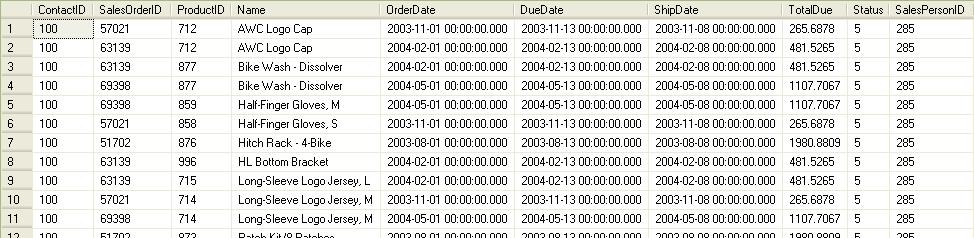
TVF & MVF output
More MSDN & MS BOL links:
http://msdn.microsoft.com/en-us/library/aa175085(SQL.80).aspx
http://msdn.microsoft.com/en-us/library/aa214363(SQL.80).aspx
http://msdn.microsoft.com/en-us/library/ms186755.aspx
http://msdn.microsoft.com/en-us/library/ms191007.aspx
http://msdn.microsoft.com/en-us/magazine/cc164062.aspx



Current Visitors

StatCounter …since April 2012


 Leisure blog: Creek & Trails
- NMDC Hyderabad Marathon – My first 42k FM, cramps, training and fuelling
- Singapore (Part 2) – 6 days itinerary, sightseeing & attractions
- Singapore (Part 1) – Tickets, Visa, Hotel, Forex Card/Cash, Metro/Bus cards
- I got full refund of my flight tickets during COVID lockdown (AirIndia via MakeMyTrip)
- YouTube – Your Google Ads account was cancelled due to no spend
- YouTube latest update on its YPP (YouTube Partner Program) which may affect your channel
- Starting your own blog !!!
- How to file ITR (Income Tax Return) online AY 2017-18 (for simple salaried)
- Scam – Become a kin/hier and earn a fortune – via LinkedIn and Email
- Places to visit in and around Vizag (aka Visakhapatnam)
 SQL with Manoj