Archive
Index Usage Stats – Indexes Used, Unused and Updated
While working on Performance Optimization and Index tuning many Developers ends up in creating some (or even many) unnecessary Indexes based upon various SQL Queries. Some or many of those Indexes might not be used at all by the SQL Query Optimizer. But even if they are used you may have to Trade-off with your ETL performance going down, as the CRUD (CREATE, READ, UPDATE, DELETE) operations are going to taking more time to update those new Indexes.
So, while creating new Indexes you will have to plan very carefully, decide and balance out things so that your Data retrieval is fast and on the same hand your ETLs are also not affected much.
SQL Server provides some DMVs (Dynamic Management Views) and DMFs (Dynamic Management Functions) to get this information from SQL engine.
–> To know how the Indexes are getting used we can use sys.dm_db_index_usage_stats DMV and this will provide us information on how many times the Index was used for SEEK, SCAN & LOOKUP operations. Check the Query and its output below:
SELECT
	DB_NAME(database_id) AS DATABASE_NAME,
	OBJECT_NAME(ius.object_id) AS TABLE_NAME,
	ids.name AS INDEX_NAME,
	ius.user_seeks AS SEEK_COUNT,
	ius.user_scans AS SCAN_COUNT,
	ius.user_lookups AS LOOKUP_COUNT,
	ius.user_seeks + ius.user_scans + ius.user_lookups AS TOTAL_USAGE,
	ius.last_user_seek AS LAST_SEEK_COUNT,
	ius.last_user_scan AS LAST_SCAN_COUNT,
	ius.last_user_lookup AS LAST_LOOKUP_COUNT
FROM sys.dm_db_index_usage_stats AS ius
INNER JOIN sys.indexes AS ids
ON ids.object_id = ius.object_id
AND ids.index_id = ius.index_id
WHERE OBJECTPROPERTY(ius.object_id,'IsUserTable') = 1
ORDER BY DATABASE_NAME, TOTAL_USAGE

–> Now if we want to know the maintenance overhead on the new Indexes we created, like every time a related Table is updated the Indexes are also updated. We can check by using sys.dm_db_index_operational_stats DMF and it will show how many INSERT, UPDATE & DELETE operations are happening on particular indexes. Check the Query and its output below:
SELECT
	DB_NAME(database_id) AS DATABASE_NAME,
	OBJECT_NAME(ios.object_id) AS TABLE_NAME,
	idx.name AS INDEX_NAME,
	ios.leaf_insert_count AS INSERT_COUNT,
	ios.leaf_update_count AS UPDATE_COUNT,
	ios.leaf_delete_count AS DELETE_COUNT,
	ios.leaf_insert_count + ios.leaf_update_count + ios.leaf_delete_count AS TOTAL_COUNT
FROM sys.dm_db_index_operational_stats (NULL,NULL,NULL,NULL ) ios
INNER JOIN sys.indexes AS idx
ON idx.object_id = ios.object_id
AND idx.index_id = ios.index_id
WHERE  OBJECTPROPERTY(ios.object_id,'IsUserTable') = 1
ORDER BY DATABASE_NAME, TOTAL_COUNT

–> So, by using these two Dynamic Management Views/Functions you can know:
1. What is the affect (maintenance overhead) of Indexes you created, and
2. Are the Indexes really used or not so that you can DROP them.
Please Note: that these stats could be wrong at times because of several reasons, like:
1. If SQL Server (MSSQLSERVER) service is re-started these counters are initialized to 0.
2. When a Database is detached or is shut down (for example, because AUTO_CLOSE is set to ON), all rows associated with the database are removed.
3. Index Rebuild resets these counters to 0 (Bug logged in MS Connect, link).
SQLNCLI11 for linked server “XYZ” returned message “Requested conversion is not supported” | SQL Server 2012 upgrade behavior changes
This was a year long pending post that got lost in my blog posts archives. Today while filtering the Posts on my Dashboard I saw this in Edit mode. So I thought to make it live after doing some edits. So, here it goes 🙂
While upgrading to SQL Server 2012 from SQL Server 2008 R2 on my DEV box, I observed some behavioral changes with SQL 2012, one ETL job that was working fine on SQL 2008 R2 was not running and throwing following error in SQL 2012:
OLE DB provider “SQLNCLI11” for linked server “MyLocal” returned message “Requested conversion is not supported.”.
Msg 7341, Level 16, State 2, Line 1
Cannot get the current row value of column “(user generated expression).Expr1003” from OLE DB provider “SQLNCLI11” for linked server “MyLocal”.
The above error depicts that there is something wrong with the Linked Server. But the same Linked Server was working for other tables, and it was failing for a specific table only. I checked the table and the ETL script where the Linked Server was being used. That script had a SELECT list fetching records from source table via Linked Server. The column list was having a computed column in the end like: CAST(NULL as UNIQUEIDENTIFIER) AS U_ID. I was not sure why anybody would write that code and what was the need to add this computed column. I removed this column and the error was gone. So it was clear that the CASTing of NULL to UNIQUEIDENTIFIER datatype was throwing this error, but the same code was working fine in SQL Server 2008 R2.
(Please check at the bottom of the post for more such behavioral changes)
–> Here is the issue that I’ve reproduced:
This will run fine in previous versions of SQL Server, but will throw error in 2012:
–> CREATE Linked Server
USE [master]
GO

EXEC master.dbo.sp_addlinkedserver
	@server = N'MyLocal',
	@srvproduct=N'MSSQL',
	@provider=N'SQLNCLI',
	@datasrc=N'MANOJPANDEY-PC', -- plz change the server name here.
	@provstr=N'PROVIDER=SQLOLEDB;SERVER=MY-PC' -- plz change the server name here.

EXEC master.dbo.sp_addlinkedsrvlogin @rmtsrvname=N'MyLocal',@useself=N'True',
	@locallogin=NULL,@rmtuser=NULL,@rmtpassword=NULL
GO
–> Create a new table:
USE [AdventureWorks2012]
GO

SELECT
	BusinessEntityID, Title, FirstName, MiddleName, LastName,
	Suffix, EmailPromotion, ModifiedDate
INTO dbo.Person
FROM [AdventureWorks2012].[Person].[Person]
–> Query table via Linked Server:
SELECT
	BusinessEntityID, Title, FirstName, MiddleName, LastName,
	Suffix, EmailPromotion, ModifiedDate
FROM [MyLocal].[AdventureWorks2012].dbo.[Person]
–> Query it after adding a column via Linked Server:
SELECT
	BusinessEntityID, Title, FirstName, MiddleName, LastName,
	Suffix, EmailPromotion, ModifiedDate
	,CAST(NULL as UNIQUEIDENTIFIER) AS U_ID
FROM [MyLocal].[AdventureWorks2012].[dbo].[Person]
OLE DB provider "SQLNCLI11" for linked server "MyLocal" returned message "Requested
conversion is not supported.".
Msg 7341, Level 16, State 2, Line 1
Cannot get the current row value of column "(user generated expression).Expr1003"
from OLE DB provider "SQLNCLI11" for linked server "MyLocal".
–> Creating a View in Remote Server:
CREATE VIEW [dbo].[vwPerson]
AS
SELECT
	BusinessEntityID, Title, FirstName, MiddleName, LastName,
	Suffix, EmailPromotion, ModifiedDate
	,CAST(NULL as UNIQUEIDENTIFIER) AS U_ID
FROM [MyLocal].[AdventureWorks2012].[dbo].[Person]
–> View also fails, as it is also expanded (same error as above):
SELECT
	BusinessEntityID, Title, FirstName, MiddleName, LastName,
	Suffix, EmailPromotion, ModifiedDate, U_ID
FROM [MyLocal].[AdventureWorks2012].[dbo].[vwPerson]
–> Workaround 1:
SELECT
	BusinessEntityID, Title, FirstName, MiddleName, LastName,
	Suffix, EmailPromotion, ModifiedDate
	,CAST(CAST(0 AS BINARY) AS UNIQUEIDENTIFIER) AS U_ID
FROM [MyLocal].[AdventureWorks2012].[dbo].[Person]
–> Workaround 2:
SELECT
	BusinessEntityID, Title, FirstName, MiddleName, LastName,
	Suffix, EmailPromotion, ModifiedDate
	,CAST(0x AS UNIQUEIDENTIFIER) AS U_ID
FROM [MyLocal].[AdventureWorks2012].[dbo].[Person]
–> Final Cleanup:
DROP TABLE dbo.Person
DROP VIEW dbo.vwPerson
GO

USE [master]
GO

EXEC master.dbo.sp_dropserver @server=N'MyLocal', @droplogins='droplogins'
GO
–> I’ve documented more behavioral changes after SQL Server 2012 upgrade, and here is the list:
2. Temp #Tables created with negative IDs
3. No native Linked Server support to SQL Server 2000
GROUPING SETS equivalent | for SQL Server 2005 and below
Sometime back I discussed about [GROUPING SETS] in my previous post and today one reader of this blog asked me how we can create the same result-set without using GROUPING SETS if we are on previous versions like SQL Server 2005 or 2000.
–> Let’s take the following SQL Query that uses GROUPING SETS operator and let’s see what Output we get:
-- GROUPING SETS
SELECT class, section, rollno, sum(marks) [sum]
FROM #tempTable
GROUP BY GROUPING SETS (
	 (class, section, rollno)
	,(class, section)
	,(class)
	,()
)
Output:
class		section	rollno	sum
HighSchool	a	1	80
HighSchool	a	2	70
HighSchool	a	3	80
HighSchool	a	NULL	230
HighSchool	b	4	90
HighSchool	b	5	90
HighSchool	b	6	50
HighSchool	b	NULL	230
HighSchool	NULL	NULL	460
Intermediate	a	1	60
Intermediate	a	2	50
Intermediate	a	3	80
Intermediate	a	NULL	190
Intermediate	b	4	90
Intermediate	b	5	50
Intermediate	b	6	70
Intermediate	b	NULL	210
Intermediate	NULL	NULL	400
NULL		NULL	NULL	860
You can refer to the DDL and population of this #tempTable in my previous post, [link].
–> And now let’s see how can we recreate the same result set without using GROUPING SETS if we are on lower versions of SQL Server (<= 2005):
-- ROLLUP and Grouping Sets Equivalent (pre SQL 2008)
SELECT class, section, rollno, marks as [sum]
FROM #tempTable

UNION ALL

SELECT class, section, null as rollnu, sum(marks) [sum]
FROM #tempTable
GROUP BY class, section

UNION ALL

SELECT class, null, null, sum(marks) [sum]
FROM #tempTable
GROUP BY class

UNION ALL

SELECT null, null, null, sum(marks) [sum]
FROM #tempTable

ORDER BY class DESC, section DESC, rollno DESC
Thanks, please let me know your thoughts and comments!!!
SQL Basics – What are Row Constructors?
Constructors, as the name suggests means to create an instance of an Object in any Object Oriented Programming language.
Here in SQL Server or T-SQL, ROW Constructor or Table Value Constructor means to create a row set by using the VALUES() clause. This allows multiple rows of data to be specified in a single DML statement. And this VALUES() clause can be used with the SELECT, INSERT and MERGE statements.
In the examples below we will see how they can be used and are helpful at times:
Usage #1. You can create a simple set of rows with a SELECT FROM statement:
SELECT *
FROM (
VALUES
	(1, 'cust 1', '(111) 111-1111', 'address 1'),
	(2, 'cust 2', '(222) 222-2222', 'address 2'),
	(3, 'cust 3', '(333) 333-3333', 'address 3'),
	(4, 'cust 4', '(444) 444-4444', 'address 4'),
	(5, 'cust 5', '(555) 555-5555', 'address 5')
) AS C (CustID, CustName, phone, addr);
Usage #2. You can use it with INSERT statement while inserting rows in a table:
CREATE TABLE dbo.Customer (
	CustID		INT,
	CustName VARCHAR(100),
	phone		VARCHAR(20),
	addr		VARCHAR(500)
)

INSERT INTO dbo.Customer (CustID, CustName, phone, addr)
VALUES
(1, 'cust 1', '(111) 111-1111', 'address 1'),
(2, 'cust 2', '(222) 222-2222', 'address 2'),
(3, 'cust 3', '(333) 333-3333', 'address 3'),
(4, 'cust 4', '(444) 444-4444', 'address 4'),
(5, 'cust 5', '(555) 555-5555', 'address 5');
Usage #3. You can create mixed row-sets from manually entered values and from other tables:
SELECT *
FROM (
VALUES
	(1, 'cust 1', '(111) 111-1111', 'address 1'),
	(2, 'cust 2', '(222) 222-2222', 'address 2'),
	(3, 'cust 3', '(333) 333-3333', 'address 3'),
	(4, 'cust 4', '(444) 444-4444', 'address 4'),
	((SELECT CustID FROM dbo.Customer WHERE CustID IN (5)),
	 (SELECT CustName FROM dbo.Customer WHERE CustID IN (5)),
	 (SELECT phone FROM dbo.Customer WHERE CustID IN (5)),
	 (SELECT addr FROM dbo.Customer WHERE CustID IN (5))
	)
) AS C (CustID, CustName, phone, addr);
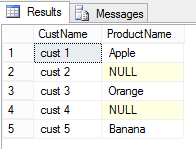
Usage #4. You can use them with JOINS, without need to create #Temp-Table or Table-Variable to store temporary data:
SELECT
	C.CustName,
	O.ProductName
FROM dbo.Customer C
LEFT JOIN (
VALUES
	(101, 1, 'Apple'),
	(102, 3, 'Orange'),
	(103, 5, 'Banana')
) AS O (OrderID ,CustID, ProductName)
ON O.CustID = C.CustID
Usage #5. You can use them with MERGE statement, again without need to create #Temp-Table or Table-Variable to store temporary data:
MERGE INTO dbo.Customer as Target
USING (
VALUES
	(5, 'cust 5', '(555) 555-5555', 'address 5 updated'),
	(6, 'cust 6', '(666) 666-6666', 'address 6')
) AS Source (CustID, CustName, phone, addr)
ON Target.CustID = Source.CustID
WHEN MATCHED THEN UPDATE SET
	Target.CustName = Source.CustName,
	Target.phone = Source.phone,
	Target.addr = Source.addr
WHEN NOT MATCHED BY Target THEN
INSERT (
	CustID,
	CustName,
	phone,
	addr
)
VALUES (
	Source.CustID,
	Source.CustName,
	Source.phone,
	Source.addr
);

select * from  dbo.Customer;

Thus, Row Constructors or Table Value Constructors are very handy when dealing with fixed set of row sets used for temporary purpose, without need of creating and storing them in #Temp-Tables or Table-Variables.
–> Final Cleanup
DROP TABLE dbo.Customer
Capture multiple errors in TRY CATCH by using THROW statement
This post relates to my earlier post [link] where I mentioned on benefit of using THROW clause with same SQL examples.
The THROW clause was introduced in SQL Server 2012 and may be replacing the RAISERROR function in near future.
Normally the SQL statements returns single error, but some SQL statements returns more than one error message when they go wrong due to some reason or exception.
–> On executing the below BACKUP statement in SSMS we can see we get two errors:
BACKUP DATABASE [AdventureWorks2012]
TO DISK='E:\FOLDER_NOT_EXISTS\test.bak'
The above code throws 2 errors with Error-Message IDs 3201 & 3013, as shown below:
error messages:
Msg 3201, Level 16, State 1, Line 2
Cannot open backup device ‘E:\FOLDER_NOT_EXISTS\test.bak’. Operating system error 3(The system cannot find the path specified.).
Msg 3013, Level 16, State 1, Line 2
BACKUP DATABASE is terminating abnormally.
-> But when we want to track these errors by using RAISERROR function it just returns the last (single) error message and its details, and the previous error message details are not returned by this function.
BEGIN TRY
	BACKUP DATABASE [AdventureWorks2012]
	TO DISK='E:\FOLDER_NOT_EXISTS\test.bak'
END TRY
BEGIN CATCH
	DECLARE @msg VARCHAR(1000) = ERROR_MESSAGE()
	RAISERROR(@msg,16,0)
END CATCH
Here, only 1 error message will be returned:
error messages:
Msg 50000, Level 16, State 0, Line 7
BACKUP DATABASE is terminating abnormally.
–> With the new THROW clause you won’t see any issue of omitting the previous errors, as it returns all error details thrown by the SQL Statement itself.
BEGIN TRY
	BACKUP DATABASE [AdventureWorks2012]
	TO DISK='E:\FOLDER_NOT_EXISTS\test.bak'
END TRY
BEGIN CATCH
	THROW;
END CATCH
The above statement throws both the error details as we saw in the first example:
error messages:
Msg 3201, Level 16, State 1, Line 2
Cannot open backup device ‘E:\FOLDER_NOT_EXISTS\test.bak’. Operating system error 3(The system cannot find the path specified.).
Msg 3013, Level 16, State 1, Line 2
BACKUP DATABASE is terminating abnormally.
Thus, if you are on SQL Server 2012 and above you must consider using THROW clause instead of the RAISERROR function.



Current Visitors

StatCounter …since April 2012


 Leisure blog: Creek & Trails
- NMDC Hyderabad Marathon – My first 42k FM, cramps, training and fuelling
- Singapore (Part 2) – 6 days itinerary, sightseeing & attractions
- Singapore (Part 1) – Tickets, Visa, Hotel, Forex Card/Cash, Metro/Bus cards
- I got full refund of my flight tickets during COVID lockdown (AirIndia via MakeMyTrip)
- YouTube – Your Google Ads account was cancelled due to no spend
- YouTube latest update on its YPP (YouTube Partner Program) which may affect your channel
- Starting your own blog !!!
- How to file ITR (Income Tax Return) online AY 2017-18 (for simple salaried)
- Scam – Become a kin/hier and earn a fortune – via LinkedIn and Email
- Places to visit in and around Vizag (aka Visakhapatnam)
 SQL with Manoj