Archive
XTP (eXtreme Transaction Processing) with Hekaton Tables & Native Compiled Stored Procedures – SQL Server 2014
In my previous posts [this & this] I talked about creating Memory Optimized Database, how to create In-Memory Tables & Native Compiled Stored Procedures and what happens when they are created.
Here in this post we will see how FAST actually In-Memory tables & Native Compiled Stored Procedures are, when compared with normal Disk based Tables & Simple Stored Procedures.
I’ll be using the same [ManTest] database used in my previous posts, you can refer to the DDL script [here].
–> We will create:
1. One Disk based Table & one simple Stored Procedure which will use this Disk based Table.
2. One In-Memory Table & one Native Compiled Stored Procedure which will use this In-Memory Table.
1. Let’s first create a Disk based Table and a normal Stored Procedure:
USE [ManTest]
GO

-- Create a Disk table (non-Memory Optimized):
CREATE TABLE dbo.DiskTable
(
    ID INT NOT NULL
        PRIMARY KEY,
    VarString VARCHAR(200) NOT NULL,
    DateAdded DATETIME NOT NULL
)
GO

-- Create normal Stored Procedure to load data into above Table:
CREATE PROCEDURE dbo.spLoadDiskTable @maxRows INT, @VarString VARCHAR(200)
AS
BEGIN
	SET NOCOUNT ON

	DECLARE @i INT = 1

	WHILE @i <= @maxRows
	BEGIN
		INSERT INTO dbo.DiskTable VALUES(@i, @VarString, GETDATE())
		SET @i = @i+1
	END
END
GO
2. Now create an In-Memory table & a Native Compiled Stored Procedure to load data:
-- Create an In-Memory table:
CREATE TABLE dbo.MemOptTable
(
    ID INT NOT NULL
        PRIMARY KEY NONCLUSTERED HASH WITH (BUCKET_COUNT = 10000),
    VarString VARCHAR(200) NOT NULL,
    DateAdded DATETIME NOT NULL
) WITH (
	MEMORY_OPTIMIZED = ON,
	DURABILITY = SCHEMA_AND_DATA
)
GO

-- Create Native Compiled Stored Procedure to load data into above Table:
CREATE PROCEDURE dbo.spLoadMemOptTable @maxRows INT, @VarString VARCHAR(200)
WITH
	NATIVE_COMPILATION,
	SCHEMABINDING,
	EXECUTE AS OWNER
AS
BEGIN ATOMIC
WITH (TRANSACTION ISOLATION LEVEL=SNAPSHOT, LANGUAGE='us_english')

	DECLARE @i INT = 1

	WHILE @i <= @maxRows
	BEGIN
		INSERT INTO dbo.MemOptTable VALUES(@i, @VarString, GETDATE())
		SET @i = @i+1
	END
END
GO
–> Now we will try to Load 10k record in above 2 table in various ways, as follows:
1. Load Disk based Table by T-SQL script using a WHILE loop.
2. Load the same Disk based Table by Stored Procedure which internally uses a WHILE loop.
3. Load In-Memory Table by T-SQL script using a WHILE loop.
4. Load the same In-Memory Table by Native Compiled Stored Procedure which internally uses a WHILE loop.
–> Working with Disk based Tables:
SET NOCOUNT ON

DECLARE
	@StartTime DATETIME2,
	@TotalTime INT

DECLARE
	@i INT,
	@maxRows INT,
	@VarString VARCHAR(200)

SET @maxRows = 10000
SET @VarString = REPLICATE('a',200)

SET @StartTime = SYSDATETIME()
SET @i = 1

-- 1. Load Disk Table (without SP):
WHILE @i <= @maxRows
BEGIN
	INSERT INTO dbo.DiskTable VALUES(@i, @VarString, GETDATE())
	SET @i = @i+1
END

SET @TotalTime = DATEDIFF(ms,@StartTime,SYSDATETIME())

SELECT 'Disk Table Load: ' + CAST(@TotalTime AS VARCHAR) + ' ms (without SP)'

-- 2. Load Disk Table (with simple SP):
DELETE FROM dbo.DiskTable

SET @StartTime = SYSDATETIME()

EXEC spLoadDiskTable @maxRows, @VarString

SET @TotalTime = DATEDIFF(ms,@StartTime,SYSDATETIME())

SELECT 'Disk Table Load: ' + CAST(@TotalTime AS VARCHAR) + ' ms (with simple SP)'
–> Working with In-Memory Tables:
-- 3. Load Memory Optimized Table (without SP):
SET @StartTime = SYSDATETIME()
SET @i = 1

WHILE @i <= @maxRows
BEGIN
	INSERT INTO dbo.MemOptTable VALUES(@i, @VarString, GETDATE())
	SET @i = @i+1
END

SET @TotalTime = DATEDIFF(ms,@StartTime,SYSDATETIME())

SELECT 'Memory Table Load: ' + CAST(@TotalTime AS VARCHAR) + ' ms (without SP)'

-- 4. Load Memory Optimized Table (with Native Compiled SP):
DELETE FROM dbo.MemOptTable

SET @StartTime = SYSDATETIME()

EXEC spLoadMemOptTable @maxRows, @VarString

SET @TotalTime = DATEDIFF(ms,@StartTime,SYSDATETIME())

SELECT 'Disk Table Load: ' + CAST(@TotalTime AS VARCHAR) + ' ms (with Native Compiled SP)'
GO
–> Output (Loaded 10k records):
Disk based Table Load	 : 28382 ms (without SP)
Disk based Table SP Load : 8297 ms  (with simple SP)
In-Memory Table Load     : 5176 ms  (without SP)
In-Memory Table SP Load  : 174 ms   (with Native Compiled SP)
So, you can clearly see the benefit and multifold increase in performance by using In-Memory Tables & Native Compiled Stored Procedures. The graph below shows performance in visual bar charts, impressive, isn’t it?

–> Final Cleanup
DROP PROCEDURE dbo.spLoadDiskTable
DROP TABLE dbo.DiskTable
DROP PROCEDURE dbo.spLoadMemOptTable
DROP TABLE dbo.MemOptTable
GO
Update: Know more about In-Memory tables:
SQL Tips – Search and list out SQL Jobs containing specific word, text or SQL Query
Today while working on one database migration project I wanted to check a particular Stored Procedure is called by what all SQL Jobs.
So, I created following queries to pass the SP name in the where clause and get respective SQL Job name.
The 1st query just gives the SQL Job name, and the 2nd query gives the SQL Job name with Job Step name, SQL Command used in that step, and target Database.
use msdb
go

-- #1. List out all SQL Jobs:

select distinct j.name
from msdb.dbo.sysjobs j
join msdb.dbo.sysjobsteps js on js.job_id = j.job_id
where js.command like '%spStartSystem%'
order by j.name


-- #2. List out all SQL Jobs with SQL command, Step name and target Database:

select
	j.name,
	js.step_name,
	js.command,
	js.database_name
from msdb.dbo.sysjobs j
join msdb.dbo.sysjobsteps js on js.job_id = j.job_id
where js.command like '%spStartSystem%'
order by j.name
Difference between NOLOCK and READPAST table hints
AS per MS BOL:
– NOLOCK: Specifies that dirty reads are allowed. No shared locks are issued to prevent other transactions from modifying data read by the current transaction, and exclusive locks set by other transactions do not block the current transaction from reading the locked data. NOLOCK is equivalent to READUNCOMMITTED.
– READPAST: Specifies that the Database Engine not read rows that are locked by other transactions. When READPAST is specified, row-level locks are skipped.
Thus, while using NOLOCK you get all rows back but there are chances to read Uncommitted (Dirty) data. And while using READPAST you get only Committed Data so there are chances you won’t get those records that are currently being processed and not committed.
Let’s do a simple test:
–> Open a Query Editor in SSMS and copy following code:
-- Creating a sample table with 100 records:
SELECT TOP 100 *
INTO dbo.Person
FROM [Person].[Person]

-- Initiate Transaction to verify the behavior of these hints:
BEGIN TRANSACTION

UPDATE dbo.Person
SET MiddleName = NULL
WHERE BusinessEntityID >= 10
AND BusinessEntityID < 20
–> Now open a second Query Editor in SSSM and copy following code:
-- NOLOCK: returns all 100 records
SELECT *
FROM dbo.Person (nolock)
-- this includes 10 records that are under update and not committed yet.

-- READPAST: returns only 90 records
SELECT *
FROM dbo.Person (readpast)
-- because other 10 are under update and are no committed yet in the 1st Query Editor:
–> Now go back to the 1st Query Editor window and run following query to Rollback the Transaction:
-- Issue a Rollback to rollback the Transaction:
ROLLBACK

-- Drop the Sample table:
DROP TABLE dbo.Person
Note:
– Using READPAST avoids locking contention when implementing a work queue that uses a SQL Server table.
– Using NOLOCK may lead to read uncommitted (dirty) data and/or may read a row more than once due to page-splitting.
Both of them avoids locking, but on the cost of incorrect/dirty data. So one should carefully use them depending on their business scenario.
Use new TRY_PARSE() instead of ISNUMERIC() | SQL Server 2012
I was working on a legacy T-SQL script written initially on SQL Server 2005 and I was facing an unexpected behavior. The code was giving me unexpected records, I tried to dig into it and found that ISNUMERIC() function applied to a column was giving me extra records with value like “,” (comma) & “.” (period).
–> So, to validate it I executed following code and found that ISNUMERIC() function also passes these characters as numbers:
SELECT
	 ISNUMERIC('123') as '123'
	,ISNUMERIC('.') as '.' --Period
	,ISNUMERIC(',') as ',' --Comma
Function ISNUMERIC() returns “1” when the input expression evaluates to a valid numeric data type; otherwise it returns “0”. But the above query will return value “1” for all 3 column values, validating them as numeric values, but that’s not correct for last 2 columns.
–> And not only this, ISNUMERIC() function treats few more characters as numeric, like: – (minus), + (plus), $ (dollar), \ (back slash), check this:
SELECT
	 ISNUMERIC('123') as '123'
	,ISNUMERIC('abc') as 'abc'
	,ISNUMERIC('-') as '-'
	,ISNUMERIC('+') as '+'
	,ISNUMERIC('$') as '$'
	,ISNUMERIC('.') as '.'
	,ISNUMERIC(',') as ','
	,ISNUMERIC('\') as '\'
This will return “0” for second column containing value “abc”, and value “1” for rest of the column values.
So, you will need to be very careful while using ISNUMERIC() function and have to consider all these possible validations on your T-SQL logic.
– OR –
Switch to new TRY_PARSE() function introduced in SQL Server 2012.
–> The TRY_PARSE() function returns the result of an expression, translated to the requested Data-Type, or NULL if the Cast fails. Let’s check how TRY_PARSE() validates above character values as numeric:
SELECT
	 TRY_PARSE('123' as int) as '123'
	,TRY_PARSE('abc' as int) as 'abc'
	,TRY_PARSE('-' as int) as '-'
	,TRY_PARSE('+' as int) as '+'
	,TRY_PARSE('$' as int) as '$'
	,TRY_PARSE('.' as int) as '.'
	,TRY_PARSE(',' as int) as ','
	,TRY_PARSE('\' as int) as '\'
So, the above query gives me expected results by validating first column value as numeric and rest as invalid and returns NULL for those.
–> TRY_PARSE() can be used with other NUMERIC & DATETIME data-types for validation, like:
SELECT
	 TRY_PARSE('123' as int) as '123'
	,TRY_PARSE('123.0' as float) as '123.0'
	,TRY_PARSE('123.1' as decimal(4,1)) as '123.1'
	,TRY_PARSE('$123.55' as money) as '$123.55'
	,TRY_PARSE('2013/09/20' as datetime) as '2013/09/20'
… will give expected results 🙂
Clustered Index will not always guarantee Sorted Rows
In my previous post I discussed about the how Clustered Index’s Data-Pages and Rows are allocated in memory (Disk). I tried to prove that that Clustered Indexes do not guarantee Physical Ordering of Rows. But instead they are Logically Ordered and Sorted.
As they are Logically Sorted and when you query a table without an “ORDER BY” clause you get Sorted Rows, but this is not what will happen always. You can also get rows in Unsorted Order, so to get Sorted rows always apply an “ORDER BY” clause. Here in this post we will see under what circumstances a table will not return Sorted rows:
–> Let’s create a simple table with a Clustered Index on it and add some records:
-- Create  table with 2 columns, first beign a PK and an IDENTITY column:
CREATE TABLE test2
(
	i INT IDENTITY(1,1) PRIMARY KEY NOT NULL,
	j INT
)

-- Let's insert some records in random order on second column:
INSERT INTO test2 (j)
SELECT 500 UNION ALL
SELECT 300 UNION ALL
SELECT 900 UNION ALL
SELECT 100 UNION ALL
SELECT 600 UNION ALL
SELECT 200

-- Now we will query the table without using ORDER BY clause:
SELECT * FROM test2
–> Output:

You get sorted rows, as the Execution plan shows that Clustered Index was used to fetch the records.
–> Now, what if this table also has a Non Clustered Index, let’s see:
-- We will create a Non Clustered Index on the same table on second column:
CREATE INDEX NCI_test ON test2 (j)

-- Again query the table without using ORDER BY clause:
SELECT * FROM test2
–> Following is the Output of the second SELECT query above:
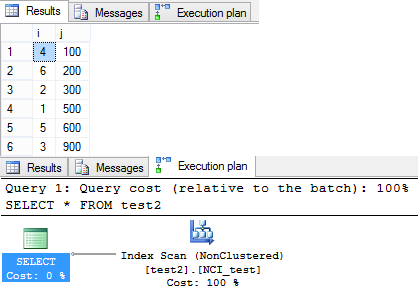
This time the query returned rows in un-ordered fashion. As you can see in the Execution plan Query optimizer preferred to do a Non Clustered Scan. Thus the records were returned in un-ordered fashion.
–> Now, If you add an ORDER BY Clause to your SELECT Query how does it return rows:
-- Added an ORDER BY Clause:
SELECT * FROM test2 ORDER BY i
–> Following is the Output of the third SELECT query above:

After adding an “ORDER BY” clause the query optimizer preferd to use the Clustered Index and returns rows in Ordered fashion again.
-- Final Cleanup
DROP TABLE test2
So, it is necessary to provide an “ORDER BY” clause to your Queries when you expect to get sorted results, even if the table has Clustered Index on it.



Current Visitors

StatCounter …since April 2012


 Leisure blog: Creek & Trails
- NMDC Hyderabad Marathon – My first 42k FM, cramps, training and fuelling
- Singapore (Part 2) – 6 days itinerary, sightseeing & attractions
- Singapore (Part 1) – Tickets, Visa, Hotel, Forex Card/Cash, Metro/Bus cards
- I got full refund of my flight tickets during COVID lockdown (AirIndia via MakeMyTrip)
- YouTube – Your Google Ads account was cancelled due to no spend
- YouTube latest update on its YPP (YouTube Partner Program) which may affect your channel
- Starting your own blog !!!
- How to file ITR (Income Tax Return) online AY 2017-18 (for simple salaried)
- Scam – Become a kin/hier and earn a fortune – via LinkedIn and Email
- Places to visit in and around Vizag (aka Visakhapatnam)
 SQL with Manoj