Archive
XACT_ABORT with TRANSACTIONS in SQL Server
SQL Server by default does not ROLLBACK a Transaction if there is error anywhere in the code inside a BEGIN TRANSACTION & COMMIT TRANSACTION block. It only skips the statement that causes the error and moves ahead.
To allow a transaction to complete entirely or fail entirely you can use the TRY-CATCH feature with ROLLBACK statement or the SET XACT_ABORT statement.
By default the SET XACT_ABORT is OFF. There ar very few cases where the T-SQL statement that raised exception are rolled back and the transaction continues processing. Depending upon the severity of the error, the entire transaction may be rolled back even when SET XACT_ABORT is OFF.
But When SET XACT_ABORT is ON, if a T-SQL statement raises an exception, then the entire transaction is terminated and rolled back.
–> Here let’s check how we can use XACT_ABORT with an example:
-- Create a test tabel and insert some records:
CREATE TABLE Tab (x INT NOT NULL PRIMARY KEY)

INSERT INTO Tab VALUES (1)
INSERT INTO Tab VALUES (2)
INSERT INTO Tab VALUES (3)
GO

-- =================================
-- Check with XACT_ABORT OFF option:
-- =================================
SET XACT_ABORT OFF; -- By default it is OFF

BEGIN TRANSACTION
	INSERT INTO Tab VALUES (4)
	INSERT INTO Tab VALUES (4) -- Statement fails but transaction is committed.
	INSERT INTO Tab VALUES (5)
COMMIT TRANSACTION
GO
/*
-- On message pane:

(1 row(s) affected)

Msg 2627, Level 14, State 1, Line 5
Violation of PRIMARY KEY constraint 'PK__Tab__3BD019E56991A7CB'. Cannot insert duplicate key in object 'dbo.Tab'. The duplicate key value is (4).
The statement has been terminated.

(1 row(s) affected)
*/

SELECT * FROM Tab
-- List records: 1,2,3,4,5
GO

-- ================================
-- Check with XACT_ABORT ON option:
-- ================================
SET XACT_ABORT ON

BEGIN TRANSACTION
	INSERT INTO Tab VALUES (6) -- Inserts 6, but the transaction is rollbacked in next step.
	INSERT INTO Tab VALUES (6) -- Statement fails and rollbacks the entire transaction.
	INSERT INTO Tab VALUES (7) -- Statement skipped as transaction is rollbacked at previous statement.
COMMIT TRANSACTION

SET XACT_ABORT OFF
GO
/*
-- On message pane:

(1 row(s) affected)

Msg 2627, Level 14, State 1, Line 5
Violation of PRIMARY KEY constraint 'PK__Tab__3BD019E56991A7CB'. Cannot insert duplicate key in object 'dbo.Tab'. The duplicate key value is (6).
*/

SELECT * FROM Tab
-- Still list records: 1,2,3,4,5
GO

-- Final cleanup
DROP TABLE Tab
GO
We can also use TRY-CATCH constructs that helps in handling transaction and can be used instead of XACT_ABORT statement. Check here how we can use them.
SQL Trivia – Identify & Delete Duplicate records from a table
I see a lot of questions/posts about dealing with duplicate records in many SQL Server forums. Many of these questions are asked in SQL Server Interviews and many developers starting their carrier in database programming find it challenging to deal with. Here we will see how we can deal with such records.
Duplicate data is one of the biggest pain points in our IT industry, which various projects have to deal with. Whatever state-of-art technology and best practices followed, the big ERP, CRM, SCM and other inventory based database management projects ends up in having duplicate & redundant data. Duplicate data keeps on increasing by manual entries and automated data loads. Various data leads getting pumped into system’s databases without proper deduping & data cleansing leads to redundant data and thus duplicated record-sets.
Data cleansing requires regular exercise of identifying duplicates, validating and removing them. To minimize these type of scenarios various checks and filters should also be applied before loading new leads into the system.
–> Lets check this by a simple exercise how we can identify & remove duplicate data from a table:
1. Insert some sample records from Person.Contact table of [AdventureWorks] database:
USE [AdventureWorks]
GO

SELECT TOP 10 ContactID, FirstName, LastName, EmailAddress, Phone
INTO DupContacts
FROM Person.Contact

SELECT * FROM DupContacts
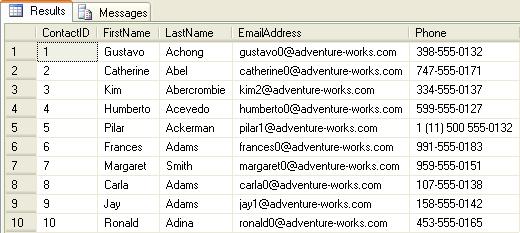
2. Insert some duplicate records from the same list inserted above:
INSERT INTO DupContacts
SELECT TOP 50 PERCENT FirstName, LastName, EmailAddress, Phone
from DupContacts

SELECT * FROM DupContacts
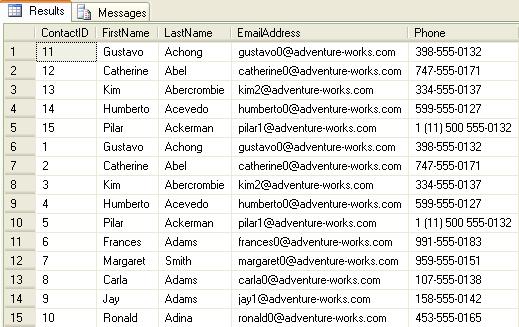
3. Insert some more duplicate records from the same list inserted above.
INSERT INTO DupContacts
SELECT TOP 20 PERCENT FirstName, LastName, EmailAddress, Phone
from DupContacts

SELECT * FROM DupContacts

–> Identify Duplicate records & delete them
Method #1: by using ROW_NUMBER() function:
;WITH dup as (
SELECT ContactID, FirstName, LastName, EmailAddress, Phone,
ROW_NUMBER() OVER(PARTITION BY FirstName, LastName ORDER BY ContactID) AS NumOfDups
FROM DupContacts)
SELECT * FROM dup
WHERE NumOfDups > 1
ORDER BY ContactID

-- Remove/Delete duplicate records:
;WITH dup as (
SELECT ContactID, FirstName, LastName, EmailAddress, Phone,
ROW_NUMBER() OVER(PARTITION BY FirstName, LastName ORDER BY ContactID) AS NumOfDups
FROM DupContacts)
DELETE FROM dup
WHERE NumOfDups > 1

SELECT * FROM DupContacts
Method #2: by using SELF-JOIN:
SELECT DISTINCT a.ContactID, a.FirstName, a.LastName, a.EmailAddress, a.Phone
FROM DupContacts a
JOIN DupContacts b
ON a.FirstName = b.FirstName
AND a.LastName = b.LastName
AND a.ContactID > b.ContactID

-- Remove/Delete duplicate records:
DELETE a
FROM DupContacts a
JOIN DupContacts b
ON a.FirstName = b.FirstName
AND a.LastName = b.LastName
AND a.ContactID > b.ContactID

SELECT * FROM DupContacts
Method #3: by using AGGREGATES & Sub-QUERY:
SELECT * FROM DupContacts
WHERE ContactID NOT IN (SELECT MIN(ContactID)
FROM DupContacts
GROUP BY FirstName, LastName)
-- Remove/Delete duplicate records:
DELETE FROM DupContacts
WHERE ContactID NOT IN (SELECT MIN(ContactID)
FROM DupContacts
GROUP BY FirstName, LastName)

SELECT * FROM DupContacts
–> Final Cleanup
DROP TABLE DupContacts
Check the same demo here:
UPDATE statement with new .WRITE Clause – SQL Server
As per MS BOL the new .WRITE clause of the UPDATE DML statement enables partial or full updates and high performance appends to varchar(max), nvarchar(max) and varbinary(max) data type columns.
The UPDATE statement is logged; however, partial updates to large value data types using the .WRITE clause are minimally logged.
Syntax: .WRITE ( expression, @Offset , @Length )
Usage: The string specified in the expression param is replaced by the number of characters specified in
@Length param starting from the position mentioned in @Offset param.
Let’s check this with an example mentioned below: The “Senior” character set is replaced by the 3 length character “Sr.” starting from the 18th character.
-- Create a table containing a VARCHAR(MAX), NVARCHAR(MAX) or VARBINARY(MAX) column:
CREATE TABLE CheckWrite (empID INT, eName VARCHAR(50), descr VARCHAR(MAX))

-- Insert test data in the table:
INSERT INTO CheckWrite
SELECT 101, 'Manoj Pandey', 'Manoj Pandey is a Sr. SQL Server developer and CRM analyst. He likes Photography & travelling.'

-- Check inserted record before UPDATE:
SELECT * FROM CheckWrite

-- Now UPDATE the descr column by using .WRITE clause:
UPDATE CheckWrite
SET descr .WRITE('Senior', 18, 3)
WHERE empID = 101

-- Check the updated result:
SELECT * FROM CheckWrite

-- Final cleanup
DROP TABLE CheckWrite
Output:–

Note: The .WRITE clause cannot be used to update a NULL column or set the value of column_name to NULL.
>> Check & Subscribe my [YouTube videos] on SQL Server.
BCP { IN | OUT | QUERYOUT } – the BCP util in SQL Server
As per MS BOL the BCP utility bulk copies data between an instance of SQL Server and a data file in a user-specified format. The BCP utility can be used to import large numbers of new rows into SQL Server tables or to export data out of tables into data files.
BCP or Bulk Copy Program is a command line utility that runs on DOS console. It is not a SQL statement, to run it from SQL SSMS you must use the xp_cmdshell Extended Stored Procedure as shown below.
Now let’s check with few examples how we can use the BCP Utility:
–> BCP OUT
-- Bulk Copy All Table records to a File
SELECT *
FROM Person.Address

exec master..xp_cmdshell 'BCP AdventureWorks.Person.Address OUT d:\PersonAddressAll.txt -T -c'
-- Processing status on Result Pane
NULL
Starting copy...
1000 rows successfully bulk-copied to host-file. Total received: 1000
1000 rows successfully bulk-copied to host-file. Total received: 2000
...
1000 rows successfully bulk-copied to host-file. Total received: 18000
1000 rows successfully bulk-copied to host-file. Total received: 19000
NULL
19614 rows copied.
Network packet size (bytes): 4096
Clock Time (ms.) Total : 250 Average : (78456.00 rows per sec.)
NULL
–> BCP QUERYOUT
-- Bulk Copy Selected (Top 20) records by using Query in BCP command from Table to a file
SELECT TOP 20 AddressID, AddressLine1, City, StateProvinceID, PostalCode, ModifiedDate
FROM Person.Address

exec master..xp_cmdshell 'BCP "SELECT TOP 20 AddressID, AddressLine1, City, StateProvinceID, PostalCode, ModifiedDate FROM AdventureWorks.Person.Address" QUERYOUT d:\PersonAddressByQuery.txt -T -c'
-- Processing status on Result Pane
NULL
Starting copy...
NULL
20 rows copied.
Network packet size (bytes): 4096
Clock Time (ms.) Total : 1 Average : (20000.00 rows per sec.)
NULL
–> BCP IN
-- Bulk Copy All File records to an existing Table
-- Create a similar table first
IF OBJECT_ID('AdventureWorks.Person.Address2') IS NOT NULL
DROP TABLE AdventureWorks.Person.Address2

SELECT *
INTO AdventureWorks.Person.Address2
FROM AdventureWorks.Person.Address
WHERE 1=2

exec master..xp_cmdshell 'BCP AdventureWorks.Person.Address2 IN d:\PersonAddressAll.txt -T -c'

-- Check newly inserted records
SELECT *
FROM AdventureWorks.Person.Address2 -- (19614 row(s) affected)
Options used in above queries:
-T : Trusted connection, here username & password are not required.
-c : Performs the operation using a character data type.
Note: In case of no Trusted connection, you must have to use the -U & -P options, like: “-U username -P password” instead of “-T”. If “-P password” is not applied the password is asked when the command is submitted, thus it is also a secure way of entering a masked password.
If you are not on default instance than there will be need to provide the Server instance name also by adding -S option, like: “-S ServerName”.
>> Check & Subscribe my [YouTube videos] on SQL Server.
SQL Trivia – Reverse a string without using T-SQL REVERSE() function
Everyone knows that the REVERSE() function (as its name suggests) reverses a string’s value, MSDN link.
This post’s title talks about going the other way, but why? If we already have this function then why to reinvent the wheel.
But at times an Interviewer may trick you and asks this question randomly: “How will you reverse a string without using REVERSE() function? No loop, should be a single query.” People who have actually worked on CTEs and know about recursive CTEs can guess the answer and create the query on-spot. Actually he wants to know if you have really worked on CTEs & recursive CTEs, or just learned the concept, or do not know about this at all.
Let’s check this by a simple example:
DECLARE @StringToReverse VARCHAR(55)
SET @StringToReverse = 'Reverse a string with out using REVERSE() function'

;WITH cte AS (
      SELECT @StringToReverse AS string, CAST('' AS VARCHAR(55)) AS revStr, LEN(@StringToReverse) AS ln
      UNION ALL
      SELECT SUBSTRING(string,0,ln) AS string, CAST(revStr + SUBSTRING(string,ln,1) AS VARCHAR(55)) AS revStr, ln-1 AS ln
      FROM cte
      WHERE ln >= 1)
SELECT @StringToReverse AS String, revStr
FROM cte
WHERE ln = 0
Output:-

Note: In the code above check line numbers 5 & 7 containing CAST function, “CAST(” AS VARCHAR(55)) AS revStr” & “CAST(revStr + SUBSTRING(string,ln,1) AS VARCHAR(55))”.
Applying CAST or CONVERT function is necessary here as datatype & size of both the columns in the anchor & recursive part should be same. Otherwise SQL server will throw the following error:
Msg 240, Level 16, State 1, Line 4
Types don’t match between the anchor and the recursive part in column “revStr” of recursive query “cte”.
>> Check & Subscribe my [YouTube videos] on SQL Server.



Current Visitors

StatCounter …since April 2012


 Leisure blog: Creek & Trails
- NMDC Hyderabad Marathon – My first 42k FM, cramps, training and fuelling
- Singapore (Part 2) – 6 days itinerary, sightseeing & attractions
- Singapore (Part 1) – Tickets, Visa, Hotel, Forex Card/Cash, Metro/Bus cards
- I got full refund of my flight tickets during COVID lockdown (AirIndia via MakeMyTrip)
- YouTube – Your Google Ads account was cancelled due to no spend
- YouTube latest update on its YPP (YouTube Partner Program) which may affect your channel
- Starting your own blog !!!
- How to file ITR (Income Tax Return) online AY 2017-18 (for simple salaried)
- Scam – Become a kin/hier and earn a fortune – via LinkedIn and Email
- Places to visit in and around Vizag (aka Visakhapatnam)
 SQL with Manoj