Microsoft Azure Data Platform – September (2017) update
Microsoft Azure updates curated from September-2017 on: Azure SQL DB/DW, HD Insight, Machine Learning (ML), Azure Data Lake (ADL), etc.

1. Run Hortonworks clusters and easily access Azure Data Lake
2. Microsoft at PostgresOpen 2017
3. Bot conversation history with Azure Cosmos DB
4. Azure Stream Analytics drives retail industry transformation with real-time insights
5. Try Azure CosmosDB for free
6. Using Azure Analysis Services with Azure Data Lake Store
7. Ask us anything about the new Azure Log Analytics language
8. Azure HDInsight training resources – Learn about big data using open source technologies
9. September updates to the Azure Analysis Services web designer
10. Azure Analysis Services now available in Azure Government
11. Diving deep into what’s new with Azure Machine Learning
12. Azure CosmosDB – database for serverless era
13. Announcing tools for the AI-driven digital transformation
14. Introducing SQL Vulnerability Assessment for Azure SQL Database and on-premises SQL Server!
15. Azure Data Factory – announcing new capabilities in public preview
16. Get insights into your Azure CosmosDB: partition heatmaps, OMS, and more
17. Run you Hive LLAP & PySpark Job in Visual Studio Code
18. Azure SQL Database and Data Warehouse VNET Service Endpoints public preview
19. General availability of HDInsight Interactive Query – blazing fast queries on hyper-scale data
20. Azure Log Analytics – meet our new query language
21. Paxata launches Self-Service Data Preparation on Azure HDInsight to accelerate Data Prep
22. Introducing HDInsight integration with Azure Log Analytics Preview
23. Azure Analysis Services adds firewall support
24. Monitoring Azure SQL Data Sync using OMS Log Analytics
SSMS Installation Error – This version of SSMS cannot be installed because a xyz version of SSMS 17.0 was detected
So, today I tried to install SSMS 17.3 version, and got following error:
This version of ssms cannot be installed because a release candidate version of ssms 17.0 was detected.
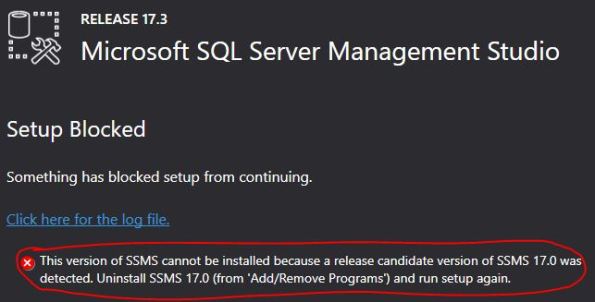
This is because if you had installed SSMS previously and uninstalled it and because of some files were not cleaned up properly, you will get this kind of message while installing SSMS separately.
–> The solution is to remove the previously installed SSMS related files from the respective version folder:
Go to following folder and remove all folders and files: C:\Program Files (x86)\Microsoft SQL Server\140\Tools\
Now try installing SSMS again and you won’t get any error !!!
Microsoft Azure Data Platform – August (2017) update
Microsoft Azure updates curated from August-2017 on: Azure SQL DB/DW, HD Insight, Machine Learning (ML), Azure Data Lake (ADL), etc.
1. Teradata Bolsters Analytics and Database capabilities for Azure
2. Migrating a Web App from ClearDB to Azure Database for MySQL
3. Online training for Azure Data Lake (ADL)
4. Introducing the #Azure CosmosDB Change Feed Processor Library
5. August updates to the Azure Analysis Services web designer
7. Azure AD (AAD) authentication extensions for Azure SQL DB and SQL DW tools
8. Data Management Gateway (DMG) – High Availability and Scalability Preview
9. Using Azure Analysis Services over Azure SQL DB and DW
10. Azure Data Factory (ADF) July new features update
11. Replicated tables now in preview for Azure SQL Data Warehouse
12. On-premises data gateway support for Azure Analysis Services
13. Imanis Data – Cloud migration, backup for your big data apps on Azure HDInsight
14. Azure Database for MySQL and Azure Database for PostgreSQL availability in India
15. Perform advanced analytics on Application Insights data using Jupyter Notebook
16. Announcing the public preview of Azure Archive Blob Storage and Blob-Level Tiering
17. Azure Analysis Services web designer adds visual model editing to the preview
18. Debug Spark Code Running in Azure HDInsight from Your Desktop
19. Hortonworks extends IaaS offering on Azure with Cloudbreak
20. Announcing Azure Data Lake Store Capture Provider for Event Hubs Capture
21. Default compatibility level 140 for Azure SQL databases
22. Preview: SQL Transparent Data Encryption (TDE) with Bring Your Own Key support
23. Announcing Azure Blob storage events preview
24. Stream Processing Changes: Azure CosmosDB change feed + Apache Spark
25. Machine Learning based anomaly detection in Azure Stream Analytics
26. Announcing Default Encryption for Azure Blobs, Files, Table and Queue Storage
27. Automation of Azure Analysis Services with Service Principals and PowerShell
Migrate from Oracle to SQL Server for free !!!
Microsoft is encouraging people/customers who are currently using Oracle, IBM Db2, Sybase, or Netezza database, to migrate to SQL Server 2017 for free (free license), get subsidized migration support services, hands-on labs, and instructor-led demos as part of this offer.

With SQL Server 2017 not only its available in Windows, but also on Linux, Mac & Docker too, you get in-memory performance across workloads, mission-critical high availability, end-to-end mobile BI, and in-database advanced analytics with security features to protect your data at rest and in motion, all on your choice of language and platform – now including Linux and Docker.
– Migration Offer Broucher Details
– Download the Microsoft SQL Server Migration Assistant v7.8 for Oracle

Sample 14 Interview Questions and Answers for Hadoop Administration Certified Professional
Despite plenty of opportunities for Hadoop professionals, getting a good job may seem tedious. This is because cracking the Hadoop Admin Interview is a challenge and you must prepare for it to get a good job. At Koenig Solutions, candidates not only acquire Hadoop administration certification, but also get to prepare for the interview to start a challenging yet lucrative career.
–> This article enlists 14 important questions and answers commonly asked during Hadoop Administration jobs interviews:
Q1. What daemons are required to run a Hadoop cluster?
A. DataNode, NameNode, JobTracker and TaskTracker are required for the process.
Q2. How would you restart a NameNode?
A. The easiest way – click on stop-all.sh (to run the command to stop running shell script). After this, click start-all.sh to restart the NameNode.
Q3. What are different schedulers available in Hadoop?
A. a. COSHH: Considers the workload, cluster and the user heterogeneity for scheduling decisions.
b. FIFO Scheduler: Doesn’t consider heterogeneity, but orders the job on the basis of arrival time in queue.
c. Fair Sharing: Defines a pool for each user. Users can use their own pools to execute the job.
Q4. What Hadoop shell commands can be used to perform copy operation?
A. fs –copyToLocal
fs –put
fs –copyFromLocal.
Q5. What’s the purpose of jps command?
A. It is used to confirm whether the daemons running Hadoop cluster are working or not. The output of jps command reveals the status of DataNode, NameNode, Secondary NameNode, JobTracker and TaskTracker.
Q6. How many NameNodes can be run on single Hadoop cluster?
A. Only one.
Q7. What will happen when the NameNode on the Hadoop cluster is down?
A. Whenever the NameNode is down, the file system goes offline.
Q8. Detail crucial hardware considerations when deploying Hadoop in product environment.
A. Operating System: 64-bit operating system
Capacity: Larger form factor (3.5”) disks allow more storage and costs less.
Network: Two TOR switches per rack for better redundancy.
Storage: To achieve high performance and scalability, it is better to design a Hadoop platform by moving the compute activity to data.
Memory: System’s memory requirements vary based on the application.
Computational Capacity: Can be determined by the total count of MapReduce slots existing across nodes within a Hadoop cluster.
Q9. Which command will you use to determine if the HDFS (Hadoop Distributed File System) is corrupt?
A. Hadoop FSCK (File System Check) command.
Q10. How a Hadoop job can be killed?
A. using command: Hadoop job –kill jobID.
Q11. Can filed be copied across multiple clusters? If yes, how?
A. Yes, it is possible using distributed copy. DistCP command can be used for intra or inter cluster copying.
Q12. Recommend the best Operating System to run Hadoop.
A. Ubuntu or Linux is the best. Although Windows can be used, it can lead to several problems.
Q13. How often the NameNode should be reformatted?
A. Never, as it can lead to complete data loss. It is formatted only once, in the beginning.
Q14. What are Hadoop configuration files and where are they located?
A. Hadoop has 3 different configuration files – mapred-site.xml, hdfs-site.xml, and core-site.xml – which are located in “conf” sub directory.
Checkout – Best Free Resources For Sharpening Your Skills In Hadoop. These are just a few questions, but you may come across several others, depending on your Hadoop
training.
Author Bio: Michael Warne is a tech blogger and an expert in Hadoop certification training. He has an experience of 5 years in the Hadoop professionals industry, and has worked as a certified Hadoop for top-notch IT companies.



Current Visitors

StatCounter …since April 2012


 Leisure blog: Creek & Trails
- NMDC Hyderabad Marathon – My first 42k FM, cramps, training and fuelling
- Singapore (Part 2) – 6 days itinerary, sightseeing & attractions
- Singapore (Part 1) – Tickets, Visa, Hotel, Forex Card/Cash, Metro/Bus cards
- I got full refund of my flight tickets during COVID lockdown (AirIndia via MakeMyTrip)
- YouTube – Your Google Ads account was cancelled due to no spend
- YouTube latest update on its YPP (YouTube Partner Program) which may affect your channel
- Starting your own blog !!!
- How to file ITR (Income Tax Return) online AY 2017-18 (for simple salaried)
- Scam – Become a kin/hier and earn a fortune – via LinkedIn and Email
- Places to visit in and around Vizag (aka Visakhapatnam)
 SQL with Manoj