Home
> SQL Errors > SSMS error – The Visual Studio component cache is out of date. Please restart Visual Studio.
SSMS error – The Visual Studio component cache is out of date. Please restart Visual Studio.
Yesterday while opening SSMS I got an error message popup which mentions:
The Visual Studio component cache is out of date. Please restart Visual Studio.
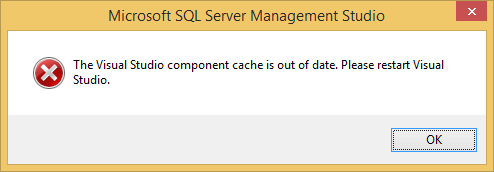
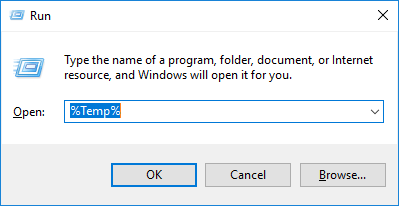
On checking in internet I found a similar issue logged in MS Connect, and the workaround was to cleanup the application folder in the Windows-Temp folder, which is located at following folder location:
C:\Users\your_user_name_here\AppData\Local\Temp\
Here is the shortcut to go to the TEMP folder:
This issue vanished after deleting the SSMS folder. This could be due to the Visual Studio component cache can’t be written or can’t be wiped while in use.
Categories: SQL Errors
Leave a comment



Current Visitors

StatCounter …since April 2012


 Leisure blog: Creek & Trails
- NMDC Hyderabad Marathon – My first 42k FM, cramps, training and fuelling
- Singapore (Part 2) – 6 days itinerary, sightseeing & attractions
- Singapore (Part 1) – Tickets, Visa, Hotel, Forex Card/Cash, Metro/Bus cards
- I got full refund of my flight tickets during COVID lockdown (AirIndia via MakeMyTrip)
- YouTube – Your Google Ads account was cancelled due to no spend
- YouTube latest update on its YPP (YouTube Partner Program) which may affect your channel
- Starting your own blog !!!
- How to file ITR (Income Tax Return) online AY 2017-18 (for simple salaried)
- Scam – Become a kin/hier and earn a fortune – via LinkedIn and Email
- Places to visit in and around Vizag (aka Visakhapatnam)
 SQL with Manoj
Thank you. Just to point out, you can also resolve this issue by completely exiting out of SSMS, making sure that all instances of SSMS are killed and reopening it and trying to query again. SSMS does automatically purge the temp data folder (at least the version I run).
I tried that, even restarted my PC, I think I was using SSMS 2016.
Thank you! It worked for me. BTW quitting SSMS completely did not resolve the issue in my case.
confirmed, deleting the SSMS folder in Temp corrected the problem.
Thank you sir its working
Just closing and opening SSMS did the job for me!
%USERPROFILE%\AppData\Local\Temp\
would be a better structured path to the directory
Thanks for the help. It worked for SSMS 2017 for me
delete everything from
%USERPROFILE%\AppData\Local\Temp\
I saw this error when trying to start ssms after the server was rebooted, so it asked if I wanted to recover my files, to which I said yes, then saw the error. By closing the SSMS, then reopening and not trying to recover my files, I didn’t receive the error.
after restarting the SQL Services it worked in my case instead removing temp files
Thank You it worked cleaning the file in SSMS folder
Thank You.I was also getting same error and after deleting SSMS folder it worked.