Archive
SQL DBA – DBID 32767 | Resource Database
select * from sys.databases
On executing the above query it gives me 9 records with DBID ranging from 1 to 9. First 4 DBIDs (1-4) for master, tempdb, model & msdb and another 5 databases (5-9) created by me.
But when I queried some DMVs & DMFs it resulted some records with DBID 32767 which left me clueless until I googled about it. Also submitted a post on my favourite MSDN T-SQL forum and got to know that this ID is reserved for Resource Database. The Resource database is readonly database that does not appear on SSMS and is managed internally by SQL Server engine. More on MS BOL about Resources.
To regenerate this scenario, lets do a simple exercise. Execute the following code (make sure you have AdventureWorks sample database installed):
USE [AdventureWorks]
go

-- Execute some sample SQL statements
select top 10 * from Person.Contact
select top 10 * from Production.Product
go 10

-- Execute sp_who2 proc
sp_who2
go 5
Now execute the query below using sys.dm_exec_query_stats DMV & sys.dm_exec_sql_text(sql_handle) DMF to get the status of what SQL engine is doing behind:
select x.dbid, x.text, a.creation_time, a.Last_execution_time, a.execution_count
from sys.dm_exec_query_stats a
cross apply sys.dm_exec_sql_text(a.sql_handle) x
go
Output:-
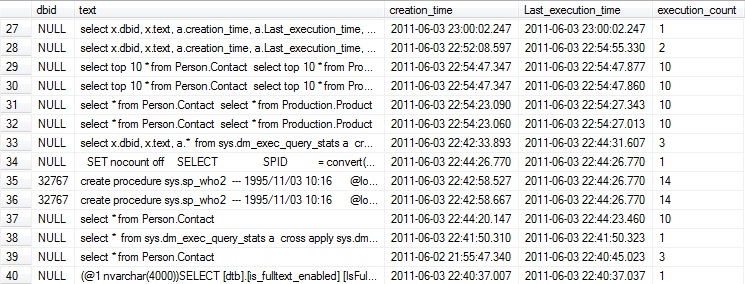
The results displayed in the image above shows 2 records with DBID 32767.
SQL Basics – Working with NOT NULL, DEFAULT and CHECK Constraints (Domain Integrity)
In my previous posts I discussed about [Entity Integrity] constraint which deals with Primary Keys & Unique Keys, and [Referential Integrity] constraint, which deals with Foreign Keys, please check the above links to know about them.
Here in this post I’ll discuss about Domain Integrity which validates the entries for a given column in a particular table. The Domain integrity can be enforced by:
1. Applying appropriate DATATYPES
2. NOT NULL constraint: enforces a column to NOT accept NULL values. Which means the columns must always contain a value and you cannot insert or update a row without specifying a value for that column.
For example: Employee name is mandatory while inserting an employee’s record, thus you can have [EmployeeName] column with NOT NULL constraint, like: [EmployeeName] nvarchar(100) NOT NULL
3. DEFAULT constraint: can be used to Insert a default value into a column, if no other value is provided while Inserting a row. This constraint works only with INSERT statement.
For example: To track the rows insert timestamp you can add this constraint to that column, like: [CreatedOn] datetime DEFAULT (getdate())
4. CHECK constraint: enforces a column to have only limited and pre-defined values. Means you cannot insert or update a row with values that are not defined with this constraint.
For example: An Employee gender could only be Male or Female, so you can have [Gender] column with CHECK constraint, like: [Gender] nchar(1) CHECK ([Gender] IN (‘M’, ‘F’))
–> Check the video on how to work with these three constraints (NOT NULL, CHECK and DEFAULT):
–> SQL Code used in above video:
--// Domain Integrity Constraints:


-- 1. NOT NULL Constraint:

CREATE TABLE [dbo].[Employee](
	 [EmployeeID]	int IDENTITY (100, 1) PRIMARY KEY
	,[EmployeeName]	nvarchar(100) NOT NULL
	,[Gender]		nchar(1)
)
GO

insert into [Employee] ([EmployeeName], [Gender])
values (NULL, NULL)

/*
Msg 515, Level 16, State 2, Line 13
Cannot insert the value NULL into column 'EmployeeName', table 'TestManDB.dbo.Employee'; column does not allow nulls. INSERT fails.
The statement has been terminated.
*/

select * from [Employee]
GO


-- 2. DEFAULT Constraint:

DROP TABLE [dbo].[Employee]
GO

CREATE TABLE [dbo].[Employee](
	 [EmployeeID]	int IDENTITY (100, 1) PRIMARY KEY
	,[EmployeeName]	nvarchar(100) NOT NULL
	,[Gender]		nchar(1)
	,[isActive]		bit				DEFAULT (1)
	,[CreatedOn]	datetime		DEFAULT (getdate())
	,[CreatedBy]	varchar(100)	DEFAULT (SYSTEM_USER)
)
GO

insert into [Employee] ([EmployeeName], [Gender])
values ('Manoj Pandey', 'M')

insert into [Employee] ([EmployeeName], [Gender])
values ('Kanchan Pandey', 'F')

insert into [Employee] ([EmployeeName], [Gender], [isActive])
values ('Maria Y', 'F', 0)

insert into [Employee] ([EmployeeName], [Gender], [CreatedOn], [CreatedBy])
values ('Brock H', 'M', '2015-01-01 21:32:07.153', 'scott')

select * from [Employee]
GO


-- 3. CHECK Constraint:

DROP TABLE [dbo].[Employee]
GO

CREATE TABLE [dbo].[Employee](
	 [EmployeeID]	int IDENTITY (100, 1) PRIMARY KEY
	,[EmployeeName]	nvarchar(100) NOT NULL
	,[Gender]		nchar(1)		CONSTRAINT ck_emp_gender CHECK ([Gender] IN ('M', 'F'))
	,[isActive]		bit				CONSTRAINT ck_emp_isActive DEFAULT (1)
	,[CreatedOn]	datetime		CONSTRAINT ck_emp_CreatedOn DEFAULT (getdate())
	,[CreatedBy]	varchar(100)	CONSTRAINT ck_emp_CreatedBy DEFAULT (SYSTEM_USER)
)
GO

insert into [Employee] ([EmployeeName], [Gender])
values ('Manoj Pandey', 'X')

/*
Msg 547, Level 16, State 0, Line 67
The INSERT statement conflicted with the CHECK constraint "CK__Employee__Gender__4D5F7D71". The conflict occurred in database "TestManDB", table "dbo.Employee", column 'Gender'.
The statement has been terminated.
*/

insert into [Employee] ([EmployeeName], [Gender])
values ('Manoj Pandey', 'M')

select * from [Employee]
GO


--// Table Generated from SSMS - Object Explorer

USE [TestManDB]
GO

ALTER TABLE [dbo].[Employee] DROP CONSTRAINT [ck_emp_gender]
GO

ALTER TABLE [dbo].[Employee] DROP CONSTRAINT [ck_emp_CreatedBy]
GO

ALTER TABLE [dbo].[Employee] DROP CONSTRAINT [ck_emp_CreatedOn]
GO

ALTER TABLE [dbo].[Employee] DROP CONSTRAINT [ck_emp_isActive]
GO

/****** Object:  Table [dbo].[Employee]    Script Date: 3/30/2016 9:45:17 PM ******/
DROP TABLE [dbo].[Employee]
GO

/****** Object:  Table [dbo].[Employee]    Script Date: 3/30/2016 9:45:17 PM ******/
SET ANSI_NULLS ON
GO

SET QUOTED_IDENTIFIER ON
GO

SET ANSI_PADDING ON
GO

CREATE TABLE [dbo].[Employee](
	[EmployeeID] [int] IDENTITY(100,1) NOT NULL,
	[EmployeeName] [nvarchar](100) NOT NULL,
	[Gender] [nchar](1) NULL,
	[isActive] [bit] NULL,
	[CreatedOn] [datetime] NULL,
	[CreatedBy] [varchar](100) NULL,
PRIMARY KEY CLUSTERED
(
	[EmployeeID] ASC
)WITH (PAD_INDEX = OFF, STATISTICS_NORECOMPUTE = OFF, IGNORE_DUP_KEY = OFF, ALLOW_ROW_LOCKS = ON, ALLOW_PAGE_LOCKS = ON) ON [PRIMARY]
) ON [PRIMARY]

GO

SET ANSI_PADDING OFF
GO

ALTER TABLE [dbo].[Employee] ADD  CONSTRAINT [ck_emp_isActive]  DEFAULT ((1)) FOR [isActive]
GO

ALTER TABLE [dbo].[Employee] ADD  CONSTRAINT [ck_emp_CreatedOn]  DEFAULT (getdate()) FOR [CreatedOn]
GO

ALTER TABLE [dbo].[Employee] ADD  CONSTRAINT [ck_emp_CreatedBy]  DEFAULT (suser_sname()) FOR [CreatedBy]
GO

ALTER TABLE [dbo].[Employee]  WITH CHECK ADD  CONSTRAINT [ck_emp_gender] CHECK  (([Gender]='F' OR [Gender]='M'))
GO

ALTER TABLE [dbo].[Employee] CHECK CONSTRAINT [ck_emp_gender]
GO


-- Final Cleanup:

DROP TABLE [dbo].[Employee]
GO
To know about more on Constraints and their types check this blog post.
Clustered vs NonClustered Indexes… and data sorting in SQL Server
This post on difference between Clustered Index & Non Clustered Index is a prequel to my blog post on requirement & use of Clustered index & NonClustered index, [link].
As per MS BOL (MSDN) in SQL Server, indexes are organized as B-trees. Each page in an index B-tree is called an index node. The top node of the B-tree is called the root node. The bottom level of nodes in the index is called the leaf nodes. Any index levels between the root and the leaf nodes are collectively known as intermediate levels.
In Clustered index: (MSDN)
1. The Leaf nodes contain the Data pages of the underlying table.
2. The Root and Intermediate level nodes contain Index pages holding Index rows.
3. Each Index row contains a Key value and a pointer to either an Intermediate level page in the B-tree, or a Data row in the Leaf level of the Index. The Pages in each level of the Index are linked in a Doubly-linked list.
4. The Pages in the Data chain and the rows in them are ordered on the value of the Clustered Index key.
5. There can be only one Clustered Index on a table.
6. Does not support Included column, because they already contain all the columns which are not in the index as Included columns.
In NonClustered Index: (MSDN)
1. The Leaf layer of a NonClustered index is made up of Index pages instead of Data pages.
2. Each Index row in the NonClustered index contains the NonClustered Key value and a row locator. This locator points to the Data row in the Clustered index or Heap having the Key value.
2.a. If the table is a Heap, which means it does not have a Clustered index, the row locator is a pointer to the row.
2.b. If the table has a Clustered index, or the index is on an Indexed view, the row locator is the Clustered index Key for the row. SQL Server retrieves the data row by searching the Clustered index using the Clustered index Key stored in the Leaf row of the NonClustered index.
3. The Data rows of the underlying table are not sorted and stored in order based on their nonclustered keys.
4. Each table can have up to 249 & 999 nonclustered indexes on SQL Server 2005 & 2008 respectively.
Indexing & data Sorting: (MSDN)
As per MS BOL, a Clustered Index only reorganizes the data pages so that the rows are logically sorted in Clustered Index order. The pages are not guaranteed to be ordered physically. SQL Server doesn’t necessarily store the data physically on the disk in clustered-index order, but while creating an index, SQL Server attempts to physically order the data as close to the logical order as possible. Each page in an index’s leaf level has a pointer to the page that logically precedes the current page and to the page that logically follows the current page, thereby creating a doubly linked list. The sysindexes table contains the address of the first leaf-level page. Because the data is guaranteed to be logically in clustered-index order, SQL Server can just start at the first page and follow the index pointers from one page to the next to retrieve the data in order.
So its not guaranteed about the physical ordering of records/rows if a table has Clustered Index on it. It is a common misconsecption among people that Clustered Index sorts data physically & Non Clustered Index sorts data logically.
Also discussed this topic on MSDN’s TSQL forum and got several expert comments & answers: http://social.msdn.microsoft.com/Forums/en-US/transactsql/thread/1c98a7ee-7e60-4730-a38c-f0e3f0deddba
More Info on ordering: https://sqlwithmanoj.com/2013/06/02/clustered-index-do-not-guarantee-physically-ordering-or-sorting-of-rows/
DB Basics – Integrity Constraints in a Database (SQL Server)
Integrity constraints are used to ensure accuracy and consistency of data in a relational database. Data integrity allows to define certain data quality requirements that the data in the database needs to meet. If a user tries to insert data that doesn’t meet these requirements, the RDBMS will not allow so.
A Constraint is a property assigned to a column or the set of columns in a table that prevents certain types of inconsistent data values from being placed in the column(s). Constraints are used to enforce the data integrity. This ensures the accuracy and reliability of the data in the database.
CONSTRAINT = The threat or use of force to prevent, restrict, or dictate the action or thought of others.
–> There are 7 types of Constraints and they are grouped in to 4 types:
| A. ENTITY INTEGRITY | 1. Primary Key | blog post | video |
| 2. Unique Key | video | ||
| B. REFERENTIAL INTEGRITY | 3. Foreign Key | blog post | video |
| C. DOMAIN INTEGRITY | 4. NOT NULL | blog post | video |
| 5. DEFAULT | |||
| 6. CHECK | |||
| D. USER DEFINED INTEGRITY | 7. RULES | blog post | video |
–> Check the video with discussion on all these Constraints:
SQL Logical Query Processing Order
–>Logical Query-processing step numbers:
(5) SELECT (5-2) DISTINCT (7) TOP(<top_specification>) (5-1) <select_list>
(1) FROM (1-J) <left_table> <join_type> JOIN <right_table> ON <on_predicate>
| (1-A) <left_table> <apply_type> APPLY <right_input_table> AS <alias>
| (1-P) <left_table> PIVOT(<pivot_specification>) AS <alias>
| (1-U) <left_table> UNPIVOT(<unpivot_specification>) AS <alias>
(2) WHERE <where_predicate>
(3) GROUP BY <group_by_specification>
(4) HAVING <having_predicate>
(6) ORDER BY <order_by_list>
(7) OFFSET <offset_specs> ROWS FETCH NEXT <fetch_specs> ROWS ONLY;
–> Logical step sequence of a Query:
1. FROM / JOIN/ APPLY/ PIVOT/ UNPIVOT
2. WHERE
3. GROUP BY
4. HAVING
5. SELECT list/ DISTINCT
6. ORDER BY
7. TOP/ OFFSET-FETCH
–> Flow diagram representing logical query-processing:

SQL Logical Query Processing Order



Current Visitors

StatCounter …since April 2012


 Leisure blog: Creek & Trails
- NMDC Hyderabad Marathon – My first 42k FM, cramps, training and fuelling
- Singapore (Part 2) – 6 days itinerary, sightseeing & attractions
- Singapore (Part 1) – Tickets, Visa, Hotel, Forex Card/Cash, Metro/Bus cards
- I got full refund of my flight tickets during COVID lockdown (AirIndia via MakeMyTrip)
- YouTube – Your Google Ads account was cancelled due to no spend
- YouTube latest update on its YPP (YouTube Partner Program) which may affect your channel
- Starting your own blog !!!
- How to file ITR (Income Tax Return) online AY 2017-18 (for simple salaried)
- Scam – Become a kin/hier and earn a fortune – via LinkedIn and Email
- Places to visit in and around Vizag (aka Visakhapatnam)
 SQL with Manoj