Archive
Memory Optimized Indexes | Hash vs Range Indexes – SQL Server 2014
In SQL Server 2014 for In-Memory tables there are lot of changes in DDLs compared with normal Disk Based Tables. In-Memory Tables related changes we’ve seen in previous posts, check [here]. Here we will see Memory Optimized Index related changes and few important things to take care before designing your Tables and Indexes.
–> Some of the main points to note are:
1. Indexes on In-Memory tables must be created inline with CREATE TABLE DDL script only.
2. These Indexes are not persisted on Disk and reside only in memory, thus they are not logged. As these Indexes are not persistent so they are re-created whenever SQL Server is restarted. Thus In-Memory tables DO NOT support Clustered Indexes.
3. Only two types of Indexes can be created on In-Memory tables, i.e. Non Clustered Hash Index and Non Clustered Index (aka Range Index). So there is no bookmark lookup.
4. These Non Clustered Indexes are inherently Covering, and all columns are automatically INCLUDED in the Index.
5. Total there can be MAX 8 Non Clustered Indexes created on an In-Memory table.
–> Here we will see how Query Optimizer uses Hash & Range Indexes to process query and return results:
1. Hash Indexes: are used for Point Lookups or Seeks. Are optimized for index seeks on equality predicates and also support full index scans. Thus these will only perform better when the predicate clause contains only equality predicate (=).
2. Range Indexes: are used for Range Scans and Ordered Scans. Are optimized for index scans on inequality predicates, such as greater than or less than, as well as sort order. Thus these will only preform better when the predicate clause contains only inequality predicates (>, <, =, BETWEEN).
–> Let’s check this by some hands-on code. We will create 2 similar In-Memory tables, one with Range Index and another with Hash Index:
-- Create In-Memory Table with simple NonClustered Index (a.k.a Range Index):
CREATE TABLE dbo.MemOptTable_With_NC_Range_Index
(
    ID INT NOT NULL
        PRIMARY KEY NONCLUSTERED,
    VarString VARCHAR(200) NOT NULL,
    DateAdded DATETIME NOT NULL
) WITH (
	MEMORY_OPTIMIZED = ON,
	DURABILITY = SCHEMA_AND_DATA
)
GO

-- Create In-Memory Table with NonClustered Hash Index:
CREATE TABLE dbo.MemOptTable_With_NC_Hash_Index
(
    ID INT NOT NULL
        PRIMARY KEY NONCLUSTERED HASH WITH (BUCKET_COUNT = 10000),
    VarString VARCHAR(200) NOT NULL,
    DateAdded DATETIME NOT NULL
) WITH (
	MEMORY_OPTIMIZED = ON,
	DURABILITY = SCHEMA_AND_DATA
)
GO
–> Now we will Insert about 10k records on both the tables, so that we have good numbers of records to compare:
DECLARE @i INT = 1

WHILE @i <= 10000
BEGIN
	INSERT INTO dbo.MemOptTable_With_NC_Range_Index
		VALUES(@i, REPLICATE('a', 200), GETDATE())

	INSERT INTO dbo.MemOptTable_With_NC_Hash_Index
		VALUES(@i, REPLICATE('a', 200), GETDATE())

	SET @i = @i+1
END
–> Now check the Execution Plan by using equality Operator (=) on both the tables:
SELECT * FROM MemOptTable_With_NC_Hash_Index  WHERE ID = 5000 -- 4%
SELECT * FROM MemOptTable_With_NC_Range_Index WHERE ID = 5000 -- 96%
You will see in the Execution Plan image below that Equality Operator with Hash Index Costs you only 4%, but Range Index Costs you 96%.

–> Now check the Execution Plan by using inequality Operator (BETWEEN) on both the tables:
SELECT * FROM MemOptTable_With_NC_Hash_Index  WHERE ID BETWEEN 5000 AND 6000 -- 99%
SELECT * FROM MemOptTable_With_NC_Range_Index WHERE ID BETWEEN 5000 AND 6000 -- 1%
You will see in the Execution Plan image below that Inequality Operator with Range Index Costs you only 1%, but Hash Index Costs you 99%.

So, while designing In-Memory Tables and Memory Optimized Indexes you will need to see in future that how you will be going to query that table. It also depends upon various scenarios and conditions, so always keep note of these things in advance while designing your In-Memory Tables.
Update: Know more about In-Memory tables:
Convert XML to Columns – MSDN TSQL forum
–> Question:
Below is the XML that i need to covert into columns please help, XML is coming from column name called “DESC” table name is “rawXML”
Columns: USER id, US_USERID, US_PASSWORD, US_SHORT, FIRST, LAST, US_LAST_PASSWORD_UPDATE
<USER id="05100">

 <US_USERID>YU</US_USERID>

  <US_PASSWORD>4026531934</US_PASSWORD>

  <US_SHORT>yu</US_SHORT>

  <US_XPN>

    <FIRST>Yehuda</FIRST>

    <LAST>Unger</LAST>

  </US_XPN>

  <US_LAST_PASSWORD_UPDATE>2006-01-19T16:10</US_LAST_PASSWORD_UPDATE>
</USER>
–>My Answer:
Check the query below:
declare @xml xml
set @xml = '<USER id="05100">

 <US_USERID>YU</US_USERID>

  <US_PASSWORD>4026531934</US_PASSWORD>

  <US_SHORT>yu</US_SHORT>

  <US_XPN>

    <FIRST>Yehuda</FIRST>

    <LAST>Unger</LAST>

  </US_XPN>

  <US_LAST_PASSWORD_UPDATE>2006-01-19T16:10</US_LAST_PASSWORD_UPDATE>
</USER>'

select
	t.c.value('../@id[1]', 'varchar(10)') as [USER],
	t.c.value('../US_USERID[1]', 'varchar(10)') as [US_USERID],
	t.c.value('../US_PASSWORD[1]', 'varchar(10)') as [US_PASSWORD],
	t.c.value('../US_SHORT[1]', 'varchar(10)') as [US_SHORT],
	t.c.value('./FIRST[1]', 'varchar(10)') as [FIRST],
	t.c.value('./LAST[1]', 'varchar(10)') as [LAST],
	t.c.value('../US_LAST_PASSWORD_UPDATE[1]', 'varchar(10)') as [US_LAST_PASSWORD_UPDATE]
from @xml.nodes('//USER/US_XPN') as t(c)
Ref Link.
Clustered Index will not always guarantee Sorted Rows
In my previous post I discussed about the how Clustered Index’s Data-Pages and Rows are allocated in memory (Disk). I tried to prove that that Clustered Indexes do not guarantee Physical Ordering of Rows. But instead they are Logically Ordered and Sorted.
As they are Logically Sorted and when you query a table without an “ORDER BY” clause you get Sorted Rows, but this is not what will happen always. You can also get rows in Unsorted Order, so to get Sorted rows always apply an “ORDER BY” clause. Here in this post we will see under what circumstances a table will not return Sorted rows:
–> Let’s create a simple table with a Clustered Index on it and add some records:
-- Create  table with 2 columns, first beign a PK and an IDENTITY column:
CREATE TABLE test2
(
	i INT IDENTITY(1,1) PRIMARY KEY NOT NULL,
	j INT
)

-- Let's insert some records in random order on second column:
INSERT INTO test2 (j)
SELECT 500 UNION ALL
SELECT 300 UNION ALL
SELECT 900 UNION ALL
SELECT 100 UNION ALL
SELECT 600 UNION ALL
SELECT 200

-- Now we will query the table without using ORDER BY clause:
SELECT * FROM test2
–> Output:

You get sorted rows, as the Execution plan shows that Clustered Index was used to fetch the records.
–> Now, what if this table also has a Non Clustered Index, let’s see:
-- We will create a Non Clustered Index on the same table on second column:
CREATE INDEX NCI_test ON test2 (j)

-- Again query the table without using ORDER BY clause:
SELECT * FROM test2
–> Following is the Output of the second SELECT query above:
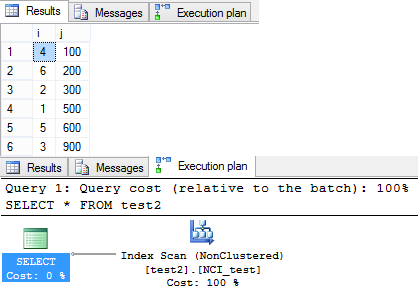
This time the query returned rows in un-ordered fashion. As you can see in the Execution plan Query optimizer preferred to do a Non Clustered Scan. Thus the records were returned in un-ordered fashion.
–> Now, If you add an ORDER BY Clause to your SELECT Query how does it return rows:
-- Added an ORDER BY Clause:
SELECT * FROM test2 ORDER BY i
–> Following is the Output of the third SELECT query above:

After adding an “ORDER BY” clause the query optimizer preferd to use the Clustered Index and returns rows in Ordered fashion again.
-- Final Cleanup
DROP TABLE test2
So, it is necessary to provide an “ORDER BY” clause to your Queries when you expect to get sorted results, even if the table has Clustered Index on it.
Clustered Index do “NOT” guarantee Physically Ordering or Sorting of Rows
Myth: Lot of SQL Developers I’ve worked with and interviewed have this misconception, that Clustered Indexes are Physically Sorted and Non-Clustered Index are Logically Sorted. When I ask them reasons, all come with their own different versions.
I discussed about this in my previous post long time back, where I mentioned as per the MSDN that “Clustered Indexes do not guarantee Physical Ordering of rows in a Table”. And today in this post I’m going to provide an example to prove it.
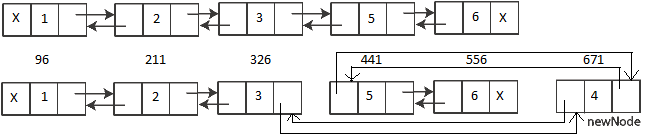
Clustered Index is the table itself as its Leaf-Nodes contains the Data-Pages of the table. The Data-Pages are nothing but Doubly Linked-List Data-Structures linked to their leading & preceding Data-Pages. The Data-Pages and rows in them are Ordered by the Clustering Key. Thus there can be only one Clustered Index on a table.
When a new Clustered Index is created on a table, it reorganizes the table’s Data-Pages Physically so that the rows are Logically sorted. But when a tables goes through updates, like INSERT/UPDATE/DELETE operations then the index gets fragmented and thus the Physical Ordering of Data-Pages gets lost. But still the Data-Pages of the Clustered Index or the Table are chained together by Doubly Linked-List in Logical Order.
We will see this behavior in the following example:
USE AdventureWorks2012
GO

CREATE TABLE test (i INT PRIMARY KEY not null, j VARCHAR(2000))

INSERT INTO test (i,j)
SELECT 1, REPLICATE('a',100) UNION ALL
SELECT 2, REPLICATE('a',100) UNION ALL
SELECT 3, REPLICATE('a',100) UNION ALL
SELECT 5, REPLICATE('a',100) UNION ALL
SELECT 6, REPLICATE('a',100)

SELECT * FROM test

DBCC IND(AdventureWorks2012, 'test', -1);

DBCC TRACEON(3604);
DBCC PAGE (AdventureWorks2012, 1, 22517, 1);
As you can see above we inserted 5 records in a table having PK as Clustering Key with following values: 1,2,3,5,6. We skipped the value 4.
–> Here is the Output of DBCC PAGE command execute in the end:
The DBCC PAGE provides very descriptive Output, but here I’ve just extracted the useful information we need.
OFFSET TABLE:

Row - Offset
4 (0x4) - 556 (0x22c)           --> 1=6
3 (0x3) - 441 (0x1b9)           --> 1=5
2 (0x2) - 326 (0x146)           --> 1=3
1 (0x1) - 211 (0xd3)            --> 1=2
0 (0x0) - 96  (0x60)		--> 1=1
It show the 5 rows with their memory allocated address in both decimal and hexadecimal formats, which is contiguous. Thus all the rows are Physically Ordered.
Now, let’s insert the value “4” that we skipped initially:
INSERT INTO test (i,j)
SELECT 4, REPLICATE('a',100)

SELECT * FROM test

DBCC IND(AdventureWorks2012, 'test', -1);

DBCC TRACEON(3604);
DBCC PAGE (AdventureWorks2012, 1, 22517, 1);
–> Here is the new Output of DBCC PAGE command execute in the end:
OFFSET TABLE:

Row - Offset
5 (0x5) - 556 (0x22c)           --> 1=6
4 (0x4) - 441 (0x1b9)           --> 1=5
3 (0x3) - 671 (0x29f)           --> 1=4           <-- new row added here
2 (0x2) - 326 (0x146)           --> 1=3
1 (0x1) - 211 (0xd3)            --> 1=2
0 (0x0) - 96  (0x60)		--> 1=1
As you can see very clearly in the output above that the memory allocation address for the new row with PK value = “4” is 671, which is not in between and greater than the address of the last row i.e. 556. The memory address of the last 2 rows is unchanged (441 & 556) and the new row is not accommodated in between as per the sort order but at the end. There is no Physical Ordering and the new row is Logically Chained with other rows and thus is Logically and Ordered, similar to the image below:
Myth Busted: Hope the above exercise clears that Clustered Indexes do not guarantee the Physical Ordering of Rows & Data Pages.
-- Final Cleanup
DROP TABLE test
XML to Table – MSDN TSQL forum
–>Question:
I’m using sql server 2000 and here is my target table:
CREATE TABLE #SampleTable
(
    Number varchar(100),
    StartNum int
)
I want to parse the XML and insert into the above table:
<activateNumber>
         <!--You may enter ANY elements at this point-->
         <number>1234</number>
         <StaartNumbers>
            <StartNum>234</StartNum>
         </StaartNumbers>
</activateNumber>
–> My Answer:
Check the code below:
CREATE TABLE #SampleTable
(
    Number varchar(100),
    StartNum int
)

DECLARE @xml XML = '<activateNumber>
         <!--You may enter ANY elements at this point-->
         <number>1234</number>
         <StaartNumbers>
            <StartNum>234</StartNum>
         </StaartNumbers>
</activateNumber>'

DECLARE @iDoc int
EXEC sp_xml_preparedocument @iDoc output, @xml

INSERT INTO #SampleTable
SELECT
	number,
	StartNum
FROM OPENXML(@iDoc,'/activateNumber/StaartNumbers',2)
WITH (number INT '../number[1]',
		StartNum INT 'StartNum[1]')

EXEC sp_xml_removedocument @iDoc
Ref Link.



Current Visitors

StatCounter …since April 2012


 Leisure blog: Creek & Trails
- NMDC Hyderabad Marathon – My first 42k FM, cramps, training and fuelling
- Singapore (Part 2) – 6 days itinerary, sightseeing & attractions
- Singapore (Part 1) – Tickets, Visa, Hotel, Forex Card/Cash, Metro/Bus cards
- I got full refund of my flight tickets during COVID lockdown (AirIndia via MakeMyTrip)
- YouTube – Your Google Ads account was cancelled due to no spend
- YouTube latest update on its YPP (YouTube Partner Program) which may affect your channel
- Starting your own blog !!!
- How to file ITR (Income Tax Return) online AY 2017-18 (for simple salaried)
- Scam – Become a kin/hier and earn a fortune – via LinkedIn and Email
- Places to visit in and around Vizag (aka Visakhapatnam)
 SQL with Manoj