Archive
Passing multiple/dynamic values to Stored Procedures & Functions | Part 1 – by passing CSV
Here in the first Part of this series we will use a CSV string that will contain comma separated list of values and pass as a VARCHAR datatype param variable to the SP. Then inside the SP we will parse this VARCHAR CSV string and use those values in our SQL Queries:
-- As always I will use the AdventureWorks database 🙂
USE [AdventureWorks2012]
GO

-- Create an SP with NVARCHAR(MAX) parameter:
CREATE PROCEDURE uspGetPersonDetailsCSV (
	@persons NVARCHAR(MAX)
)
AS
BEGIN
	--DECLARE @persons NVARCHAR(MAX)
	--SET @persons = 'Charles,Jade,Jim,Luke,Ken'

	SELECT T.C.value('.', 'NVARCHAR(100)') AS [Name]
	INTO #tblPersons
	FROM (SELECT CAST ('<Name>' + REPLACE(@persons, ',', '</Name><Name>') + '</Name>' AS XML) AS [Names]) AS A
	CROSS APPLY Names.nodes('/Name') as T(C)

	SELECT BusinessEntityID, Title, FirstName, MiddleName, LastName, ModifiedDate
	FROM [Person].[Person] PER
	WHERE EXISTS (SELECT Name FROM #tblPersons tmp WHERE tmp.Name  = PER.FirstName)
	ORDER BY FirstName, LastName

	DROP TABLE #tblPersons
END
GO

-- No execute this SP by passing a list of values comma separated as a single string:
EXEC uspGetPersonDetailsCSV 'Charles,Jade,Jim,Luke,Ken'
GO
-- Check the output, objective achieved 🙂

-- Final Cleanup
DROP PROCEDURE uspGetPersonDetailsCSV
GO
This is the most simplest and common method to pass multiple values to an SP, but not ideal. If there are multiple values with count ranging to thousands, then storing them in VARCHAR will not be possible and parsing them would be a big trade off.
So, to perform this operation we have another method by using XML String. Check this in my next [blog post].
Columnstore Indexes in SQL Server 2012
This time the new version of SQL Server 2012 a.k.a Denali has introduced a new kind of index i.e. ColumnStore Index, which is very different from the traditional indexes. This new index differs in the way it is created, stores its table contents in specific format and provides fast retrieval of data from the new storage.
–> Before talking about ColumnStore Index, let’s first check and understand what is a ColumnStore?
ColumnStore is a data storage method that uses xVelocity technology based upon Vertipaq engine, which uses a new Columnar storage technique to store data that is highly Compressed and is capable of In-memory Caching and highly parallel data scanning with Aggregation algorithms.
Traditionally, on the other side a RowStore is the traditional and by-default way to store data for each row and then joins all the rows and store them in Data Pages, and is still the same storage mechanism for Heap and Clustered Indexes.
The ColumnStore or Columnar data format does not store data in traditional RowStore fashion, instead the data is grouped and stored as one column at a time in Column Segments.
–> Here is what happens when you try to create a ColumnStore Index on a table:
1. Existing table rows are divided into multiple RowGroups, a Row-Group can contain upto 1 million rows.
2. Each column of a RowGroup is stored in its own Segment and is compressed.
3. The individual compressed Column Segments are added to the ColumnStore.
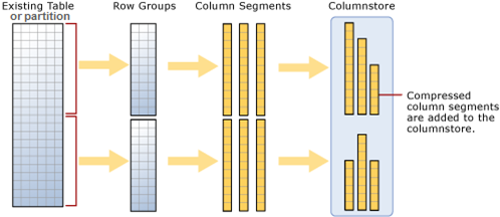
4. When new rows are inserted or existing ones are updated (in small batches, except BulkLoad) they are added to a separate Delta Store, upto a threshold of 1 million rows.
5. When a Delta-Store reaches its threshold of 1 million rows a separate process Tuple-mover invokes and closes the delta-store, compresses it & stores it into the ColumnStore index.
–> Thus, Columnstore indexes can produce faster results by doing less I/O operations by following:
1. Reading only the required columns, thus less data is read from disk to memory.
2. Heavy Column compression, which reduces the number of bytes that must be read and moved.
3. Advanced query execution technology by processing chunks of columns called batches (1000 rows) in a streamlined manner, further reducing CPU usage.
4. Stored as ColumnStore Object Pool in RAM to cache ColumnStore Index, instead of SQL Buffer Pool (for Pages)
–> Please Note: In SQL Server 2012 ColumnStore indexes has some limitations:
1. A Table (Heap or BTree) can have only one NonClustered ColumnStore Index.
2. Cannot be a Clustered Index.
3. A Table with NonClustered ColumnStore Index becomes readonly and cannot be updated.
4. Check MSDN BoL for more limitations with SQL Server 2012 version, link.
Reorganize Index vs Rebuild Index in SQL Server
Well-designed indexes on tables/views improves the performance of queries run against a database by reducing disk I/O operations and consume fewer system resources. Indexes can be helpful for a variety of queries that contain SELECT, UPDATE, DELETE, or MERGE statements.
SQL Server Database Engine automatically maintains indexes whenever INSERT, UPDATE, or DELETE operations are made to the underlying data. Over time these modifications can cause the information in the index to become scattered/fragmented in the database. Fragmentation exists when indexes have pages in which the logical ordering, based on the key value, does not match the physical ordering inside the data file. Heavily fragmented indexes can degrade query performance and cause your application to respond slowly.
SQL Server has provided ways to reduce/remedy fragmentation by Reorganizing or Rebuilding an Index.
1. Reorganize Index: uses minimal system resources. It defragments the leaf level of clustered and nonclustered indexes on tables and views by physically reordering the leaf-level pages to match the logical, left to right, order of the leaf nodes. Reorganizing also compacts the index pages. Compaction is based on the existing fill factor value.
2. Rebuild Index: drops and re-creates the index. This removes fragmentation, reclaims disk space by compacting the pages based on the specified or existing fill factor setting, and reorders the index rows in contiguous pages. When ALL is specified, all indexes on the table are dropped and rebuilt in a single transaction.
So, which approach to go with, Reorganize or Rebuild?
First of all we’ll check the fragmentation status of a particular table or an index, by using sys.dm_db_index_physical_stats function.
Here we will check the status of all indexes in [HumanResources].[Employee] table of [AdventureWorks2012] database.
select
	x.name as Index_Name,
	s.database_id, s.object_id, s.index_id, s.index_type_desc, -- General info columns
	s.avg_fragmentation_in_percent, s.fragment_count, s.avg_fragment_size_in_pages -- stats we need
from sys.indexes x
cross apply sys.dm_db_index_physical_stats (
	DB_ID(N'AdventureWorks2012'), -- database_id
	x.object_id, -- object_id
	x.index_id, -- index_id
	NULL, -- partition_number
	NULL) as s -- mode
where s.object_id = object_id('HumanResources.Employee')
Output:

We will use the following criteria setup by Microsoft to detirmine the best method to correct the fragmentation:
avg_fragmentation_in_percent value | Corrective statement
> 5% and <= 30%			     ALTER INDEX REORGANIZE
> 30%				     ALTER INDEX REBUILD WITH (ONLINE = ON)*
The above results shows that the Indexes [AK_Employee_LoginID] and [AK_Employee_NationalIDNumber] requires Rebuild and rest of them are good.
–> TO REBUILD:
--// To Rebuild [AK_Employee_LoginID] Index, run the following query:

USE AdventureWorks2012;
GO

ALTER INDEX AK_Employee_LoginID
	ON HumanResources.Employee
REBUILD;
GO

--// To Rebuild All indexes, use following query:

USE AdventureWorks2012;
GO

ALTER INDEX ALL
	ON HumanResources.Employee
REBUILD WITH (FILLFACTOR = 80, SORT_IN_TEMPDB = ON, STATISTICS_NORECOMPUTE = ON);
GO
–> TO REORGANIZE:
--// To Reorganize [AK_Employee_NationalIDNumber] Index, run the following query:

USE AdventureWorks2012;
GO

ALTER INDEX AK_Employee_NationalIDNumber
	ON HumanResources.Employee
REORGANIZE;
GO

--// To Reorganize All indexes on [HumanResources].[Employee], use following query:

USE AdventureWorks2012;
GO

ALTER INDEX ALL
	ON HumanResources.Employee
REORGANIZE;
GO
So, check the fragmentation status by using the DM function sys.dm_db_index_physical_stats and then decide to do either REORGANIZE or a REBUILD on an Index.
Difference between Decimal and Numeric datatypes
Decimal vs Numeric: None… both are same!!!
This is a misconception among many developers that Decimal and Numeric are different data types. And lot of people do not agree to understand that they are same unless I redirect them to this MSDN BOL [link].
Few days back while designing a data model for one our support enhancement project this question was raised and following was the conversation:
Person A: Ok, this column is defined as Numeric, can’t we make it a Decimal?
Me: What difference will it make?
Person A: Decimal is more precise than Numeric (according to him).
Me: No, both are same.
Person B, C and some others: There is slight difference, Decimal holds more accurate precision values than Numeric.
To my surprise none of them were aware that both are same.
So, when I redirected them to MSDN decimal and numeric (Transact-SQL) and show them the line which says: “numeric is functionally equivalent to decimal.” they agreed.
So, not to confuse between Decimal & Numeric, they both are synonyms to each other.
SQL Server 2012 (a.k.a Denali) – New feature | WITH RESULT SETS
“WITH RESULT SETS”, a new feature added in SQL Server 2012 allows us to tweak the Column Names and their Datatypes returned by an SP upon executed as per our needs. In SQL Server 2012 while calling an SP you can add the “WITH RESULT SETS” option and can provide the new Column Names and/or with new Datatypes with the parenthesis as per your wish (shown below).
Prior to this if one has to do the same, he has to either:
– Edit the same SP with new column names, or
– Create a new duplicate SP with different column headers, or
– Push records to a temp table first then use the records set form that table (discussed in later part of this post).
Let’s check this new feature by a simple example here by using a Stored Procedure from [AdventureWorks2012] database for SQL Server 2012:
USE [AdventureWorks2012]
GO

-- Normal SP call without using "WITH RESULT SETS" option:
EXEC [dbo].[uspGetEmployeeManagers] @BusinessEntityID = 100
Recordset with same headers as in SP:

RecursionLevel	BusinessEntityID	FirstName	LastName	OrganizationNode	ManagerFirstName	ManagerLastName
0		100			Lolan		Song		/3/1/9/7/		Kok-Ho			Loh
1		93			Kok-Ho		Loh		/3/1/9/			Peter			Krebs
2		26			Peter		Krebs		/3/1/			James			Hamilton
3		25			James		Hamilton	/3/			Ken			Sánchez
-- This is how you can use the new option and get desired headers:
EXEC [dbo].[uspGetEmployeeManagers] @BusinessEntityID = 100
WITH RESULT SETS
(
	(
	Level INT,
	BusinessID INT,
	EmpFirstName VARCHAR(50),
	EmpLastName VARCHAR(50),
	OrgNode VARCHAR(20),
	ManagerFirstName VARCHAR(50),
	ManagerLastName VARCHAR(50)
	)
)
Recordset with new headers as in SP:

Level	BusinessID	EmpFirstName	EmpLastName	OrgNode		ManagerFirstName	ManagerLastName
0	100		Lolan		Song		/3/1/9/7/	Kok-Ho			Loh
1	93		Kok-Ho		Loh		/3/1/9/		Peter			Krebs
2	26		Peter		Krebs		/3/1/		James			Hamilton
3	25		James		Hamilton	/3/		Ken			Sánchez
–> Traditonal appraoch prior to ver. 2012
-- Create a table with columns with required names:
CREATE TABLE #tempData (
	Level INT,
	BusinessID INT,
	EmployeeFirstName VARCHAR(50),
	EmployeeLastName VARCHAR(50),
	OrgNode VARCHAR(20),
	ManagerFirstName VARCHAR(50),
	ManagerLastName VARCHAR(50)
	)

-- Insert records from the SP to the table:
INSERT INTO #tempData (Level, BusinessID, EmployeeFirstName, EmployeeLastName, OrgNode, ManagerFirstName, ManagerLastName)
EXEC @return_value = [dbo].[uspGetEmployeeManagers] @BusinessEntityID = 100

-- Finaly select the table and use the records:
SELECT * FROM #tempData

-- Final Cleanup:
DROP TABLE #tempData
GO
Well this is OK, but not very exciting feature for me as a developer.
I was hoping this would allow me to add/remove the columns and/or Concatenate them, like FirstName & LastName to FullName, but No!!!
For more information you can check MS BOL, here: http://msdn.microsoft.com/en-us/library/ms188332(v=sql.110).aspx



Current Visitors

StatCounter …since April 2012


 Leisure blog: Creek & Trails
- NMDC Hyderabad Marathon – My first 42k FM, cramps, training and fuelling
- Singapore (Part 2) – 6 days itinerary, sightseeing & attractions
- Singapore (Part 1) – Tickets, Visa, Hotel, Forex Card/Cash, Metro/Bus cards
- I got full refund of my flight tickets during COVID lockdown (AirIndia via MakeMyTrip)
- YouTube – Your Google Ads account was cancelled due to no spend
- YouTube latest update on its YPP (YouTube Partner Program) which may affect your channel
- Starting your own blog !!!
- How to file ITR (Income Tax Return) online AY 2017-18 (for simple salaried)
- Scam – Become a kin/hier and earn a fortune – via LinkedIn and Email
- Places to visit in and around Vizag (aka Visakhapatnam)
 SQL with Manoj