Archive
SQL DBA – Upgrade to SQL Server 2012 – Use Upgrade Advisor
Are you planning to upgrade your SQL Servers to 2012? YES!
How will you make sure that you are ready for Upgrade? ???
How will you make sure that the Upgrade will be seamless? 😦
SQL Server 2012 “Upgrade Advisor” is for you to check and analyze instances of all previous SQL Server versions i.e. 2008 R2, 2008, 2005 and even 2000 in preparation for upgrading to SQL Server 2012.
“Upgrade Advisor” identifies all features and configuration changes that might affect your upgrade. It provides links to documentation that describes each identified issue and how to resolve it and also generates a report that captures identified issues to fix either before or after you upgrade.
This tool has some prerequisites to install, and if you don’t install them you might see following error while installation:
Setup is missing prerequisites:

-Microsoft SQL Server 2012 Transact-SQL Script DOM,
which is not installed by Upgrade Advisor Setup.
To continue, install SQL Server 2012 Transact-SQL Script DOM from below
hyperlink and then run the Upgrade Advisor Setup operation again :

Go to http://go.microsoft.com/fwlink/?LinkID=216742
The above error mentions to install “MS SQL Server 2012 Transact-SQL ScriptDom” component. Install it from here: http://www.microsoft.com/en-us/download/details.aspx?id=29065&ocid=aff-n-we-loc–ITPRO40886&WT.mc_id=aff-n-we-loc–ITPRO40886
But for this also “MS DOT NET 4.0” is required on your system. To Install it check this link: http://www.microsoft.com/en-us/download/details.aspx?id=17851
After installing Upgrade Advisor, launch the tool, it gives you 2 options:
1. Launch Upgrade Advisor Analysis Wizard
2. Report Upgrade Advisor Viewer
–> Analysis Wizard lets you run alanysis on following SQL components shown in image below:

–> Report Viewer tell you about the changes that needs attention or needs change/fix before or after upgrading to 2012. After Analysis Wizard finishes it creates repots which is in the form of an XML file.
The Report Viewer tool uses this XML file generated and give you details of components that may be affected. The report provides Importance, When to fix (Before/After), Description and links to information that will help you fix or reduce the effect of the known issues, image below:

After you are done with this Analysis and checking Reports, now the time is to work and fix on issues listed in the Reports.
Other than this you also need to check Microsoft BOL and/or MSDN articles to check for Discontinued and Deprecated features, Breaking and Behavior Changes.
Check following important links:
1. SQL Server Backward Compatibility: http://msdn.microsoft.com/en-us/library/cc707787
2. Database Engine Backward Compatibility: http://msdn.microsoft.com/en-us/library/ms143532
3. Analysis Services Backward Compatibility: http://msdn.microsoft.com/en-us/library/ms143479
4. Integration Services Backward Compatibility: http://msdn.microsoft.com/en-us/library/ms143706
5. Reporting Services Backward Compatibility: http://msdn.microsoft.com/en-us/library/ms143251
6. Other Backward Compatibility: http://msdn.microsoft.com/en-us/library/cc280407
Columnstore Indexes in SQL Server 2012
This time the new version of SQL Server 2012 a.k.a Denali has introduced a new kind of index i.e. ColumnStore Index, which is very different from the traditional indexes. This new index differs in the way it is created, stores its table contents in specific format and provides fast retrieval of data from the new storage.
–> Before talking about ColumnStore Index, let’s first check and understand what is a ColumnStore?
ColumnStore is a data storage method that uses xVelocity technology based upon Vertipaq engine, which uses a new Columnar storage technique to store data that is highly Compressed and is capable of In-memory Caching and highly parallel data scanning with Aggregation algorithms.
Traditionally, on the other side a RowStore is the traditional and by-default way to store data for each row and then joins all the rows and store them in Data Pages, and is still the same storage mechanism for Heap and Clustered Indexes.
The ColumnStore or Columnar data format does not store data in traditional RowStore fashion, instead the data is grouped and stored as one column at a time in Column Segments.
–> Here is what happens when you try to create a ColumnStore Index on a table:
1. Existing table rows are divided into multiple RowGroups, a Row-Group can contain upto 1 million rows.
2. Each column of a RowGroup is stored in its own Segment and is compressed.
3. The individual compressed Column Segments are added to the ColumnStore.
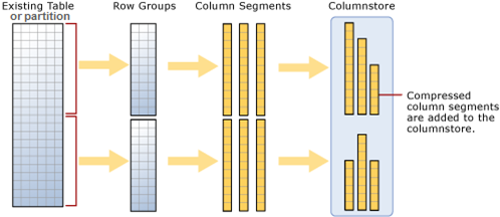
4. When new rows are inserted or existing ones are updated (in small batches, except BulkLoad) they are added to a separate Delta Store, upto a threshold of 1 million rows.
5. When a Delta-Store reaches its threshold of 1 million rows a separate process Tuple-mover invokes and closes the delta-store, compresses it & stores it into the ColumnStore index.
–> Thus, Columnstore indexes can produce faster results by doing less I/O operations by following:
1. Reading only the required columns, thus less data is read from disk to memory.
2. Heavy Column compression, which reduces the number of bytes that must be read and moved.
3. Advanced query execution technology by processing chunks of columns called batches (1000 rows) in a streamlined manner, further reducing CPU usage.
4. Stored as ColumnStore Object Pool in RAM to cache ColumnStore Index, instead of SQL Buffer Pool (for Pages)
–> Please Note: In SQL Server 2012 ColumnStore indexes has some limitations:
1. A Table (Heap or BTree) can have only one NonClustered ColumnStore Index.
2. Cannot be a Clustered Index.
3. A Table with NonClustered ColumnStore Index becomes readonly and cannot be updated.
4. Check MSDN BoL for more limitations with SQL Server 2012 version, link.
New CHOOSE() and IIF() functions introduced in SQL Server 2012 (Denali)
1. The CHOOSE() function provides you array like feature where 1st parameter specifies the index and rest parameters are the array elements, this returns the element at the specified index from a list of elements.
-- CHOOSE()
SELECT CHOOSE ( 3, 'Apple', 'Mango', 'Banana', 'Kiwi' ) AS Result; -- Banana
SELECT CHOOSE ( 2, 'Manoj', 'Saurabh', 'Andy', 'Dave' ) AS Result; -- Saurabh
GO
2. The IIF() function is a good replacement of CASE statement, it returns either of the two values passed to 2nd and 3rd parameter on evaluation of boolean expression to the 1st parameter.
-- IIF()
DECLARE @x int = 10;
DECLARE @y int = 20;
SELECT IIF ( @x > @y, 'TRUE', 'FALSE' ) AS Result; -- FALSE

-- CASE equivalent
SELECT CASE
	WHEN @x > @y THEN 'TRUE'
	ELSE 'FALSE'
END AS Result; -- FALSE
GO
Note: IIF() function is internally converted to CASE expression by SQL engine and can be nested upto 10 levels like CASE.
–> Video:
“Identity Gap” Issue with the new SEQUENCE feature in SQL Server 2012 … and its workaround
In my previous post I discussed about an issue with IDENTITY property. Here today while working on a similar new feature “SEQUENCE”, I found a similar kind of behavior with it.
Here also when you restart SQL Server or restart the service the last sequence number jumps to a higher random number.
Here is a simple code to reproduce this issue:
-- CREATE a simple Sequence
CREATE SEQUENCE CountBy1
	START WITH 1
	INCREMENT BY 1
	MINVALUE 0
	NO MAXVALUE ;
GO


-- CREATE a test table:
CREATE TABLE TEST_SEQ (ID INT, NAME VARCHAR(200));

-- INSERT some records:
INSERT INTO TEST_SEQ
SELECT NEXT VALUE FOR CountBy1, 'Manoj Pandey'

INSERT INTO TEST_SEQ
SELECT NEXT VALUE FOR CountBy1, 'Gaurav Pandey'
GO

-- Check the INSERTed records before server restart:
SELECT * FROM TEST_SEQ
GO


-- RESTART SQL Server & INSERT a new record:
INSERT INTO TEST_SEQ
SELECT NEXT VALUE FOR CountBy1, 'Garvit Pandey'
GO

-- Check the INSERTed records after server restart:
SELECT * FROM TEST_SEQ
GO


--// Final cleanup
DROP TABLE TEST_SEQ
DROP SEQUENCE CountBy1
Finally I got the following output:

As you can see by running the above test before I restarted SQL Server the SEQUENCE value assigned to the last record was 2, but when I restarted the new SEQUENCE value generated is 51.
Reason: Actually while creating SEQUENCE object SQL Server engine caches the new SEQUENCE values to Increase performance. By default the cache size is 50, so it caches values upto 50 values, and when SQL Server restarts it starts after 50, that’s a bug.
Workaround: To avoid this situation you can put an “NO CACHE” option while declaring the SEQUENCE object, like:
-- CREATE a simple Sequence
CREATE SEQUENCE CountBy1
	START WITH 1
	INCREMENT BY 1
	MINVALUE 0
	NO MAXVALUE
	NO CACHE ; -- here
GO
This will not cache the future values and you wont get this issue of jumping values and gaps.
To know more about SEQUENCES check my previous blog post, [link].
Jump/Gap Issue with IDENTITY property in SQL Server 2012 … and its workaround (not a bug)
Sometime back there was discussion going on in an SQL Server forum regarding issues with IDENTITY property in the new SQL Server 2012. The issue was that, when restarting SQL Server (or service) the IDENTITY value in a particular table having IDENTITY column jumps to a higher random number and starts from there.
I tried to reproduce this issue, the SQL Server version I’m using is as follows:
Microsoft SQL Server 2012 RC0 - 11.0.1750.32 (X64)
	Nov  4 2011 17:54:22
	Copyright (c) Microsoft Corporation
	Business Intelligence Edition (64-bit) on Windows NT 6.1
	(Build 7601: Service Pack 1)
I reproduced the issue with following code:
-- CREATE a test table:
CREATE TABLE TEST_IDENTITY (
	ID INT IDENTITY(1,1),
	NAME VARCHAR(200)
	);

-- INSERT some records:
INSERT INTO TEST_IDENTITY (NAME)
SELECT 'Manoj Pandey'

INSERT INTO TEST_IDENTITY (NAME)
SELECT 'Gaurav Pandey'
GO

-- Check recently inserted records:
SELECT * FROM TEST_IDENTITY -- 2 records, with ID value 1, 2.

-- Check the current IDENTITY value:
DBCC CHECKIDENT ('TEST_IDENTITY')
--Checking identity information: current identity value '2', current column value '2'.
--DBCC execution completed. If DBCC printed error messages, contact your system administrator.
GO


-- RESTART SQL Server and check the current IDENTITY value:
DBCC CHECKIDENT ('TEST_IDENTITY')
--Checking identity information: current identity value '11', current column value '2'.
--DBCC execution completed. If DBCC printed error messages, contact your system administrator.

-- INSERT a new record:
INSERT INTO TEST_IDENTITY (NAME)
SELECT 'Garvit Pandey'
GO

-- Check recently inserted records:
SELECT * FROM TEST_IDENTITY -- 3 records, with ID value 1, 2, 12.
GO

--// Final cleanup
DROP TABLE TEST_IDENTITY
Finally I got the following output:
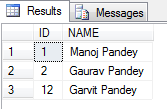
As you can see by running the above test before I restarted SQL Server the IDENTITY value was 2, but when I restarted the IDENTITY value changed to 11.
Thus the new records was inserted with value = 12.
The above bug/issue has been logged in the Microsoft Connect site, [here].
Workaround: Right now there is no fix for this, so you need to check all tables in you database every time your SQL Server restarts and reseed the correct IDENTITY value. Check my blog post to reseed the IDENTITY value.



Current Visitors

StatCounter …since April 2012


 Leisure blog: Creek & Trails
- NMDC Hyderabad Marathon – My first 42k FM, cramps, training and fuelling
- Singapore (Part 2) – 6 days itinerary, sightseeing & attractions
- Singapore (Part 1) – Tickets, Visa, Hotel, Forex Card/Cash, Metro/Bus cards
- I got full refund of my flight tickets during COVID lockdown (AirIndia via MakeMyTrip)
- YouTube – Your Google Ads account was cancelled due to no spend
- YouTube latest update on its YPP (YouTube Partner Program) which may affect your channel
- Starting your own blog !!!
- How to file ITR (Income Tax Return) online AY 2017-18 (for simple salaried)
- Scam – Become a kin/hier and earn a fortune – via LinkedIn and Email
- Places to visit in and around Vizag (aka Visakhapatnam)
 SQL with Manoj