Archive
Implementing “Row Level Security” (RLS) with “Block Predicates” in SQL Server 2016 – Part 2
In my [previous post] I discussed about Row Level Security, its introduction, and a detailed demo on how to implement it.
There I discussed about the Filter Predicate option available in the CTP 2.x release. With this option we can restrict read access for a user to avoid unauthorized access of rows.
Filter Predicates filters the read operations like SELECT, UPDATE and DELETE, but do not filter INSERT operations, and thus a user can INSERT any row (associate to another user also).
Here in this post I will talk about the new Block Predicate option available in the CTP 3.0 release. With this option we can restrict write access for specific users.
Block Predicates block all write operations like:
– AFTER INSERT and AFTER UPDATE
– BEFORE UPDATE
– and BEFORE DELETE
To know more about these write operations check MS BoL here.
I’m using the same script I used in my [previous post] about RLS with Filter Predicates.
–> Step #1. Create some test accounts and test data:
-- Let's create some test accounts:

-- Three users for The CEO, HR & Finance department admin users.
CREATE USER userCEO WITHOUT LOGIN;
GO
CREATE USER userHR WITHOUT LOGIN;
GO
CREATE USER userFin WITHOUT LOGIN;
GO
CREATE USER userAdmin WITHOUT LOGIN;
GO

-- Create a sample table [dbo].[Employee]: with a self-referencing Manager ID column.
CREATE TABLE dbo.Employee (
	[EmpCode] NVARCHAR(50),  -- Employee ID
	[EmpName] NVARCHAR(250), -- Employee/Manager Full Name
	[Salary]  MONEY,		 -- Fictious Salary
	[MgrCode] NVARCHAR(50)   -- Manager ID
);
GO

-- Now insert some test records:

-- Top Boss CEO
INSERT INTO dbo.Employee VALUES ('userCEO' , 'CEO Top Boss'  , 800, NULL)

-- Next 2 levels under CEO
INSERT INTO dbo.Employee VALUES ('userHR'  , 'HR User'		 , 700, 'userCEO');
INSERT INTO dbo.Employee VALUES ('userFin' , 'Finance User'  , 600, 'userCEO');

-- Employees under Kevin
INSERT INTO dbo.Employee VALUES ('manojp'  , 'Manoj Pandey'  , 100, 'userHR');
INSERT INTO dbo.Employee VALUES ('saurabhs', 'Saurabh Sharma', 400, 'userHR');
INSERT INTO dbo.Employee VALUES ('deepakb' , 'Deepak Biswal' , 500, 'userHR');

-- Employees under Amy
INSERT INTO dbo.Employee VALUES ('keshavk' , 'Keshav K'		 , 200, 'userFin');
INSERT INTO dbo.Employee VALUES ('viveks'  , 'Vivek S'		 , 300, 'userFin');
GO

-- Let's check the records before applying "Row Level Security":
SELECT * FROM dbo.Employee; -- 8 rows
GO
Output: As a normal SEELCT and without RLS, it just ignores my Execution Context and execute the Query and return all the 8 rows.
–> Step #2. Grant only SELECT to the CEO-User, and Grant SELECT, INSERT,UPDATE, DELETE access on the dbo.Employee table to all 3 users:
GRANT SELECT ON dbo.Employee TO userCEO;
GO
GRANT SELECT, INSERT, UPDATE, DELETE ON dbo.Employee TO userHR;
GO
GRANT SELECT, INSERT, UPDATE, DELETE ON dbo.Employee TO userFin;
GO
GRANT SELECT, INSERT, UPDATE, DELETE ON dbo.Employee TO userAdmin;
GO
The new “Row Level Security” feature lets you:
– apply this security at the database level
– create two predicate functions, Filter & Block Predicates.
– and there is no need to apply the WHERE clause to filter out unauthorized users.
–> Step #3a. Create an Inline Table-Valued Function to create a Filter Predicate function:
CREATE FUNCTION dbo.fn_SecurityFilterPredicateEmployee (@mgrCode AS sysname)
    RETURNS TABLE
WITH SCHEMABINDING
AS
    RETURN SELECT 1 AS fn_SecurityPredicateEmployee_result
	-- Predicate logic
	WHERE @mgrCode = USER_NAME()
	OR USER_NAME() IN ('userCEO', 'userAdmin'); -- the CEO and Admin should see all rows
GO
–> Step #3b. Create an Inline Table-Valued Function to create a Block Predicate function:
CREATE FUNCTION dbo.fn_SecurityBlockPredicateEmployee (@mgrCode AS sysname)
    RETURNS TABLE
WITH SCHEMABINDING
AS
    RETURN SELECT 1 AS fn_SecurityPredicateEmployee_result
	-- Predicate logic
	WHERE @mgrCode = USER_NAME()
	OR USER_NAME() = 'userAdmin'; -- the Admin should have SELECT, INSERT, UPDATE, DELETE access to all rows
GO
Both the functions returns value 1 when a row in the MgrCode (Manager ID) column is the same as the user executing the query (@@mgrCode = USER_NAME()) or if the user executing the query is the Top Boss user USER_NAME() IN (‘userCEO’, ‘userAdmin’) and (USER_NAME() = ‘userCEO’) respectively.
–> Step #4. Create a security policy adding both the functions for Filter & Block predicates:
CREATE SECURITY POLICY ManagerFilter
ADD FILTER PREDICATE
	dbo.fn_SecurityFilterPredicateEmployee(MgrCode) ON dbo.Employee,
ADD BLOCK PREDICATE
	dbo.fn_SecurityBlockPredicateEmployee(MgrCode) ON dbo.Employee
WITH (STATE = ON); -- The state must be set to ON to enable the policy.
GO

-- Now let's again check the records after applying "Row Level Security":
SELECT * FROM dbo.Employee; -- 0 rows, because my used does not have any access.
GO
Finally with the above 4 steps we’ve configured RLS with both Filter & Block predicates, to restrict unauthorized access and modification of data.
Note: to check and validate RLS with Filter Predicate while retrieving data (or SELECT) please refer my [previous post].
–> Now, let’s check and validate RLS with Block Predicate while Updating data (INSERT, UPDATE, DELETE):
Usage #1. First we will check our top boss ‘userCEO’ account which has just read/SELECT access:
EXECUTE AS USER = 'userCEO';
	SELECT * FROM dbo.Employee; -- 8 rows

-- 1. Insert:
	INSERT INTO dbo.Employee (EmpCode, EmpName, Salary, MgrCode)
	VALUES ('akashm' , 'Akash M'  , 550, 'userCEO') -- error
/*
Msg 229, Level 14, State 5, Line 106
The INSERT permission was denied on the object 'Employee', database 'TestManDB', schema 'dbo'.
*/

-- 2. Update:
	UPDATE [dbo].[Employee] SET Salary = 900 WHERE EmpCode = 'akashm' -- error
/*
Msg 229, Level 14, State 5, Line 111
The UPDATE permission was denied on the object 'Employee', database 'TestManDB', schema 'dbo'.
*/

-- 3. Delete:
	DELETE FROM [dbo].[Employee] WHERE EmpCode = 'akashm' -- error
/*
Msg 229, Level 14, State 5, Line 118
The DELETE permission was denied on the object 'Employee', database 'TestManDB', schema 'dbo'.
*/
REVERT;
GO
As you can see above for ‘userCEO’ account all INSERT/UPDATE/DELETE operations failed on the Employee table, as it only has read/SELECT access.
nbsp;
Usage #2. Now let’s check the ‘userHR’ account which as all permissions on his data:
EXECUTE AS USER = 'userHR';
	SELECT * FROM dbo.Employee; -- 3 rows

-- 1. Insert:
	INSERT INTO dbo.Employee (EmpCode, EmpName, Salary, MgrCode)
	VALUES ('akashm' , 'Akash M'  , 550, 'userHR')
	SELECT * FROM dbo.Employee; -- 4 rows

-- 2: Update:
	UPDATE [dbo].[Employee] SET Salary = 900 WHERE EmpCode = 'akashm'
	SELECT * FROM dbo.Employee; -- 4 rows, with Salary = 900

-- 3: Delete:
	DELETE FROM [dbo].[Employee] WHERE EmpCode = 'akashm'
	SELECT * FROM dbo.Employee; -- 3 rows

-- 4. Update another user's row:
	UPDATE [dbo].[Employee] SET Salary = 1000 WHERE EmpCode = 'viveks'
	-- (0 row(s) affected)
REVERT;
GO
So, the ‘userHR’ account can modify his records in all 3 INSERT/UPDATE/DELETE operations. But the 4th UPDATE operation fails where he tries to update another user (‘userFin’) record. However this does not displays any error message, but the query output message clearly shows no records were updated.
Usage #3. Execute as our Admin who can insert record for any User:
EXECUTE AS USER = 'userAdmin';
	SELECT * FROM dbo.Employee; -- 8 rows

-- 1. Insert row for another user HR:
	INSERT INTO dbo.Employee (EmpCode, EmpName, Salary, MgrCode)
	VALUES ('akashm' , 'Akash M'  , 550, 'userHR')
	SELECT * FROM dbo.Employee; -- 9 rows

-- 2. Insert row for another user Fin:
	INSERT INTO dbo.Employee (EmpCode, EmpName, Salary, MgrCode)
	VALUES ('shantis' , 'Shanti S'  , 200, 'userFin')
	SELECT * FROM dbo.Employee; -- 10 rows

-- 3. Update other user's rows (HR & Fin):
	UPDATE [dbo].[Employee] SET Salary = 900 WHERE EmpCode IN ('akashm', 'shantis')
	SELECT * FROM dbo.Employee; -- 10 rows total, last 2 rows with Salary = 900

-- 4. Delete other user's rows (HR & Fin)::
	DELETE FROM [dbo].[Employee] WHERE EmpCode IN ('akashm', 'shantis')
	SELECT * FROM dbo.Employee; -- 8 rows
REVERT;
GO
And here you can see the ‘userAdmin’ account is able to update all rows belonging to other users as well, as it is configured to behave like that, and this logic is built into the Security function that we build above in Step 3.b, where the Predicate logic looks like this:
    -- Predicate logic
    WHERE @mgrCode = USER_NAME()
    OR USER_NAME() = 'userAdmin';
–> Thus, by using Row Level Security feature in SQL Server 2016 you can build your own customized Security feature for Read & Write operations for Tables by creating Inline Table-Valued Functions with Filter & Block predicates which are linked to the Security Policy for respective tables.
–> Final Cleanup
USE [TestManDB]
GO
DROP SECURITY POLICY [dbo].[ManagerFilter]
GO
DROP FUNCTION [dbo].[fn_SecurityFilterPredicateEmployee]
GO
DROP FUNCTION [dbo].[fn_SecurityBlockPredicateEmployee]
GO
DROP TABLE [dbo].[Employee]
GO
Check the same demo on YouTube:
SQL Server 2016 CTP 3.2 update is here | download now
Microsoft (on 17-Dec-2015) announced the CTP 3.2 update of the recently and initially released Community Technology Preview (CTP) 2.x & 3.0 versions of SQL Server 2016.
[Register and Download the CTP 3.2 Evaluation version (180 days) here]
–> Direct download link (~2.6 GB):
– Download the single ISO: SQLServer2016CTP3.2-x64-ENU.iso
– Or download both EXE & BOX files:
– – Box file SQLServer2016-x64-ENU.box
– – EXE file SQLServer2016-x64-ENU.exe
–> Check version and SQL build:
select @@version
Microsoft SQL Server 2016 (CTP3.2) – 13.0.900.73 (X64) Dec 10 2015 18:49:31 Copyright (c) Microsoft Corporation Enterprise Evaluation Edition (64-bit) on Windows 10 Enterprise 6.3 (Build 10240: )
–> This release has major enhancements on Reporting Services (SSRS):
1. A new Reporting Services web portal is available, with an updated, modern, portal which incorporates KPIs, Mobile Reports and Paginated Reports.
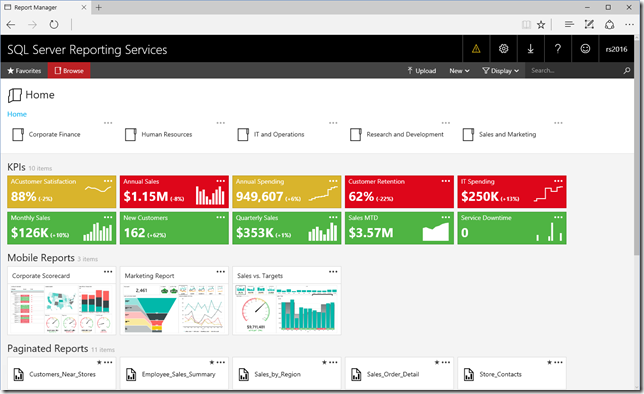
2. Support for Mobile reports which is based on Datazen technology, optimized for mobile devices and form factors and provide an optimal experience for users accessing BI reports on mobile devices.

3. Design mobile reports using SQL Server Mobile Report Publisher.
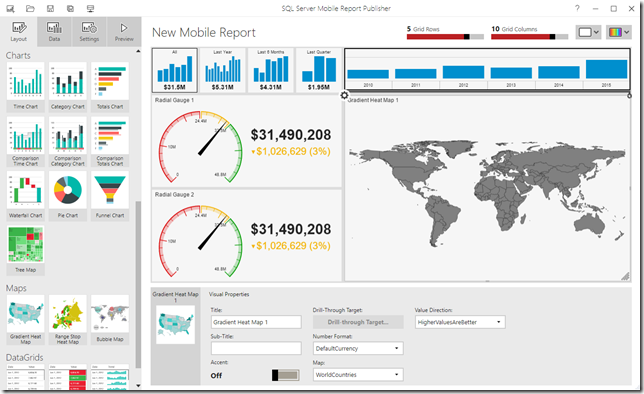
4. For more enhancements check [the SSRS Blog].
–> Few more enhancements in other areas:
1. SQL Server Managed Backup to Microsoft Azure uses the new block blob storage for backup files instead of page blobs. Block blobs have a size limitation of 200GB per blob, whereas page blobs have a size limitation per blob of 1 TB.
2. JSON support now includes the WITHOUT_ARRAY_WRAPPER option, to remove the square brackets that surround the JSON output of the FOR JSON clause by default.
3. With Stretch Database you can specify a predicate to select rows to archive from a table that contains both historical and current data, by using the ALTER TABLE statement.
– You can also unmigrate the data that Stretch Database has migrated to Azure.
– You can now use a federated service account for SQL Server to communicate with the remote Azure SQL Database server when certain conditions are true, by using ALTER DATABASE statement.
4. Analysis Services (SSAS), new functionality for Tabular models at the 1200 compatibility level, including the first wave of JSON scripting in SSMS, DirectQuery, Calculated Tables in SSDT, and other smaller enhancements that add up to a better model design experience.
5. Integration Services (SSIS), enhancements include HDFS-to-HDFS copy support, as well as Hadoop connectivity improvements, including ARVO file format support and Kerberos authentication support.
I’ve covered very few and important points here, you can check all the updates here in [SQL Server blog for CTP 3.2] with details.
For all these new features released in SQL Server 2016, check my blog posts here.
So, download the Preview today and start playing with the new features and plan your DB migration/upgrade.
SQL Server 2016 CTP 3.1 update is here | download now
Microsoft today (01-Dec-2015) announced the CTP 3.1 update of the recently and initially released Community Technology Preview (CTP) 2.x & 3.0 versions of SQL Server 2016.
[Register and Download the CTP 3.1 Evaluation version (180 days) here]
–> Direct download link (~2.58 GB):
– Download the single ISO: SQLServer2016CTP3.0-x64-ENU.iso
– Or download both EXE & BOX files:
– – Box file SQLServer2016-x64-ENU.box
– – EXE file SQLServer2016-x64-ENU.exe
–> Check version and SQL build:
select @@version
Microsoft SQL Server 2016 (CTP3.1) – 13.0.800.111 (X64) Nov 21 2015 16:40:33 Copyright (c) Microsoft Corporation Enterprise Evaluation Edition (64-bit) on Windows 10 Enterprise 6.3 (Build 10240: )
–> Following are enhancements in some areas:
1. New In-Memory OLTP improvements, including Unique indexes, LOB data types, and Indexes with NULLable key columns.
2. The COMPRESS and DECOMPRESS functions convert values into and out of the GZIP algorithm.
3. Programmability improvement for DATEDIFF_BIG and AT TIME ZONE functions.
4. New view sys.time_zone_info added to support date and time interactions.
5. Enhancements to StretchDB, compatible with AlwaysOn and unmigrate the data that Stretch Database has migrated to Azure.
6. Enhancements to SQL Server Analysis Services (SSAS), upgrade your existing Tabular models from 1100/1103 to 1200 compatibility level, Roles support for Tabular 1200 model, and a JSON editor for SSDT.
7. PowerPivot and SSRS/Power View are now available for SharePoint Server 2016 Beta 2.
I’ve covered very few and important points here, you can check all the updates here in [SQL Server blog for CTP 3.1] with details.
For all these new features released in SQL Server 2016, check my blog posts here.
So, download the Preview today and start playing with the new features and plan your DB migration/upgrade.
New syntax option “IF EXISTS” with DROP and ALTER statements – in SQL Server 2016
I was going through some sample Scripts provided by Microsoft SQL Server team on their site, and was checking the JSON Sample Queries procedures views and indexes.sql script file.
And the following ALTER statement grabbed my attention:
ALTER TABLE Sales.SalesOrder_json
DROP
	COLUMN IF EXISTS vCustomerName,
	CONSTRAINT IF EXISTS [SalesOrder reasons must be formatted as JSON array],
	COLUMN IF EXISTS SalesReasons,
	CONSTRAINT IF EXISTS [SalesOrder items must be formatted as JSON array],
	COLUMN IF EXISTS OrderItems,
	CONSTRAINT IF EXISTS [SalesOrder additional information must be formatted as JSON],
	COLUMN IF EXISTS Info
GO
The above DDL Query is removing Columns and Constraints form the table, and if you notice there is a new option after the COLUMN/CONSTRAINT name i.e. IF EXISTS.
And same with the DROP statements:
DROP INDEX IF EXISTS idx_SalesOrder_json_CustomerName ON Sales.SalesOrder_json
go
DROP PROCEDURE IF EXISTS Person.PersonList_json
go
DROP VIEW IF EXISTS Sales.vwSalesOrderInfoRel_json
go
DROP FUNCTION IF EXISTS dbo.ufnToRawJsonArray
go
Here also it is dropping Database objects conditionally by using IF EXISTS in between the object type and name.
To make sure I checked the MSDN BOL and found that this is a new feature added to the SQL Server 2016 version. And as per this msdn article this enhancement has been add with the CTP 3 release.
For IF EXISTS option/syntax the MSDN BoL mentions: Conditionally drops the [object] only if it already exists.
This is a very helpful enhancement added to these DDL statements and would reduce a lot of effort and coding lines.
–> Previously with ALTER statement, to DROP any item you had to check the existence of it with a separate IF EXISTS() statement, and then DROP it within the IF condition, like:
IF EXISTS (select * from INFORMATION_SCHEMA.COLUMNS WHERE COLUMN_NAME = 'vCustomerName')
BEGIN
	ALTER TABLE Sales.SalesOrder_json
	DROP COLUMN vCustomerName;
END
GO
This is only for one column, to DROP other 6 columns/constraints you will have to repeat this 6 more times.
–> Similarly for the DROP statement, you would need to do:
IF EXISTS (select * from INFORMATION_SCHEMA.ROUTINES WHERE ROUTINE_NAME = 'PersonList_json')
BEGIN
	DROP PROCEDURE Person.PersonList_json
END
GO
But if you check the ALTER statement with the IF EXISTS option at the top it is doing 7 ALTER DROP operations with one statement and within a single transaction. And similarly the DROP statement with this IF EXISTS option is doing it in one go.
Thus, the new IF EXISTS syntax can be used optionally to check & drop items form a single statement with these DDLs:
1. ALTER: statement with DROP COLUMN & DROP CONSTRAINT option.
2. DROP: statement with all Database objects, like: AGGREGATE, ASSEMBLY, COLUMN, CONSTRAINT, DATABASE, DEFAULT, FUNCTION, INDEX, PROCEDURE, ROLE, RULE, SCHEMA, SECURITY POLICY, SEQUENCE, SYNONYM, TABLE, TRIGGER, TYPE, USER, and VIEW.
You can download the SQL Server 2016 sample Database and files from this link.
Check more new features of SQL Server 2016 here: https://sqlwithmanoj.com/sql-server-2016-articles/
Store JSON data in a table, OPENJSON and JSON_Value functions | SQL Server 2016 – Part 4
In my previous posts I talked about how to [export] a Table or Query data into JSON string format, and [read it back] from JSON string to Relational-table format, and with [nested elements].
Here, in this post I’ll show how we can store JSON data in a normal table column, just like you store XML data.
XML data is stored in a column of XML datatype which also check the validity of the XML data to be stored. But to store JSON data there is no new datatype introduced, JSON can be stored in an NVARCHAR datatype column just like a plain text, and to validate it you can add a CHECK constraint on it.
IsJSON() function: can be used as a CHECK constraint on the columns that contain JSON string which will validate if the JSON string is in proper format or not.
As we will need AdvantureWorks2014 Sample Database in our example below, we need to upgrade its Compatibility from SQL 2014 to SQL 2016, i.e. from level 120 to 130, like:
USE [master]
GO

ALTER DATABASE [AdventureWorks2014] SET COMPATIBILITY_LEVEL = 130
GO
You can download AdvantureWorks2014 sample Database from Microsoft [CodePlex site].
–> Ok, now let’s create a new Table with OrderDetailsJSON column for storing JSON string with a CHECK constraint on it:
USE [AdventureWorks2014]
GO

CREATE TABLE CustomerOrder (
	BusinessEntityID INT,
	FirstName NVARCHAR(50),
	MiddleName NVARCHAR(50),
	LastName NVARCHAR(50),
	EmailPromotion INT,

	OrderDetailsJSON NVARCHAR(MAX) -- normal column with NVARCHAR datatype
		CHECK ( IsJSON ( OrderDetailsJSON ) = 1 ) -- CHECK Constraint to validate JSON string
)
–> Let’s create a sample record-set with JSON data in OrderDetailsJSON column. We will use FOR JSON AUTO option to convert relational data to JSON string for our example, as shown below:
;WITH CTE_PersonContact AS (
	SELECT
		BusinessEntityID, FirstName, MiddleName, LastName, EmailPromotion,
		OrderDetailsJSON =
		(	SELECT SalesOrderID, OrderDate, SubTotal, TaxAmt, TotalDue
			FROM [AdventureWorks2014].[Sales].[SalesOrderHeader] S
			WHERE S.CustomerID = P.BusinessEntityID
			FOR JSON AUTO -- here
		) -- our JSON column
	FROM [Person].[Person] P
)
INSERT INTO CustomerOrder
SELECT
	BusinessEntityID, FirstName, MiddleName, LastName, EmailPromotion,
	OrderDetailsJSON
FROM CTE_PersonContact
WHERE OrderDetailsJSON IS NOT NULL

-- (9778 row(s) affected)
–> Check the above inserted records with the OrderDetailsJSON column containing data in JSON format:
SELECT * FROM CustomerOrder

-- (9778 row(s) affected)

–> Let’s Query back the JSON data from the OrderDetailsJSON column with other columns in relational form, by using OPENJSON() function. As for each Customer it can contain multiple orders we will get multiple rows for each Customer and multiple columns as per defined in the JSON string:
SELECT
	C.BusinessEntityID, C.FirstName, C.MiddleName, C.LastName, C.EmailPromotion,
	J.SalesOrderID, J.OrderDate, J.SubTotal, J.TaxAmt, J.TotalDue
FROM CustomerOrder C
CROSS APPLY OPENJSON (OrderDetailsJSON)
WITH (
	SalesOrderID INT,
	OrderDate DATETIME,
	SubTotal MONEY,
	TaxAmt MONEY,
	TotalDue MONEY
) AS J

-- (17463 row(s) affected)

–> And if you want to get just one Order per Customer then you can use following Query, by using JSON_Value() function and by specifying the array key pointer/position to get the first value fro the array:
SELECT
	C.BusinessEntityID, C.FirstName, C.MiddleName, C.LastName, C.EmailPromotion,
	SalesOrderID		= JSON_Value (OrderDetailsJSON, '$[0].SalesOrderID'),
	OrderDate			= JSON_Value (OrderDetailsJSON, '$[0].OrderDate'),
	SubTotal			= JSON_Value (OrderDetailsJSON, '$[0].SubTotal'),
	TaxAmt				= JSON_Value (OrderDetailsJSON, '$[0].TaxAmt'),
	TotalDue			= JSON_Value (OrderDetailsJSON, '$[0].TotalDue')
FROM CustomerOrder C

-- (9778 row(s) affected)
We can also use JSON string for passing multiple values from a single parameter in an Stored Procedure to implement dynamic parameters functionality as a workaround, check the [blog post] for the same.



Current Visitors

StatCounter …since April 2012


 Leisure blog: Creek & Trails
- NMDC Hyderabad Marathon – My first 42k FM, cramps, training and fuelling
- Singapore (Part 2) – 6 days itinerary, sightseeing & attractions
- Singapore (Part 1) – Tickets, Visa, Hotel, Forex Card/Cash, Metro/Bus cards
- I got full refund of my flight tickets during COVID lockdown (AirIndia via MakeMyTrip)
- YouTube – Your Google Ads account was cancelled due to no spend
- YouTube latest update on its YPP (YouTube Partner Program) which may affect your channel
- Starting your own blog !!!
- How to file ITR (Income Tax Return) online AY 2017-18 (for simple salaried)
- Scam – Become a kin/hier and earn a fortune – via LinkedIn and Email
- Places to visit in and around Vizag (aka Visakhapatnam)
 SQL with Manoj