Archive
SQL Basics – Difference between WHERE, GROUP BY and HAVING clause
All these three Clauses are a part/extensions of a SQL Query, are used to Filter, Group & re-Filter rows returned by a Query respectively, and are optional. Being Optional they play very crucial role while Querying a database.
–> Here is the logical sequence of execution of these clauses:
1. WHERE clause specifies search conditions for the rows returned by the Query and limits rows to a meaningful set.
2. GROUP BY clause works on the rows returned by the previous step #1. This clause summaries identical rows into a single/distinct group and returns a single row with the summary for each group, by using appropriate Aggregate function in the SELECT list, like COUNT(), SUM(), MIN(), MAX(), AVG(), etc.
3. HAVING clause works as a Filter on top of the Grouped rows returned by the previous step #2. This clause cannot be replaced by a WHERE clause and vice-versa.
As these clauses are optional thus a minimal SQL Query looks like this:
SELECT *
FROM [Sales].[SalesOrderHeader]
This Query returns around 32k (thousand) rows form SalesOrderHeader table. Thus, if somebody wants to do some analysis on this big row-set it would be very difficult and time consuming for him.
–> Use Case: Let’s say a Sales department wants to get a list of such Customers who bought more number of items last year, so that they can sell more some stuff to them this year. How they will go ahead?
1. Using WHERE clause: First of all they will need to apply filter on above ~32k rows and get list of Orders that were made last year (i.e. in 2014) to limit the row-set, like:
SELECT *
FROM [Sales].[SalesOrderHeader]
WHERE OrderDate >= '2014-01-01 00:00:00.000'
AND OrderDate < '2015-01-01 00:00:00.000'
This Query still gives ~12k records and its still difficult to identify such Customers who have more orders.
2. Using GROUP BY clause: Here we need to group the Customers with their number of Orders, like:
SELECT CustomerID, COUNT(*) AS OrderNos
FROM [Sales].[SalesOrderHeader]
WHERE OrderDate >= '2014-01-01 00:00:00.000'
AND OrderDate < '2015-01-01 00:00:00.000'
GROUP BY CustomerID

This query still returns ~10k records, and I’ve go through the entire list of records to identify such records. Is there any way where I can still filter out the unwanted records with lesser count?
3. USING HAVING clause: This will works on top of GROUP BY clause to filter the grouped records onCOUNT(*) AS OrderNos column values (like a WHERE clause), like:
SELECT CustomerID, COUNT(*) AS OrderNos
FROM [Sales].[SalesOrderHeader]
WHERE OrderDate >= '2014-01-01 00:00:00.000'
AND OrderDate < '2015-01-01 00:00:00.000'
GROUP BY CustomerID
HAVING COUNT(*) > 10

Thus, by using all these these clauses we can reduce and narrow down the row-set to do some quick analysis.
Check this video tutorial on WHERE clause and difference with GROUP BY & HAVING clause.
What is SQL, PL/SQL, T-SQL and difference between them
Today I got an email from a student who is pursuing his Bachelors degree in Computer Application (BCA). He visited my blog and sent me an email regarding his confusion with terms like SQL, T-SQL, PL/SQL, and asked me what is differences between them and how are they related? I had a chat with him and told the basic differences, but he further asked me how they are related to Microsoft SQL Server, Oracle, MySQL, etc? As he is studying SQL only based upon Oracle in his course curriculum, these all terms were not clear to him, so I cleared all his doubts while chatting with him.
After a while I had a same reminiscence that when I was a student I also had these doubts and confusions, and there was nobody to guide me, but I gradually came to know about this and it took some time. Thus, I’am taking this opportunity to put all these things together here in a single blog post for my readers (specially students) and for my reference as well.
–> SQL: stands for Structured Query Language and is pronounced as Sequel, and in early days it was also known as SEQUEL only.
– IBM in early 1970s developed SEQUEL which stands for Structured English QUEry Langauge for their RDBMS. The acronym was later changed to SQL, as SEQUEL was already trademarked by some UK based aircraft company.
–> PL/SQL: stands for Procedural Language/Structured Query Language and is used with Oracle database to create PL/SQL units such as Procedures, Functions, Packages, Types, Triggers, etc. which are stored in the database for reuse by applications that use any of the Oracle Database programmatic interfaces.
– Oracle in 1970s known as “Relational Software” saw SQL potential and influenced by Boyce, Codd and Chamberlin developed their own RDBMS product which was commercially available as Oracle Database. Oracle is supported on many Operating Systems like Windows, Linux, Solaris, AIX, OpenVMS, etc. [Oracle Database]
–> DB2: IBM during early 1980s made SQL commercially available with its product known as IBM DB2 from its prototype “System R”. [IBM DB2]
–> SQL Standardization: Later in 1986 SQL was adopted as a Standard by ANSI (American National Standards Institute) as SQL-86, and today the latest Standard is known as SQL:2011
✔ As a standarg SQL should support following:
– Language elements: Clauses, Expressions, Predicates, Queries, Statements.
– Operators: =, , >, =, <=, BETWEEN, LIKE, IN, NOT IN, IS, IS NOT, AS, etc.
– Conditional expressions: CASE, IF ELSE
– Queries: which include SELECT, FROM, WHERE, GROUP BY, HAVING, ORDER BY, etc.
– Data Types: Numeric, Char, Bit, Date and Time
– NULL or 3VL (Three value Logic)
– DDL, DML, TCL
–> T-SQL: stands for Transact-SQL, and is Sybase & Microsoft’s proprietary extension. T-SQL is very similar to PL/SQL, one can create T-SQL units such as Procedures, Functions, Types, Triggers, etc. as mentioned above.
– In 1987 Sybase shipped their first RDBMS product known as Sybase SQL Server. [Sybase]
– In 1988-89 Microsoft had an agreement with Sybase and ported the Sybase RDBMS to OS/2 platform and marketed it as Microsoft SQL Server 1.0, which was equivalent to Sybase SQL Server 3.0. [Microsoft SQL Server]
– In 1993 Sybase and Microsoft dissolved their partnership, and Microsoft bought the SQL Server code base from Sybase and both went different streams to develop their own product.
– Till SQL Server 2000 Microsoft has Sybase code base, and this was completely written in SQL Server 2005.
– Microsoft SQL Server is only supported on Windows Operating Systems.
–> MySQL: was founded by a Swedish Company MySQL AB in 1995 and is the most widely used open-source RDBMS. The MySQL development project has made its source code available under the terms of the GNU General Public License. MySQL does not currently comply with the full SQL standard. In 2008 Oracle corporation completely acquired MySQL. MySQL is supported on many Operating Systems like Windows, Linux, Solaris, OS X and FreeBSD. [MySQL.com]
–> FoxPRO and dBase: were very popular DataBase Management System (DBMS) products in mid 1980s and 1990s. They lack some RDBMS features and are out of support now, but are still being used in various legacy systems.
– FoxPRO is supported by Microsoft and was a text-based Procedural programming language and DBMS, for MD DOS, Windows, and UNIX. Microsoft Visual FoxPRO 9.0 being the latest and probably the last version published in 2007. [FoxPRO msdn]
– dBase was a very popular DBMS package including core Database engine, a Query system, a Forms engine and a xBase programming language with *.dbf file format. [dBase.com]
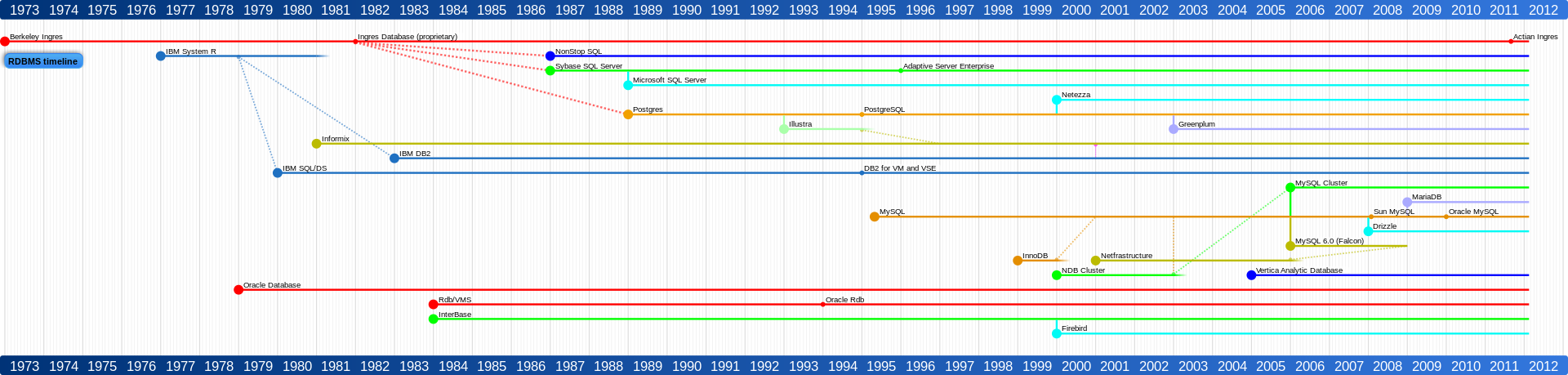
–> Here is a complete timeline that shows SQL and how it got evolved as different Products by different Vendors/Companies (click on the image to expand):
–> There are many other popular SQL Products/System softwares available in market, and major of them are:
1. Oracle database
2. Microsoft SQL Server
3. IBM DB2
4. MySQL
5. PostgreSQL
6. Teradata
Create a software development environment with a tool such as Visual Studio and access it from any where on any device on your hosted virtual desktop from CloudDesktopOnline.com. Also, if you prefer a server, try Apps4Rent.
SQL Error – SQLState = S0002 NativeError = 208 [SQL Server Native Client 11.0][SQL Server]Invalid object name ‘xyztable’ Unable to resolve column level collations
While working with the BCP command to dump data from a Source table to a data file I was getting some errors.
I was trying to execute following BCP command from SSMS by using xp_cmdshell Extended Stored Procedure:
DECLARE @str VARCHAR(1000)
SET @str = 'bcp "Select * FROM dbo.xyzTable" '
	+ 'queryout "D:\BulkOut\xyzTable.dat" '
	+ '-S "sourceServer.database.windows.net" '
	+ '-U "saUserName" -P "saPassword"  -f "D:\Bulk\xyzTable.fmt" '

EXEC xp_cmdshell @str
GO
… and encountered following error:
NULL
Starting copy…
SQLState = S0002, NativeError = 208
Error = [Microsoft][SQL Server Native Client 11.0][SQL Server]Invalid object name ‘xyzTable’.
SQLState = S1000, NativeError = 0
Error = [Microsoft][SQL Server Native Client 11.0]Unable to resolve column level collations
NULL
BCP copy out failed
NULL
After searching a bit on Internet I found that I missed to provide the Database name, thus the error “Invalid object name”. What a silly mistake 🙂
So, there are 2 ways you can provide Database name while querying your table.
1. First is by prefixing Database name with the SELECT statement.
2. Second is by using the -d flag with the Database name.
let’s check both the options here:
-- 1. By Providing DB name with the SELECT statement:
DECLARE @str VARCHAR(1000)
SET @str = 'bcp "Select * FROM DBName.dbo.xyzTable" ' -- DB name SELECT stmt
	+ 'queryout "D:\BulkOut\xyzTable.dat" '
	+ '-S "sourceServer.database.windows.net" '
	+ '-U "saUserName" -P "saPassword"  -f "D:\Bulk\xyzTable.fmt" '

EXEC xp_cmdshell @str
GO

-- 2. By providing DB name as an argument with the BCP statement:
DECLARE @str VARCHAR(1000)
SET @str = 'bcp "Select * FROM dbo.xyzTable" '
	+ 'queryout "D:\BulkOut\xyzTable.dat" -d "DBName" ' -- DB name with -d flag
	+ '-S "sourceServer.database.windows.net" '
	+ '-U "saUserName" -P "saPassword"  -f "D:\Bulk\xyzTable.fmt" '

EXEC xp_cmdshell @str
GO
As I saw lot of people faced the same error and there was not proper answer, so I thought to blog it here.
>> Check & Subscribe my [YouTube videos] on SQL Server.
SQL Error – Msg 15281, Level 16, State 1, Procedure xp_cmdshell, Line 1 SQL Server blocked access because this component is turned off
I was trying to execute a Windows Shell command from SSMS by using xp_cmdshell Extended Stored Procedure and encountered an error highlighted below in RED color:
EXEC xp_cmdshell 'DIR *.exe'
Msg 15281, Level 16, State 1, Procedure xp_cmdshell, Line 1
SQL Server blocked access to procedure ‘sys.xp_cmdshell’ of component ‘xp_cmdshell’ because this component is turned off as part of the security configuration for this server. A system administrator can enable the use of ‘xp_cmdshell’ by using sp_configure.
Even if you are a sysadmin and as by default this option is turned off after a new SQL Server installation, you need to manually turn on this option, let’s see how:
-- To change the advanced options:
EXEC sp_configure 'show advanced options', 1
GO
-- To update the current value for advanced options:
RECONFIGURE
GO
-- To enable the xp_cmdshell option:
EXEC sp_configure 'xp_cmdshell', 1
GO
-- To update the new configured value for xp_cmdshell option:
RECONFIGURE
GO
–> If you want to suppress the messages returned by the xp_cmdshell extended Stored Procedure use the optional parameter no_output.
exec xp_cmdshell 'DIR *.exe', no_output
Please Note: If xp_cmdshell is executed within a BATCH and returns an error, the complete batch will fail. In earlier versions of SQL Server the batch used to continue executing.
If the user is not member of sysadmin role and want to use this extended SP then a Proxy account credential need to be created by using sp_xp_cmdshell_proxy_account. Check this KB article for the same: link.
Error Msg 7302, Cannot create an instance of OLE DB provider “Microsoft.Jet.OLEDB.4.0” for linked server – MSDN TSQL forum
–> Question:
Below is the script to export data from Access 2003 using SQL server 2012 in SQL Server Management Studio:
EXEC sp_addlinkedserver
   @server = 'SNE_SNAP2014',
   @provider = 'Microsoft.Jet.OLEDB.4.0',
   @srvproduct = 'OLE DB Provider for Jet',
   @datasrc = 'T:\Data Management\Project -SNAP SNE\SNE SNAP2014 T-Drive.mdb'
GO
this results into following error:
Msg 7302, Level 16, State 1, Line 2
Cannot create an instance of OLE DB provider “Microsoft.Jet.OLEDB.4.0” for linked server “SNE_SNAP2014”.
–> My Answer:
Please make sure that both Access & SQL Server 2012 should be on same 32 or 64 bit architecture.
Check this blog post for resolution and more info: https://sqlwithmanoj.com/2012/07/10/querying-excel-2010-from-sql-server-in-64-bit-environment/
Ref Link.



Current Visitors

StatCounter …since April 2012


 Leisure blog: Creek & Trails
- NMDC Hyderabad Marathon – My first 42k FM, cramps, training and fuelling
- Singapore (Part 2) – 6 days itinerary, sightseeing & attractions
- Singapore (Part 1) – Tickets, Visa, Hotel, Forex Card/Cash, Metro/Bus cards
- I got full refund of my flight tickets during COVID lockdown (AirIndia via MakeMyTrip)
- YouTube – Your Google Ads account was cancelled due to no spend
- YouTube latest update on its YPP (YouTube Partner Program) which may affect your channel
- Starting your own blog !!!
- How to file ITR (Income Tax Return) online AY 2017-18 (for simple salaried)
- Scam – Become a kin/hier and earn a fortune – via LinkedIn and Email
- Places to visit in and around Vizag (aka Visakhapatnam)
 SQL with Manoj