Archive
Jump/Gap Issue with IDENTITY property in SQL Server 2012 … and its workaround (not a bug)
Sometime back there was discussion going on in an SQL Server forum regarding issues with IDENTITY property in the new SQL Server 2012. The issue was that, when restarting SQL Server (or service) the IDENTITY value in a particular table having IDENTITY column jumps to a higher random number and starts from there.
I tried to reproduce this issue, the SQL Server version I’m using is as follows:
Microsoft SQL Server 2012 RC0 - 11.0.1750.32 (X64)
	Nov  4 2011 17:54:22
	Copyright (c) Microsoft Corporation
	Business Intelligence Edition (64-bit) on Windows NT 6.1
	(Build 7601: Service Pack 1)
I reproduced the issue with following code:
-- CREATE a test table:
CREATE TABLE TEST_IDENTITY (
	ID INT IDENTITY(1,1),
	NAME VARCHAR(200)
	);

-- INSERT some records:
INSERT INTO TEST_IDENTITY (NAME)
SELECT 'Manoj Pandey'

INSERT INTO TEST_IDENTITY (NAME)
SELECT 'Gaurav Pandey'
GO

-- Check recently inserted records:
SELECT * FROM TEST_IDENTITY -- 2 records, with ID value 1, 2.

-- Check the current IDENTITY value:
DBCC CHECKIDENT ('TEST_IDENTITY')
--Checking identity information: current identity value '2', current column value '2'.
--DBCC execution completed. If DBCC printed error messages, contact your system administrator.
GO


-- RESTART SQL Server and check the current IDENTITY value:
DBCC CHECKIDENT ('TEST_IDENTITY')
--Checking identity information: current identity value '11', current column value '2'.
--DBCC execution completed. If DBCC printed error messages, contact your system administrator.

-- INSERT a new record:
INSERT INTO TEST_IDENTITY (NAME)
SELECT 'Garvit Pandey'
GO

-- Check recently inserted records:
SELECT * FROM TEST_IDENTITY -- 3 records, with ID value 1, 2, 12.
GO

--// Final cleanup
DROP TABLE TEST_IDENTITY
Finally I got the following output:
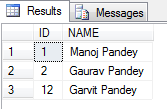
As you can see by running the above test before I restarted SQL Server the IDENTITY value was 2, but when I restarted the IDENTITY value changed to 11.
Thus the new records was inserted with value = 12.
The above bug/issue has been logged in the Microsoft Connect site, [here].
Workaround: Right now there is no fix for this, so you need to check all tables in you database every time your SQL Server restarts and reseed the correct IDENTITY value. Check my blog post to reseed the IDENTITY value.
GO is not a valid TSQL statement
SQL Server support 2 commands that are not Transact SQL Statements, but are recognized by SQL Server utilities such as: SQL Server Management Studio (SSMS), sqlcmd and osql.
These are:
1. GO (Batch separator)
2. \ (Backslash)
The above 2 keywords can be used to facilitate the readability and execution of batches and scripts.
–> “GO” (batch separator):
– “GO” is not a valid Transact-SQL statement.
– SQL Server utilities interpret “GO” as a signal that they should send the current batch of Transact-SQL statements to an instance of SQL Server.
– The “GO” command is never send to the server.
– Scope of Variables is limited to its batch, once defined in a batch they cannot be used after the “GO” command in another batch.
– You can also use the “GO” command to execute same batch multiple times. Just add a number after it, like: “GO 100” will execute the batch 100 times.
– Command “GO” can even be changed with some other name. In SSMS goto menu, select Tools -> Options -> Query Execution: Here you change the batch separator by-default “GO” to something else. But the SQL Scripts you’ve created earlier will fail if they contain “GO” keyword now.
–> \ (Backslash): You can break a long string into multiple lines for good readability.
sqlcmd & osql are command line utilities so the parameters passed to them and options they take should not be split into multiple lines. Otherwise it may raise an error or you may get unexpected results.
To maintain formatting and readability of your SQL statements you can use “\” (backslash) in your SQL statements when putting them as parameters in sqlcmd or osql utilities.
All about IDENTITY columns in SQL Server
We know that IDENTITY column property creates an IDENTITY column in a table. This property can be used with the CREATE TABLE and ALTER TABLE Transact-SQL statements.
But there are certain things that some of us are not aware of about the IDENTITY property.
Do you know that:
1. Not only INT, but you can also use IDENTITY property with other datatypes like: SMALLINT, TINY INT, BIGINT, NUMERIC and DECIMAL.
2. System function @@IDENTITY returns the last identity value used by the current session.
3. Function IDENT_SEED returns the seed value which is the starting number of IDENTITY column, default is 1.
4. Function IDENT_INCR returns the increment value of IDENTITY column, default is 1.
5. Function IDENT_CURRENT accepts table name as parameter and returns the last identity value inserted into that table.
6. IDENTITY() function as mentioned above can be used with CREATE/ALTER TABLE statements, but it can also be used with SELECT INTO statement while creating a table on the fly with SELECT statement. Check [here].
7. With INSERT statement you can’t provide IDENTITY column name and value, unless you explicitly SET IDENTITY_INSERT ON.
8. SET IDENTITY_INSERT ON does not work with Table Variables.
9. Keyword IDENTITYCOL automatically refers to the IDENTITY column of the table.
–> Let’s check how we can use IDENTITYCOL keyword mentioned on 9th point discussed above:
-- Using IDENTITYCOL at WHERE clause and ORDER BY clause:
SELECT *
FROM [Sales].[SalesOrderDetail]
WHERE IDENTITYCOL <= 100
ORDER BY IDENTITYCOL


-- Using IDENTITYCOL with COUNT() function instead of the original column name & with Column name separately:
SELECT
	SalesOrderID,
	COUNT(IDENTITYCOL) AS Cnt1,
	COUNT(SalesOrderDetailID) AS Cnt2
FROM [Sales].[SalesOrderDetail]
WHERE ModifiedDate BETWEEN '01/01/2006' AND '02/01/2006'
GROUP BY SalesOrderID


-- Using IDENTITYCOL at column level and at JOIN's ON clause:
SELECT
	D.SalesOrderID, D.IDENTITYCOL, D.OrderQty, D.UnitPrice, D.UnitPriceDiscount, [ProductID],
	H.AccountNumber, H.SubTotal, H.TotalDue
FROM [Sales].[SalesOrderDetail] D
INNER JOIN [Sales].[SalesOrderHeader] H
	ON H.IDENTITYCOL = D.SalesOrderID
WHERE H.OrderDate BETWEEN '01/01/2006' AND '02/01/2006'
Check the output of the last 2 SQL statements:
– The 1st output shows same COUNTS for both the columns.
– And 2nd output shows the original name of Column name appearing on the header even when we are using the IDENTITYCOL keyword.

As shown above you don’t have to go, look and type the actual IDENTITY column names of different tables and can be taken care of by using the common IDENTITYCOL keyword.
Check the same demo here in YouTube:
SQL Server 2012 (a.k.a. Denali) | “SET FMTONLY ON/OFF” Deprecated | new SPs and DMFs Introduced
While running SQL Server Profiler to know what’s running behind the Application you might have noticed “SET FMTONLY ON” with other SQL statements. Most of you would be knowing this, the main point of putting this post is to let people know that this feature is deprecated in Denali and not to use it in new development work.
“SET FMTONLY ON” Returns only metadata to the client. It can be used to test the format of the response without actually running the query.
Let’s check how it is being used and what it returns:
USE AdventureWorks2012;
GO

-- Simple SELECT without using the "SET FMTONLY ON", OFF by-default:
SELECT TOP 10
	BusinessEntityID, Title, FirstName, MiddleName, LastName, Suffix, EmailPromotion
FROM [Person].[Person]

-- Using "SET FMTONLY":
SET FMTONLY ON;

SELECT TOP 10
	BusinessEntityID, Title, FirstName, MiddleName, LastName, Suffix, EmailPromotion
FROM [Person].[Person]

SET FMTONLY OFF;
GO
Output:

This feature is deprecated in Denali and should not be used in production code.
Now in replacement to this Denali has introduced 4 new objects to get the same information in easy and more informative way.
These are as follows:
--> 1. SP: sp_describe_first_result_set
-- Returns the metadata for the first possible result set of the Transact-SQL batch.
EXEC sp_describe_first_result_set @tsql = N'SELECT * FROM HumanResources.Employee'

--> 2. SP: sp_describe_undeclared_parameters
-- Returns a result set that contains metadata about undeclared parameters in a Transact-SQL batch.
EXEC sp_describe_undeclared_parameters @tsql = N'SELECT * FROM HumanResources.Employee where BusinessEntityID = @id AND BirthDate > @dt'

--> 3. DMF: sys.dm_exec_describe_first_result_set()
-- This is a DMF (Dynamic Management Function) which takes a Transact-SQL statement as a parameter and describes the metadata of the first result set for the statement.
SELECT * FROM sys.dm_exec_describe_first_result_set (N'SELECT * FROM HumanResources.Employee', NULL, 0)
-- It is similar to the SP sp_describe_first_result_set mentioned above.

--> 4. DMF: sys.dm_exec_describe_first_result_set_for_object()
-- This is a DMF (Dynamic Management Function) which takes an @object_id as a parameter and describes the first result metadata for the module with that ID.
SELECT * FROM sys.dm_exec_describe_first_result_set_for_object(OBJECT_ID('uspGetEmployeeManagers'), 0)
-- It has same set definition as sys.dm_exec_describe_first_result_set() DMF mentioned above.


-- The last mentioned DMF can also be used with the sys.procedures to get the metadata of the Stored Procedures:
SELECT p.name, X.*
FROM sys.procedures AS p
CROSS APPLY sys.dm_exec_describe_first_result_set_for_object(p.object_id, 0) AS X
… Just execute each one of these and check what all information they provide.
I really like these SPs and DM Functions, will be very useful in Metadata based based Dev work.
More info on this check MS BOL: http://msdn.microsoft.com/en-us/library/ms173839.aspx
SQL Server 2012 (a.k.a Denali) – New feature | Enhanced OVER() Clause – Part1
OVER() clause in SQL Server was introduced in version 2005 and it was the same in 2008 and even 2008-R2.
Ranking functions like ROW_NUMBER(), RANK(), DENSE_RANK() & NTILE() can use the OVER() clause to Parition and Order a record-set before actually applying their logic. Thus a large record-set can be divided into several partitions and calculations can be applied to each set in a set-based approach rather than going with Loops or Cursors.
With the new version of SQL Server i.e. 2012 the OVER() clause has been extended completely to other aggregates, like SUM(), AVG(), etc. Prior to this the OVER() clause can be partially used for these Aggregate Functions.
Here we will see solving a classic problem of calculating Running Totals with this new feature.
I’ve already discussed about solving this problem with JOINS in version 2005,2008, 2008-R2 in my previous post at following [link].
Let’s see how can we use the SUM() Aggregate Function with OVER() clause to solve this:
USE [AdventureWorks2012]
GO

-- With 2012, calculating Running totals by using Aggregare function SUM() with extended Window Function OVER():
;with RunTot as (
	select
		row_number() over(order by s.OrderDate) as row,
		s.SalesPersonID, p.FirstName, p.LastName, s.TotalDue, s.OrderDate
	from Sales.SalesOrderHeader s
	join Person.Person p
	on s.SalesPersonID = p.BusinessEntityID
	)
SELECT
	SalesPersonID, FirstName, LastName, OrderDate, TotalDue,
	SUM(TotalDue) OVER(partition by SalesPersonID ORDER BY row)
FROM RunTot
order by SalesPersonID, row
GO


-- Prior to 2012 calculating Running totals by using SELF-JOIN:
;with RunTot as (
	select
		row_number() over(partition by s.SalesPersonID order by s.OrderDate) as row,
		s.SalesPersonID, p.FirstName, p.LastName, s.TotalDue, s.OrderDate
	from Sales.SalesOrderHeader s
	join Person.Person p
	on s.SalesPersonID = p.BusinessEntityID)
select a.row, a.SalesPersonID, a.FirstName, a.LastName, a.OrderDate, a.TotalDue, sum(b.TotalDue) as RunTotal
from RunTot a
join RunTot b on a.SalesPersonID = b.SalesPersonID and a.row >= b.row
group by a.row, a.SalesPersonID, a.FirstName, a.LastName, a.TotalDue, a.OrderDate
order by a.SalesPersonID, a.row
On comparing performance of both the queries within the batch:
– The first query with SUM() window function costs just 38%.
– While the second query without the SUM() window function by using JOINS costs 68%.
I still like to call SQL Server’s latest release by its code name “Denali”, not “SQL Server 2012”.
Stay tuned to other new features of Denali in my forthcomming posts.
For more information about the OVER() clause check MS BOL link here: http://msdn.microsoft.com/en-us/library/ms189461.aspx



Current Visitors

StatCounter …since April 2012


 Leisure blog: Creek & Trails
- NMDC Hyderabad Marathon – My first 42k FM, cramps, training and fuelling
- Singapore (Part 2) – 6 days itinerary, sightseeing & attractions
- Singapore (Part 1) – Tickets, Visa, Hotel, Forex Card/Cash, Metro/Bus cards
- I got full refund of my flight tickets during COVID lockdown (AirIndia via MakeMyTrip)
- YouTube – Your Google Ads account was cancelled due to no spend
- YouTube latest update on its YPP (YouTube Partner Program) which may affect your channel
- Starting your own blog !!!
- How to file ITR (Income Tax Return) online AY 2017-18 (for simple salaried)
- Scam – Become a kin/hier and earn a fortune – via LinkedIn and Email
- Places to visit in and around Vizag (aka Visakhapatnam)
 SQL with Manoj