SQL Server 2016 CTP 3.2 update is here | download now
Microsoft (on 17-Dec-2015) announced the CTP 3.2 update of the recently and initially released Community Technology Preview (CTP) 2.x & 3.0 versions of SQL Server 2016.
[Register and Download the CTP 3.2 Evaluation version (180 days) here]
–> Direct download link (~2.6 GB):
– Download the single ISO: SQLServer2016CTP3.2-x64-ENU.iso
– Or download both EXE & BOX files:
– – Box file SQLServer2016-x64-ENU.box
– – EXE file SQLServer2016-x64-ENU.exe
–> Check version and SQL build:
select @@version
Microsoft SQL Server 2016 (CTP3.2) – 13.0.900.73 (X64) Dec 10 2015 18:49:31 Copyright (c) Microsoft Corporation Enterprise Evaluation Edition (64-bit) on Windows 10 Enterprise 6.3 (Build 10240: )
–> This release has major enhancements on Reporting Services (SSRS):
1. A new Reporting Services web portal is available, with an updated, modern, portal which incorporates KPIs, Mobile Reports and Paginated Reports.
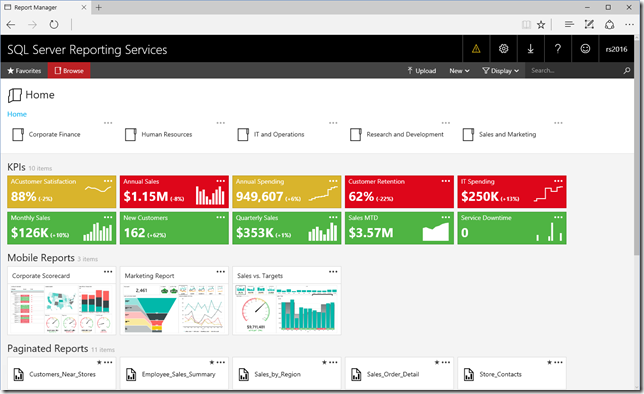
2. Support for Mobile reports which is based on Datazen technology, optimized for mobile devices and form factors and provide an optimal experience for users accessing BI reports on mobile devices.

3. Design mobile reports using SQL Server Mobile Report Publisher.
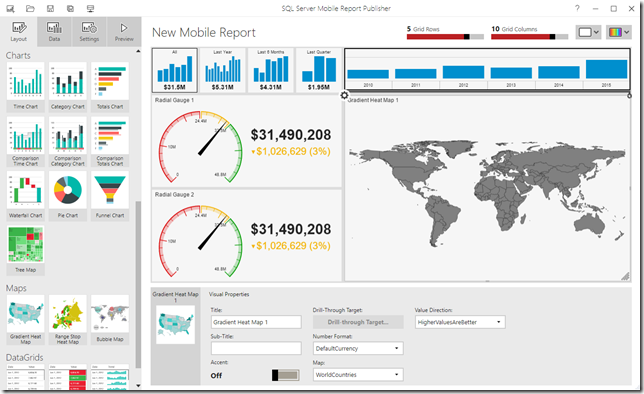
4. For more enhancements check [the SSRS Blog].
–> Few more enhancements in other areas:
1. SQL Server Managed Backup to Microsoft Azure uses the new block blob storage for backup files instead of page blobs. Block blobs have a size limitation of 200GB per blob, whereas page blobs have a size limitation per blob of 1 TB.
2. JSON support now includes the WITHOUT_ARRAY_WRAPPER option, to remove the square brackets that surround the JSON output of the FOR JSON clause by default.
3. With Stretch Database you can specify a predicate to select rows to archive from a table that contains both historical and current data, by using the ALTER TABLE statement.
– You can also unmigrate the data that Stretch Database has migrated to Azure.
– You can now use a federated service account for SQL Server to communicate with the remote Azure SQL Database server when certain conditions are true, by using ALTER DATABASE statement.
4. Analysis Services (SSAS), new functionality for Tabular models at the 1200 compatibility level, including the first wave of JSON scripting in SSMS, DirectQuery, Calculated Tables in SSDT, and other smaller enhancements that add up to a better model design experience.
5. Integration Services (SSIS), enhancements include HDFS-to-HDFS copy support, as well as Hadoop connectivity improvements, including ARVO file format support and Kerberos authentication support.
I’ve covered very few and important points here, you can check all the updates here in [SQL Server blog for CTP 3.2] with details.
For all these new features released in SQL Server 2016, check my blog posts here.
So, download the Preview today and start playing with the new features and plan your DB migration/upgrade.
Exam 70-461, SQL 2014 update – Querying Microsoft SQL Server 2014
In one of my previous post I talked about [Exam 70-461 for SQL Server 2012], and I really got good and big response, with ~250 comments. As SQL Server 2014 got released most of the folks asked me about the certification update.
So here in this post I’ll talk about the same exam 70-461 which is now updated for SQL Server 2014, and Microsoft has not changed the exam code for this version of SQL Server.
This updated certification exam is still based on SQL Server 2012 with new features of SQL Server 2014. Previously with SQL 2012 the exam was divided into 4 modules, please check my previous post, link above. Here with SQL 2014 update the exam is reshaped into 20 modules listed below:
1. Introduction to Microsoft SQL Server 2014
– SQL Server architecture | MSDN
– Editions | MSDN
– SQL Server Management Studio | MSDN
2. Introduction to T-SQL Querying
– T-SQL intro | MSDN
– Set based queries
– Predicate Logic | MSDN
– SELECT statement Logical Ordering | MSDN
3. Writing SELECT Queries
– Simple SELECT queries | MSDN
– Find & eliminate duplicates, and DISTINCT keyword
– Working with Columns
– CASE expressions | MSDN
4. Querying Multiple Tables
– SQL JOINs (INNER, OUTER, CROSS & Self) | MSDN | TechNet
5. Sorting and Filtering Data
– Sorting data with ORDER BY clause | MSDN
– Filtering data with WHERE clause MSDN
– Filtering data with TOP keyword | MSDN
– Using TOP-OFFSET clause | MSDN | TechNet
– Working with NULL/unknown values
6. Working with SQL Server 2014 Data Types
– New SQL 2014 datatypes (Character, Date, Time) | MSDN
– Write Queries using different Datatypes | MSDN
7. Using DML to Modify Data
– Inserting Data | MSDN
– Modifying Data | MSDN
– Deleting Data | MSDN
8. Using Built-In Functions
– SQL 2014 new functions (Conversion, Logical)
9. Grouping and Aggregating Data
– Using Aggregate functions | MSDN
– Using GROUP BY clause | MSDN
– Using HAVING clause | MSDN
10. Using Sub-Queries
– Self-Contained Subqueries | TechNet
– Correlated Subqueries | TechNet
– Using EXISTS() predicate with Subqueries | TechNet
11. Using Table Expressions
– Using Views | MSDN
– Using Inline Table Values functions | MSDN | TechNet
– Using Derived Tables
– Using CTEs (Common Table Expressions) | MSDN | TechNet
12. Using Set Operators
– The UNION, UNION ALL Operator | MSDN
– EXCEPT vs INTERSECT | MSDN
– Using APPLY (CROSS & OUTER) | TechNet
13. Using Window Ranking, Offset, and Aggregate Functions
– Window functions with OVER() clause | MSDN
– More Window functions (ROW_NUMBER, RANK, DENSE_RANK, NTILE) | MSDN
14. Pivoting and Grouping Sets
– Writing queries with PIVOT and UNPIVOT | MSDN | TechNet
– Using Grouping Sets | MSDN | TechNet
15. Querying data with Stored Procedures
– Creating Stored Procedures (SP) | MSDN
– Using Parameters with SPs | MSDN
– Working with Dynamic SQL | MSDN
– EXECUTE | MSDN
– sp_ExecuteSQL | MSDN
16. Programming with T-SQL
– Working with Variables, Batches | MSDN | TechNet
– Using IF conditions | MSDN
– WHILE loops | MSDN
17. Implementing Error Handling
– Using TRY/CATCH block | MSDN
– Working with Error Handling | MSDN
– Returning error information
– Raising user-defined errors and passing system errors | MSDN
18. Implementing Transactions
– Using Transactions | MSDN
– Use of “SET XACT_ABORT” with Transactions | MSDN | MSDN-2
– Effects of Isolation Levels on Transactions | MSDN
19. Improving Query Performance
– Factors affecting Query Performance | MSDN
– Checking Execution plan
– Optimize SQL queries, Query tuning | MSDN
– Optimize SQL Indexes, Index tuning | MSDN
20. Querying SQL Server Metadata
– Querying System Catalog Views | MSDN
– Querying System Catalog Functions | MSDN
– Using System Stored Procedures | MSDN
– Using Dynamic Management Objects (DMVs, DMFs) | MSDN
–> Check SQL Server 2014 videos here:
I’ll be updating the above post going forward and as I post something related to SQL Server 2012 & 2014.
Please provide your comments if you want me to talk about any of the above items, thanks !
SQL Server 2016 CTP 3.1 update is here | download now
Microsoft today (01-Dec-2015) announced the CTP 3.1 update of the recently and initially released Community Technology Preview (CTP) 2.x & 3.0 versions of SQL Server 2016.
[Register and Download the CTP 3.1 Evaluation version (180 days) here]
–> Direct download link (~2.58 GB):
– Download the single ISO: SQLServer2016CTP3.0-x64-ENU.iso
– Or download both EXE & BOX files:
– – Box file SQLServer2016-x64-ENU.box
– – EXE file SQLServer2016-x64-ENU.exe
–> Check version and SQL build:
select @@version
Microsoft SQL Server 2016 (CTP3.1) – 13.0.800.111 (X64) Nov 21 2015 16:40:33 Copyright (c) Microsoft Corporation Enterprise Evaluation Edition (64-bit) on Windows 10 Enterprise 6.3 (Build 10240: )
–> Following are enhancements in some areas:
1. New In-Memory OLTP improvements, including Unique indexes, LOB data types, and Indexes with NULLable key columns.
2. The COMPRESS and DECOMPRESS functions convert values into and out of the GZIP algorithm.
3. Programmability improvement for DATEDIFF_BIG and AT TIME ZONE functions.
4. New view sys.time_zone_info added to support date and time interactions.
5. Enhancements to StretchDB, compatible with AlwaysOn and unmigrate the data that Stretch Database has migrated to Azure.
6. Enhancements to SQL Server Analysis Services (SSAS), upgrade your existing Tabular models from 1100/1103 to 1200 compatibility level, Roles support for Tabular 1200 model, and a JSON editor for SSDT.
7. PowerPivot and SSRS/Power View are now available for SharePoint Server 2016 Beta 2.
I’ve covered very few and important points here, you can check all the updates here in [SQL Server blog for CTP 3.1] with details.
For all these new features released in SQL Server 2016, check my blog posts here.
So, download the Preview today and start playing with the new features and plan your DB migration/upgrade.
SQL DBA – Database restored successfully, but stuck in (Restoring…) state
Today after restoring a database on my DEV machine from a PROD backup, I observed that the database was still showing as Restoring… in Object Explorer, and cannot be used. I again checked in SSMS results pane and it was showing as a successful restore with below message:
100 percent processed.
Processed 21713736 pages for database ‘dbName’, file ‘dbName_Data’ on file 1.
Processed 398 pages for database ‘dbName’, file ‘dbName_log’ on file 1.
RESTORE DATABASE successfully processed 21714134 pages in 506.682 seconds (334.808 MB/sec).
I checked online and found that I was using WITH NO RECOVERY option with my RESTORE DATABASE statement, like:
RESTORE DATABASE db_name WITH NO RECOVERY
… and by using above option, you make the Database to be unused, and allow more Roll Forward actions to continue with the next RESTORE DATABASE statements in sequence.
As this was not my intention, so I can simply mark by Database to stop accepting more Transaction Logs, by forcing the database out of Restoring state, by issuing following statement:
RESTORE DATABASE dbName WITH RECOVERY
Converting database ‘dbName’ from version 706 to the current version 852.
Database ‘dbName’ running the upgrade step from version 706 to version 770.
…
Database ‘dbName’ running the upgrade step from version 851 to version 852.
RESTORE DATABASE successfully processed 0 pages in 1.716 seconds (0.000 MB/sec).
… and my database was out from Restoring… state, and I could use it now !!!
New syntax option “IF EXISTS” with DROP and ALTER statements – in SQL Server 2016
I was going through some sample Scripts provided by Microsoft SQL Server team on their site, and was checking the JSON Sample Queries procedures views and indexes.sql script file.
And the following ALTER statement grabbed my attention:
ALTER TABLE Sales.SalesOrder_json
DROP
	COLUMN IF EXISTS vCustomerName,
	CONSTRAINT IF EXISTS [SalesOrder reasons must be formatted as JSON array],
	COLUMN IF EXISTS SalesReasons,
	CONSTRAINT IF EXISTS [SalesOrder items must be formatted as JSON array],
	COLUMN IF EXISTS OrderItems,
	CONSTRAINT IF EXISTS [SalesOrder additional information must be formatted as JSON],
	COLUMN IF EXISTS Info
GO
The above DDL Query is removing Columns and Constraints form the table, and if you notice there is a new option after the COLUMN/CONSTRAINT name i.e. IF EXISTS.
And same with the DROP statements:
DROP INDEX IF EXISTS idx_SalesOrder_json_CustomerName ON Sales.SalesOrder_json
go
DROP PROCEDURE IF EXISTS Person.PersonList_json
go
DROP VIEW IF EXISTS Sales.vwSalesOrderInfoRel_json
go
DROP FUNCTION IF EXISTS dbo.ufnToRawJsonArray
go
Here also it is dropping Database objects conditionally by using IF EXISTS in between the object type and name.
To make sure I checked the MSDN BOL and found that this is a new feature added to the SQL Server 2016 version. And as per this msdn article this enhancement has been add with the CTP 3 release.
For IF EXISTS option/syntax the MSDN BoL mentions: Conditionally drops the [object] only if it already exists.
This is a very helpful enhancement added to these DDL statements and would reduce a lot of effort and coding lines.
–> Previously with ALTER statement, to DROP any item you had to check the existence of it with a separate IF EXISTS() statement, and then DROP it within the IF condition, like:
IF EXISTS (select * from INFORMATION_SCHEMA.COLUMNS WHERE COLUMN_NAME = 'vCustomerName')
BEGIN
	ALTER TABLE Sales.SalesOrder_json
	DROP COLUMN vCustomerName;
END
GO
This is only for one column, to DROP other 6 columns/constraints you will have to repeat this 6 more times.
–> Similarly for the DROP statement, you would need to do:
IF EXISTS (select * from INFORMATION_SCHEMA.ROUTINES WHERE ROUTINE_NAME = 'PersonList_json')
BEGIN
	DROP PROCEDURE Person.PersonList_json
END
GO
But if you check the ALTER statement with the IF EXISTS option at the top it is doing 7 ALTER DROP operations with one statement and within a single transaction. And similarly the DROP statement with this IF EXISTS option is doing it in one go.
Thus, the new IF EXISTS syntax can be used optionally to check & drop items form a single statement with these DDLs:
1. ALTER: statement with DROP COLUMN & DROP CONSTRAINT option.
2. DROP: statement with all Database objects, like: AGGREGATE, ASSEMBLY, COLUMN, CONSTRAINT, DATABASE, DEFAULT, FUNCTION, INDEX, PROCEDURE, ROLE, RULE, SCHEMA, SECURITY POLICY, SEQUENCE, SYNONYM, TABLE, TRIGGER, TYPE, USER, and VIEW.
You can download the SQL Server 2016 sample Database and files from this link.
Check more new features of SQL Server 2016 here: https://sqlwithmanoj.com/sql-server-2016-articles/



Current Visitors

StatCounter …since April 2012


 Leisure blog: Creek & Trails
- NMDC Hyderabad Marathon – My first 42k FM, cramps, training and fuelling
- Singapore (Part 2) – 6 days itinerary, sightseeing & attractions
- Singapore (Part 1) – Tickets, Visa, Hotel, Forex Card/Cash, Metro/Bus cards
- I got full refund of my flight tickets during COVID lockdown (AirIndia via MakeMyTrip)
- YouTube – Your Google Ads account was cancelled due to no spend
- YouTube latest update on its YPP (YouTube Partner Program) which may affect your channel
- Starting your own blog !!!
- How to file ITR (Income Tax Return) online AY 2017-18 (for simple salaried)
- Scam – Become a kin/hier and earn a fortune – via LinkedIn and Email
- Places to visit in and around Vizag (aka Visakhapatnam)
 SQL with Manoj