Archive
Informatica – ERROR: Workflow [FOLDER_NAME:WORKFLOW_NAME[version 1]] is disabled. Please check the Integration Service log for more information.
Today I got an email alert for the Informatica Workflow that was working properly suddenly gave following error:
ERROR: Workflow [FOLDER_NAME:WORKFLOW_NAME[version 1]] is disabled.
Please check the Integration Service log for more information.
The Workflow was not getting kicked off and there was nothing else showing up in the logs other than this error.
I did a bit of research and as the error message indicates I found that one setting might be enabled that can disable the Workflow.
–> I opened the Workflow Designer, opened the Workflow in the Designer window. Right-click on the Workflow Designer canvas and this opens up following window, which shows up as below:
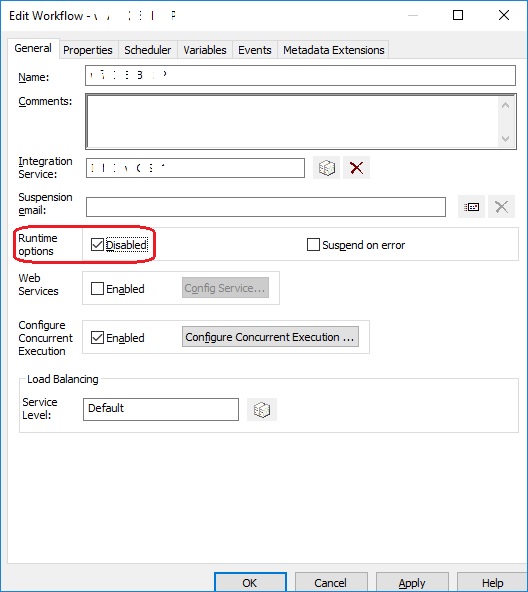
… here as you can see that the setting “Runtime Options, Disabled” is checked/enabled (circled, above). This means that the Workflow is currently in disabled state. Just un-check this option and save it by clicking on the Apply button.
Now re-run the Workflow and it should run now without any issues.
Apache Spark books:
- Spark: The Definitive Guide
- Learning Spark 2Ed
SQL Server - Certification exam books:
- TSQL: 70-761 , 70-762
- DBA: 70-764 , 70-765
- DW/BI: 70-767
SQL Tags
annual report Apache Spark APPLY Operator Azure Databricks BCP Clustered Index ColumnStore Index Cpp CROSS APPLY Databricks Denali Download SQL Server Excel Exception Handling FileTables Graphics in Cpp Hekaton Hekaton 2014 IDENTITY In-Memory Tables Install SQL Server Java Applet Programs Java Basic Programs Java File Handling Java IO Programs Java OO Programs JSON JSON SQL Linked Server msdb MSDN TSQL forum multiple values to Stored Procedures PRIMARY KEY Python Runnable Interface sp_configure SQL Agent SQL Server 2012 SQL Server 2014 SQL Server 2016 SQL Server 2017 SQL Server Certification SQL Server Interview Questions SQL Server on Linux Stored Procedure Temporary Tables TRY-CATCH WordPress Annual Report XML XML SQL| M | T | W | T | F | S | S |
|---|---|---|---|---|---|---|
| 1 | 2 | 3 | 4 | 5 | 6 | 7 |
| 8 | 9 | 10 | 11 | 12 | 13 | 14 |
| 15 | 16 | 17 | 18 | 19 | 20 | 21 |
| 22 | 23 | 24 | 25 | 26 | 27 | 28 |
| 29 | 30 | 31 | ||||
Categories
- AI & ML (1)
- Big Data (13)
- Apache Spark (6)
- Hadoop (5)
- DBA Stuff (37)
- Interview Q (8)
- Microsoft Azure (37)
- Azure Data Factory (1)
- Azure DevOps (2)
- Cosmos DB (5)
- Databricks (7)
- MS BI (9)
- Analysis Services (1)
- DW and BI (1)
- Integration Services (1)
- Power BI (4)
- Reporting Services (2)
- Tabular Model (1)
- Others (205)
- Blockchain (1)
- Certifications (9)
- Cloud Computing (1)
- Cpp (32)
- Cpp Graphics (21)
- Excel (10)
- Informatica (5)
- Java (56)
- Linux (8)
- Microsoft (15)
- MS.net (2)
- Oracle (1)
- Powershell (3)
- Python (6)
- Reviews (5)
- Security (1)
- Spark SQL (3)
- SQL Server (9)
- SQLwithManoj (12)
- Uncategorized (7)
- VBA Macro (1)
- Visual Studio (1)
- Windows (6)
- SQL Server Conferences (1)
- SQL Server Internals (85)
- Datatypes (5)
- DB Concepts (28)
- Indexes (11)
- JOINS (4)
- ML Python (2)
- SQL DB Engine (8)
- SQL Server Migration (1)
- SQL Server Upgrade (1)
- Stored Procedures (11)
- tempdb (3)
- XML (16)
- SQL Server Questions (41)
- SQL Server Versions (139)
- SQL Azure (5)
- SQL Server 2005 (7)
- SQL Server 2008 (5)
- SQL Server 2012 (33)
- SQL Server 2014 (18)
- SQL Server 2016 (50)
- SQL Server 2017 (20)
- SQL Server 2019 (2)
- SQL Server 2022 (1)
- SQL Server 2025 (1)
- SQL Server Express (1)
- T SQL (184)
- Differences (31)
- JSON (6)
- Misconception (7)
- Optimization Performance (14)
- SQL Basics (15)
- SQL Built-in Functions (6)
- SQL Errors (45)
- SQL Tips (67)
- SQL Trivia (9)
Archives
Top Posts
- DB Basics - SQL Server JOINS and Types
- SQL Error - The server may be running out of resources, or the assembly may not be trusted with PERMISSION_SET = EXTERNAL_ACCESS or UNSAFE
- ColumnStore Index enhancements in SQL Server 2014
- Download & Install SQL Server Management Studio (SSMS) 2016 (decoupled from SQL Server engine setup)
- Implementing "Row Level Security" (RLS) with "Filter Predicate" in SQL Server 2016 - Part 1
- Python error: while converting Pandas Dataframe or Python List to Spark Dataframe (Can not merge type)
- SQL Error - The operation cannot be performed on a database with database snapshots or active DBCC replicas
- Cosmos DB - Get record COUNT from all Collections in all Databases (using .net)
- Passed 70-461 Exam : Querying Microsoft SQL Server 2012
- SQL Tips - Search and list out SQL Jobs containing specific word, text or SQL Query
Blog Stats, since Aug 2010
- 5,142,478 hits
StatCounter …since April 2012

Leisure blog: Creek & Trails
- NMDC Hyderabad Marathon – My first 42k FM, cramps, training and fuelling
- Singapore (Part 2) – 6 days itinerary, sightseeing & attractions
- Singapore (Part 1) – Tickets, Visa, Hotel, Forex Card/Cash, Metro/Bus cards
- I got full refund of my flight tickets during COVID lockdown (AirIndia via MakeMyTrip)
- YouTube – Your Google Ads account was cancelled due to no spend
- YouTube latest update on its YPP (YouTube Partner Program) which may affect your channel
- Starting your own blog !!!
- How to file ITR (Income Tax Return) online AY 2017-18 (for simple salaried)
- Scam – Become a kin/hier and earn a fortune – via LinkedIn and Email
- Places to visit in and around Vizag (aka Visakhapatnam)
Disclaimer
This is my personal blog site.
The opinions expressed here represent my own and not those of my employer. For accuracy and official reference refer to MS Books On Line and/or MSDN/TechNet.
My employer do not endorse any tools, applications, books, or concepts mentioned on the blog. I have documented my personal experience on this blog.




