Archive
ColumnStore Index enhancements in SQL Server 2014
ColumnStore Indexes were first introduced in SQL Server 2012, and this created a new way to store and retrieve the Index or Table data in an efficient manner.
ColumnStore uses xVelocity technology that was based on Vertipaq engine, this uses a new Columnar storage technique to store data that is highly Compressed and is capable of In-memory Caching and highly parallel data scanning with Aggregation algorithms.
ColumnStore or Columnar data format does not store data in traditional RowStore fashion, instead the data is grouped and stored as one column at a time in Column Segments.
The Traditional RowStore stores data for each row and then joins all the rows and store them in Data Pages, and is still the same storage mechanism for Heap and Clustered Indexes.
Thus, a ColumnStore increases the performance by reading less data that is highly compressed, and in batches from disk to memory by further reducing the I/O.
–> To know more about ColumnStore Indexes check [MSDN BoL].
✔ We will start with SQL Server 2012 offering for ColumnStore Indexes:
1. A Table (Heap or BTree) can have only one NonClustered ColumnStore Index.
2. A Table with NonClustered ColumnStore Index becomes readonly and cannot be updated.
3. The NonClustered ColumnStore Index uses Segment Compression for high compression of Columnar data.
✔ With SQL Sever 2014 some new features were added, like:
1. You can create one Clustered ColumnStore Index on a Table, and no further Indexes can be created.
2. A Table with Clustered ColumnStore Index can be updated with INSERT/UPDATE/DELETE operations.
3. Both Clustered & NonClustered ColumnStore Index has new Archival Compression options i.e. COLUMNSTORE_ARCHIVE to further compress the data.
–> Check more about this on [MSDN BoL].
Getting Started with Hekaton (Memory Optimized) tables | SQL Server 2014
Hekaton, which also means in-Memory or Memory Optimized Tables, is a Microsoft Code Project for its new version of SQL Server 2014. This version of SQL Server mainly focuses on the high performance In-Memory Database workloads. Which means this version includes Memory Optimized Tables which will reside into Server’s memory and efficiently provides execution of Business Logic by completely reducing I/O between Disk & Memory.
So, as soon as a Memory Optimized Table is created the data it contains will also load into Memory. Let’s see here a Hands-On with Hekaton Tables by simple T-SQL Scripts:
–> Let’s first create a Test Database:
USE [master]
GO

CREATE DATABASE [ManTest]
 CONTAINMENT = NONE
 ON  PRIMARY (
	NAME = N'ManTest',
	FILENAME = N'D:\SQLServer2014\MSSQL\DATA\ManTest.mdf',
	SIZE = 5120KB,
	FILEGROWTH = 1024KB
 )
 LOG ON (
	NAME = N'ManTest_log',
	FILENAME = N'D:\SQLServer2014\MSSQL\Log\ManTest_log.ldf',
	SIZE = 1024KB,
	FILEGROWTH = 10%
 )
GO
–> Now we will create a FileGroup and associate the [ManTest] Database with it:
USE [ManTest]
GO

-- Add MEMORY_OPTIMIZED_DATA filegroup to the database.
ALTER DATABASE [ManTest]
	ADD FILEGROUP [ManTestFG] CONTAINS MEMORY_OPTIMIZED_DATA
GO

-- Add file to the MEMORY_OPTIMIZED_DATA filegroup.
ALTER DATABASE [ManTest]
ADD FILE
  ( NAME = ManTestFG_file1,
    FILENAME = N'D:\SQLServer2014\MSSQL\DATA\Datasample_database_1') -- You might need to check and correct the path here.
TO FILEGROUP ManTestFG
GO
A SQL Server FileGroup is required to store memory_optimized_data in a SQL Server Database. As per MSDN this FileGroup will be used to guarantee durability of memory-resident data in the event of a server crash or restart. During the crash recovery phase in server startup, the data is recovered from this FileGroup and loaded back into memory.
–> Now we will create Memory Optimized Table with new Options added in CREATE TABLE syntax:
-- Create memory optimized table and hash indexes on the memory optimized table:
CREATE TABLE dbo.Person_memoryOptimizedTable
(
	PersonID INT NOT NULL
		PRIMARY KEY NONCLUSTERED HASH WITH (BUCKET_COUNT = 19972),

	PersonName NVARCHAR(100) NOT NULL,

	DateAdded DATETIME NOT NULL

) WITH (MEMORY_OPTIMIZED = ON, DURABILITY = SCHEMA_AND_DATA)
GO
The Options:
– NONCLUSTERED HASH WITH : Clustered Index not allowed (as indexes are not stored, but re-created after SQL Server is restarted), so a PK should be defined with NonClustered Index of Type ‘Hash’.
– BUCKET_COUNT : Indicates the number of buckets that should be created in the Hash index.
– MEMORY_OPTIMIZED=ON : makes the table Memory Optimized.
– DURABILITY = SCHEMA_AND_DATA : makes the Table and its Data available all the time in-Memory.
Note:
– Indexes can only be created online with CREATE TABLE statement.
– If you don’t provide the DURABILITY = SCHEMA_AND_DATA option, then the Data will be persisted in the Table only.
– The Option DURABILITY = SCHEMA_ONLY will not make the Table Data Durable on Disk and data will lost after Server Restart or Crash, but the Table Schema will be available.
–> Let’s insert some records in the table created above:
-- Inserting records into the Memory Optimized Table from [Person] table in [AdventureWorks] DB:
INSERT INTO dbo.Person_memoryOptimizedTable
SELECT
	[BusinessEntityID],
	CONCAT([FirstName], ' ', [MiddleName], ' ', [LastName]) AS PersonName,
	GETDATE() AS DateAdded
FROM [AdventureWorks2012].[Person].[Person]
You will get following error:
Msg 41317, Level 16, State 3, Line 34
A user transaction that accesses memory optimized tables or natively compiled procedures cannot access more than one user database or databases model and msdb, and it cannot write to master.
This means that you cannot insert records into Memory Optimized Tables across databases.
So, we have a workaround here, we will insert records into a #temp table first and then insert from this #temp table.
-- So, I'll insert records from [AdvantureWorks] Database to #temp table first:
SELECT
	[BusinessEntityID],
	CONCAT([FirstName], ' ', [MiddleName], ' ', [LastName]) AS PersonName,
	GETDATE() AS DateAdded
into #tempPerson
FROM [AdventureWorks2012].[Person].[Person]
-- (19972 row(s) affected)

-- Now, I can insert records from #temp table into the Memory Optimized Table:
INSERT INTO dbo.Person_memoryOptimizedTable
SELECT
	[BusinessEntityID],
	PersonName,
	DateAdded
FROM #tempPerson
-- (19972 row(s) affected)

-- Let's check contents of the Table:
SELECT *
FROM Person_memoryOptimizedTable
GO
So, we here saw how to create Memory Optimized Tables and create a Separate Database to store them by allocating a FileGroup to the DB.
-- Final Cleanup
DROP TABLE dbo.Person_memoryOptimizedTable

DROP TABLE #tempPerson
GO

USE master
GO

DROP DATABASE ManTest
GO
Update: Know more about In-Memory tables:
Next post I’ll discuss more about Memory Optimized tables, their benefits and limitations.
Finally installed SQL Server 2014 CTP1
Last month I posted the availability of the first Community Test Preview (CTP-1) of SQL Server 2014, [link].
As mentioned officially by Microsoft this preview (CTP-1) should be installed on a fresh OS (Windows 8 or Server 2012) and not with existing Dev machine. So, some days back I finally managed to get an isolated machine and installed on it. The Installation is similar to SQL Server 2012, only difference is the version number till now.
After successful install on opening SSMS you will see following Splash Screen with 2014 branding:
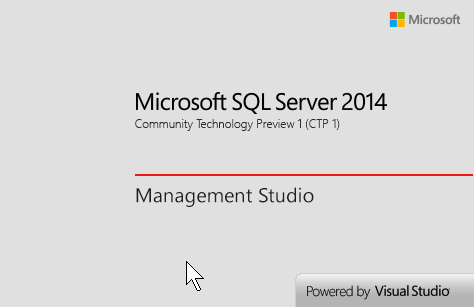
.
–> On checking the version by SQL statement you get:
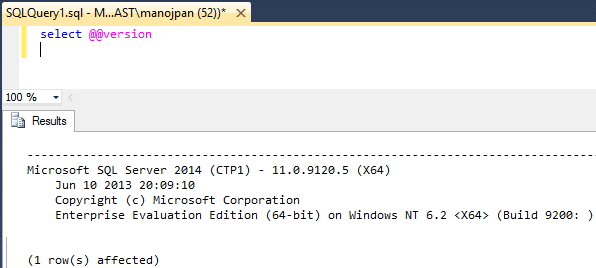
.
–> On checking the “Tables” section on Object Explorer it gives you option to create “Memory Optimized Tables”:
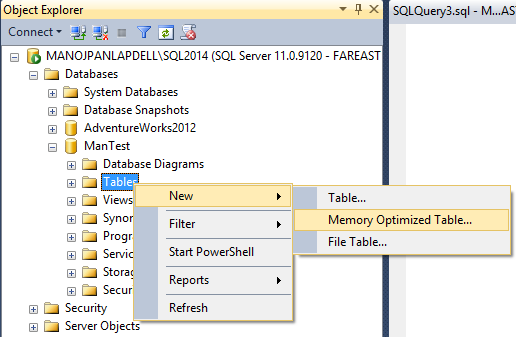
… but this is not graphical (like Create Table), it provides a Script template and opens it in SQL Query Editor.
.
–> On checking the “Stored Procedures” section on Object Explorer it gives you option to create “Natively Compiled Stored Procedures”:
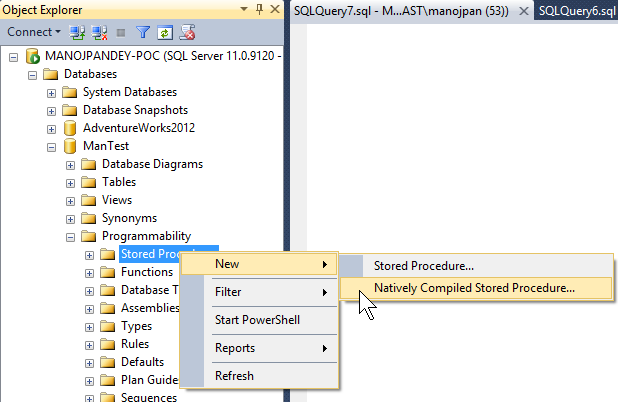
… and just like “Create Procedure” it also provides a Script template and opens it in SQL Query Editor.
Next post I’ll come with some hands-on with Creating a Database, Memory Optimized tables and new things introduced in SQL Server 2014.
SQL Server 2014 | New Features
Around 3 years back (~ Nov’2010) the first Community Test Preview (CTP-1) of SQL Server 2012 was released, and with great excitement I blogged about its new features and availability. Now after 3 years, last month-end (June’2013) the first Community Test Preview (CTP-1) of SQL Server 2014 is released, and with same great excitement here I’m with my similar blog post.
SQL Server 2014, this time mainly focuses on high performance in-Memory Operations for OLTP Databases by providing Memory Optimized Tables & Natively Compiled Stored Procedures. There is not much enhancement in T-SQL section, which was with SQL Server 2012. But with In-Memory features SQL Server 2014 has made a lot of impression and is definitely going to make a lot of impact.
Let’s see what all new features SQL Server 2014 is packed with:
.
>> Database Engine:
–> Memory-optimized tables: read more.
–> Natively Compiled Stored Procedures: read more.
-> AlwaysOn enhancements
– The maximum number of secondary replicas is increased from 4 to 8.
– When disconnected from the primary replica or during cluster quorum loss, readable secondary replicas now remain available for read workloads.
– Enhancements are made to increase the efficiency and ease of troubleshooting availability groups
– Failover cluster instances (FCIs) can now use Cluster Shared Volumes as cluster shared disks in Windows Server 2012 and above.
– The following three dynamic management views now return information for FCIs:
1. sys.dm_hadr_cluster (Transact-SQL)
2. sys.dm_hadr_cluster_members (Transact-SQL)
3. sys.dm_hadr_cluster_networks (Transact-SQL)
–> Managing the lock priority of online operations
Additional partition switching and index rebuild operations can now be performed while a table is online. The ONLINE = ON option now contains a WAIT_AT_LOW_PRIORITY option which permits you to specify how long the rebuild process should wait for the necessary locks.
–> Columnstore indexes
– Updateable Clustered Columnstore Indexes: can perform some insert, update, and delete operations, read more.
– SHOWPLAN displays information about columnstore indexes: The EstimatedExecutionMode and ActualExecutionMode properties have two possible values: Batch or Row. The Storage property has two possible values: RowStore and ColumnStore.
– Archival data compression: ALTER INDEX … REBUILD has a new COLUMNSTORE_ARCHIVE data compression option that further compresses the specified partitions of a columnstore index, read more.
–> Buffer pool extension
Provides the seamless integration of solid-state drives (SSD) as a nonvolatile random access memory (NvRAM) extension to the Database Engine buffer pool to significantly improve I/O throughput.
–> Query plans
Includes substantial improvements to the component that creates and optimized query plans.
–> Inline specification of CLUSTERED and NONCLUSTERED
Inline specification of CLUSTERED and NONCLUSTERED indexes is now allowed for disk-based tables.
–> SELECT … INTO
The SELECT … INTO statement is improved and can now operate in parallel.
–> Deployment Enhancements
Deploy a SQL Server Database to a Windows Azure Virtual Machine enables deployment of a SQL Server database to a Windows Azure VM, read more.
.
>> Analysis Services & BI
1. Updates to Design Tool installation
2. Features recently added: Power View for Multidimensional Models
… read more.
.
>> No Changes to Integration Services, Reporting Services & Replication
.
You can know more about the CTP-1 version from my previous blog post. This post provides the Download Link, Install Prerequisites, Limitations, etc for the beta product.
SQL Server 2014 CTP1 now Available… download now!!!

Finally the wait is over to get your hands dirty on SQL Server 2014 as the first Community Test Preview (CTP1) is released and is available for download form the Microsoft Official Site.
–> Download the SQL Server 2014 CTP1 [here].
You will need to login with your Windows Live ID to go to the download page.
–> Microsoft has released following Installation Limitations for SQL Server 2014 Community Technology Preview 1 (CTP1):
- Microsoft SQL Server 2014 CTP1 is pre-release software and should be installed only on a clean machine. It does not support upgrade from or side-by-side installations with any previous version of SQL Server, including SQL Server 2012. In addition it does not work with or support side by side installations with any client redistributables of SQL Server such as feature pack components, Visual Studio 2012 or earlier versions, SQL Server Data Tools, Data Tier Application Framework, etc.
- To administer Microsoft SQL Server 2014 CTP1 use only SQL Server Management Studio that ships as a part of Microsoft SQL Server 2014 CTP1.
- The Microsoft SQL Server 2014 CTP1 release is NOT supported by Microsoft Customer Services and Support (CSS).
- The Microsoft SQL Server 2014 CTP1 release is only available in the X64 architecture.
- The Microsoft SQL Server 2014 CTP1 release is a NON-PRODUCTION release and should not be installed and used in production environments.
- The Microsoft SQL Server 2014 CTP1 release does NOT have an associated Microsoft SQL Server 2014 CTP1 Feature Pack.
- The Microsoft SQL Server 2014 CTP1 release on Windows Azure VM is only intended for functional development and testing, and not for performance testing.
- The Microsoft SQL Server 2014 CTP1 release contains branding and versioning from older Microsoft SQL Server releases.
–> System Requirements to install SQL Server 2014 CTP1: [here]
- Minimum Windows 8 or Windows Server 2012
- X64 architecture only
- MS.Net Framework 3.5 SP1
–> Product Detail Page, [link].
Imp Note: As the first limitation point says to install it on a Clean Machine, this means the machine should not have any Pre-Releases of SQL Server and/or Visual Studio Installed.
So, to start with SQL Server 2014 CTP1 you need to get a clean machine, or a new machine with a freshly installed Windows OS.
Check more on SQL Server 2014 CTP1, here: http://www.microsoft.com/en-us/sqlserver/sql-server-2014.aspx



Current Visitors

StatCounter …since April 2012


 Leisure blog: Creek & Trails
- NMDC Hyderabad Marathon – My first 42k FM, cramps, training and fuelling
- Singapore (Part 2) – 6 days itinerary, sightseeing & attractions
- Singapore (Part 1) – Tickets, Visa, Hotel, Forex Card/Cash, Metro/Bus cards
- I got full refund of my flight tickets during COVID lockdown (AirIndia via MakeMyTrip)
- YouTube – Your Google Ads account was cancelled due to no spend
- YouTube latest update on its YPP (YouTube Partner Program) which may affect your channel
- Starting your own blog !!!
- How to file ITR (Income Tax Return) online AY 2017-18 (for simple salaried)
- Scam – Become a kin/hier and earn a fortune – via LinkedIn and Email
- Places to visit in and around Vizag (aka Visakhapatnam)
 SQL with Manoj