Archive
Microsoft PSS – SQL 2016 Series: It just runs faster | April updates
Microsoft PSS Engineers have built a series on “It Just Runs Faster”!
“In the Sep 2014 the SQL Server CSS and Development teams performed a deep dive focused on scalability and performance when running on current and new hardware configurations. The SQL Server Development team tasked several individuals with scalability improvements and real world testing patterns. You can take advantage of this effort packaged in SQL Server 2016. – https://www.microsoft.com/en-us/server-cloud/products/sql-server-2016/”
SQL 2016 will run faster in many ways, without changing code.
The series kickoff is here:
https://blogs.msdn.microsoft.com/psssql/2016/02/23/sql-2016-it-just-runs-faster-announcement/
Previous updates:
Microsoft PSS – SQL 2016 Series: It just runs faster | Feb-March updates
The announcements so far in April are:
SQL 2016 – It Just Runs Faster: Updated Scheduling Algorithms
https://blogs.msdn.microsoft.com/psssql/2016/04/01/sql-2016-it-just-runs-faster-updated-scheduling-algorithms/
SQL 2016 – It Just Runs Faster: Dynamic Memory Object (CMemThread) Partitioning
https://blogs.msdn.microsoft.com/psssql/2016/04/06/sql-2016-it-just-runs-faster-dynamic-memory-object-cmemthread-partitioning/
SQL 2016 – It Just Runs Faster: SOS_RWLock Redesign
https://blogs.msdn.microsoft.com/psssql/2016/04/07/sql-2016-it-just-runs-faster-sos_rwlock-redesign/
SQL 2016 – It Just Runs Faster: Indirect Checkpoint Default
https://blogs.msdn.microsoft.com/psssql/2016/04/12/sql-2016-it-just-runs-faster-indirect-checkpoint-default/
SQL 2016 – It Just Runs Faster: Larger Data File Writes
https://blogs.msdn.microsoft.com/psssql/2016/04/15/sql-2016-it-just-runs-faster-larger-data-file-writes/
SQL 2016 – It Just Runs Faster: Multiple Log Writer Workers
https://blogs.msdn.microsoft.com/psssql/2016/04/19/sql-2016-it-just-runs-faster-multiple-log-writer-workers/
SQL 2016 – It Just Runs Faster: Column Store Uses Vector Instructions (SSE/AVX)
https://blogs.msdn.microsoft.com/psssql/2016/04/22/sql-2016-it-just-runs-faster-column-store-uses-vector-instructions-sseavx/
SQL 2016 – It Just Runs Faster – BULK INSERT Uses Vector Instructions (SSE/AVX)
https://blogs.msdn.microsoft.com/psssql/2016/04/27/sql-2016-it-just-runs-faster-bulk-insert-uses-vector-instructions-sseavx/
SQL 2016 – It Just Runs Faster: AlwaysOn Log Transport Reduced Context Switches
https://blogs.msdn.microsoft.com/psssql/2016/04/28/sql-2016-it-just-runs-faster-alwayson-log-transport-reduced-context-switches/
Check my blog posts on most of the new features released in SQL Server 2016 here
Download & Install SQL Server Management Studio (SSMS) 2016 (decoupled from SQL Server engine setup)
In my [previous blog] post of SQL Server 2016 RC0 availability, I mentioned regarding SQL Server Management Studio (SSMS) that it will no longer be installed from the main feature tree of SQL Server engine setup.
As per Microsoft, this is basically to support the move to make a universal version of SSMS that ships every month or so.
So, now on wards after installing SQL Server 2016 you need to install SSMS separately.
–> Till SQL Server 2014 you have an option of choosing SSMS in the Feature selection tree, but with SQL Server 2016 and on wards this option is taken out, can be seen in the pic below:

–> Now to download SSMS 2016 you can either visit the Microsoft [download page]
Or, try installing directly via the “Installation Center” as shown below. This will install SSMS directly online.

So, once you take appropriate action above to download SSMS 2016, the Installation kicks off like this:
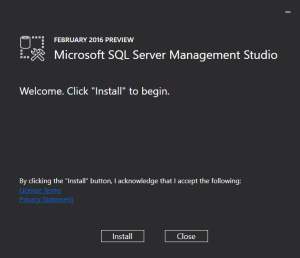
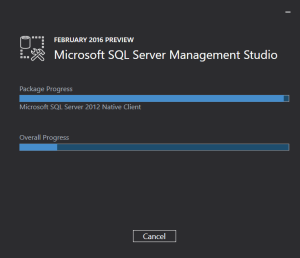
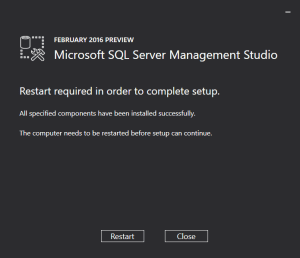
And here is the version information of SSMS 2016 after successful installation:
Microsoft SQL Server Management Studio	 13.0.12000.65
Microsoft Analysis Services Client Tools 13.0.1100.213
Microsoft Data Access Components (MDAC)	 10.0.10586.0
Microsoft MSXML				 3.0 6.0
Microsoft Internet Explorer		 9.11.10586.0
Microsoft .NET Framework		 4.0.30319.42000
Operating System			 6.3.10586
Tech Tip: Move your SQL server onto the cloud with Hosted Citrix VDI available unbelievable citrix xendesktop pricing and get an easy remote access to it from anywhere on any device(PC/Mac/Linux/android/iOS) powered by one of the leading providers of cloud hosting – Apps4Rent.
Check my blog posts on most of the new features released in SQL Server 2016
Microsoft PSS – SQL 2016 Series: It just runs faster | Feb-March updates
Microsoft PSS Engineers have built a series on “It Just Runs Faster”!
“In the Sep 2014 the SQL Server CSS and Development teams performed a deep dive focused on scalability and performance when running on current and new hardware configurations. The SQL Server Development team tasked several individuals with scalability improvements and real world testing patterns. You can take advantage of this effort packaged in SQL Server 2016. – https://www.microsoft.com/en-us/server-cloud/products/sql-server-2016/”
SQL 2016 will run faster in many ways, without changing code.
The series kickoff is here:
https://blogs.msdn.microsoft.com/psssql/2016/02/23/sql-2016-it-just-runs-faster-announcement/
The first article in this series came out the end of February:
SQL 2016 – It Just Runs Faster: DBCC Scales 7x Better
https://blogs.msdn.microsoft.com/psssql/2016/02/25/sql-2016-it-just-runs-faster-dbcc-scales-7x-better/
The announcements so far in March are:
SQL 2016 – It Just Runs Faster: DBCC Extended Checks
https://blogs.msdn.microsoft.com/psssql/2016/03/01/sql-2016-it-just-runs-faster-dbcc-extended-checks/
SQL 2016 – It Just Runs Faster: Native Spatial Implementation(s)
https://blogs.msdn.microsoft.com/psssql/2016/03/03/sql-2016-it-just-runs-faster-native-spatial-implementations/
SQL Server Parallel Query Placement Decision Logic
https://blogs.msdn.microsoft.com/psssql/2016/03/04/sql-server-parallel-query-placement-decision-logic/
SQL 2016 – It Just Runs Faster: TVPs with Spatial Column(s)
https://blogs.msdn.microsoft.com/psssql/2016/03/08/sql-2016-it-just-runs-faster-tvps-with-spatial-columns/
SQL 2016 – It Just Runs Faster: Spatial Index Builds Faster
https://blogs.msdn.microsoft.com/psssql/2016/03/10/sql-2016-it-just-runs-faster-spatial-index-builds-faster/
SQL 2016 – It Just Runs Faster: -T1117 and -T1118 changes for TEMPDB and user databases
https://blogs.msdn.microsoft.com/psssql/2016/03/15/sql-2016-it-just-runs-faster-t1117-and-t1118-changes-for-tempdb-and-user-databases/
SQL 2016 – It Just Runs Faster: Automatic TEMPDB Configuration
https://blogs.msdn.microsoft.com/psssql/2016/03/17/sql-2016-it-just-runs-faster-automatic-tempdb-configuration/
SQL 2016 – It Just Runs Faster: LDF Stamped
https://blogs.msdn.microsoft.com/psssql/2016/03/22/sql-2016-it-just-runs-faster-ldf-stamped/
SQL 2016 – It Just Runs Faster: Instant File Initialization
https://blogs.msdn.microsoft.com/psssql/2016/03/25/sql-2016-it-just-runs-faster-instant-file-initialization/
SQL 2016 – It Just Runs Faster: Automatic Soft NUMA
https://blogs.msdn.microsoft.com/psssql/2016/03/30/sql-2016-it-just-runs-faster-automatic-soft-numa/
Check my blog posts on most of the new features released in SQL Server 2016 here
My whitepaper published on – Top 8 features of SQL Server 2016
I am super excited to announce the availability of my Whitepaper at Microsoft IT Showcase on:
Microsoft IT looks at the top eight features of SQL Server 2016
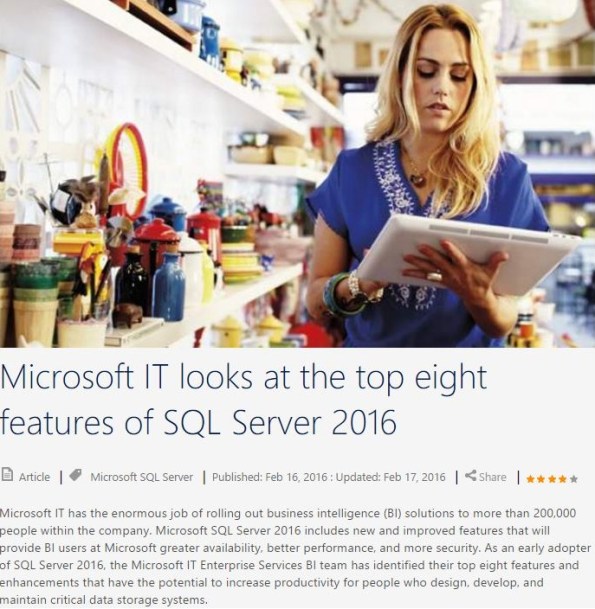
Summary:
1. In-Memory OLTP helps ESBI meet their users’ business requirements for increased agility.
2. Columnstore Indexes reduce the amount of time it takes to run and render SRSS reporting data.
3. Temporal data reduces the amount of support tickets received from the field due to inaccurate data.
4. Row-Level Security provides a more reliable and standardized method to easily control which users can access data.
5. Dynamic Data Masking helps limit exposure of sensitive data, preventing users who should not have access to the data from viewing it.
6. Query Store provides better insight into the performance differences caused by changes in query plans.
7. Active Query Statistics allows a view of active query execution plans and helps identify and fix blocking issues while queries are running.
8. SQL Stretch Database helps improve performance to frequently used data while preserving access to archived data.
Please check my other posts on SQL Server 2016
New in-built Table-Valued Function STRING_SPLIT() in SQL Server 2016 – to split strings
Till now it was bit tricky to split a Sentence or CSV String to multiple values or rows, and we used different logic to do the same.
In my [previous post] I blogged similar logic to Split a String and Combine back by using some XML syntax.
In SQL Server 2016 this has been made simpler by using a new function STRING_SPLIT(), let’s see this with a simple example:
SELECT * FROM STRING_SPLIT('My name is Manoj Pandey', ' ')
This will split all the words in the sentence separated by a whitespace in different rows:

Here is the syntax for the same:
STRING_SPLIT ( string , separator )
Please note: that the separator should be a single character expression, so this should not be an empty string, like:
SELECT * FROM STRING_SPLIT('My name is Manoj Pandey', '')
Will result into an error:
Msg 214, Level 16, State 11, Line 3
Procedure expects parameter ‘separator’ of type ‘nchar(1)/nvarchar(1)’.
–> Let’s check one more example:
We have a comma separated Cities list for each State as a row in a table:
CREATE TABLE #tempCityState (
	[State] VARCHAR(5),
	[Cities] VARCHAR(50)
)

INSERT INTO #tempCityState
SELECT 'AK', 'Nashville,Wynne'
UNION ALL
SELECT 'CA', 'Fremont,Hanford,Los Anggeles'
UNION ALL
SELECT 'CO', 'Aspen,Denver,Teluride,Vail'
Now, lets just use the simple function STRING_SPLIT() with CROSS APPLY operator, like:
SELECT [State], value
FROM #tempCityState
CROSS APPLY STRING_SPLIT([Cities], ',')
Will give you following output:

–> And if I compare the performance of this function with the earlier approach I mentioned in my [previous post]:
Run both the queries by enabling Actual Execution plan (Ctrl + M):
SELECT [State], value
FROM #tempCityState
CROSS APPLY STRING_SPLIT([Cities], ',')

SELECT A.[State], Split.a.value('.', 'VARCHAR(100)') AS City
FROM (SELECT [State], CAST ('<M>' + REPLACE([Cities], ',', '</M><M>') + '</M>' AS XML) AS String
    FROM  #tempCityState) AS A
CROSS APPLY String.nodes ('/M') AS Split(a)
ORDER BY 1,2
I can see that the STRING_SPLIT() gives me better performance compared to the other:




Current Visitors

StatCounter …since April 2012


 Leisure blog: Creek & Trails
- NMDC Hyderabad Marathon – My first 42k FM, cramps, training and fuelling
- Singapore (Part 2) – 6 days itinerary, sightseeing & attractions
- Singapore (Part 1) – Tickets, Visa, Hotel, Forex Card/Cash, Metro/Bus cards
- I got full refund of my flight tickets during COVID lockdown (AirIndia via MakeMyTrip)
- YouTube – Your Google Ads account was cancelled due to no spend
- YouTube latest update on its YPP (YouTube Partner Program) which may affect your channel
- Starting your own blog !!!
- How to file ITR (Income Tax Return) online AY 2017-18 (for simple salaried)
- Scam – Become a kin/hier and earn a fortune – via LinkedIn and Email
- Places to visit in and around Vizag (aka Visakhapatnam)
 SQL with Manoj