Archive
In-memory enhancements and improvements in SQL Server 2016
In-Memory tables were introduced in SQL Server 2014 and were also known as Hekaton tables. I’ve written previously about In-memory tables for SQL Server 2014 and you can check in my [previous posts] to know more about these type of tables with some Hands-on examples and demos.
–> In-memory tables as new concept in SQL Server 2014 had lot of limitations compared to normal tables. But with the new release of SQL Server 2016 some limitations are addressed and other features have been added for In-Memory tables. These improvements will enable scaling to larger databases and higher throughput in order to support bigger workloads. And compared to previous version of SQL Server it will be easier to migrate your applications to and leverage the benefits of In-Memory OLTP with SQL Server 2016.
–> I have collated all the major improvements here in the table below:

* Collation Support
1. Non-BIN2 collations in index key columns
2. Non-Latin code pages for (var)char columns
3. Non-BIN2 collations for comparison and sorting in native modules
–> You can check more about In-Memory tables for SQL Server 2016 in MSDN BoL [here].
Check the above details explained in the video below:
Leap Second coming this June 2015, will it affect SQL Server?
And it’s not big and concerning like Y2K !
Every few years a Leap Second needs to be added to the Coordinated Universal Time (UTC), so that we keep the time of the day as close to the mean solar time as is possible. On a Leap Second day, an extra second ss is added to our clocks at midnight. This is done to match the time shown by the official atomic clocks. Last time it happened in 2012.
So, officially the time actually goes from 23:59:59 to 23:59:60 instead of directly to 00:00:00.
–> So, on June 30 2015 midnight the Leap Second aware and Windows clock will tick like this:
– Leap Second clock : 23:59:59 , 23:59:60 , 00:00:00 , 00:00:01
– Windows clock : 23:59:59 , 00:00:00 , 00:00:01
–> Now question comes will it affect SQL Server and the time it stores?
No, because SQL Server gets time from Windows and Windows does not honor Leap Seconds. Windows just skips the 23:59:60 time and thus its clock becomes 1 second faster. Which slowly gets synced-up with the correct time using Network Time Protocol (NTP). That’s why you can also not set or store this time on Windows and in SQL Server.
–> Impact on SQL Azure (SQL Database):
No, Azure service has been designed to be resilient to clock discrepancies across Microsoft’s numerous infrastructure components and regions. Azure has proven application compatibility for handling Leap Seconds given it uses the Windows time-synchronization protocol, which is used by all Windows systems including the Windows client OS, Windows Server, Windows Phone, and Hyper-V.
The KB Article 909614 also explains how Window treats Leap Second:
“The Windows Time service that is working as a Network Time Protocol (NTP) client does not indicate the value of the Leap Indicator when the Windows Time service receives a packet that includes a leap second. (The Leap Indicator indicates whether an impending leap second is to be inserted or deleted in the last minute of the current day.) Therefore, after the leap second occurs, the NTP client that is running Windows Time service is one second faster than the actual time. This time difference is resolved at the next time synchronization.”
–> Check here on MSDN Blogs for more info:
1. What is Leap Second: http://blogs.msdn.com/b/mthree/archive/2015/01/08/leap-seconds-010815.aspx
2. Leap Second and Windows: http://blogs.msdn.com/b/mthree/archive/2015/01/14/leap-seconds-011415.aspx
3. Impact on Microsoft products: http://blogs.msdn.com/b/mthree/archive/2015/06/01/2015-leap-second-060115.aspx
T-SQL Query solution to SSGAS2015 2nd Question/Challenge – SQL Server Geeks
The 2nd Challenge in SQL Server Geeks Facebook Page goes like this:
For the #SSGAS2015 attendees are leaving comments with their email ids. These comments gets saved into a table COMMENTS. You as an SQL Developer, need to extract all the email ids from the COMMENTS table.
–> Sample records in the table:
ID	Comment
1	Can I pay using PayUMoney. Please revert on ahmad.osama1984@gmail.com.
        Also send details to manusqlgeek@gmail.com
2	I would like to get updates on SQLServerGeeks summit. Please send details
        to myemailid@yahoo.com
–> Expected Answer:
ID	Emails
1	ahmad.osama1984@gmail.com, manusqlgeek@gmail.com
2	myemailid@yahoo.com
–> Initially this looked very tricky and tough question, but when you think by dividing the problem it looked very simple and here it goes:
1. First split the sentence into columns containing individual words by the whitespace separator.
2. Then Transpose all the columns as rows.
3. Then filter out the rows that contains email ID values.
4. Now for every ID column Transpost back the filtered rows into a single comma separated column value.
–> Here is the full solution:
-- Create the Table (DDL):
CREATE TABLE COMMENTS (
	ID INT,
	Comment VARCHAR(1000)
)

-- Insert the 2 test rows:
INSERT INTO COMMENTS
SELECT 1, 'Can I pay using PayUMoney. Please revert on ahmad.osama1984@gmail.com. Also send details to manusqlgeek@gmail.com'
UNION ALL
SELECT 2, 'I would like to get updates on SQLServerGeeks summit. Please send details to myemailid@yahoo.com'

-- Check the rows:
select * from COMMENTS

-- Final solution as a single T-SQL Query:
;with CTE AS (
	SELECT A.ID, Split.a.value('.', 'VARCHAR(100)') AS Email
	FROM (SELECT ID, CAST ('<M>' + REPLACE(REPLACE(Comment,'. ', ' '), ' ', '</M><M>') + '</M>' AS XML) AS String
		FROM  COMMENTS) AS A
	CROSS APPLY String.nodes ('/M') AS Split(a)
)
, CTE2 AS (
	SELECT ID, Email
	FROM CTE
	WHERE Email like '%@%'
)
SELECT DISTINCT ID, (SELECT STUFF((SELECT ', ' + Email
 FROM CTE2
 WHERE ID  = t.ID
 FOR XML PATH('')),1,1,'')) AS Emails
FROM CTE2 t

-- Drop the table finally:
DROP TABLE COMMENTS
GO
Waiting for the coming challenges. Thanks!
This blog just crossed one million hits – Thanks!!!
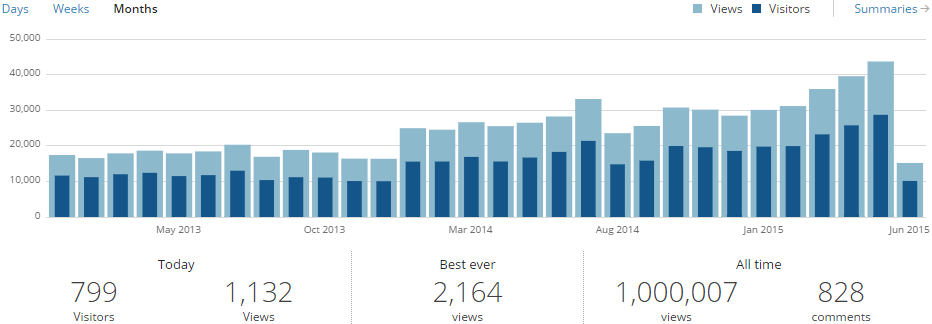
Feeling very happy to see my blog crossing 1 million hits today 🙂
I started blogging on WordPress from August 2010 and it took almost 5 years to achieve one million mark!
Just Last year in July 2014 I purchased and moved to my own domain name SQLwithManoj dot com within WordPress itself and WordPress really took care of it without any issues. You must be seeing some Ads on this site, so the annual domain fee is also recovered from the Ads revenue I get.
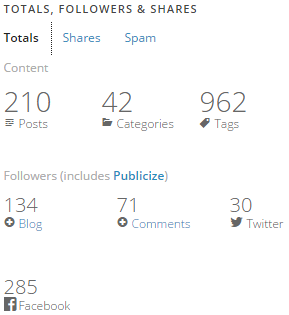
–> Currently this blog has 210 Posts with 828 Comments:
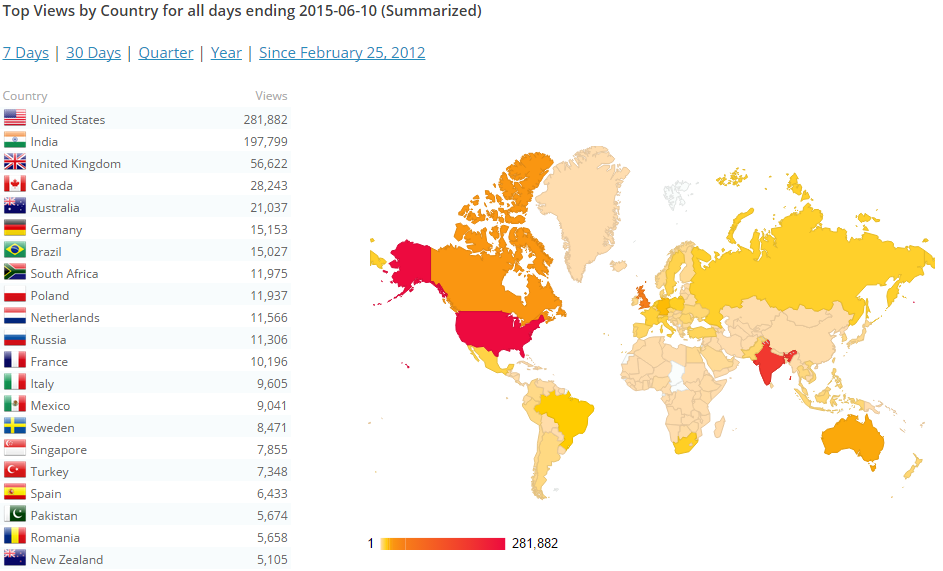
–> Stats from across the globe, some top countries:
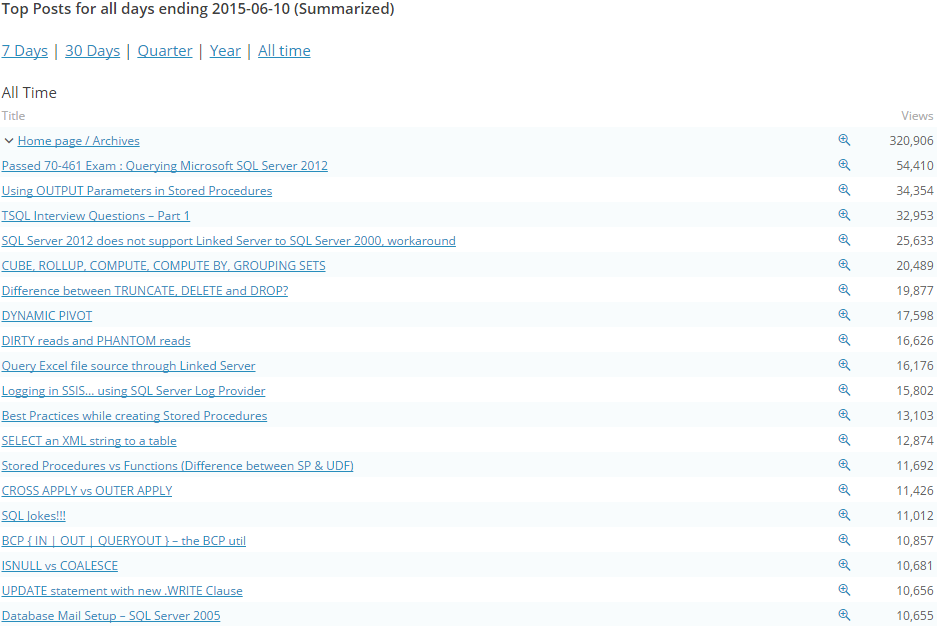
–> Here are some top Posts viewed since inception:
I would like to thank you all for visiting my blog, liking my posts, for your comments, suggestions and finding it helpful.
ColumnStore Indexes evolution from SQL Server 2012, 2014 to 2016
ColumnStore Indexes were first introduced in SQL Server 2012, and this created a new way to store and retrieve the Index or Table data in an efficient manner.
ColumnStore uses xVelocity technology that was based on Vertipaq engine, this uses a new Columnar storage technique to store data that is highly Compressed and is capable of In-memory Caching and highly parallel data scanning with Aggregation algorithms.
ColumnStore or Columnar data format does not store data in traditional RowStore fashion, instead the data is grouped and stored as one column at a time in Column Segments.
The Traditional RowStore stores data for each row and then joins all the rows and store them in Data Pages, and is still the same storage mechanism for Heap and Clustered Indexes.
Thus, a ColumnStore increases the performance by reading less data that is highly compressed, and in batches from disk to memory by further reducing the I/O.
–> To know more about ColumnStore Indexes check [MSDN BoL].
–> Let’s see the journey of ColumnStore index from SQL Server 2012 to 2016:
✔ We will start with SQL Server 2012 offering for ColumnStore Indexes:
1. A Table (Heap or BTree) can have only one NonClustered ColumnStore Index.
2. A Table with NonClustered ColumnStore Index becomes readonly and cannot be updated.
3. The NonClustered ColumnStore Index uses Segment Compression for high compression of Columnar data.
✔ With SQL Sever 2014 some new features were added, like:
1. You can create one Clustered ColumnStore Index on a Table, and no further Indexes can be created.
2. A Table with Clustered ColumnStore Index can be updated with INSERT/UPDATE/DELETE operations.
3. Both Clustered & NonClustered ColumnStore Index has new Archival Compression options i.e. COLUMNSTORE_ARCHIVE to further compress the data.
✔ Now with SQL Server 2016 new features have been added and some limitations are removed:
1. A Table will still have one NonClustered ColumnStore Index, but this will be updatable and thus the Table also.
2. Now you can create a Filtered NonClustered ColumnStore Index by specifying a WHERE clause to it.
3. A Clustered ColumnStore Index table can have one or more NonClustered RowStore Indexes.
4. Clustered ColumnStore Index can now be Unique indirectly as you can create a Primary Key Constraint on a Heap table (and also Foreign Key constraints).
5. Columnar Support for In-Memory (Hekaton) tables, as you can create one one ColumnStore Index on top of them.
–> Here is the full feature summary of ColumnStore Indexe evolution from SQL Server 2012 to 2016:

–> Check more about this on [MSDN BoL].
Check the above details explained in the video below:



Current Visitors

StatCounter …since April 2012


 Leisure blog: Creek & Trails
- NMDC Hyderabad Marathon – My first 42k FM, cramps, training and fuelling
- Singapore (Part 2) – 6 days itinerary, sightseeing & attractions
- Singapore (Part 1) – Tickets, Visa, Hotel, Forex Card/Cash, Metro/Bus cards
- I got full refund of my flight tickets during COVID lockdown (AirIndia via MakeMyTrip)
- YouTube – Your Google Ads account was cancelled due to no spend
- YouTube latest update on its YPP (YouTube Partner Program) which may affect your channel
- Starting your own blog !!!
- How to file ITR (Income Tax Return) online AY 2017-18 (for simple salaried)
- Scam – Become a kin/hier and earn a fortune – via LinkedIn and Email
- Places to visit in and around Vizag (aka Visakhapatnam)
 SQL with Manoj