Archive
Microsoft Community Contributor Award 2011
Just received an email from Microsoft that I’ve been recognized for this year’s (2011) “MS Community Contributor Award” for my contribution in Microsoft’s online technical communities.
And I can sport this badge now:

MCCA 2011
What is MCCA: The Microsoft Community Contributor Award is reserved for participants who have made notable contributions in Microsoft online community forums such as TechNet, MSDN and Answers. The value of these resources is greatly enhanced by participants, who voluntarily contribute your time and energy to improve the online community experience for others.
Becoming a Microsoft Community Contributor Award recipient includes access to important benefits, such as complimentary resources to support you in your commitment to Microsoft online communities.
I’ve been following the MSDN’s TSQL from since 2006-07, but actively answering the question for the past 6-7 months. In the duration I’ve got 2311 points till date (not bad), with total 511 posts & 132 answers marked (image below).

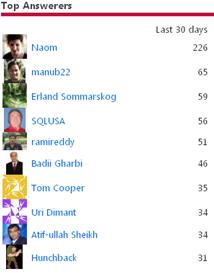
My MSDN’s TSQL forum link: http://social.msdn.microsoft.com/profile/manub22/?type=forum
MCC 2011 Facebook fan page: http://www.facebook.com/pages/Microsoft-Community-Contributor/113784705335192
Import Excel Sheet with multiple Recordsets
Importing records from an Excel is a very simple task. Load your data in Excel with appropriate headers and Run the Import/Export Wizard, your records are transfered from Excel sheet to a MS SQL table.
But what if a single Sheet contains multiple record sets with variable headers. Like First 100 rows of Customer data with 10 headers. Then just below 50 rows of Order data with less than 10 or more than 10 headers.
Seems a bit difficult but not impossible. Its tricky though, lets see how:
Lets us suppose your Excel file is in following format shown in image below (Fig-1):
1. Contact recordset &
2. Sales Order recordset

Fig-1 Sheet with multiple recordsets
Now select the Contact recordset including headers as shown in Fig-2 and right-click and select “Name a Range…” option.

Fig-2 Create a named Range
Fig-3 shows a pop-up box where you can apply and provide a name for that range selection.

Fig-3 Range name for Contacts
Similarly repeat this for Sales Order recordset as shown in Fig-4.

Fig-4 Range name for Sales Order
Now you can see 2 named ranges Contacts & Sales in the dropdown in Fig-5.

Fig-5 Check both the Named ranges
Now we are ready to Import the data. As shown in Fig-6 the Import/Export wizard detects the named ranges and explicitly shows them as Source among other 3 sheets of your Excel file. Simply select both of them and make the required changes as you do for Sheets and click the Next button.

Fig-6 Named ranges while Import
Fig-7 Shows both the tables created & data loaded in SQL Server.

Fig-7 Sources getting copied into SQL tables
Now check the records and match them with the Excel sheet, as shown in Fig-8

Fig-8 Check the tables in SQL Server finally
Wow!!! that was simple.
I was asked this question in an SQL interview and I didn’t knew the answer, obviously you don’t need to know everything… but you should. Discussed this question on MSDN TSQL forum and got the suggestion, thus the blog post. Link: http://social.msdn.microsoft.com/Forums/en-US/transactsql/thread/cf849418-d18f-4b7a-99eb-dbfed6269603/#778c0e99-368a-40f2-b9d4-b747c1754853
Excel data validation with VBA macros
You have an important lead set or any other orders/financial recordset in excel and have to import the data in SQL Server. This is not a one time effort but ongoing and in future you have to deals with lot such records/data files. To import valid data in your SQL tables you want to ensure and validate at the frst step instead of correcting the data by firing SQL queries. Also to avoid this manual work to identify the incorrect/invalid data out of thousands of records automated approach would be quite helpful.
Excel not only store data but also have a power to run VBA macro code against and manipulate the data. Lets take a simple example to validate a set of Customer numbers & their insert date, shown below:
-- Test Data which is correct and expected to import in SQL table.
InsertDate	CustomerNo
11/16/2009	91878552
11/16/2009	101899768
11/16/2009	101768884
11/16/2009	123456789123
11/16/2009	101768800
Columns InsertDate should be a valid date & CustomerNo should be numeric & less than 12 characters or max length equal to 12.
-- Lets tweak the test data put some invalid values under both the columns, shown below:
InsertDate	CustomerNo
11/16/2009	91878552
51/96/2009	101899768
11/16/2009	1017abc84
11/16/2009	123456789123
11/16/2009	101768800
If you are on MS Office 2007 create a Macro enabled excel file with extension *.xlsm, OR if you are on 2003 and lower version *.xls file would be fine. Copy the above data in Sheet1 with incorrect values. Now press open up the VBA macro editor or press ALT+F11 keys. Now double click on Sheet1 under “Project -VBAProjects” explorer.
I wish to run the validation while someone tries to save the macro enabled excel file. So the event selected is “BeforeSave”. And the VBA macro code goes below:
Private Sub Workbook_BeforeSave(ByVal SaveAsUI As Boolean, Cancel As Boolean)

	Dim errorCode As Integer
	Dim errorMsg As String

	Dim numOfRecs As Integer
	Dim counter As Integer

	'---------------------
	'Start - Validate Date
	'---------------------
	Sheet1.Activate
	Range("A2").Select

	errorCode = 0
	numOfRecs = 0

	Do Until ActiveCell.Value = vbNullString

		' Validate Date
		If IsDate(ActiveCell.Value) <> True Then
			errorCode = 1
			ActiveCell.Interior.ColorIndex = 3 'Red
		Else
			ActiveCell.Interior.ColorIndex = 2 'White
		End If

		numOfRecs = numOfRecs + 1

		ActiveCell.Offset(1, 0).Select

	Loop

	If errorCode = 1 Then
		errorMsg = errorMsg + vbCrLf & "- Invalid Insert Date"
	End If
	'-------------------
	'End - Validate Date
	'-------------------

	'--------------------------
	'Start - Validate Customer#
	'--------------------------
	Sheet1.Activate
	Range("B2").Select

	errorCode = 0

	Do Until ActiveCell.Value = vbNullString

		' Check for a valid Customer Number
		If IsNumeric(ActiveCell.Value) <> True Or Len(ActiveCell.Value) > 12 Then
			errorCode = 1
			ActiveCell.Interior.ColorIndex = 3 'Red
		Else
			ActiveCell.Interior.ColorIndex = 2 'White
		End If

		ActiveCell.Offset(1, 0).Select

	Loop

	If errorCode = 1 Then
		errorMsg = errorMsg + vbCrLf & "- Invalid Customer #"
	End If
	'------------------------
	'End - Validate Customer#
	'------------------------

	' Go to first cell.
	Range("A1").Select

	'If errors then display the error msg and do not save the file otherwise save the excel file.
	If errorCode = 1 Then
		MsgBox "Workbook not saved. Following are the fields that contain invalid values." _
			& vbCrLf & errorMsg & vbCrLf & vbCrLf & _
			"Please correct the values highlighted in RED color.", vbCritical, "Data Validation ERROR"

		Cancel = True

	End If

End Sub

Invalid values highlighted RED
Now save the macro code and close the editor. Now try to Save the Excel file, you will get the cells with invalid values highlighted in RED, as shown in the image. The excel file not be saved and when closing you will get the dialog box to save it again & again.
In order to save it correctly you need to correct the invalid values, i.e. InsertDate & CustomerNo, and then save it. The RED highlighted cells will become WHITE for the correct values.
This excel file is now very much validated and clean to import in SQL Server or any other database.
Try this code and tweak it as per your needs.
I’ve also discussed this logic in MSDN’s TSQL forum at following link: http://social.msdn.microsoft.com/Forums/en-US/transactsql/thread/09299d7d-9306-4ea4-bb29-87207572aa04
Suggestions & comments are welcome!!!
SQL Jokes!!!
Yes, SQL Jokes… there are SQL jokes also… on internet that I collated from various sources and now they are in my single post, all below… read & enjoy!!!
>> A SQL query walks into a bar and sees two tables. He walks up to them and says ‘Can I join you?
Then a waitress walks up and says ‘Nice view !
>> Joins are what RDBMS’s do for a living.
>> And afterwards…like most men…he performed a Rollback and never Commited…
>> He picked those two tables after performing a full scan of the other tables in the room.
>> A SQL query walks into a bar on Valentine’s day, and sees two tables. She says “insert all this, you cartesian pigs!”
>> Q: Why do you never ask SQL people to help you move your furniture?
A: They sometimes drops the table
>> The Query was soon surrounded by subQueries – it was then he realized he had walked into an Array Bar.
>> SQL Table walks to a psychiatrist dr. Index
Table: “Doctor, I have a problem”
Dr: “what kind a problem?”
Table: “I’m a mess. I have things all over the place, i always look for my stuff”
Dr. “No problem. I will get you in order”.
>> Index and table are reading a book “index-sutra”
Table: Oh, baby tonight we can try a clustered position”
Index: “yeah baby, we can also try covered position”
Table: “or maybe multiple clustered position”
Index: “baby, yes, that’s the one. i’m just gonna call my friends”
>> Indexianina philosophy on Fill factor 50 = “Half empty or Half full?”
>> What does an execution plan say to t-sql query? “Go f**k yourself, if you are not happy with me”
>> Execution plan to t-sql query is like alter-ego to self.
>> What does table say to a trigger: “Hey, stop it, i’m full”.
>> When did God create the DBA ? A. The day before he had his rights revoked.
>> BIT says to itself: “When I grow up, i want to be BLOB”.
>> There are two types of DBAs:
1) DBAs that do backups
2) DBAs that will do backups
>> An Oracle DBA and a DB2 DBA walk into a bar. The barman asks them what they’d like to drink and a huge debate ensues on how to optimize the query. (Boom Tish)
Their mate the SQL Server DBA rolls in after about 15 minutes only to find them still arguing. After rolling his eyes at them, he walks up to the bar and greets the barman warmly. The barman asks him “Hey, you’re a DBA too aren’t you? Why aren’t you joining in?” The SQL Server DBA grins at the barman and says “Ah… well… the reason I’m late is that this always happens when these clowns go out drinking – I work with SQL Server, so I had the option of optimizing the query using a wizard before I got here! So mine’s a scotch!”
>> NULL is the Chuck Norris of the database – nothing can be compared to it.
>> What kind of undergarments to DBAs wear?
Well, (who’d have guessed it) Depends…
>> It is March 1st and the first day of DBMS school
The teacher starts off with a role call..
Teacher: Oracle?
“Present sir”
Teacher: DB2?
“Present sir”
Teacher: SQL Server?
“Present sir”
Teacher: MySQL?
[Silence]
Teacher: MySQL?
[Silence]
Teacher: Where the hell is MySQL
[In rushes MySQL, unshaven, hair a mess]
Teacher: Where have you been MySQL
“Sorry sir I thought it was February 31st“
… comments & more jokes are welcome!!!
>> Check & Subscribe my [YouTube videos] on SQL Server.
2010 in review…
The stats helper monkeys at WordPress.com mulled over how this blog did in 2010, and here’s a high level summary of its overall blog health:

The Blog-Health-o-Meter™ reads This blog is on fire!.
Crunchy numbers

A helper monkey made this abstract painting, inspired by your stats.
A Boeing 747-400 passenger jet can hold 416 passengers. This blog was viewed about 1,400 times in 2010. That’s about 3 full 747s.
In 2010, there were 25 new posts, growing the total archive of this blog to 37 posts. There were 3 pictures uploaded, taking up a total of 236kb.
The busiest day of the year was December 21st with 85 views. The most popular post that day was TSQL Interview Questions.
Where did they come from?
The top referring sites in 2010 were social.msdn.microsoft.com, en.wordpress.com, social.technet.microsoft.com, google.co.in, and google.com.
Some visitors came searching, mostly for sql server denali, manub22, sql server denali features, t sql interview questions, and smtp security settings sql 2008 from_address.
Attractions in 2010
These are the posts and pages that got the most views in 2010.
TSQL Interview Questions December 2010
2 comments
SQL Server 11, codename Denali – New Features November 2010
Linked Server in MS SQL Server November 2010
Combine multiple ROWS to CSV String… and vice-versa September 2010
4 comments and 1 Like on WordPress.com,
Database Mail Setup – SQL Server 2005 September 2010
5 comments



Current Visitors

StatCounter …since April 2012


 Leisure blog: Creek & Trails
- NMDC Hyderabad Marathon – My first 42k FM, cramps, training and fuelling
- Singapore (Part 2) – 6 days itinerary, sightseeing & attractions
- Singapore (Part 1) – Tickets, Visa, Hotel, Forex Card/Cash, Metro/Bus cards
- I got full refund of my flight tickets during COVID lockdown (AirIndia via MakeMyTrip)
- YouTube – Your Google Ads account was cancelled due to no spend
- YouTube latest update on its YPP (YouTube Partner Program) which may affect your channel
- Starting your own blog !!!
- How to file ITR (Income Tax Return) online AY 2017-18 (for simple salaried)
- Scam – Become a kin/hier and earn a fortune – via LinkedIn and Email
- Places to visit in and around Vizag (aka Visakhapatnam)
 SQL with Manoj