Archive
New Sample database “WideWorldImporters” for SQL Server 2016 and Azure SQL Database
So now as SQL Server 2016 is released (on 1-June-2016) and is in market for few days, so Microsoft team has released a new Sample Database “WideWorldImporters” specially for learning and working with new features of SQL Server 2016 and Azure SQL Database.
Till now AdventureWorks was quiet popular Sample Database since SQL Server 2005 to SQL Server 2014, and still will be. And prior to this we had Northwind and Pubs sample databases to work with SQL Server 2000 version.
–> WideWorldImporters:
You can download both the OLTP and OLAP (DW/BI) databases from this GitHub link.
1. WideWorldImporters (OLTP): contains sample tables for OnLine Transaction Processing (OLTP) workloads, as well as Real-time Operation Analytics.
2. WideWorldImportersDW (OLAP, DW/BI): contains sample tables for OnLine Analytical Processing (OLAP) workloads, in Dimensional Model, like Fact and Dimension tables.
3. For Azure SQL Database: you can download the bacpac for both the editions OLTP/OLAP.
–> These Sample Databases are designed in such a way that these can be used to check and evaluate the new Features of SQL Server 2016, like:
1. Temporal Database and Tables
2. Native JSON support
3. ColumnStore Index
4. In-Memory OLTP
5. Row Level Security, Dynamic Data Masking and Always Encrypted
6. Partitioning
7. Query Store
8. Polybase
–> The MSDN Documentation of these sample databases provides you more information on:
1. Installation and Configuration
2. The Database Catalog
3. Use of SQL Server features and capabilities (mentioned in above points)
4. Some Sample Queries (zip file)
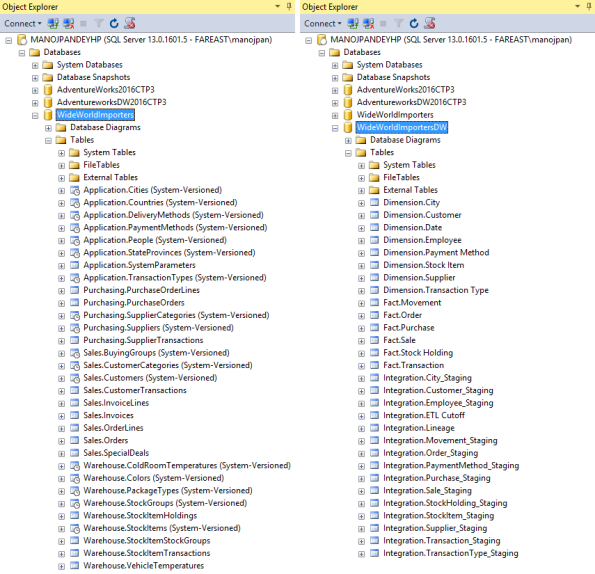
–> After Downloading and Restoring the sample tables looks like this in Object Explorer:
Polybase error in SQL Server 2016 : Row size exceeds the defined Maximum DMS row size, larger than the limit of [32768 bytes]
I got an email form one of my reader regarding issues while working with SQL Server 2016 and Polybase, and it is as follows:
I am able to successfully install SQL with Polybase and able to query data in Azure storage but for a table I am getting error.
I am trying to pull data by creating External Data Source connection in SQL enabled Polybase features. I am getting below error as:
Cannot execute the query “Remote Query” against OLE DB provider “SQLNCLI11” for linked server “(null)”. 107093;Row size exceeds the defined Maximum DMS row size: [40174 bytes] is larger than the limit of [32768 bytes]
With the error description its quiet evident that the External tables does not support row size more than 32768 bytes. But still I take a look online and found in Azure Documentation that this is a limitation right now with Polybase. The Azure document mentions:
Wide rows support is not supported yet, “If you are using Polybase to load your tables, define your tables so that the maximum possible row size, including the full length of variable length columns, does not exceed 32,767 bytes. While you can define a row with variable length data that can exceed this figure, and load rows with BCP, you will not be be able to use Polybase to load this data quite yet. Polybase support for wide rows will be added soon. Also, try to limit the size of your variable length columns for even better throughput for running queries.”
link: https://azure.microsoft.com/en-us/documentation/articles/sql-data-warehouse-develop-table-design/
SQL Server 2016 RTM full and final version available – Download it now !!!
Its 1st June 2016 and finally Microsoft has released SQL Server 2016 full and final version, and is available for download!
Exactly a year back the first CTP version of SQL Server 2016 was released and we got a chance to get a glimpse of the new features coming in. Then after every month or two Microsoft kept rolling out the CTP versions with more new features, enhancements, and bug fixes on the previous CTP builds.
–> Download SQL Server:
To download SQL Server 2016 you can Register and Download the SQL Server 2016 Full or free Evaluation version (180 days) here.
Or you can Direct download the DVD ISO file image (~2.1 GB) SQLServer2016-SSEI-Eval.exe
–> Free Developer Version:
Microsoft on March 2016 announced that going forward the Developer version of SQL Server any release will be free for Developers and Learning purpose. Register and Download the Developer version.
Or you can Directly download the DVD ISO image (~2.1 GB): en_sql_server_2016_developer_x64_dvd_8777069.iso
This Developer version is meant for development and testing only, and not for production environments or for use with production data. For more info please check my previous blog post.
–> One big Update on SSMS:
From now onward SSMS i.e. SQL Server Management Studio will not be part of SQL Server installation. This has to be installed separately via the SSMS download page, or from the Installation Center which will download SSMS from online.
As per Microsoft, this is basically to support the move to make a universal version of SSMS for both SQL Server on-Prem & Azure SQL Database, that will ship every month or so.
Check my previous post on installing SSMS separately.
–> Check new features in SQL Server 2016: https://sqlwithmanoj.com/sql-server-2016-articles/
1. Native JSON Support, Part1, Part2, Part3, Part4, Part5
2. Temporal Data/Tables, Part1, Part2
3. Row Level Security, Part1, Part2
4. Dynamic Data Masking, Link
5. Stretch Database, Link
6. Query Store, Link
7. Live Query Statistics, Link
8. Enhanced In-Memory OLTP, Link
9. Enhanced ColumnStore Indexes, Link
10. Truncate Table partition
11. Other features like, IF EXIST with DROP stmt, STRING_SPLIT fn, COMPRESS & DECOMPRESS fn, etc.
Microsoft PSS – SQL 2016 Series: It just runs faster | May updates
Microsoft PSS Engineers have built a series on “It Just Runs Faster”!
“In the Sep 2014 the SQL Server CSS and Development teams performed a deep dive focused on scalability and performance when running on current and new hardware configurations. The SQL Server Development team tasked several individuals with scalability improvements and real world testing patterns. You can take advantage of this effort packaged in SQL Server 2016. – https://www.microsoft.com/en-us/server-cloud/products/sql-server-2016/”
SQL 2016 will run faster in many ways, without changing code.
The series kickoff is here:
https://blogs.msdn.microsoft.com/psssql/2016/02/23/sql-2016-it-just-runs-faster-announcement/
Previous updates:
Microsoft PSS – SQL 2016 Series: It just runs faster | Feb-March updates
Microsoft PSS – SQL 2016 Series: It just runs faster | April updates
The announcements so far in May are:
SQL 2016 – It Just Runs Faster: AlwaysOn Parallel Compression / Improved Algorithms
https://blogs.msdn.microsoft.com/psssql/2016/05/03/sql-2016-it-just-runs-faster-alwayson-parallel-compression-improved-algorithms/
SQL 2016 – It Just Runs Faster – AlwaysOn AES-NI Encryption
https://blogs.msdn.microsoft.com/psssql/2016/05/05/sql-2016-it-just-runs-faster-alwayson-aes-ni-encryption/
SQL 2016 – It Just Runs Faster: In-Memory Optimized Database Worker Pool
https://blogs.msdn.microsoft.com/psssql/2016/05/10/sql-2016-it-just-runs-faster-in-memory-optimized-database-worker-pool/
SQL 2016 – Leverages On Demand MSDTC Startup
https://blogs.msdn.microsoft.com/psssql/2016/05/12/sql-2016-leverages-on-demand-msdtc-startup/
SQL 2016 – It Just Runs Faster: XEvent Linq Reader
https://blogs.msdn.microsoft.com/psssql/2016/05/18/sql-2016-it-just-runs-faster-xevent-linq-reader/
Check my blog posts on most of the new features released in SQL Server 2016 here
SQL Server 2012: Error handling for multiple errors – MSDN TSQL forum
–> Question:
I have a stored procedure which steps through a list of transaction log backups and applies them to a DR database with NORECOVERY. As part of our DR test process, it is sometimes possible that the DR database gets ahead of the transaction log list. In this circumstance I get the error:
Msg 4326, Level 16, State 1, Line 8
The log in this backup set terminates at LSN 74000000023300001, which is too early to apply to the database. A more recent log backup that includes LSN 74000000025200001 can be restored.
Msg 3013, Level 16, State 1, Line 8
RESTORE LOG is terminating abnormally.
This is fine and I’m happy to ignore this log and move on to the next one. However there appears to be no way to catch the 4326 error. Wrapping the restore in a TRY … CATCH only identifies the 3013 error number and that could be caused by many issues that I don’t want to ignore. If my TRY … CATCH uses the THROW command, both the 4326 and 3013 errors are displayed so my session clearly has a handle to them both.
My questions are:
1. Can I catch the first error thrown?
2. Can I review all the errors thrown?
3. Can the output from THROW be captured in a variable so I can parse it?
–> Answer:
While using RAISERROR it will only catch the last error thrown, it won’t catch and return all the errors.
The new THROW keyword introduced in SQL Server 2012 returns all the errors, check this link: https://sqlwithmanoj.com/2015/02/04/capture-multiple-errors-in-try-catch-by-using-throw-statement/
But I don’t think if there is any mechanism to store both the errors returned by any script as after THROW the execution ends and control is transferred to the client.
Other than using DBCC OUTBUFFER(@@spid), you will need to parse the multiple error details spread through several rows.
Ref link.



Current Visitors

StatCounter …since April 2012


 Leisure blog: Creek & Trails
- NMDC Hyderabad Marathon – My first 42k FM, cramps, training and fuelling
- Singapore (Part 2) – 6 days itinerary, sightseeing & attractions
- Singapore (Part 1) – Tickets, Visa, Hotel, Forex Card/Cash, Metro/Bus cards
- I got full refund of my flight tickets during COVID lockdown (AirIndia via MakeMyTrip)
- YouTube – Your Google Ads account was cancelled due to no spend
- YouTube latest update on its YPP (YouTube Partner Program) which may affect your channel
- Starting your own blog !!!
- How to file ITR (Income Tax Return) online AY 2017-18 (for simple salaried)
- Scam – Become a kin/hier and earn a fortune – via LinkedIn and Email
- Places to visit in and around Vizag (aka Visakhapatnam)
 SQL with Manoj