Archive
SQL Basics – Working with VIEWs in SQL Server
Views in SQL Server and other RDBMSs are simply Virtual Tables or Stored Queries. Views are like tables, contains rows and columns, but do not store any data within. Instead they use the Query that is defined to create the view to show data from one or more tables.
–> A view can be used for:
1. Simplifying a complex query, give it a simple name, and use it like a table.
2. Providing security by restricting the table access and showing only selected Columns and Rows via Views.
3. Providing compatibility with other client systems that cannot be changed.
–> Now let’s see how Views helps with above points:
Point #1: Consider Query below, it will be difficult and time consuming to write the same query every time. Also due to human error at times you may not be able to get same or desired results, because you can commit mistake or forget something while writing the same logic.
USE [AdventureWorks2014]
GO

SELECT
	 P.BusinessEntityID AS EmpID
	,P.Title
	,CONCAT(P.FirstName, ' ', P.MiddleName, ' ', P.LastName) AS EmployeeName
	,P.Suffix
	,E.BirthDate
	,CASE
		WHEN E.Gender = 'M' THEN 'Male'
		ELSE 'Female'
	 END as Gender
	,IIF(E.MaritalStatus = 'S', 'Single', 'Married') as MaritalStatus
FROM Person.Person P
JOIN [HumanResources].[Employee] E
ON E.BusinessEntityID = P.BusinessEntityID

… here we have Joined 2 tables and selected only required columns. You will also notice that we have changed the column names (alias), and created calculated columns, like EmployeeName, Gender & MaritalStatus.
So rather than writing this query every time, its better to store this query as a View, like below:
CREATE VIEW dbo.vwPersonEmployee
AS
SELECT
	 P.BusinessEntityID AS EmpID
	,P.Title
	,CONCAT(P.FirstName, ' ', P.MiddleName, ' ', P.LastName) AS EmployeeName
	,P.Suffix
	,E.BirthDate
	,CASE
		WHEN E.Gender = 'M' THEN 'Male'
		ELSE 'Female'
	 END as Gender
	,IIF(E.MaritalStatus = 'S', 'Single', 'Married') as MaritalStatus
FROM Person.Person P
JOIN [HumanResources].[Employee] E
ON E.BusinessEntityID = P.BusinessEntityID
GO
… and simply execute the view instead of the query now onwards, like:
SELECT * FROM dbo.vwPersonEmployee
Point #2: The above View uses 2 tables Person.Person & HumanResources.Employee. Now if you want a user to have restricted access to these 2 tables, but also want the user to query View to get desired and restricted data, then you can GRANT access only to the View, like:
CREATE USER userView WITHOUT LOGIN;

GRANT SELECT ON dbo.vwPersonEmployee TO userView;
GO

EXECUTE AS USER = 'userView';

SELECT * FROM dbo.vwPersonEmployee 	-- Displays View data

SELECT * FROM Person.Person				-- ERROR: The SELECT permission was denied on the object
SELECT * FROM HumanResources.Employee	-- ERROR: The SELECT permission was denied on the object

REVERT;
GO

DROP USER userView
GO
… here when the user executes the View he can see the data, but with only selected columns. But if he tries to use tables, he will get error.
Point #3: Now let’s say a client application which was getting data from an old table, let’s say dbo.Person, with following columns: PersonID, PersonFirstName, PersonLastName. Now on the new DB system the table is replaced by a new table Person.Person with different column names. This will make the system unusable and unstable.
But with the use of Views we can fill the gap, by creating a new View with name dbo.Person on top of Person.Person, and aliasing new columns with old column names, like:
CREATE VIEW dbo.Person
AS
SELECT
	 BusinessEntityID as PersonID
	,FirstName as PersonFirstName
	,LastName as PersonLastName
FROM Person.Person
GO
… so by this way the client application can talk to the new table by hitting the View instead of the Table.
–> Dropping/Deleting Views:
DROP VIEW dbo.vwPersonEmployee
DROP VIEW dbo.Person
SQL Basics – Working with NOT NULL, DEFAULT and CHECK Constraints (Domain Integrity)
In my previous posts I discussed about [Entity Integrity] constraint which deals with Primary Keys & Unique Keys, and [Referential Integrity] constraint, which deals with Foreign Keys, please check the above links to know about them.
Here in this post I’ll discuss about Domain Integrity which validates the entries for a given column in a particular table. The Domain integrity can be enforced by:
1. Applying appropriate DATATYPES
2. NOT NULL constraint: enforces a column to NOT accept NULL values. Which means the columns must always contain a value and you cannot insert or update a row without specifying a value for that column.
For example: Employee name is mandatory while inserting an employee’s record, thus you can have [EmployeeName] column with NOT NULL constraint, like: [EmployeeName] nvarchar(100) NOT NULL
3. DEFAULT constraint: can be used to Insert a default value into a column, if no other value is provided while Inserting a row. This constraint works only with INSERT statement.
For example: To track the rows insert timestamp you can add this constraint to that column, like: [CreatedOn] datetime DEFAULT (getdate())
4. CHECK constraint: enforces a column to have only limited and pre-defined values. Means you cannot insert or update a row with values that are not defined with this constraint.
For example: An Employee gender could only be Male or Female, so you can have [Gender] column with CHECK constraint, like: [Gender] nchar(1) CHECK ([Gender] IN (‘M’, ‘F’))
–> Check the video on how to work with these three constraints (NOT NULL, CHECK and DEFAULT):
–> SQL Code used in above video:
--// Domain Integrity Constraints:


-- 1. NOT NULL Constraint:

CREATE TABLE [dbo].[Employee](
	 [EmployeeID]	int IDENTITY (100, 1) PRIMARY KEY
	,[EmployeeName]	nvarchar(100) NOT NULL
	,[Gender]		nchar(1)
)
GO

insert into [Employee] ([EmployeeName], [Gender])
values (NULL, NULL)

/*
Msg 515, Level 16, State 2, Line 13
Cannot insert the value NULL into column 'EmployeeName', table 'TestManDB.dbo.Employee'; column does not allow nulls. INSERT fails.
The statement has been terminated.
*/

select * from [Employee]
GO


-- 2. DEFAULT Constraint:

DROP TABLE [dbo].[Employee]
GO

CREATE TABLE [dbo].[Employee](
	 [EmployeeID]	int IDENTITY (100, 1) PRIMARY KEY
	,[EmployeeName]	nvarchar(100) NOT NULL
	,[Gender]		nchar(1)
	,[isActive]		bit				DEFAULT (1)
	,[CreatedOn]	datetime		DEFAULT (getdate())
	,[CreatedBy]	varchar(100)	DEFAULT (SYSTEM_USER)
)
GO

insert into [Employee] ([EmployeeName], [Gender])
values ('Manoj Pandey', 'M')

insert into [Employee] ([EmployeeName], [Gender])
values ('Kanchan Pandey', 'F')

insert into [Employee] ([EmployeeName], [Gender], [isActive])
values ('Maria Y', 'F', 0)

insert into [Employee] ([EmployeeName], [Gender], [CreatedOn], [CreatedBy])
values ('Brock H', 'M', '2015-01-01 21:32:07.153', 'scott')

select * from [Employee]
GO


-- 3. CHECK Constraint:

DROP TABLE [dbo].[Employee]
GO

CREATE TABLE [dbo].[Employee](
	 [EmployeeID]	int IDENTITY (100, 1) PRIMARY KEY
	,[EmployeeName]	nvarchar(100) NOT NULL
	,[Gender]		nchar(1)		CONSTRAINT ck_emp_gender CHECK ([Gender] IN ('M', 'F'))
	,[isActive]		bit				CONSTRAINT ck_emp_isActive DEFAULT (1)
	,[CreatedOn]	datetime		CONSTRAINT ck_emp_CreatedOn DEFAULT (getdate())
	,[CreatedBy]	varchar(100)	CONSTRAINT ck_emp_CreatedBy DEFAULT (SYSTEM_USER)
)
GO

insert into [Employee] ([EmployeeName], [Gender])
values ('Manoj Pandey', 'X')

/*
Msg 547, Level 16, State 0, Line 67
The INSERT statement conflicted with the CHECK constraint "CK__Employee__Gender__4D5F7D71". The conflict occurred in database "TestManDB", table "dbo.Employee", column 'Gender'.
The statement has been terminated.
*/

insert into [Employee] ([EmployeeName], [Gender])
values ('Manoj Pandey', 'M')

select * from [Employee]
GO


--// Table Generated from SSMS - Object Explorer

USE [TestManDB]
GO

ALTER TABLE [dbo].[Employee] DROP CONSTRAINT [ck_emp_gender]
GO

ALTER TABLE [dbo].[Employee] DROP CONSTRAINT [ck_emp_CreatedBy]
GO

ALTER TABLE [dbo].[Employee] DROP CONSTRAINT [ck_emp_CreatedOn]
GO

ALTER TABLE [dbo].[Employee] DROP CONSTRAINT [ck_emp_isActive]
GO

/****** Object:  Table [dbo].[Employee]    Script Date: 3/30/2016 9:45:17 PM ******/
DROP TABLE [dbo].[Employee]
GO

/****** Object:  Table [dbo].[Employee]    Script Date: 3/30/2016 9:45:17 PM ******/
SET ANSI_NULLS ON
GO

SET QUOTED_IDENTIFIER ON
GO

SET ANSI_PADDING ON
GO

CREATE TABLE [dbo].[Employee](
	[EmployeeID] [int] IDENTITY(100,1) NOT NULL,
	[EmployeeName] [nvarchar](100) NOT NULL,
	[Gender] [nchar](1) NULL,
	[isActive] [bit] NULL,
	[CreatedOn] [datetime] NULL,
	[CreatedBy] [varchar](100) NULL,
PRIMARY KEY CLUSTERED
(
	[EmployeeID] ASC
)WITH (PAD_INDEX = OFF, STATISTICS_NORECOMPUTE = OFF, IGNORE_DUP_KEY = OFF, ALLOW_ROW_LOCKS = ON, ALLOW_PAGE_LOCKS = ON) ON [PRIMARY]
) ON [PRIMARY]

GO

SET ANSI_PADDING OFF
GO

ALTER TABLE [dbo].[Employee] ADD  CONSTRAINT [ck_emp_isActive]  DEFAULT ((1)) FOR [isActive]
GO

ALTER TABLE [dbo].[Employee] ADD  CONSTRAINT [ck_emp_CreatedOn]  DEFAULT (getdate()) FOR [CreatedOn]
GO

ALTER TABLE [dbo].[Employee] ADD  CONSTRAINT [ck_emp_CreatedBy]  DEFAULT (suser_sname()) FOR [CreatedBy]
GO

ALTER TABLE [dbo].[Employee]  WITH CHECK ADD  CONSTRAINT [ck_emp_gender] CHECK  (([Gender]='F' OR [Gender]='M'))
GO

ALTER TABLE [dbo].[Employee] CHECK CONSTRAINT [ck_emp_gender]
GO


-- Final Cleanup:

DROP TABLE [dbo].[Employee]
GO
To know about more on Constraints and their types check this blog post.
SQL Basics – UDF | User Defined Functions – Scalar, Table Valued (TVF), MultiStatement (MTVF)
UDF or User Defined Functions are a set or batch of code where one can apply any SQL logic and return a single scalar value or a record set.
According to MS BOL UDFs are the subroutines made up of one or more Transact-SQL statements that can be used to encapsulate code for reuse. These reusable subroutines can be used as:
– In TSQL SELECT statements at column level.
– To create parametrized view or improve the functionality of in indexed view.
– To define a column and CHECK constraints while creating a table.
– To replace a stored procedures and views.
– Join complex logic with a table where a stored procedure fails.
– Faster execution like Stored procedures, reduce compliation cost by caching the execution query plans.
Apart from the benefits UDF’s has certain limitations:
– Can not modify any database objects, limited to update table variables only.
– Can not contain the new OUTPUT clause.
– Can only call extended stored procedures, no other procedures.
– Can not define TRY-CATCH block.
– Some built-in functions are not allowed here, like:GETDATE(), because GETDATE is non-deterministic as its value changes every time it is called. On the other hand DATEADD() is allowed as it is deterministic, because it will return same result when called with same argument values.
A UDF can take 0 or upto 1024 parameters and returns either a scalar value or a table record set depending on its type.
SQL Server supports mainly 3 types of UDFs:
1. Scalar function
2. Inline table-valued function
3. Multistatement table-valued function
1. Scalar function: Returns a single value of any datatype except text, ntext, image, cursor & timestamp.
-- Example:
--// Create Scalar UDF [dbo].[ufn_GetContactOrders]
SET ANSI_NULLS ON
GO
SET QUOTED_IDENTIFIER ON
GO
CREATE FUNCTION [dbo].[ufn_GetContactOrders](@ContactID int)
RETURNS varchar(500)
AS
BEGIN
	DECLARE @Orders varchar(500)

	SELECT @Orders = COALESCE(@Orders + ', ', '') + CAST(SalesOrderID as varchar(10))
	FROM Sales.SalesOrderHeader
	WHERE ContactID = @ContactID

	RETURN (@Orders)
END

--// Usage:
-- Used at COLUMN level with SELECT
SELECT ContactID, dbo.ufn_GetContactOrders(ContactID) FROM Person.Contact
WHERE ContactID between 100 and 105 -- Output below

-- Used while defining a computed column while creating a table.
CREATE TABLE tempCustOrders (CustID int, Orders as (dbo.ufn_GetContactOrders(CustID)))

INSERT INTO tempCustOrders (CustID)
SELECT ContactID FROM Person.Contact
WHERE ContactID between 100 and 105

SELECT * FROM tempCustOrders -- Output below

DROP TABLE tempCustOrders
Output of both the selects above:
ContactID	OrdersCSV
100		51702, 57021, 63139, 69398
101		47431, 48369, 49528, 50744, 53589, 59017, 65279, 71899
102		43874, 44519, 46989, 48013, 49130, 50274, 51807, 57113, 63162, 69495
103		43691, 44315, 45072, 45811, 46663, 47715, 48787, 49887, 51144, 55310, 61247, 67318
104		43866, 44511, 45295, 46052, 46973, 47998, 49112, 50215, 51723, 57109, 63158, 69420
105		NULL
Note: If this was a temp(#) table then the function also needs to be created in tempdb, cause the temp table belongs to tempdb. The tables in function should also have the database name prefixed, i.e. [AdventureWorks].[Sales].[SalesOrderHeader]
2. Inline table-valued function: Returns a table i.e. a record-set. The function body contains just a single TSQL statement, which results to a record-set and is returned from here.
-- Example:
--// Create Inline table-valued UDF [dbo].[ufn_itv_GetContactSales]
SET ANSI_NULLS ON
GO
SET QUOTED_IDENTIFIER ON
GO
CREATE FUNCTION [dbo].[ufn_itv_GetContactSales](@ContactID int)
RETURNS TABLE
AS
RETURN (
	SELECT h.[ContactID], h.[SalesOrderID], p.[ProductID], p.[Name], h.[OrderDate], h.[DueDate],
	h.[ShipDate], h.[TotalDue], h.[Status], h.[SalesPersonID]
	FROM Sales.SalesOrderHeader AS h
	JOIN Sales.SalesOrderDetail AS d ON d.SalesOrderID = h.SalesOrderID
	JOIN Production.Product AS p ON p.ProductID = d.ProductID
	WHERE ContactID = @ContactID )

--// Usage:
SELECT * FROM ufn_itv_GetContactSales(100)
3. Multistatement table-valued function: Also returns a table (record-set) but can contain multiple TSQL statements or scripts and is defined in BEGIN END block. The final set of rows are then returned from here.
-- Example:
--// Create Multistatement table-valued UDF [dbo].[ufn_mtv_GetContactSales]
SET ANSI_NULLS ON
GO
SET QUOTED_IDENTIFIER ON
GO
CREATE FUNCTION [dbo].[ufn_mtv_GetContactSales](@ContactID int)
RETURNS @retSalesInfo TABLE (
	[ContactID] INT NOT NULL,
	[SalesOrderID] INT NULL,
	[ProductID] INT NULL,
	[Name] NVARCHAR(50) NULL,
	[OrderDate] DATETIME NULL,
	[DueDate] DATETIME NULL,
	[ShipDate] DATETIME NULL,
	[TotalDue] MONEY NULL,
	[Status] TINYINT NULL,
	[SalesPersonID] INT NULL)
AS
BEGIN
	IF @ContactID IS NOT NULL
	BEGIN
		INSERT @retSalesInfo
		SELECT h.[ContactID], h.[SalesOrderID], p.[ProductID], p.[Name], h.[OrderDate], h.[DueDate],
			   h.[ShipDate], h.[TotalDue], h.[Status], h.[SalesPersonID]
		FROM Sales.SalesOrderHeader AS h
		JOIN Sales.SalesOrderDetail AS d ON d.SalesOrderID = h.SalesOrderID
		JOIN Production.Product AS p ON p.ProductID = d.ProductID
		WHERE ContactID = @ContactID
	END
	-- Return the recordsets
	RETURN
END

--// Usage:
SELECT * FROM ufn_mtv_GetContactSales(100)
— Output:
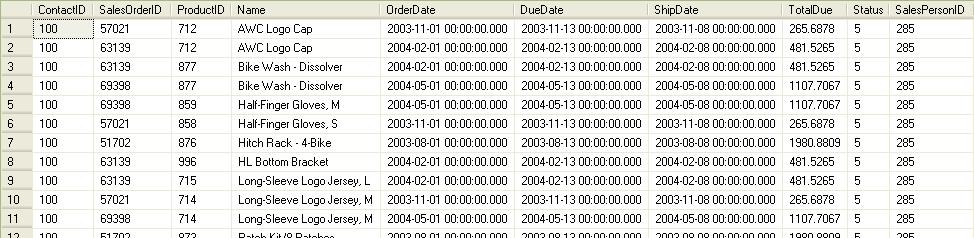
TVF & MVF output
More MSDN & MS BOL links:
http://msdn.microsoft.com/en-us/library/aa175085(SQL.80).aspx
http://msdn.microsoft.com/en-us/library/aa214363(SQL.80).aspx
http://msdn.microsoft.com/en-us/library/ms186755.aspx
http://msdn.microsoft.com/en-us/library/ms191007.aspx
http://msdn.microsoft.com/en-us/magazine/cc164062.aspx
SQL Basics – IDENTITY property of a Column (in a table)
With IDENTITY property you can:
1. Creates an identity column in a table.
2. Used for generating key values, based on the current seed & increment.
3. Each new value for a particular transaction is different from other concurrent transactions on the table.
–> You can check the demo about IDENTITY property here:
–> IDENTITY property on a column does not guarantee:
1. Uniqueness of the value,
2. Consecutive values within a transaction,
3. Consecutive values after server restart or other failures,
4. Reuse of values,
–> SQL Script used in Demo:
-- IDENTITY property of a Column

CREATE TABLE [dbo].[Employee](
	[EmployeeID]	int				NOT NULL IDENTITY (100, 1),
	[EmployeeName]	nvarchar(100)	NOT NULL,
	[Gender]		nchar(1)		NULL,
	[DOB]			datetime		NULL,
	[DOJ]			datetime		NULL,
	[DeptID]		int				NULL
)

INSERT INTO [dbo].[Employee] (EmployeeName, Gender, DOB, DOJ, DeptID)
VALUES ('MANOJ PANDEY', 'M', '1990-01-01', '2010-01-01', 101)

INSERT INTO [dbo].[Employee] (EmployeeName, Gender, DOB, DOJ, DeptID)
VALUES ('JHON K', 'M', NULL, '2010-01-01', NULL)

INSERT INTO [dbo].[Employee] ([EmployeeName])
VALUES ('Brock H')
GO

SELECT * FROM [dbo].[Employee]
GO


-- Inserting Explicit value in IDENTITY column:

SET IDENTITY_INSERT [dbo].[Employee] ON

INSERT INTO [dbo].[Employee] ([EmployeeID],[EmployeeName])
VALUES (1000, 'Brock H')

SET IDENTITY_INSERT [dbo].[Employee] OFF
GO


SELECT * FROM [dbo].[Employee]
GO

INSERT INTO [dbo].[Employee] ([EmployeeName])
VALUES ('Jhon B')
GO

SELECT * FROM [dbo].[Employee]
GO
–> Check more articles on IDENTITY property:
– RE-SEED an IDENTITY value of a Column
– Using IDENTITY() function with SELECT into statement
– All about IDENTITY columns, some more secrets
– IDENTITY property behavior with SQL Server 2012 and above
SQL Basics – Backup and Restore Database in SQL Server
–> SQL Script to take Backup of a database:
USE [master]
GO

BACKUP DATABASE [AdventureWorks2014]
	TO  DISK = N'D:\SQL\AdventureWorks2014.bak' WITH NOFORMAT,
	NOINIT,
	NAME = N'AdventureWorks2014-Full Database Backup',
	SKIP,
	NOREWIND,
	NOUNLOAD,
	STATS = 10
GO
–> SQL Script to Restore a Backup file:
USE [master]
GO

RESTORE DATABASE [TestManDB2] FROM  DISK = N'D:\SQL\TestManDB.bak' WITH FILE = 1,
	MOVE N'TestManDB' TO N'D:\MSSQL\DATA\TestManDB2.mdf',
	MOVE N'TestManDB_log' TO N'D:\MSSQL\DATA\TestManDB2_log.ldf',
	NOUNLOAD,
	STATS = 5
GO
–> Video on how to backup and restore a database:



Current Visitors

StatCounter …since April 2012


 Leisure blog: Creek & Trails
- NMDC Hyderabad Marathon – My first 42k FM, cramps, training and fuelling
- Singapore (Part 2) – 6 days itinerary, sightseeing & attractions
- Singapore (Part 1) – Tickets, Visa, Hotel, Forex Card/Cash, Metro/Bus cards
- I got full refund of my flight tickets during COVID lockdown (AirIndia via MakeMyTrip)
- YouTube – Your Google Ads account was cancelled due to no spend
- YouTube latest update on its YPP (YouTube Partner Program) which may affect your channel
- Starting your own blog !!!
- How to file ITR (Income Tax Return) online AY 2017-18 (for simple salaried)
- Scam – Become a kin/hier and earn a fortune – via LinkedIn and Email
- Places to visit in and around Vizag (aka Visakhapatnam)
 SQL with Manoj