Informatica – ERROR: Workflow [FOLDER_NAME:WORKFLOW_NAME[version 1]] is disabled. Please check the Integration Service log for more information.
Today I got an email alert for the Informatica Workflow that was working properly suddenly gave following error:
ERROR: Workflow [FOLDER_NAME:WORKFLOW_NAME[version 1]] is disabled.
Please check the Integration Service log for more information.
The Workflow was not getting kicked off and there was nothing else showing up in the logs other than this error.
I did a bit of research and as the error message indicates I found that one setting might be enabled that can disable the Workflow.
–> I opened the Workflow Designer, opened the Workflow in the Designer window. Right-click on the Workflow Designer canvas and this opens up following window, which shows up as below:
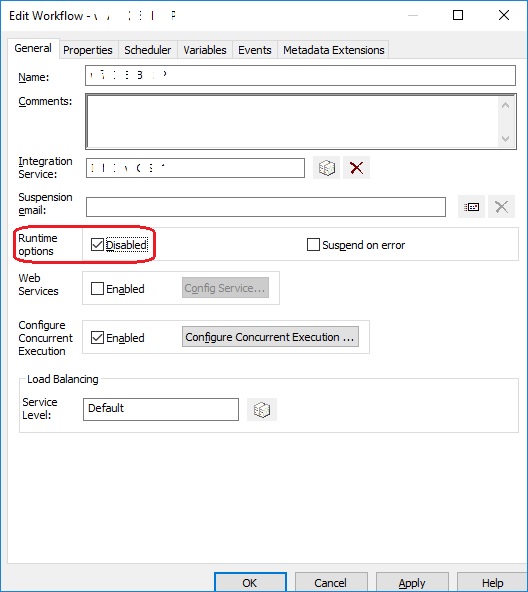
… here as you can see that the setting “Runtime Options, Disabled” is checked/enabled (circled, above). This means that the Workflow is currently in disabled state. Just un-check this option and save it by clicking on the Apply button.
Now re-run the Workflow and it should run now without any issues.
Resolving issues while enabling Temporal Data on an existing Table
In my [previous post] about Temporal Data I showed how to setup Temporal on an existing table. That was a simple scenario where the tables does not have historical data, and we added the 2 Period columns on that table, and we didn’t face any issues.
–> Check demo to setup Temporal Tables:
–> Resolving potential issues while enabling Temporal Data on an existing Table:
There might be other scenarios where an existing table already contains the Period columns and you want to assign them as the Temporal Period Columns. Here, in this post I’ve tried to do the same with an existing table and ran into some issues while setting it up. Resolved the issues in process to make that table a Temporal Table, which we will see below:
–> My existing table looks like this, EffectiveStartDate & EffectiveEndDate datetime type columns as Period Columns:
CREATE TABLE dbo.ResourceTD (
	 ResourceID
	 -- other columns here
	,EffectiveStartDate datetime,
	,EffectiveEndDate datetime,
)
–> 1. First Issue: While setting up Parent Temporal Table with the ALTER TABLE statement:
ALTER TABLE dbo.ResourceTD
ADD PERIOD FOR SYSTEM_TIME (
    EffectiveStartDate,
    EffectiveEndDate
)
GO
… I got following error below:
Msg 13575, Level 16, State 0, Line 42
ADD PERIOD FOR SYSTEM_TIME failed because table ‘SQL2016POC.dbo.ResourceTD’ contains records where end of period is not equal to MAX datetime.
This was evident by the error message, as the columns datatype was datetime initially and I ALTERed them to datetime2 but the values set were not MAX, but like this “9999-12-31 00:00:00”. So, you need to set them to the MAX possible date, like “9999-12-31 23:59:59.9999999” as shown below:
UPDATE dbo.ResourceTD
SET EffectiveEndDate = '9999-12-31 23:59:59.9999999'
GO
–> 2. Second Issue: Finally, while enabling the Temporal Table with History Table:
-- Enabling the System-Versioning ON
ALTER TABLE dbo.ResourceTD
SET (SYSTEM_VERSIONING = ON (HISTORY_TABLE = dbo.ResourceTDHistory))
GO
… I got following error below:
Msg 13541, Level 16, State 0, Line 85
Setting SYSTEM_VERSIONING to ON failed because history table ‘SQL2016POC.dbo.ResourceTDHistory’ contains invalid records with end of period set before start.
I found that the EffectiveStartDate & EffectiveEndDate columns values were not correct, actually EffectiveStartDate was greater than EffectiveEndDate. That might be due to some previous processing of business logic and manual error. So, I swapped the value for those records.
–> You will need to check for all possible scenarios until the Historical Table gets created successfully, some as follows (but not limited to these):
-- Scenario #1
SELECT * FROM ResourceTDHistory WHERE EffectiveStartDate IS NULL
SELECT * FROM ResourceTDHistory WHERE EffectiveEndDate IS NULL

-- Scenario #2
SELECT *
FROM ResourceTDHistory
WHERE EffectiveStartDate > EffectiveEndDate
I faced these two issues related to this single table. You might face similar or other issues with other tables, based upon different scenarios.
I will update this post if I see any other issues while setting up Temporal tables. Or if you come across, please let me know by your comments, Thanks !!!
Error Msg 8672, MERGE statement attempted to UPDATE or DELETE the same row more than once – MSDN TSQL forum
–> Question:
I am trying to do update/insert operation using merge statement, but getting below error:
“The MERGE statement attempted to UPDATE or DELETE the same row more than once. This happens when a target row matches more than one source row. A MERGE statement cannot UPDATE/DELETE the same row of the target table multiple times. Refine the ON clause to ensure a target row matches at most one source row, or use the GROUP BY clause to group the source rows.”
I am using SQL Server 2014. I knew there was a bug in older version of SQL Server (like version 2008). Does this issue still persist in latest version of SQL Server?
–> My Answer:
There might be 2 reasons:
1. Your source/target tables might be having DUPLICATES.
2. There might NO DUPLICATES, but you might be using NOLOCK hint? If yes, then your source table might be very big and going through constant changes (INSERT/UPDATE/DELETE), which might be causing PAGE-SPLITS and causing to read single source row TWICE. Try removing NOLOCK and run your MERGE stmt.
–> Another Answer by Naomi:
You need to fix the source of the problem, not apply patches. If your source has duplicate rows for the same key used to update, when how would you know which row will be used to update? The simple solution is to eliminate duplicates by either using correct combinations of keys to join or creating an extra key with ROW_NUMBER() approach.
Ref Link.
Memory Optimized “Table Variables” in SQL Server 2014 and 2016
SQL Server 2014 provided you these new features to create [Memory Optimized Tables] and [Native Compiled Stored Procedures] for efficient and quick processing of data and queries which happens all in memory.
It also provided you one more feature to create Memory Optimized Table Variables, in addition to normal Disk Based Table Variables.
This new feature would provide you more efficiency in Storing, Retrieving and Querying temporary data from and in memory.
Normal Table Variables are created in tempdb and utilize it for their entire life. Now with these new Memory Optimized Table Variables they will become free from tempdb usage, relieve tempdb contention and reside in memory only till the scope i.e. batch of a SQL script or a Stored Procedure.
Let’s see how to use these and what performance gain you get out of these tables.
–> Enable Database for supporting Memory Optimized tables: To use this feature your Database should be associated with a FileGroup. So, let’s alter the database.
USE [TestManDB]
GO

-- Add the Database to a new FileGroup

ALTER DATABASE [TestManDB]
    ADD FILEGROUP [TestManFG] CONTAINS MEMORY_OPTIMIZED_DATA
GO

ALTER DATABASE [TestManDB]
ADD FILE (
	NAME = TestManDBFG_file1,
    FILENAME = N'E:\MSSQL\DATA\TestManDBFG_file1' -- Put correct path here
)
TO FILEGROUP TestManFG
GO
Otherwise, while creating Memory Optimized objects you will get below error:
Msg 41337, Level 16, State 100, Line 1
Cannot create memory optimized tables. To create memory optimized tables, the database must have a MEMORY_OPTIMIZED_FILEGROUP that is online and has at least one container.
You cannot create a Memory Optimized Table Variable directly with DECLARE @TableVarName AS TABLE (…) statement. First you will need to create a Table Type, then based upon this you can create Tables Variables.
–> Create a Table TYPE [Person_in_mem]
CREATE TYPE dbo.Person_in_mem AS TABLE(
	 BusinessEntityID INT NOT NULL
	,FirstName NVARCHAR(50) NOT NULL
	,LastName NVARCHAR(50) NOT NULL

	INDEX [IX_BusinessEntityID] HASH (BusinessEntityID)
		WITH ( BUCKET_COUNT = 2000)
)
WITH ( MEMORY_OPTIMIZED = ON )
GO
The Memory Optimized Table Type should have an Index, otherwise you will see an error as mentioned below:
Msg 41327, Level 16, State 7, Line 27
The memory optimized table ‘Person_in_mem’ must have at least one index or a primary key.
Msg 1750, Level 16, State 0, Line 27
Could not create constraint or index. See previous errors.
Ok, now as we’ve created this table type, now we can create as many Table Variables based upon this.
–> Now, create a Table variable @PersonInMem of type [Person_in_mem] that is created above:
DECLARE @PersonInMem AS Person_in_mem

-- insert some rows into this In-Memory Table Variable
INSERT INTO @PersonInMem
SELECT TOP 1000
	 [BusinessEntityID]
	,[FirstName]
	,[LastName]
FROM [AdventureWorks2014].[Person].[Person]

SELECT * FROM @PersonInMem
GO
Here we successfully created a Table Variable, inserted records into it and retrieved same by the SELECT statement, and this all happened in memory.
Now how can we see we that how much benefits we got from this? What we can do is, we can create a separate Disk-Based Table Variable and do similar operation on it and compare the results by checking the Execution Plan.
–> Comparing performance of both In-Memory vs Disk-Based Table-Variables
– Enable the Actual Execution Plan and run below script to Create and Populate both:
1. In-Memory Table Variable
2, Disk-Based Table Variable
-- 1. In-Memory Table Variable
DECLARE @PersonInMem AS Person_in_mem

INSERT INTO @PersonInMem
SELECT TOP 1000
	 [BusinessEntityID]
	,[FirstName]
	,[LastName]
FROM [AdventureWorks2014].[Person].[Person]

select * from @PersonInMem


-- 2. Disk-Based Table Variable
DECLARE @Person AS TABLE (
	 BusinessEntityID INT NOT NULL
	,FirstName NVARCHAR(50) NOT NULL
	,LastName NVARCHAR(50) NOT NULL
)

INSERT INTO @Person
SELECT TOP 1000
	 [BusinessEntityID]
	,[FirstName]
	,[LastName]
FROM [AdventureWorks2014].[Person].[Person]

select * from @Person
GO
–> Now, check the Actual Execution Plan results below:
1. Check the Cost of INSERT operation with both the tables:
– It took only 8% cost to insert into In-memory Table Variable.
– But it took 89% cost to insert into a Disk-Based Table Variable.
> If You see the individual Operators in both the plans you will see that :
For @PersonInMem Table Variable the cost of INSERT was just 19% compared to the cost of INSERT for @Person Table Variable that was 92%.

2. Check the Cost to SELECT/Retrieve rows both the tables:
– It took only 0% cost to retrieve rows from the In-memory Table Variable
– And it took 3% cost to retrieve rows from a Disk-Based Table Variable

This proves that the INSERT and SELECT operations with Memory Optimized table are way more faster that normal Disk-Based tables.
Thus, using Memory Optimized Table Variables will provide you better performance for storing temporary data within memory and process with in Stored Procedure or your T-SQL Scripts.
Update: Know more about In-Memory tables:
Obfuscate column level data by using “Dynamic Data Masking” in SQL Server 2016
This time SQL Server 2016 has made good additions in area of Security by introducing features like:
1. Always Encrypted
2. Row Level Security, check my previous post,
3. Dynamic Data Masking, this post
4. and other security features, like Transparent Data Encryption (TDE), etc.
Dynamic Data Masking provides you support for real-time obfuscation of data so that the data requesters do not get access to unauthorized data. This helps protect sensitive data even when it is not encrypted, and shows obfuscated data at the presentation layer without changing anything at the database level.
Dynamic Data Masking limits sensitive data exposure by masking it to non-privileged users. This feature helps prevent unauthorized access to sensitive data by enabling customers to designate how much of the sensitive data to reveal with minimal impact on the application layer. It’s a Policy-based Security feature that hides the sensitive data in the result set of a Query over designated database columns, while the data in the database is not changed.
–> “Dynamic Data Masking” provides you three functions/options to Mask your data:
1. default(): just replaces the column value with ‘XXXX’ by default.
2. email(): shows an email ID to this format ‘aXXX@XXXX.com’.
3. partial(prefix,padding,suffix): gives you option to format and mask only some part of a string value.
We will see the usage of all these 3 masking functions below.
–> To setup Dynamic Data Masking on a particular Table you need to:
1. CREATE TABLE with MASKED WITH FUNCTION option at column level.
– Or ALTER TABLE columns by using this option if the table is already present.
2. Create Users and Grant Read/SELECT access for the above CREATED/ALTERED table.
–> 1. Create a sample table [dbo].[Customer] with masked columns:
CREATE TABLE dbo.Customer (
	CustomerID 	 INT IDENTITY PRIMARY KEY,
	FirstName 	 VARCHAR(250),
	LastName 	 VARCHAR(250) MASKED WITH (FUNCTION = 'default()') NULL,
	PhoneNumber  VARCHAR(12)  MASKED WITH (FUNCTION = 'partial(1,"XXXXXXXXX",0)') NULL,
	Email 		 VARCHAR(100) MASKED WITH (FUNCTION = 'email()') NULL,
	CreditCardNo VARCHAR(16)  MASKED WITH (FUNCTION = 'partial(4,"XXXXXXXXXX",2)') NULL,
);
–> Now insert some test records (fictitious figures):
INSERT INTO dbo.Customer (FirstName, LastName, PhoneNumber, Email, CreditCardNo)
VALUES
('Manoj',   'Pandey', '4442889882', 'manojp@gmail.com', '4563234576547834'),
('Saurabh', 'Sharma', '9812446452', 'sausha@gmail.com', '1243096778653487'),
('Vivek',   'Singh',  '6745239856', 'viveks@gmail.com', '8756341209876735'),
('Keshav',  'Singh',  '9867452387', 'keshav@gmail.com', '2938713685372618');
–> Let’s check the rows on [dbo].[Customer] table in context of my User:
SELECT * FROM dbo.Customer;
GO
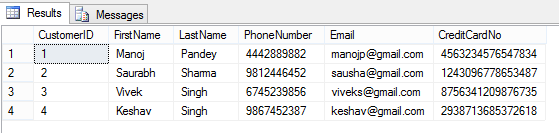
Here, I can see all the row/column values as I have full access to read the masked/sensitive data.
–> 2.a. Now let’s create a Test Account and just Grant Read access to [dbo].[Customer] table:
CREATE USER AnyUser WITHOUT LOGIN;
GO

GRANT SELECT ON dbo.Customer TO AnyUser;
GO
–> Let’s execute the SELECT statement on [dbo].[Customer] table in the Context of this new user account:
EXECUTE AS USER = 'AnyUser';
SELECT * FROM dbo.Customer;
REVERT;
GO

And you can see that the user is not able to see the masked data as he is not authorized to see it.
–> Removing Masking from a column by simple ALTER TABLE/COLUMN statement:
ALTER TABLE dbo.Customer
ALTER COLUMN LastName DROP MASKED;
GO

-- Let's check the table data again:
EXECUTE AS USER = 'AnyUser';
SELECT * FROM dbo.Customer;
REVERT;
GO
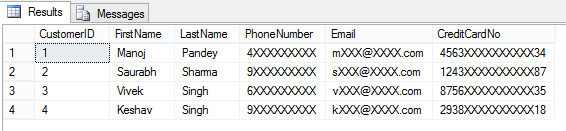
Here, now you are able to see contents of LastName columns, as the masking has been removed from this column by using simple ALTER TABLE/COLUMN statement.
–> 2.b. Granting the UNMASK permission to “AnyUser”:
GRANT UNMASK TO AnyUser;
GO

-- Let's check the table data again:
EXECUTE AS USER = 'AnyUser';
SELECT * FROM dbo.Customer;
REVERT;
GO
He is able to see all data unmasked when the UNMASK permission is granted to this user.
–> 2.c. Revoking back the UNMASK permission form the same user:
REVOKE UNMASK TO AnyUser;
GO
EXECUTE AS USER = 'AnyUser';
SELECT * FROM dbo.Customer;
REVERT;
GO
After Revoking UNMASK permission he is again not able to see complete data.
This way you can control access to your precious or PII data by masking the columns/fields that you don’t want to show to the external world or some set of users.
–> Final Cleanup:
DROP TABLE dbo.Customer;
GO
DROP USER [AnyUser]
GO
–> Check the same demo on YouTube:



Current Visitors

StatCounter …since April 2012


 Leisure blog: Creek & Trails
- NMDC Hyderabad Marathon – My first 42k FM, cramps, training and fuelling
- Singapore (Part 2) – 6 days itinerary, sightseeing & attractions
- Singapore (Part 1) – Tickets, Visa, Hotel, Forex Card/Cash, Metro/Bus cards
- I got full refund of my flight tickets during COVID lockdown (AirIndia via MakeMyTrip)
- YouTube – Your Google Ads account was cancelled due to no spend
- YouTube latest update on its YPP (YouTube Partner Program) which may affect your channel
- Starting your own blog !!!
- How to file ITR (Income Tax Return) online AY 2017-18 (for simple salaried)
- Scam – Become a kin/hier and earn a fortune – via LinkedIn and Email
- Places to visit in and around Vizag (aka Visakhapatnam)
 SQL with Manoj