Self Service BI by using Power BI – Power Pivot (Part 2)
After a long pause I’m back again to discuss on Power BI.
In my previous Power BI Series first part [link] I discussed about the first component of Power BI, i.e. Power Query and how to use it to discover and gather data.
Power Pivot lets you:
1. Create your own Data Model from various Data Sources, Modeled and Structured to fit your business needs.
2. Refresh from its Original sources as often as you want.
3. Format and filter your Data, create Calculated fields, define Key Performance Indicators (KPIs) to use in PivotTables and create User-Defined hierarchies to use throughout a workbook.
And here in second part I will discuss about few of these features.
–> The benefit of creating Data Model in Power Pivot is that Power Pivot Models run in-memory so that users can analyze 100’s of millions of rows of data with lightning fast performance.
All you need is Microsoft Excel 2013 to create your Data Model. Check this [link] to troubleshoot if you don’t see POWERPIVOT option in Excel ribbon.
–> Creating Data Model:
To create a Data Model you need a Data Source, so we will use SQL Server as a Data Source and I’ve setup AdventureWorksDW2012 Database for our hands-on. Click [here] to download AdventureWorksDW2012 DB from CodePlex.
1. Open Excel, and go to POWERPIVOT tab and click on Manage, this will open a new PowerPivot Manager window.

2. Now on this new window, click on From Database icon and select From SQL Server from the dropdown, this will open a Table Import Wizard Popup window.
3. Provide SQL Server Instance name that you want to connect to. Select AdventureWorksDW2012 Database from the Database name dropdown, and click Next.

4. Click Next again and select the required Tables (10 selected), click Finish.

5. Make sure you get Success message finally, click Close.
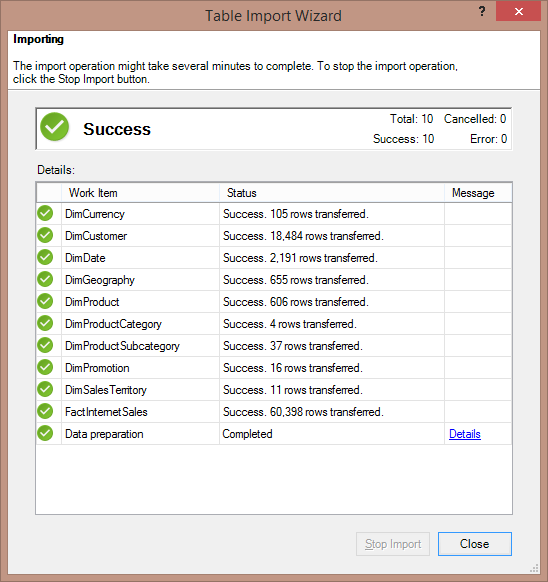
6. In the PowerPivot Manager window you will see many tabs listing records. Click on Diagram View to see all the tabs as tables and relations between them. This is your Power Pivot – Data Model:
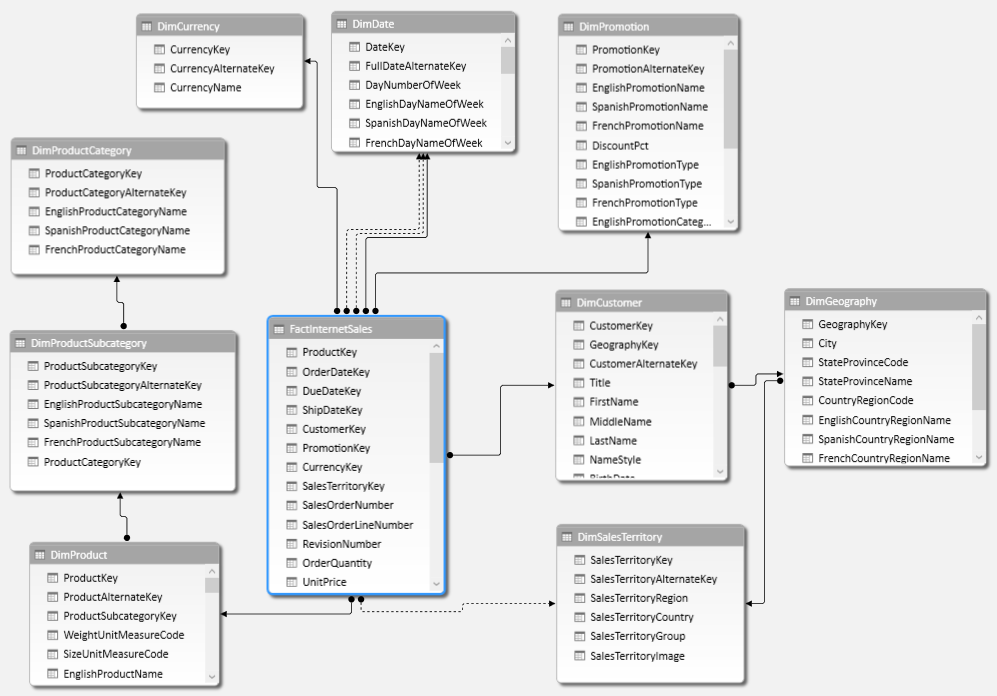
–> Now as your Data Model is ready, you can create Pivot Reports in Excel, let’s see how:
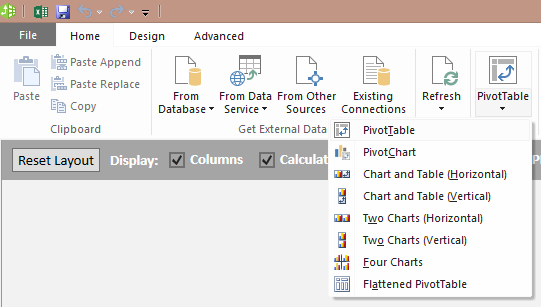
1. Go to the PowerPivot Manager window and click on PivotTable icon and then select PivotTable from the dropdown.
2. The control moves to the Excel sheet, select Existing Worksheet on the Popup.
3. Now select following columns form the PivotTable Fields list:
– DimGeography.EnglighCountryRegionName
– FactInternetSales.SalesAmount
This would give you Total sales across Regions in the Worksheet
4. Let’s add some Slicers to this:
4.a. Click on PIVOTTABLE TOOLS – ANALYZE, here click on Insert Slicer. On ALL tab, select DimDate.FiscalYear column. This will add Year slicer to the report.
4.b. Now again click on the PivotTable Report, you will see the PIVOTTABLE TOOLS on the ribbon bar again. Select Insert Slicer again and select DimProductCategory.EnglighProductCategoryName column.
You can align, move, resize the report, slicers and beautify the report as you want, as shown below:
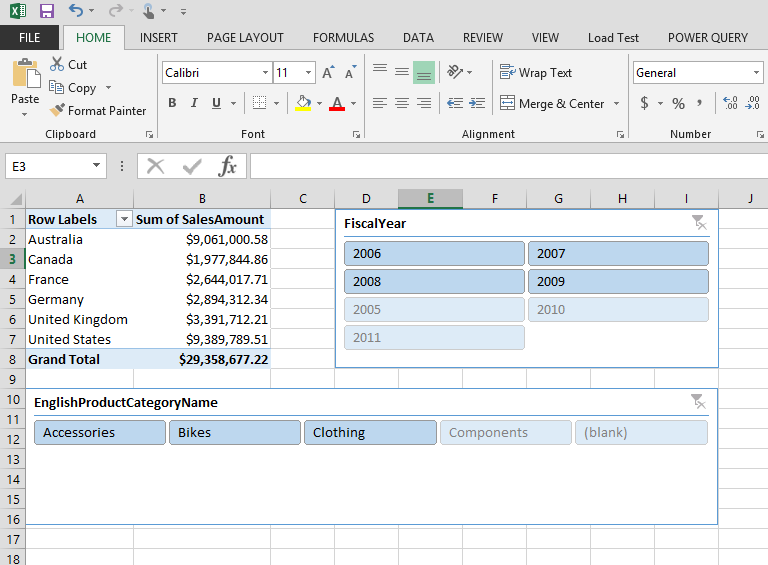
This way you can add Graphs, Charts and create very impressive Reports UI as per your requirements.
This Power Pivot – Data Model can also be used to create Power View Reports, which we will cover in next part of this series.
Thanks!!!
What is the use of SQL server table compression – MSDN TSQL forum
–> Question:
1. What is the use of the table compression?
2. When do we need to compress the table ?
3. If i compress the table what will be the performance impact?
–> My Answer:
1. What is the use of the table compression?
Reduction in DiskSpace as well as reduction in I/O happening across memory and CPU.
2. when do we need to compress the table ?
If your table column contains lot of wide character strings (char/varchar) columns, then you will get the best compression. Can go for Row/Page level compression, Page level has highest level of compression.
3. If i compress the table what will be the performance impact?
No, in most of the cases. But you will get good perf because of reduction in I/O, because many times I/O is the main culprit. CPUs being more powerful can compress/uncompress data within no time compared to the time taken by I/O.
–> Another Answer by Erland:
There are two levels of compression: ROW and PAGE. ROW is basically a different storage format, which gives a more compact format for most data profiles. Not the least if you have plenty of fixed-length columns that are often NULL. ROW compression has a fairly low CPU overhead. Since compression means that the data takes up less space, this means a scan of the full table will be faster. This is why you may gain performance.
Page compression is more aggressive and uses a dictionary. You can make a bigger gain in disk space, but the CPU overhead is fairly considerable, so it is less likely that you will make a net gain.
To find out how your system is affected, there is a stored procedure, of which I don’t recall the name right now, which can give you estimated space savings. But if you also want to see the performance effects, you will need to run a test with your workload.
There is also columnstore, which also is a form a compression, and which for data warehouses can give enormous performance gains.
Ref Link.
DB Basics – What are ACID properties of a Transaction in an RDBMS?
In order to perform a Transaction in a database system and to make sure it works without any issues, there are few rules a Database Transaction should follow. These rules are the standards across all Relational Database systems (RDBMS) and are called ACID rules.
ACID stands for Atomicity, Consistency, Isolation and Durability. So let’s check what all these Rules states.
–> A: Atomicity states that every Transaction should be atomic in nature. A Transaction in a Relational Database can contain either a single SQL statement or multiple SQL statements. Thus by Atomic Transaction it means “all or none”. Either all SQL statements/steps execute successfully in a transaction, or fail as a single unit and none of them should be treated as executed and the system should be returned to its original state.
For example: If account-A & account-B both having $2000 balance, you have to transfer $1000 from account-A to account-B, this will involves 2 steps. First withdrawal from account-A, and Second deposit in account-B. Thus, both the steps should be treated as single or atomic unit and at the end account-A should have $1000 & account-B should have $3000 balance. If in case after First step the system fails or any error occurs then first step should also be rolled-back and $1000 withdrawn from account-A should be re-deposited to it, maintaining $2000 back in both the accounts. Thus there should be no intermediate state where account-A has $1000 and account-B still has $2000 balance.
–> C: Consistency states that any Transaction happened in a database will take it from one consistent state to another consistent state. The data finally recorded in the database must be valid according to the defined Rules, Constraints, Cascades, Triggers, etc. If in case of any failure to these rules the changes made by any transaction should be rolled-back, this will put the system in earlier consistent state.
For example: If the money deposit process has any Trigger built on top of it. And at the time of money transfer any of the Trigger fails or any database node, the system should automatically Rollback the complete transaction and switch back the system to its previous consistent state before the transaction was started. Or if everything executes successfully then the system is committed to a new consistent state.
–> I: Isolation means Transactions performing same functions should run in Isolation and not in parallel to provide more concurrency to the data and avoiding dirty reads & writes. One need to use proper Transaction Isolation levels and locking in order to prevent this.
For example: If two people accessing a joint-account with $5000 balance from 2 terminals to withdraw money. Let’s say at same time John & Marry apply to withdraw $4000 from two different ATMs. If both the Transactions do not run in Isolation and run in parallel then both John & Marry will be able to withdraw $4000 each i.e. $8000 total from their account. To make sure this won’t happen Transactions should be not allowed to run in parallel, by setting Transaction Isolations and/or locking methods on the database objects.
–> D: Durability, a transaction should be durable by storing the data permanently and making it available in case of power failure, recovery from system failure, crash, any error, etc. All in all, the data should not get lost in any of the miss-happenings and one should be able to recover data from restore, logging and other methods.
Microsoft Azure Redis Cache – General availability

Microsoft today announced the general availability of Azure Redis Cache, as well as its related pricing changes.
Azure Cache is a family of distributed, in-memory, scalable solutions that enables you to build highly scalable and responsive applications by providing you super-fast access to your data. It’s based on the popular open source Redis Cache, and it gives you access to a secured, dedicated Redis cache that’s managed by Microsoft.
–> Microsoft offers following types of Azure Cache:
1. Azure Redis Cache: Built on the open source Redis cache. This is a dedicated service, currently in General Availability.
2. Managed Cache Service: Built on App Fabric Cache. This is a dedicated service, currently in General Availability.
3. In-Role Cache: Built on App Fabric Cache. This is a self-hosted cache, available via the Azure SDK.
–> This provides you:
1. High performance: Azure Redis Cache helps your application become more responsive, even as user load increases, and leverages the low-latency, high-throughput capabilities of the Redis engine. This separate distributed cache layer allows your data tier to scale independently for more efficient use of compute resources in your application layer.
2. Great features: Redis is an advanced key-value store, where keys can contain data structures. It supports a set of atomic operations on these data types, and it supports master/subordinate replication, with fast non-blocking first synchronization, auto-reconnection on net split, and more. Other features include transactions, Pub/Sub, Lua scripting, and keys with a limited time to live.
3. Easy to use and manage: Provision Redis cache using the Azure Management Portal. You can use Redis from most programming languages used today. Easily manage and monitor health and performance in the Azure Preview portal. Let Microsoft manage replication of the cache for increased availability.
4. Azure Managed Cache Service: Azure Managed Cache Service is based on the App Fabric Cache engine. It also gives you access to a secure, dedicated cache that is managed by Microsoft. A cache created using the Cache Service is also accessible from applications within Azure running on Azure Websites, Web & Worker Roles and Virtual Machines.
5. In-Role Cache: In-Role Cache is based on the App Fabric Cache engine. In-Role Cache allows you to perform caching by using a dedicated web or worker role instance in an application deployed to Microsoft Azure Cloud Services. This provides flexibility in terms of deployment options and size but you manage the cache yourself.
–> Microsoft Azure Redis Cache will be available in two tiers:
1. Basic: A Single Cache node. Multiple sizes. Ideal for Development/Test and non-critical workloads.
2. Standard: A replicated cache in a Two-node Primary/Secondary Configuration. Includes SLA and replication support. Multiple Sizes.
Cache is available in sizes from 250MB upto 53GB.
** Click here for PRICING DETAILS **
–> Just use your subscription on Microsoft Azure Portal to spin up a new “Redis Cache” service:

–> Here is Step-by-Step documentation on how to use “Azure Redis Cache”, [link]
–> For more info on “Azure Caching” check my friend’s blog, [link] – Author: Ganesh Shankaran.
Difference between Temporary Table and Table Variable, which one is better in performance? – MSDN TSQL forum
–> Question:
Anyone could you explain What is difference between Temp Table (#, ##) and Table Variable (DECLARE @V TABLE (EMP_ID INT)) ?
Which one is recommended to use for better performance?
Also is it possible to create CLUSTER and NONCLUSTER Index on Table Variables?
In my case: 1-2 days transnational data are more than 3-4 Millions. I tried using both # and table variable and found table variable is faster.
Is that Table variable using Memory or Disk space?
–> My Answer:
Check this link to see differences b/w Temp Table & Table Variable.
TempTables & TableVariables both use memory & tempDB in similar manner, check this blog post.
Performance wise if you are dealing with millions of records then Temp Table is ideal, as you can create explicit indexes on top of them. But if there are less records then Table Variables are good suited.
On Tables Variable explicit index are not allowed, if you define a PK column, then a Clustered Index will be created automatically.
Ref Link.



Current Visitors

StatCounter …since April 2012


 Leisure blog: Creek & Trails
- NMDC Hyderabad Marathon – My first 42k FM, cramps, training and fuelling
- Singapore (Part 2) – 6 days itinerary, sightseeing & attractions
- Singapore (Part 1) – Tickets, Visa, Hotel, Forex Card/Cash, Metro/Bus cards
- I got full refund of my flight tickets during COVID lockdown (AirIndia via MakeMyTrip)
- YouTube – Your Google Ads account was cancelled due to no spend
- YouTube latest update on its YPP (YouTube Partner Program) which may affect your channel
- Starting your own blog !!!
- How to file ITR (Income Tax Return) online AY 2017-18 (for simple salaried)
- Scam – Become a kin/hier and earn a fortune – via LinkedIn and Email
- Places to visit in and around Vizag (aka Visakhapatnam)
 SQL with Manoj