Archive
A very Happy SQL-licious & SQL-s-tastic Valentines day to all of you !!!
Wish you all a very happy Valentines day !
Here is a love Query for you all:
SELECT NCHAR(10084)
Execute it and share it with your valentine 😂
… and now a special SQL Joke on this day!
--// Valentines special SQL query: for Guys

Select * from [Earth]
where [Girl] = 'Single'
and [status] = 'Available';

-- (0 row(s) affected)


--// Valentines special SQL query: for Girls

Select * from [Earth]
where [Boy]  = 'Single'
and [status] = 'Available';

-- System.outOfMemory.exception
-- Too many rows to handle
For more jokes on SQL check here.
Subscribe my YouTube channel for more updates on SQL.
Informatica – WRT_8229, Multiple-step OLE DB operation generated errors. Check each OLE DB status value, if available. No work was done.
Working with Informatica is fun, but challenging at times, don’t know if this is the same other ETL tools, like SSIS, etc.
Today, while running a Workflow I was getting an error on a session, and due to this the rows were not getting inserted from Source to Target table. The error is as follows:
Severity: ERROR
Timestamp: 1/25/2016 3:37:43 PM
Node: node03_AZxyzxyzxyzxyz
Thread: WRITER_1_*_1
Process ID: 7180
Message Code: WRT_8229
Message: Database errors occurred: Microsoft OLE DB Provider for SQL Server: Multiple-step OLE DB operation generated errors. Check each OLE DB status value, if available. No work was done.
Database driver error…
Function Name : Execute Multiple
SQL Stmt : INSERT INTO dbo.Contact (Id,Name,Description,CreatedBy,CreatedOn,ModifiedBy,ModifieOn,RowCheckSum) VALUES ( ?, ?, ?, ?, ?, ?, ?, ?, ?, ?, ?, ?)

I check all the place and at last found that the last column “RowCheckSum” as mentioned in the error above, was not present in my Target table.
So, I just went ahead and added this column with simple “ALTER TABLE ADD COLUMN” statement.
And post this fix, my Workflow ran without any issues, and I got the table populated as expected.
Informatica – There is no Integration Service found for this workflow (error)
Today while executing a new Informatica Workflow that I designed I got a pop-up with following error message:
“There is no Integration Service found for this workflow”

The Workflow was not getting kicked off and there was nothing else showing up other than the error message box.
Thus, I did a bit research and as the error message indicates found that the Workflow needs to be linked to an Integration Service so that the data movement could be enabled from Source to the Target.
The Informatica Integration Service (or infasvcs) acts as a controller for entire workflow execution. Integration Service gets into action whenever a workflow is kicked off (either manually or by schedule). It reads Workflow, Session/Task and Mapping information from Repository Database and performs the execution as per transformations defined.
–> Right-click on the Workflow Designer and this opens up following window, which shows the Integration Service text box empty, below:

… you just need to click on the button adjacent to it (circled, above), which opens up following window:
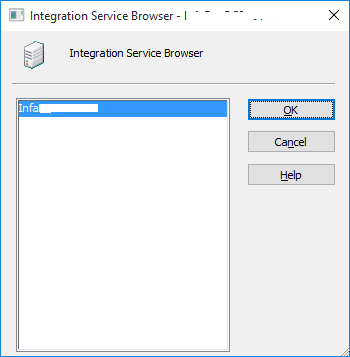
… here, you just need to select the Integration Services listed and click OK. Post this you will see the text box populated with the Integration Service name.
–> But if you want this to be assigned for more than one Workflow or to be executed with different Integration Service than you can go with this approach:
Close all the Workflow Folders.
And in main-menu click Services –> Assign Integration Service

… this will open following window below, and here you can select more than one Workflow and select Integration Services for them:

2015 in review
The WordPress.com stats helper monkeys prepared a 2015 annual report for this blog.

Here’s an excerpt:
The Louvre Museum has 8.5 million visitors per year. This blog was viewed about 520,000 times in 2015. If it were an exhibit at the Louvre Museum, it would take about 22 days for that many people to see it.
In 2015, there were 68 new posts, growing the total archive of this blog to 272 posts.
Exam 70-461, SQL 2014 update – Querying Microsoft SQL Server 2014
In one of my previous post I talked about [Exam 70-461 for SQL Server 2012], and I really got good and big response, with ~250 comments. As SQL Server 2014 got released most of the folks asked me about the certification update.
So here in this post I’ll talk about the same exam 70-461 which is now updated for SQL Server 2014, and Microsoft has not changed the exam code for this version of SQL Server.
This updated certification exam is still based on SQL Server 2012 with new features of SQL Server 2014. Previously with SQL 2012 the exam was divided into 4 modules, please check my previous post, link above. Here with SQL 2014 update the exam is reshaped into 20 modules listed below:
1. Introduction to Microsoft SQL Server 2014
– SQL Server architecture | MSDN
– Editions | MSDN
– SQL Server Management Studio | MSDN
2. Introduction to T-SQL Querying
– T-SQL intro | MSDN
– Set based queries
– Predicate Logic | MSDN
– SELECT statement Logical Ordering | MSDN
3. Writing SELECT Queries
– Simple SELECT queries | MSDN
– Find & eliminate duplicates, and DISTINCT keyword
– Working with Columns
– CASE expressions | MSDN
4. Querying Multiple Tables
– SQL JOINs (INNER, OUTER, CROSS & Self) | MSDN | TechNet
5. Sorting and Filtering Data
– Sorting data with ORDER BY clause | MSDN
– Filtering data with WHERE clause MSDN
– Filtering data with TOP keyword | MSDN
– Using TOP-OFFSET clause | MSDN | TechNet
– Working with NULL/unknown values
6. Working with SQL Server 2014 Data Types
– New SQL 2014 datatypes (Character, Date, Time) | MSDN
– Write Queries using different Datatypes | MSDN
7. Using DML to Modify Data
– Inserting Data | MSDN
– Modifying Data | MSDN
– Deleting Data | MSDN
8. Using Built-In Functions
– SQL 2014 new functions (Conversion, Logical)
9. Grouping and Aggregating Data
– Using Aggregate functions | MSDN
– Using GROUP BY clause | MSDN
– Using HAVING clause | MSDN
10. Using Sub-Queries
– Self-Contained Subqueries | TechNet
– Correlated Subqueries | TechNet
– Using EXISTS() predicate with Subqueries | TechNet
11. Using Table Expressions
– Using Views | MSDN
– Using Inline Table Values functions | MSDN | TechNet
– Using Derived Tables
– Using CTEs (Common Table Expressions) | MSDN | TechNet
12. Using Set Operators
– The UNION, UNION ALL Operator | MSDN
– EXCEPT vs INTERSECT | MSDN
– Using APPLY (CROSS & OUTER) | TechNet
13. Using Window Ranking, Offset, and Aggregate Functions
– Window functions with OVER() clause | MSDN
– More Window functions (ROW_NUMBER, RANK, DENSE_RANK, NTILE) | MSDN
14. Pivoting and Grouping Sets
– Writing queries with PIVOT and UNPIVOT | MSDN | TechNet
– Using Grouping Sets | MSDN | TechNet
15. Querying data with Stored Procedures
– Creating Stored Procedures (SP) | MSDN
– Using Parameters with SPs | MSDN
– Working with Dynamic SQL | MSDN
– EXECUTE | MSDN
– sp_ExecuteSQL | MSDN
16. Programming with T-SQL
– Working with Variables, Batches | MSDN | TechNet
– Using IF conditions | MSDN
– WHILE loops | MSDN
17. Implementing Error Handling
– Using TRY/CATCH block | MSDN
– Working with Error Handling | MSDN
– Returning error information
– Raising user-defined errors and passing system errors | MSDN
18. Implementing Transactions
– Using Transactions | MSDN
– Use of “SET XACT_ABORT” with Transactions | MSDN | MSDN-2
– Effects of Isolation Levels on Transactions | MSDN
19. Improving Query Performance
– Factors affecting Query Performance | MSDN
– Checking Execution plan
– Optimize SQL queries, Query tuning | MSDN
– Optimize SQL Indexes, Index tuning | MSDN
20. Querying SQL Server Metadata
– Querying System Catalog Views | MSDN
– Querying System Catalog Functions | MSDN
– Using System Stored Procedures | MSDN
– Using Dynamic Management Objects (DMVs, DMFs) | MSDN
–> Check SQL Server 2014 videos here:
I’ll be updating the above post going forward and as I post something related to SQL Server 2012 & 2014.
Please provide your comments if you want me to talk about any of the above items, thanks !



Current Visitors

StatCounter …since April 2012


 Leisure blog: Creek & Trails
- NMDC Hyderabad Marathon – My first 42k FM, cramps, training and fuelling
- Singapore (Part 2) – 6 days itinerary, sightseeing & attractions
- Singapore (Part 1) – Tickets, Visa, Hotel, Forex Card/Cash, Metro/Bus cards
- I got full refund of my flight tickets during COVID lockdown (AirIndia via MakeMyTrip)
- YouTube – Your Google Ads account was cancelled due to no spend
- YouTube latest update on its YPP (YouTube Partner Program) which may affect your channel
- Starting your own blog !!!
- How to file ITR (Income Tax Return) online AY 2017-18 (for simple salaried)
- Scam – Become a kin/hier and earn a fortune – via LinkedIn and Email
- Places to visit in and around Vizag (aka Visakhapatnam)
 SQL with Manoj