Archive
Preparing for 70-463 Exam : Implementing a Data Warehouse with Microsoft SQL Server 2012
After passing 70-461 exam last year I’m now preparing for 70-463 exam i.e. Implementing a Data Warehouse with Microsoft SQL Server 2012. This exam mainly focuses on implementing Data Warehouses with Dimension & Fact tables, working with SSIS packages and Data Quality solutions. Thus being a Database Developer (primarily) this exam will be bit tough for me as I’ve not worked with Dimensional modelling, SSIS and DQS.
For preparation I’m referring to Training Kit (Exam 70-463) Implementing a Data Warehouse with Microsoft SQL Server 2012
This exam is primarily intended for ETL and Data Warehouse (DW) developers who create Business Intelligence (BI) solutions, and whose responsibilities include Data Cleansing, and Extract Transform Load and Data Warehouse implementation.
–> The Exam is divided into 5 modules:
1. Design and Implement a Data Warehouse | 11%
– Introducing Star and Snowflake Schemas
– Design and Implement Dimensions
– Design and Implement Fact tables
– Managing the Performance of a Data Warehouse
– PREP links: Introduction to dimensions (Analysis Services – multidimensional data) | Dimension relationships | Columnstore indexes
2. Extract and Transform data | 23%
– Define Connection managers
– Design Data Flow
– Implement Data Flow with Transformations
– Control Flow tasks and Containers, Precedence Constraints
– Manage SSIS package execution
– Implement Script tasks in SSIS
– PREP links: Integration Services (SSIS) connections | Data flow | Slowly changing dimension transformation
3. Load Data | 27%
– Design control flow
– Implement package logic by using SSIS variables and parameter
– Implement Control flow
– Implement Data Load options
– Implement Script components in SSIS
– Slowly Changing Dimensions
– Preparing a Package for Incremental Load
– Package Transactions, Checkpoints, Event Handlers
– PREP links: Integration Services transactions | Developing a custom task | Integration Services (SSIS) parameters
4. Configure and Seploy SSIS solutions | 24%
– Troubleshoot Data Integration issues
– Install and Maintain SSIS components
– Implement Auditing, Logging, and Event handling
– Deploy SSIS solutions
– Configure SSIS security settings
– Data Mining Task and Transformation
– Preparing Data for Data Mining
– Implementing SSIS Fuzzy Transformations
– PREP links: Troubleshooting tools for package development | Load-balancing packages on remote servers by using SQL Server Agent | Integration Services (SSIS) logging
5. Build Data Quality Solutions (DQS) | 15%
– Install and maintain Data Quality services
– Creating and Maintaining a Knowledge Base
– Create a Data Quality project to clean data, Profiling Data and Improving Data Quality
– Using DQS and the DQS Cleansing Transformation
– Implement Master Data Management (MDM) solutions
– Using Master Data Services Add-in for Excel
– PREP links: Install Data Quality Services | Install Master Data Services | Master Data Services features and tasks
-–> You can visit following Study materials to prepare for this Exam:
Microsoft Link for this Certification: http://www.microsoft.com/learning/en-us/exam-70-463.aspx
Book on AMAZON.com: Training Kit (Exam 70-463) Implementing a Data Warehouse with Microsoft SQL Server 2012
I will try to update this blog post or will put up a new post with my learning while preparing for this exam.
All The Best!!!
SQL Server 2012 Certification Path
It’s always good to give Certifications, it enhances your technical skills and prove your knowledge, and more over it looks good on your Resume!
Exactly last year I passed the “Querying Microsoft SQL Server 2012” (70-461) exam, and I blogged my experience [here]. Since then I get lot of hits on the post from all over the world. Then only I came to know that there are many people who want to pursue for this exam and other follow up exams in sequence.
People ask me about study materials, dumps (which I don’t recommend strongly). Few people have confusion to give which exam in what order. Some are not aware of the exams that lies in the Certification Path.
So, I have created a visual snapshot of all these exams for all SQL Server 2012 Certification exams at different levels:

SQL Server 2012 Certification Path
So, you can start with any of the 3 exams at the bottom (first) level based upon your area of interest. A Dev can take 70-461, a DBA can start with 70-462, and a DataWarehouse Engineer can go with 70-463, and you can take them in any order.
1. Microsoft Certified Professional: As soon as you pass any one exam you are an MCP.
2. Microsoft Certified Solution Associate: After you are done with all three (70-461 + 70-462 + 70-463) you are an MCSA.
3. Microsoft Certified Solution Expert: After achieving MCSA, you can either go for MCSE in Data Platform (70-464 + 70-465) or Business Intelligence (70-466 + 70-467).
4. Microsoft Certified Solution Master: After achieving MCSA in Data Platform, you can go even further to MCSM by taking 70-468 & 70-469 exams.
–> Study material for:
– Exam 70-461: Training Kit (Exam 70-461): Querying Microsoft SQL Server 2012
– Exam 70-462: Training Kit (Exam 70-462): Administering Microsoft SQL Server 2012 Databases
– Exam 70-463: Training Kit (Exam 70-463): Implementing a Data Warehouse with Microsoft SQL Server 2012
– Exam 70-464: Channel9 Video | Instructor-led – Developing Microsoft SQL Server 2012 Databases
– Exam 70-465: Channel9 Video | Instructor-led – Designing Database Solutions for Microsoft SQL Server 2012
– Exam 70-466: Channel9 Video | Instructor-led – Implementing Data Models and Reports with Microsoft SQL Server 2012
– Exam 70-467: Channel9 Video | Instructor-led – Designing Business Intelligence Solutions with Microsoft SQL Server 2012
– Exam 70-986: Not yet available
– Exam 70-987: Not yet available
–> UPDATE:
– MCSE (DP: 464/465 and BI: 466/467) exams are updated with SQL 2014 topics.
– MCSA (461/462/463) exams will be having SQL 2012 content only.
For more details about the Certification Path and exams you can check Microsoft Official site: http://www.microsoft.com/learning/en-us/sql-certification.aspx
–> Download “SQL Server 2014 Full or Express version for practice:
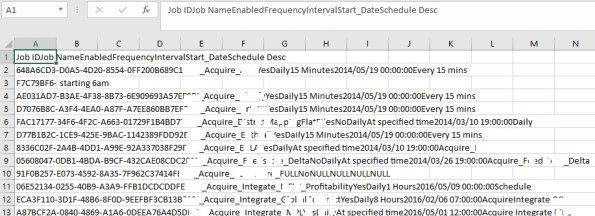
Excel pasting dataset in single column, copied from SSMS Results grid
Today while copying data from SQL Server Management Studio (SSMS) into Excel, I observed that all the data is getting copied only to the first column of Excel Sheet. The Data from SSMS in multiple columns was not getting copied to different columns in Excel.
I realized that the previous day I had splitted some comma separated data in Excel to separate columns. So I think Excel saved the same comma-separated setting and thus not allowing to split data in TAB separated format form SSMS.
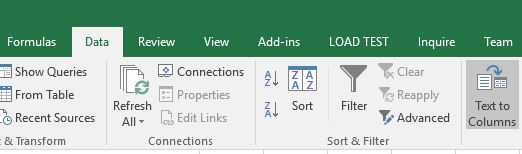
So I had to do the split of the dataset again, by going to Data ribbon –> Text to Columns option:
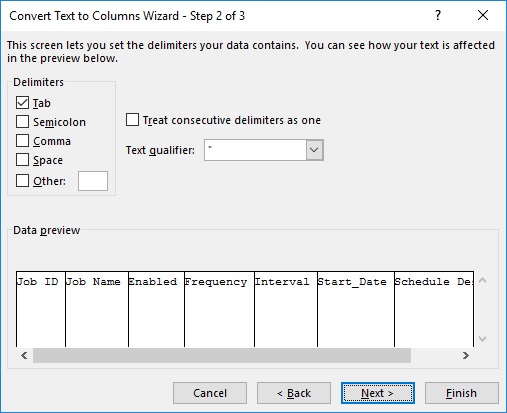
Select the Delimiter as TAB and click Next/Finish:
The Dataset in Excel will be separated in different columns just like in the SSMS Results grid:

Off topic | ERROR: The RPC server is unavailable. (Exception from HRESULT: 0x800706BA)
Today while setting up the DEV Environment as part of Windows Server 2012 & SQL Server 2012 upgrade I faced this error.
I was installing an MSI from one system via a client (MSI deployment tool) to another remote system (on same domain) and was getting this error:
The RPC server is unavailable. (Exception from HRESULT: 0x800706BA)
I checked on internet all possible options to resolve this error, which were:
1. “Remote Procedure Call (RPC)” service should be running on the remote computer.
2. “Windows Management Instrumentation” service should be running on the remote computer.
3. “TCP/IP NetBIOS Helper” service should be running on the remote computer.
4. “DCOM Server Process Launcher” service should be running.
5. File and printer sharing should be enabled, on LAN properties.
I checked all the above options and lot of other suggestions available on internet forums and they were all set correctly.
–> Finally my colleague suggested me to check the “Group Policy Object Editor”, and check the firewall properties “Remote Administration Exception” and “File and Printer Sharing Exception”. And yes he was right, they were not enabled.
So to enable the properties you have to go to “Group Policy Object Editor” by executing gpedit.msc command. A winodw will open, goto: Computer Configuration -> Administrative Templates -> Network -> Network Connections -> Windows Firewall -> Domain Profile:
Here, enable the following properties:
– Allow inbound remote administration exception
– Allow inbound file and printer sharing exception

And when I enabled these two, the MSI deployed successfully without any error!!!



Current Visitors

StatCounter …since April 2012


 Leisure blog: Creek & Trails
- NMDC Hyderabad Marathon – My first 42k FM, cramps, training and fuelling
- Singapore (Part 2) – 6 days itinerary, sightseeing & attractions
- Singapore (Part 1) – Tickets, Visa, Hotel, Forex Card/Cash, Metro/Bus cards
- I got full refund of my flight tickets during COVID lockdown (AirIndia via MakeMyTrip)
- YouTube – Your Google Ads account was cancelled due to no spend
- YouTube latest update on its YPP (YouTube Partner Program) which may affect your channel
- Starting your own blog !!!
- How to file ITR (Income Tax Return) online AY 2017-18 (for simple salaried)
- Scam – Become a kin/hier and earn a fortune – via LinkedIn and Email
- Places to visit in and around Vizag (aka Visakhapatnam)
 SQL with Manoj