2017 blogging in review
Happy New Year 2018 from SQLwithManoj !!!
This time again like previous year (in 2016) WordPress.com stats helper monkeys didn’t prepare annual report for any of their blogs for year 2017. So I prepared my own Annual Report.
–> Here are some Crunchy numbers from 2017
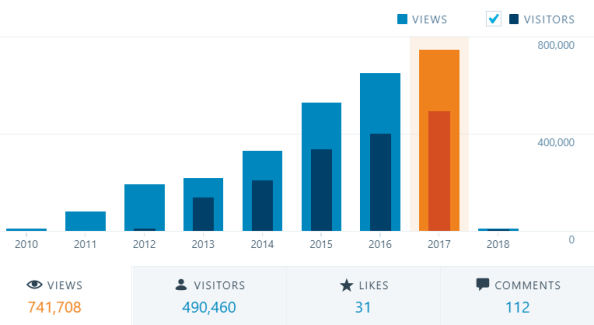
The Louvre Museum has 8.5 million visitors per year. This blog was viewed about 741,708 times by 490,460 unique visitors in 2017. If it were an exhibit at the Louvre Museum, it would take about 17 days for that many people to see it.
There were 38 pictures uploaded, taking up a total of 3.1 MB. That’s about 3 pictures every month.
This blog also got its highest ever hits/views per day (i.e. 3295) on Nov 16th this year.
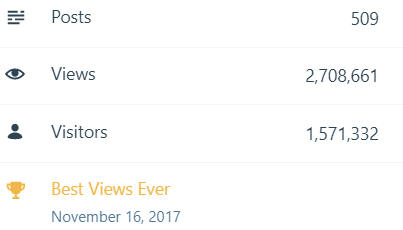
–> All-time posts, views, and visitors
–> Posting Patterns
In 2017, there were 30 new posts, growing the total archive of this blog to 509 posts.
LONGEST STREAK: 8 post each day, in June 2017
–> Attractions in 2017
These are the top 5 posts that got most views in 2017:
1. Download & Install SQL Server Management Studio (SSMS) 2016 (61,566 views)
2. SQL Server 2016 RTM full & final version available – Download now (38,368 views)
3. SQL Basics – Difference b/w TRUNCATE, DELETE and DROP? (15,407 views)
4. SQL Basics – Difference b/w WHERE, GROUP BY and HAVING clause (15,378 views)
5. Passed 70-461 Exam : Querying Microsoft SQL Server 2012 (13,022 views)
–> How did they find me?
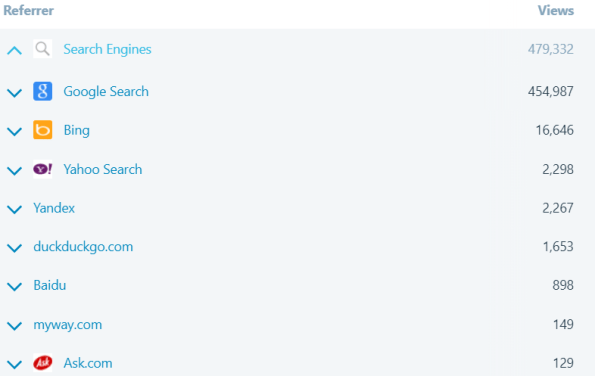
The top referring sites and search engines in 2016 were:
–> Where did they come from?
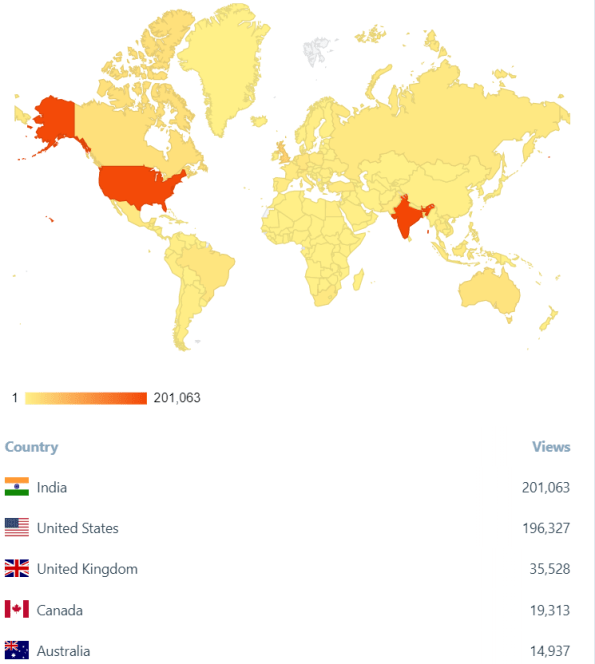
Out of 210 countries, top 5 visitors came from India, United States, United Kingdom, Canada and Australia:
–> Followers: 352
Wordpress.com: 138
Email: 214
Facebook Page: 1,180
–> Alexa Rank (lower the better)
Global Rank: 236,536
India Rank: 44,871
Estimated Monthly Revenue: $172
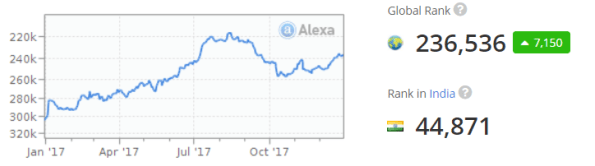
Alexa history shows how the alexa rank of sqlwithmanoj.com has varied in the past, which in turn also tells about the site visitors.
That’s all for 2017, see you in year 2018, all the best !!!
Connect me on Facebook, Twitter, LinkedIn, YouTube, Google, Email
SQL Server 2017 – ColumnStore Index enhancements and improvements over previous versions
ColumnStore Indexes were first introduced in SQL Server 2012, and this created a new way to store and retrieve the Index or Table data in an efficient manner.
–> What’s new in SQL Server 2017?
1. Online Non-Clustered ColumnStore index build and rebuild support added
2. Clustered Columnstore Indexes now support LOB columns (nvarchar(max), varchar(max), varbinary(max))
3. Columnstore index can have a non-persisted computed columns
4. The -fc option in Database Tuning Advisor (DTA) for allowing recommendations of ColumnStore indexes
–> Video on ColumnStore Index:
SQL Server 2017 In-Memory enhancements and improvements over previous versions
In-Memory tables were introduced in SQL Server 2014 and were also known as Hekaton tables. You can check my previous articles about In-memory tables for [SQL Server 2014] and [SQL Server 2016].
–> In-memory tables as new concept in SQL Server 2014/2016 had lot of limitations compared to normal Disk based tables. But with the new release of SQL Server 2017 some limitations are addressed and other features have been added for In-Memory tables. These improvements will enable scaling to larger databases and higher throughput in order to support bigger workloads. And compared to previous version of SQL Server it will be easier to migrate your applications to and leverage the benefits of In-Memory OLTP with SQL Server 2017.
–> I have collated all the major improvements here in the table below:
1. sp_spaceused is now supported for memory-optimized tables.
2. sp_rename is now supported for memory-optimized tables and natively compiled T-SQL modules.
3. CASE statements are now supported for natively compiled T-SQL modules.
4. The limitation of eight indexes on memory-optimized tables has been eliminated.
5. TOP (N) WITH TIES is now supported in natively compiled T-SQL modules.
6. ALTER TABLE against memory-optimized tables is now substantially faster in most cases.
7. Transaction log redo of memory-optimized tables is now done in parallel. This bolsters faster recovery times and significantly increases the sustained throughput of AlwaysOn Availability Group configuration.
8. Memory-optimized filegroup files can now be stored on Azure Storage. Backup/Restore of memory-optimized files on Azure Storage is supported.
9. Support for computed columns in memory-optimized tables, including indexes on computed columns.
10. Full support for JSON functions in natively compiled modules, and in check constraints.
11. CROSS APPLY operator in natively compiled modules.
12. Performance of B-tree (NonClustered) index rebuild for MEMORY_OPTIMIZED tables during database recovery has been significantly optimized. This improvement substantially reduces the database recovery time when NonClustered indexes are used.
SQL Server 2017 RTM, download, and cool “New Features” !!!
On 2nd October 2017 Microsoft released the full & final General Available (GA) version of SQL Server 2017.
As announced earlier with the first CTP release, the new SQL Server 2017 will run both on Windows & Linux. Not only Linux, but it will be supported on Docker, and macOS (via Docker) too.
–> Downloads:
– SQL Server 2017 RTM bits: To download the SQL Server 2017 RTM you can Register and Download the Full version or Free evaluation version (180 days).
– SSMS 17.x bits: download here
– Reporting Services (SSRS) 2017 bits: Starting SQL Server 2017 is no longer bundled with the ISO or CAB files, and will need to be installed separately: download here
–> Check version and SQL build:
select @@version
Microsoft SQL Server 2017 (RTM) – 14.0.1000.169 (X64)
Aug 22 2017 17:04:49
Copyright (C) 2017 Microsoft Corporation
Enterprise Evaluation Edition (64-bit) on Windows 10 Enterprise 10.0 (Build 16299: ) (Hypervisor)
–> Here are few few “Top Features” added in SQL Server 2017:
1. SQL Server on Linux: Now run SQL Server on all platforms, Windows, Linux, Mac, docker.
2. New Graph Database: for modeling many-to-many relationships.
3. Resumable online index rebuild: Resumes an online index rebuild operation from where it stopped after a failure or a pause.
4. Adaptive query processing: feature optimizes strategies to your application workload in runtime condition.
5. IDENTITY_CACHE option: to avoid gaps in identity values in case of server restarts or failover.
6. SQL Server Machine Learning Services: which added Python support, with existing R language.
7. SSIS “Scale Out” and HA (High Availability): execute SSIS packages across multiple servers.
–> For a full list of various features already rolled out with previous CTP versions, please check my previous posts below:
– All new features added in SQL Server 2016 SP1, [link].
– New features added in:
–> Videos on SQL Server 2017
– Download & Install SQL Server 2017 & SSMS on Windows
–> References:
>> SQL Server 2017 official Page
SQL DBA – Get top Tables with Stale Statistics
SQL Server Query Optimizer (QO) uses Statistics to create query plans that improve query performance. The QO uses these statistics to estimate the cardinality (number of rows) in the query result.
There are times when these STATISTICS may go stale after certain INSERT, UPDATE and DELETE operations which involves large amount of rows, not qualifying for Auto-Stats Threshold.
For more about Statistics and Threshold check on MSDN Docs link
Identify Stale Stats:
Here is a simple query to identify TOP tables that have stale statistics, so that you can create UPDATE statistics for them explicitly:
SELECT TOP 50
	 CONCAT(sch.name, '.', obj.name) AS 'Table Name'
	,MAX(sp.last_updated)			AS 'Stats Last Updated'
	,MAX(sp.rows)					AS 'Rows'
	,MAX(sp.modification_counter)	AS 'Modification Counter'
FROM sys.stats st
JOIN sys.objects obj ON st.object_id = obj.object_id
JOIN sys.schemas sch ON obj.schema_id = sch.schema_id
CROSS APPLY sys.dm_db_stats_properties(obj.object_id, st.stats_id) AS sp
WHERE obj.is_ms_shipped = 0
GROUP BY CONCAT(sch.name, '.', obj.name)
ORDER BY MAX(sp.modification_counter) DESC;
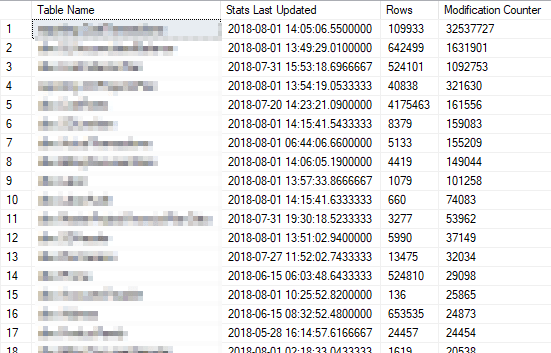
UPDATE Stats:
UPDATE STATISTICS dbo.table_name
GO



Current Visitors

StatCounter …since April 2012


 Leisure blog: Creek & Trails
- NMDC Hyderabad Marathon – My first 42k FM, cramps, training and fuelling
- Singapore (Part 2) – 6 days itinerary, sightseeing & attractions
- Singapore (Part 1) – Tickets, Visa, Hotel, Forex Card/Cash, Metro/Bus cards
- I got full refund of my flight tickets during COVID lockdown (AirIndia via MakeMyTrip)
- YouTube – Your Google Ads account was cancelled due to no spend
- YouTube latest update on its YPP (YouTube Partner Program) which may affect your channel
- Starting your own blog !!!
- How to file ITR (Income Tax Return) online AY 2017-18 (for simple salaried)
- Scam – Become a kin/hier and earn a fortune – via LinkedIn and Email
- Places to visit in and around Vizag (aka Visakhapatnam)
 SQL with Manoj