A very Happy SQL-licious & SQL-s-tastic Valentines day to all of you !!!
Wish you all a very happy Valentines day !
Here is a love Query for you all:
SELECT NCHAR(10084)
Execute it and share it with your valentine 😂
… and now a special SQL Joke on this day!
--// Valentines special SQL query: for Guys

Select * from [Earth]
where [Girl] = 'Single'
and [status] = 'Available';

-- (0 row(s) affected)


--// Valentines special SQL query: for Girls

Select * from [Earth]
where [Boy]  = 'Single'
and [status] = 'Available';

-- System.outOfMemory.exception
-- Too many rows to handle
For more jokes on SQL check here.
Subscribe my YouTube channel for more updates on SQL.
SQL Server 2016 CTP 3.3 update is here | download now
Microsoft (on 4-Feb-2015) announced the CTP 3.3 update of the recently and initially released Community Technology Preview (CTP) 2.x & 3.0 versions of SQL Server 2016.
[Register and Download the CTP 3.3 Evaluation version (180 days) here]
–> Direct download link (~2.6 GB):
– Download the single ISO: SQLServer2016CTP3.3-x64-ENU.iso
– Or download both EXE & BOX files:
– Box file SQLServer2016-x64-ENU.box
– EXE file SQLServer2016-x64-ENU.exe
–> Check version and SQL build:
select @@version
Microsoft SQL Server 2016 (CTP3.3) – 13.0.1000.281 (X64) Jan 28 2016 15:11:40 Copyright (c) Microsoft Corporation Enterprise Evaluation Edition (64-bit) on Windows 10 Enterprise 6.3 (Build 10586: )
–> This CTP 3.3 release has major enhancements on:
1. Stretch Database improvement includes:
– Alter and drop index support for stretch tables.
– Add, alter and drop columns support for stretch tables.
– Query performance improvement.
– Azure Stretch database edition preview with support for up to 60TB
– Point-in-time restore and geo-failover support.
– Improved SSMS visualization with StretchDB icons.
– Added support for stretching using federated accounts in SSMS.
2. In-Memory OLTP enhancements, which dramatically improves transaction processing performance.
– Automatic update of statistics on memory-optimized tables
– Sampled statistics for memory-optimized tables
– Use of LOB types varchar(max), nvarchar(max), and varbinary(max) with built-in string functions (‘+’, len, ltrim, rtrim and substring) in natively compiled modules, and as return type of natively compiled scalar UDFs.
– Support also larger rows using types varchar(n), nvarchar(n) and varbinary(n)
– OUTPUT clause can now be used with INSERT, UPDATE and DELETE statements in natively compiled stored procedures.
3. Foreign Key enhancements , increased the number of supported incoming foreign key REFERENCES to a table:
– Till SQL Server 2014 the recommended maximum was 253, now the new maximum is 10,000 references, while maintaining good performance for DML operations in both the referencing and the referenced table.
4. Autostats enhancements, Previously, statistics were automatically recalculated when the change exceeded a fixed threshold.
– Now the algorithm is refined such that it is no longer a fixed threshold, but in general will be more aggressive in triggering statistics scans, resulting in more accurate query plans.
–> Few more enhancements in other areas:
1. SSAS (Analysis Services) DirectQuery models, Tabular Models running in DirectQuery mode now also allows:
– DAX filters when defining roles and creation of calculated columns.
– Apply row level security to a DirectQuery model.
– Translating your tabular model into different languages to be consumed by any client tool connecting to SSAS.
– and many more, [check here].
2. SSRS (Reporting Services) web portal, updated preview of the new web portal now enables you to:
– add the KPIs and reports you use to your Favorites, to create and edit shared data sources for your KPIs and reports, and to perform other management tasks.
– access the reports you need on your Favorites page – without the clutter.
– and many more, [check here].
3. SQL Server Management Studio (SSMS) Jan 2016 Release, [check here].
I’ve covered very few and important points here, you can check all the updates here in [SQL Server blog for CTP 3.3] with details.
For all these new features released in SQL Server 2016, check my blog posts here.
So, download the Preview today and start playing with the new features and plan your DB migration/upgrade.
Informatica – WRT_8229, Multiple-step OLE DB operation generated errors. Check each OLE DB status value, if available. No work was done.
Working with Informatica is fun, but challenging at times, don’t know if this is the same other ETL tools, like SSIS, etc.
Today, while running a Workflow I was getting an error on a session, and due to this the rows were not getting inserted from Source to Target table. The error is as follows:
Severity: ERROR
Timestamp: 1/25/2016 3:37:43 PM
Node: node03_AZxyzxyzxyzxyz
Thread: WRITER_1_*_1
Process ID: 7180
Message Code: WRT_8229
Message: Database errors occurred: Microsoft OLE DB Provider for SQL Server: Multiple-step OLE DB operation generated errors. Check each OLE DB status value, if available. No work was done.
Database driver error…
Function Name : Execute Multiple
SQL Stmt : INSERT INTO dbo.Contact (Id,Name,Description,CreatedBy,CreatedOn,ModifiedBy,ModifieOn,RowCheckSum) VALUES ( ?, ?, ?, ?, ?, ?, ?, ?, ?, ?, ?, ?)

I check all the place and at last found that the last column “RowCheckSum” as mentioned in the error above, was not present in my Target table.
So, I just went ahead and added this column with simple “ALTER TABLE ADD COLUMN” statement.
And post this fix, my Workflow ran without any issues, and I got the table populated as expected.
Informatica – There is no Integration Service found for this workflow (error)
Today while executing a new Informatica Workflow that I designed I got a pop-up with following error message:
“There is no Integration Service found for this workflow”

The Workflow was not getting kicked off and there was nothing else showing up other than the error message box.
Thus, I did a bit research and as the error message indicates found that the Workflow needs to be linked to an Integration Service so that the data movement could be enabled from Source to the Target.
The Informatica Integration Service (or infasvcs) acts as a controller for entire workflow execution. Integration Service gets into action whenever a workflow is kicked off (either manually or by schedule). It reads Workflow, Session/Task and Mapping information from Repository Database and performs the execution as per transformations defined.
–> Right-click on the Workflow Designer and this opens up following window, which shows the Integration Service text box empty, below:

… you just need to click on the button adjacent to it (circled, above), which opens up following window:
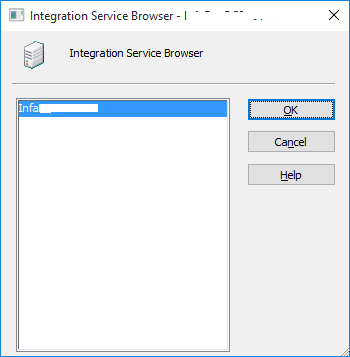
… here, you just need to select the Integration Services listed and click OK. Post this you will see the text box populated with the Integration Service name.
–> But if you want this to be assigned for more than one Workflow or to be executed with different Integration Service than you can go with this approach:
Close all the Workflow Folders.
And in main-menu click Services –> Assign Integration Service

… this will open following window below, and here you can select more than one Workflow and select Integration Services for them:

How to import/store photos with file name and other properties into SQL Server table – MSDN TSQL forum
–> Question:
I was tasked to load several thousand of photos into the SQL Server. Those photos are saved in a specific folder. I want to store the file name in one column and the photo in another column. It would take month for me to enter one by one.
Is there a way to loop through a given folder and add the file name and photo into the tables using TSQL?
–> Answer:
If you are on SQL Server 2012 and ahead, you can use FileTables feature, which is built on top of FileStream and very easy to implement.
FileTable feature does not store files (or images in your case) in SQL Database, but in a secure Windows File-System location which is only visible via SSMS.
Check my blog post on FileTables: https://sqlwithmanoj.com/2012/02/28/sql-server-2012-a-k-a-denali-new-feature-filetables/
After implementing FileTables feature you just need to copy-paste all these images or any kind of file on this folder and you are done.
The retrieval of data is very easy and you get all the properties stored in the metadata files.
Ref link.



Current Visitors

StatCounter …since April 2012


 Leisure blog: Creek & Trails
- NMDC Hyderabad Marathon – My first 42k FM, cramps, training and fuelling
- Singapore (Part 2) – 6 days itinerary, sightseeing & attractions
- Singapore (Part 1) – Tickets, Visa, Hotel, Forex Card/Cash, Metro/Bus cards
- I got full refund of my flight tickets during COVID lockdown (AirIndia via MakeMyTrip)
- YouTube – Your Google Ads account was cancelled due to no spend
- YouTube latest update on its YPP (YouTube Partner Program) which may affect your channel
- Starting your own blog !!!
- How to file ITR (Income Tax Return) online AY 2017-18 (for simple salaried)
- Scam – Become a kin/hier and earn a fortune – via LinkedIn and Email
- Places to visit in and around Vizag (aka Visakhapatnam)
 SQL with Manoj