SQL Server 2012 Certification Path
It’s always good to give Certifications, it enhances your technical skills and prove your knowledge, and more over it looks good on your Resume!
Exactly last year I passed the “Querying Microsoft SQL Server 2012” (70-461) exam, and I blogged my experience [here]. Since then I get lot of hits on the post from all over the world. Then only I came to know that there are many people who want to pursue for this exam and other follow up exams in sequence.
People ask me about study materials, dumps (which I don’t recommend strongly). Few people have confusion to give which exam in what order. Some are not aware of the exams that lies in the Certification Path.
So, I have created a visual snapshot of all these exams for all SQL Server 2012 Certification exams at different levels:

SQL Server 2012 Certification Path
So, you can start with any of the 3 exams at the bottom (first) level based upon your area of interest. A Dev can take 70-461, a DBA can start with 70-462, and a DataWarehouse Engineer can go with 70-463, and you can take them in any order.
1. Microsoft Certified Professional: As soon as you pass any one exam you are an MCP.
2. Microsoft Certified Solution Associate: After you are done with all three (70-461 + 70-462 + 70-463) you are an MCSA.
3. Microsoft Certified Solution Expert: After achieving MCSA, you can either go for MCSE in Data Platform (70-464 + 70-465) or Business Intelligence (70-466 + 70-467).
4. Microsoft Certified Solution Master: After achieving MCSA in Data Platform, you can go even further to MCSM by taking 70-468 & 70-469 exams.
–> Study material for:
– Exam 70-461: Training Kit (Exam 70-461): Querying Microsoft SQL Server 2012
– Exam 70-462: Training Kit (Exam 70-462): Administering Microsoft SQL Server 2012 Databases
– Exam 70-463: Training Kit (Exam 70-463): Implementing a Data Warehouse with Microsoft SQL Server 2012
– Exam 70-464: Channel9 Video | Instructor-led – Developing Microsoft SQL Server 2012 Databases
– Exam 70-465: Channel9 Video | Instructor-led – Designing Database Solutions for Microsoft SQL Server 2012
– Exam 70-466: Channel9 Video | Instructor-led – Implementing Data Models and Reports with Microsoft SQL Server 2012
– Exam 70-467: Channel9 Video | Instructor-led – Designing Business Intelligence Solutions with Microsoft SQL Server 2012
– Exam 70-986: Not yet available
– Exam 70-987: Not yet available
–> UPDATE:
– MCSE (DP: 464/465 and BI: 466/467) exams are updated with SQL 2014 topics.
– MCSA (461/462/463) exams will be having SQL 2012 content only.
For more details about the Certification Path and exams you can check Microsoft Official site: http://www.microsoft.com/learning/en-us/sql-certification.aspx
–> Download “SQL Server 2014 Full or Express version for practice:
CTP-2 released for SQL Server 2014 | and I’ve installed it !
Much awaited Community Test Preview 2 (CTP-2) for SQL Server 2014 is released and you can Download it from [here].
Check out the Release Notes [here]. This lists some limitations, issues and workarounds for them.
–> As mentioned in my [previous post] for CTP-1:
– You cannot upgrade your existing installation of CTP-1 to CTP-2.
– and similar to CTP-1 restrictions you cannot install CTP-2 with pre-existing versions of SQL Server, SSDT and Visual Studio.
Sp, this should also be a clean install to be used only for learning and POCs, and should not be used on Production Environments. Installation is very simple and similar to CTP-1 and latest SQL Server previous versions.
–> What’s new with CTP-2:
1. Can create Range Indexes for Ordered Scans (along with Hash Indexes in CTP-1).
2. Configure the In-memory usage limit to provide performance and stability for the traditional disk-based workloads.
3. Memory Optimization Advisor wizard added to SSMS for converting disk-based Tables to In-memory (Hekaton) Tables, by identifying Incompatible Data Types, Identity Columns, Constraints, Partitioning, Replications, etc.
4. Similar to above a “Naive Compilation Advisor” wizard for converting Stored Procedures to Natively Compiled SPs, by identifying Incompatible SQL statements, like: SET Options, UDFs, CTE, UNION, DISTINCT, One-part names, IN Clause, Subquery, TVFs, GOTO, ERROR_NUMBER, INSERT EXEC, OBJECT_ID, CASE, SELECT INTO, @@rowcount, QUOTENAME, EXECUTE, PRINT, EXISTS, MERGE, etc.
5. and many more enhancements with Always On like: allowing to view XEvents in UTC time, triggering XEvents when replicas change synchronization state, and recording the last time and transaction LSN committed when a replica goes to resolving state, new wizard to greatly simplify adding a replica on Azure.
Enough for now, let me go back and work with CTP-2, wait for more updates !!!
Difference between NOLOCK and READPAST table hints
AS per MS BOL:
– NOLOCK: Specifies that dirty reads are allowed. No shared locks are issued to prevent other transactions from modifying data read by the current transaction, and exclusive locks set by other transactions do not block the current transaction from reading the locked data. NOLOCK is equivalent to READUNCOMMITTED.
– READPAST: Specifies that the Database Engine not read rows that are locked by other transactions. When READPAST is specified, row-level locks are skipped.
Thus, while using NOLOCK you get all rows back but there are chances to read Uncommitted (Dirty) data. And while using READPAST you get only Committed Data so there are chances you won’t get those records that are currently being processed and not committed.
Let’s do a simple test:
–> Open a Query Editor in SSMS and copy following code:
-- Creating a sample table with 100 records:
SELECT TOP 100 *
INTO dbo.Person
FROM [Person].[Person]

-- Initiate Transaction to verify the behavior of these hints:
BEGIN TRANSACTION

UPDATE dbo.Person
SET MiddleName = NULL
WHERE BusinessEntityID >= 10
AND BusinessEntityID < 20
–> Now open a second Query Editor in SSSM and copy following code:
-- NOLOCK: returns all 100 records
SELECT *
FROM dbo.Person (nolock)
-- this includes 10 records that are under update and not committed yet.

-- READPAST: returns only 90 records
SELECT *
FROM dbo.Person (readpast)
-- because other 10 are under update and are no committed yet in the 1st Query Editor:
–> Now go back to the 1st Query Editor window and run following query to Rollback the Transaction:
-- Issue a Rollback to rollback the Transaction:
ROLLBACK

-- Drop the Sample table:
DROP TABLE dbo.Person
Note:
– Using READPAST avoids locking contention when implementing a work queue that uses a SQL Server table.
– Using NOLOCK may lead to read uncommitted (dirty) data and/or may read a row more than once due to page-splitting.
Both of them avoids locking, but on the cost of incorrect/dirty data. So one should carefully use them depending on their business scenario.
Behind the scenes with Hekaton Tables & Native Compiled SPs | SQL Server 2014
In my previous posts I talked about:
1. What’s [new with SQL Server 2014 & Hekaton] and CTP-1 [download link].
2. [Installing] SQL Server 2014 with Sneak-Peek.
3. Working with [Hekaton] Tables.
Here, in this post I’ll discuss more on what the new SQL Server 2014 does behind the scene while you create Hekaton or Memory-Optimized Tables & Native Compiled Stored Procedures.
I will use the same Database (Hekaton enabled) created in my [previous post], and then we will check what SQL Server does while creating Hekaton tables & Compiled SPs:
–> Create Memory-Optimized Table:
USE [ManTest]
GO

CREATE TABLE dbo.Test_memoryOptimizedTable
(
	TestID INT NOT NULL
		PRIMARY KEY NONCLUSTERED HASH WITH (BUCKET_COUNT = 1024),

	TestName NVARCHAR(100) NOT NULL,

	DateAdded DATETIME NOT NULL

) WITH (MEMORY_OPTIMIZED = ON, DURABILITY = SCHEMA_AND_DATA)
GO
–> Create Native Compiled Stored Procedure:
USE [ManTest]
GO

CREATE PROCEDURE dbo.Test_NativelyCompiledStoredProcedure (
	@param1 INT not null,
	@param2 NVARCHAR(100) not null
	)
WITH NATIVE_COMPILATION, SCHEMABINDING, EXECUTE AS OWNER
AS
BEGIN ATOMIC
WITH (
	TRANSACTION ISOLATION LEVEL = SNAPSHOT,
	LANGUAGE = N'us_english'
	)

INSERT dbo.Test_memoryOptimizedTable VALUES (@param1, @param2, getdate())

END
GO
–> After executing above code as usual the Tables & Stored Procedure will be created. But the important thing here is what the Hekaton Engine does internally, is shown in the following image below:
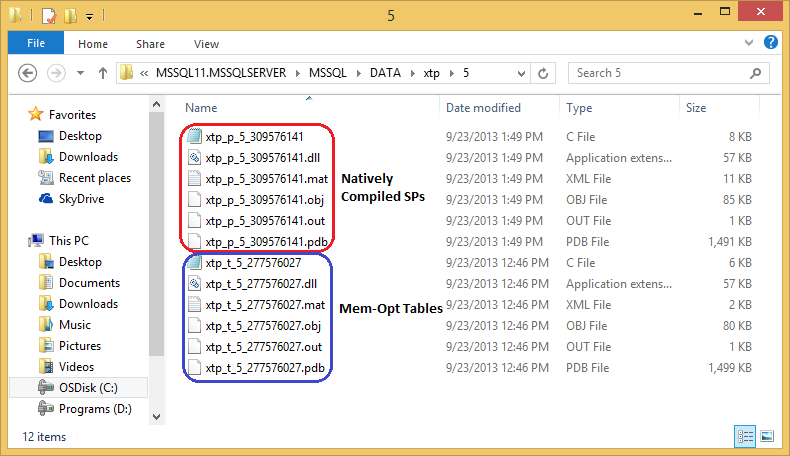
– It creates total 6 files for every Table & SP with following extensions: .c, .dll, .mat, .obj, .out and .pdb.
– Most important are the C Code and the DLL files with four (4) other supporting files for each Table the Stored Procedure and stores them at following path: “C:\Program Files\Microsoft SQL Server\MSSQL11.MSSQLSERVER\MSSQL\DATA\xtp\5\”.
– The “xtp” folder/directory here contains a sub-folder “5” which is nothing but the Database ID, check this:
SELECT DB_ID();

SELECT object_id, name, type
FROM sys.sysobjects
WHERE name IN ('Test_memoryOptimizedTable', 'Test_NativelyCompiledStoredProcedure');
– If you look closely the file are create with particular naming conventions and relate to the results of above query:
— For files xtp_t_5_277576027: xtp_t is for Table, 5 is the Database ID and 277576027 is the Object (table) ID.
— For files xtp_p_5_325576198: xtp_p is for Stored Procedure, 5 is the Database ID and 325576198 is the Object (Stored Procedure) ID.
–> Opening the xtp_t_5_277576027.c file looks like this:
#define __in
#define __out
#define __inout
#define __in_opt
#define __out_opt
#define __inout_opt
#define __in_ecount(x)
#define __out_ecount(x)
#define __deref_out_ecount(x)
#define __inout_ecount(x)
#define __in_bcount(x)
#define __out_bcount(x)
#define __deref_out_bcount(x)
#define __deref_out_range(x, y)
#define __success(x)
#define __inout_bcount(x)
#define __deref_opt_out
#define __deref_out
#define __checkReturn
#define __callback
#define __nullterminated

typedef unsigned char bool;
typedef unsigned short wchar_t;
typedef long HRESULT;

typedef unsigned __int64 ULONG_PTR;

#include "hkenggen.h"
#include "hkrtgen.h"
#include "hkgenlib.h"

#define ENABLE_INTSAFE_SIGNED_FUNCTIONS
#include "intsafe.h"

int _fltused = 0;

int memcmp(const void*, const void*, size_t);
void *memcpy(void*, const void*, size_t);
void *memset(void*, int, size_t);

#define offsetof(s,f)   ((size_t)&(((s*)0)->f))

struct hkt_277576027
{
	__int64 hkc_3;
	long hkc_1;
	unsigned short hkvdo[2];
};
struct hkis_27757602700002
{
	long hkc_1;
};
struct hkif_27757602700002
{
	long hkc_1;
};
unsigned short GetSerializeSize_277576027(
	struct HkRow const* hkRow)
{
	struct hkt_277576027 const* row = ((struct hkt_277576027 const*)hkRow);
	return ((row->hkvdo)[1]);
}
HRESULT Serialize_277576027(
	struct HkRow const* hkRow,
	unsigned char* buffer,
	unsigned short bufferSize,
	unsigned short* copySize)
{
	return (RowSerialize(hkRow, (GetSerializeSize_277576027(hkRow)), buffer, bufferSize, copySize));
}
HRESULT Deserialize_277576027(
	struct HkTransaction* tx,
	struct HkTable* table,
	unsigned char const* data,
	unsigned short datasize,
	struct HkRow** hkrow)
{
	return (RowDeserialize(tx, table, data, datasize, sizeof(struct hkt_277576027), (sizeof(struct hkt_277576027) + 200), hkrow));
}
unsigned short GetSerializeRecKeySize_277576027(
	struct HkRow const* hkRow)
{
	struct hkt_277576027 const* row = ((struct hkt_277576027 const*)hkRow);
	unsigned short size = sizeof(struct hkif_27757602700002);
	return size;
}
HRESULT SerializeRecKey_27757602700002(
	struct HkRow const* hkRow,
	unsigned char* hkKey,
	unsigned short bufferSize,
	unsigned short* keySize)
{
	struct hkt_277576027 const* row = ((struct hkt_277576027 const*)hkRow);
	struct hkif_27757602700002* key = ((struct hkif_27757602700002*)hkKey);
	(*keySize) = sizeof(struct hkif_27757602700002);
	if ((bufferSize < (*keySize)))
	{
		return -2013265920;
	}
	(key->hkc_1) = (row->hkc_1);
	return 0;
}
HRESULT DeserializeRecKey_277576027(
	unsigned char const* data,
	unsigned short dataSize,
	struct HkSearchKey* key,
	unsigned short bufferSize)
{
	struct hkif_27757602700002 const* source = ((struct hkif_27757602700002 const*)data);
	struct hkis_27757602700002* target = ((struct hkis_27757602700002*)key);
	unsigned long targetSize = sizeof(struct hkis_27757602700002);
	if ((targetSize > bufferSize))
	{
		return -2013265920;
	}
	(target->hkc_1) = (source->hkc_1);
	return 0;
}
__int64 CompareSKeyToRow_27757602700002(
	struct HkSearchKey const* hkArg0,
	struct HkRow const* hkArg1)
{
	struct hkis_27757602700002* arg0 = ((struct hkis_27757602700002*)hkArg0);
	struct hkt_277576027* arg1 = ((struct hkt_277576027*)hkArg1);
	__int64 ret;
	ret = (CompareKeys_int((arg0->hkc_1), (arg1->hkc_1)));
	return ret;
}
__int64 CompareRowToRow_27757602700002(
	struct HkRow const* hkArg0,
	struct HkRow const* hkArg1)
{
	struct hkt_277576027* arg0 = ((struct hkt_277576027*)hkArg0);
	struct hkt_277576027* arg1 = ((struct hkt_277576027*)hkArg1);
	__int64 ret;
	ret = (CompareKeys_int((arg0->hkc_1), (arg1->hkc_1)));
	return ret;
}
unsigned long ComputeSKeyHash_27757602700002(
	struct HkSearchKey const* hkArg)
{
	struct hkis_27757602700002* arg = ((struct hkis_27757602700002*)hkArg);
	unsigned long hashState = 0;
	unsigned long hashValue = 0;
	hashValue = (ComputeHash_int((arg->hkc_1), (&hashState)));
	return hashValue;
}
unsigned long ComputeRowHash_27757602700002(
	struct HkRow const* hkArg)
{
	struct hkt_277576027* arg = ((struct hkt_277576027*)hkArg);
	unsigned long hashState = 0;
	unsigned long hashValue = 0;
	hashValue = (ComputeHash_int((arg->hkc_1), (&hashState)));
	return hashValue;
}
struct HkOffsetInfo const KeyOffsetArray_27757602700002[] =
{

	{
		offsetof(struct hkis_27757602700002, hkc_1),
		0,
		0,
	},
};
struct HkKeyColsInfo const KeyColsInfoArray_277576027[] =
{

	{
		sizeof(struct hkis_27757602700002),
		KeyOffsetArray_27757602700002,
		sizeof(struct hkis_27757602700002),
		sizeof(struct hkis_27757602700002),
	},
};
struct HkOffsetInfo const OffsetArray_277576027[] =
{

	{
		offsetof(struct hkt_277576027, hkc_1),
		0,
		0,
	},

	{
		(offsetof(struct hkt_277576027, hkvdo) + 0),
		0,
		0,
	},

	{
		offsetof(struct hkt_277576027, hkc_3),
		0,
		0,
	},
};
struct HkColsInfo const ColsInfo_277576027 =
{
	sizeof(struct hkt_277576027),
	OffsetArray_277576027,
	KeyColsInfoArray_277576027,
};
struct HkHashIndexMD HashIndexMD_277576027[] =
{

	{
		2,
		1,
		1024,
		CompareSKeyToRow_27757602700002,
		CompareRowToRow_27757602700002,
		ComputeSKeyHash_27757602700002,
		ComputeRowHash_27757602700002,
	},
};
struct HkTableMD TableMD =
{
	sizeof(struct hkt_277576027),
	(sizeof(struct hkt_277576027) + 200),
	1,
	HashIndexMD_277576027,
	0,
	0,
	0,
	(&ColsInfo_277576027),
	277576027,
	0,
	GetSerializeSize_277576027,
	Serialize_277576027,
	Deserialize_277576027,
	GetSerializeRecKeySize_277576027,
	SerializeRecKey_27757602700002,
	DeserializeRecKey_277576027,
};
__declspec(dllexport)
struct HkTableBindings g_Bindings =
{
	277576027,
	(&TableMD),
};
I cannot understand a single bit here, but this recalls memories when I was studying C & C++ in college 🙂
–> Final Cleanup
DROP PROCEDURE dbo.Test_NativelyCompiledStoredProcedure
DROP TABLE dbo.Test_memoryOptimizedTable
Update: Know more about In-Memory tables:
Use new TRY_PARSE() instead of ISNUMERIC() | SQL Server 2012
I was working on a legacy T-SQL script written initially on SQL Server 2005 and I was facing an unexpected behavior. The code was giving me unexpected records, I tried to dig into it and found that ISNUMERIC() function applied to a column was giving me extra records with value like “,” (comma) & “.” (period).
–> So, to validate it I executed following code and found that ISNUMERIC() function also passes these characters as numbers:
SELECT
	 ISNUMERIC('123') as '123'
	,ISNUMERIC('.') as '.' --Period
	,ISNUMERIC(',') as ',' --Comma
Function ISNUMERIC() returns “1” when the input expression evaluates to a valid numeric data type; otherwise it returns “0”. But the above query will return value “1” for all 3 column values, validating them as numeric values, but that’s not correct for last 2 columns.
–> And not only this, ISNUMERIC() function treats few more characters as numeric, like: – (minus), + (plus), $ (dollar), \ (back slash), check this:
SELECT
	 ISNUMERIC('123') as '123'
	,ISNUMERIC('abc') as 'abc'
	,ISNUMERIC('-') as '-'
	,ISNUMERIC('+') as '+'
	,ISNUMERIC('$') as '$'
	,ISNUMERIC('.') as '.'
	,ISNUMERIC(',') as ','
	,ISNUMERIC('\') as '\'
This will return “0” for second column containing value “abc”, and value “1” for rest of the column values.
So, you will need to be very careful while using ISNUMERIC() function and have to consider all these possible validations on your T-SQL logic.
– OR –
Switch to new TRY_PARSE() function introduced in SQL Server 2012.
–> The TRY_PARSE() function returns the result of an expression, translated to the requested Data-Type, or NULL if the Cast fails. Let’s check how TRY_PARSE() validates above character values as numeric:
SELECT
	 TRY_PARSE('123' as int) as '123'
	,TRY_PARSE('abc' as int) as 'abc'
	,TRY_PARSE('-' as int) as '-'
	,TRY_PARSE('+' as int) as '+'
	,TRY_PARSE('$' as int) as '$'
	,TRY_PARSE('.' as int) as '.'
	,TRY_PARSE(',' as int) as ','
	,TRY_PARSE('\' as int) as '\'
So, the above query gives me expected results by validating first column value as numeric and rest as invalid and returns NULL for those.
–> TRY_PARSE() can be used with other NUMERIC & DATETIME data-types for validation, like:
SELECT
	 TRY_PARSE('123' as int) as '123'
	,TRY_PARSE('123.0' as float) as '123.0'
	,TRY_PARSE('123.1' as decimal(4,1)) as '123.1'
	,TRY_PARSE('$123.55' as money) as '$123.55'
	,TRY_PARSE('2013/09/20' as datetime) as '2013/09/20'
… will give expected results 🙂



Current Visitors

StatCounter …since April 2012


 Leisure blog: Creek & Trails
- NMDC Hyderabad Marathon – My first 42k FM, cramps, training and fuelling
- Singapore (Part 2) – 6 days itinerary, sightseeing & attractions
- Singapore (Part 1) – Tickets, Visa, Hotel, Forex Card/Cash, Metro/Bus cards
- I got full refund of my flight tickets during COVID lockdown (AirIndia via MakeMyTrip)
- YouTube – Your Google Ads account was cancelled due to no spend
- YouTube latest update on its YPP (YouTube Partner Program) which may affect your channel
- Starting your own blog !!!
- How to file ITR (Income Tax Return) online AY 2017-18 (for simple salaried)
- Scam – Become a kin/hier and earn a fortune – via LinkedIn and Email
- Places to visit in and around Vizag (aka Visakhapatnam)
 SQL with Manoj